Theo's Playbook: Using Markdown Instruction Files to Make AI Truly Understand Your Development Intent

Theo shows how Markdown instruction files and AI-audited failure patterns transform AI programming collaboration.
Tech creator Theo reveals his methodology for dramatically improving AI coding efficiency through carefully crafted Markdown instruction files (agents.md, CLAUDE.md, and custom Skills). His approach includes using AI to audit session histories for failure patterns, writing Skill Descriptions as trigger keywords rather than manuals, and establishing clear communication protocols. The key insight: don't copy others' configs—understand the thinking process behind them.
Well-known tech creator and T3 product founder Theo (t3.gg) recently admitted he's been making fewer videos because he's been spending an absurd amount of time writing code — merging dozens of PRs in just three days. The efficiency leap behind all this isn't some new model or tool, but rather a collection of Markdown files he spent two full days and over a dozen hours refining: a global agents.md, CLAUDE.md, and a series of custom Skills.
This article systematically breaks down his approach: how to write these instruction files, how to use AI to audit your own history to discover failure patterns, and how to sync these configurations across five development machines. The core message is simple — you shouldn't copy someone else's configuration; you should understand how they think.
Why Global Instruction Files Matter So Much
Theo admitted that for nearly two years he barely touched his global agents.md and CLAUDE.md, because he once believed these files "weren't that important." But when he started collaborating with multiple models at scale, problems exploded.
Some technical background is helpful here: agents.md and CLAUDE.md are configuration files supported by Claude Code (Anthropic's command-line AI programming tool) and similar tools. When an AI agent starts up, it automatically reads these Markdown files from the project root or global configuration path, injecting their contents as part of the System Prompt into the conversation context. Global files affect all projects, while project-level files only affect specific codebases. This design lets developers define AI behavior boundaries, coding style preferences, and workflow conventions in natural language without modifying any code.
The most interesting part of his rewritten global file is the opening self-introduction: "I am the CEO, you are my agent." This seems redundant but is actually critical. He explains: models are extremely good at matching tone — the way you talk to them makes them more likely to respond in the same manner. This is closely tied to how large language models are trained: models learn "role consistency" patterns from massive conversational data, and when you explicitly establish an authority-executor conversation framework, the model tends more toward following instructions rather than acting on its own initiative.
Following that is a "CEO memo" that clearly states preferences: likes ambitious ideas, simple systems, software within reach; don't keep complexity just because it already exists, don't introduce a mechanism just because it "looks architecturally impressive." These words directly suppress the model's tendency to write unnecessary piles of code.
He specifically emphasizes two additions: "Questions are read-only, no modifications" — solving the problem of models rushing to modify code when you're just asking a question; and a YAGNI (You Aren't Gonna Need It) principle to resist scope creep.
YAGNI is one of the core principles of Extreme Programming, proposed by Ron Jeffries in the 1990s. Its central claim is: don't implement something just because you predict you might need it in the future. In the context of AI-assisted programming, this principle is especially important — large language models naturally tend to generate "complete" solutions, including abstraction layers, configuration systems, error handling for error handling, and other things you don't currently need. Theo writing YAGNI into his global instructions is essentially fighting the model's over-engineering tendency, keeping it focused on the problem at hand rather than building a perfect future-proof architecture.
Using AI to Audit AI: Let Data Tell You Where Models Fail
This is the most inspiring part of the entire methodology. Theo didn't write rules from thin air — he had an agent comb through all the history from every session he'd run on his machine, identifying the most common failure patterns for each model and each runtime environment, categorized by frequency.
The deeper logic of this approach is worth expanding on: AI programming tools (like Claude Code, Cursor, Windsurf, etc.) typically store complete logs of all sessions locally, including every user instruction, every model response, and every tool call (file reads/writes, command execution, etc.). These logs are a data goldmine — they record all of the model's decision paths and failure points in real working scenarios. Theo's innovation is using an AI agent to systematically analyze these logs, essentially performing an automated "post-mortem" that transforms subjective feelings of "this model sometimes gets things wrong" into quantifiable statements like "this model has an X% failure rate on this type of task."
The results were very clear:
- Opus 5 aggressively "kills processes," frequently killing the T3 Code instance it's running on — killing processes more times in two days than his total with other tools
- Sonnet submitted PRs where 40% were unreviewed Draft PRs, far higher than other models
- On tool misuse, Opus was the worst; on over-building, Opus 5 and 4.8 were the most aggressive
He also tracked "corrections per 100 user messages," acknowledging that some models get corrected more because he gives them the hardest tasks with less context, but the data still helped him turn subjective intuitions into quantifiable improvement directions.
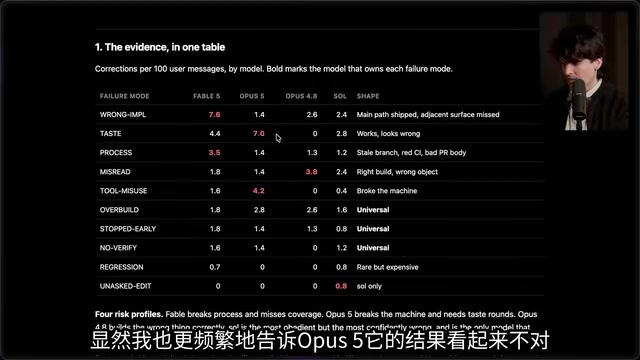
Theo's general advice: when you find an AI session didn't go as expected, ask the agent "why did you make this decision." It might be outdated content in CLAUDE.md, or it might have misread something at the start and then gone wrong from there. Have the model categorize and review its own tool calls, and you can optimize specifically. This practice has a more formal name in machine learning — Explainability: caring not just about the model's output, but understanding why it made that decision, in order to find systematic improvement directions.
The Essence of Skills: Description Is a Trigger Keyword, Not a Manual
Theo shared several Skills that changed his workflow, and the most important insight is that most people (and AI) write Skill Descriptions wrong.
To understand this point, you need to know the technical mechanism of Skills. Skills are a modular configuration system in Claude Code and similar tools. Each Skill consists of a Description and Content. The Description is unconditionally loaded into the context window at the start of every conversation, so the model can judge whether it needs to invoke that skill; the Content is only expanded and read when the model decides to use that Skill. This design is similar to lazy loading in operating systems — Description is like a function signature, Content is like the function body.
He points out: Description is unconditionally inserted into the context, regardless of whether the Skill is used. Therefore, the purpose of Description isn't to exhaustively explain what the skill does, but to tell the model when to bring it in — it should be a set of "magic trigger keywords." He's seen many Skills that put all details into the Description, with the result that the model already has all the information without actually calling the skill, completely defeating the design purpose. Worse, overly long Descriptions continuously consume limited context window space — even models with 200K token windows show significantly reduced attention to key information when the context is filled with irrelevant content, known as the "Lost in the Middle" problem.
Based on this principle, he split what was originally a single PR skill into two:
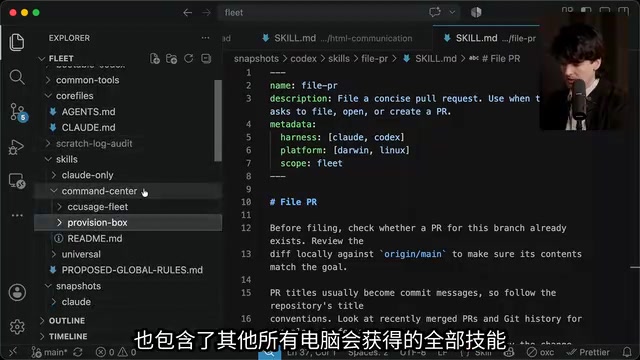
File PR: Making PR Titles Human-Readable
He complained that his agents used to generate PR titles so obscure that "even he couldn't understand them" — like long sentences stuffed with implementation details. The solution was providing clear good-vs-bad comparison examples:
- Bad example:
Perf: Server negotiates per-message Deflate over WebSocket - Good example:
Perf: Server gzips WebSocket frames, 70% size reduction
He emphasizes: agents are extremely good at learning from good and bad examples. Just put one or two real positive and negative cases into a skill or global configuration, and the model immediately understands what's good and what's bad to you. This is called "Few-shot Learning" in AI — guiding model behavior by providing a small number of examples in the prompt, which often far outperforms purely textual rules. Research shows that contrastive examples (providing both positive and negative cases) are more effective than positive cases alone, because they help the model establish a clear decision boundary. He also requires descriptions to start with plain language explaining "what's the problem, what's the solution" rather than jumping straight into an implementation checklist.
Baby Sit PR: Having the Agent Watch PRs Until They Go Green
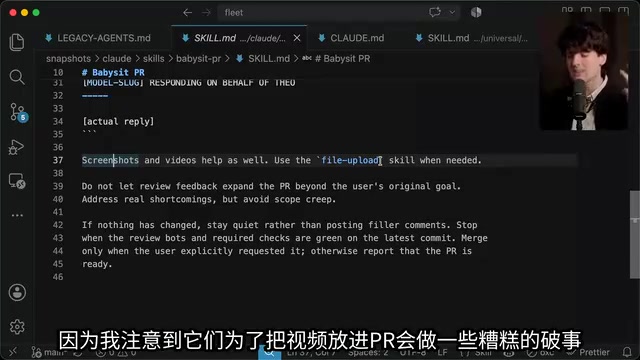
This skill monitors PRs, rebases when needed, responds to AI review bot comments, and loops continuously until all checks pass and everyone approves. Key rules include: verify each bot finding against original code before making changes, distinguish real defects from infrastructure flaky issues (i.e., flaky tests in CI/CD pipelines — tests that occasionally fail due to network timeouts, resource contention, or other non-code reasons), and reply to comments in a clear format "on behalf of the CEO."
The most important rule: "Don't let review feedback expand the PR beyond the user's original goal." Handle real defects, but avoid scope creep. This echoes the YAGNI principle again — AI review bots often suggest "while you're at it, fix this too," and if the agent accepts everything without judgment, a simple bug fix PR can balloon into a massive refactoring.
File Upload and HTML Communication: Making AI Better at Reporting Work
Theo repeatedly emphasizes a core theme: the point of all this isn't making the model better at writing code, but making the model better at communicating with me.
This viewpoint reflects an important evolution in AI-assisted programming. Early on, people focused on "can the model write correct code," but as model coding capabilities rapidly improved, the bottleneck gradually shifted to human-AI collaboration communication efficiency — the model completes the work, but you spend massive amounts of time understanding what it did, why it did it that way, and whether the result meets expectations. Solving this communication bottleneck yields more practical productivity gains than further improving code generation quality.
To this end, he built two practical skills:
File Upload Skill allows the agent to upload screenshots, screen recordings, logs, and build artifacts to his self-hosted server, returning a public URL. This way, even when he's on his phone using T3 Code, he can have the AI send him a screen recording URL of a new feature, or embed it directly in a PR. He also added a requires field in the metadata — machines without the configured token shouldn't use this skill, and should prompt the user instead of guessing. This requires field design embodies a "graceful degradation" philosophy: rather than having the agent try various workarounds when missing necessary conditions (often causing more errors), it clearly informs the user "I cannot perform this operation because X configuration is missing."
HTML Communication Skill (derived from Postplan) generates HTML artifacts for human consumption: plans, specs, research results, UI mock comparisons, etc. He split this one too: a Postplan Read uses curl (not a browser) to read URLs, and an HTML Communication handles generation. He even made a clever setup — whenever "HTML" appears at the end of a prompt with no other context, it automatically triggers this skill. This design lets him trigger complex behavior with the shortest possible instruction — for example, adding "HTML" after a task description tells the AI it needs to render the work results as a visual HTML report.
With all this in place, his prompts are astonishingly short. A real example: to fix a CSS bug, he just says "I have a wake-up thread that wants to settle but the button won't click, diagnose and fix, file a PR and babysit it" — and about 15 minutes later gets a mergeable PR. These minimal prompts work because all behavioral norms, workflow definitions, and quality standards are pre-encoded in global configurations and Skills — he doesn't need to repeat "how to write PR titles" or "what to do when checks fail" every time; that information has become the agent's "muscle memory."
Key Insight: Don't Copy, Understand
Facing countless requests to "share your agents.md," Theo explicitly refuses — and this is intentional.
His reasoning is profound: the value of these files isn't in what specific instructions they contain, but in why he added this content, the process that led him here. Directly copying someone else's global configuration is like applying someone else's generic code template to every project you touch — it pollutes how all your agents work on everything. More specifically, everyone's development habits, tech stack, team size, and code style preferences differ — Theo's optimal configuration as a startup CEO writing TypeScript/Next.js might be completely inapplicable, even harmful, for someone writing Python/Django at a large corporation.
He also clarifies a common misconception: agents.md should not be treated as README.md. README is project background for humans and AI to judge "should I bring in this code"; while agents.md/CLAUDE.md tells AI how to modify the codebase and what to know before modifying it. The former faces readers, the latter faces executors. Using an analogy: README is like a building's exterior plaque and visitor's guide, telling you "what is this place"; while agents.md is like a construction specification manual, telling workers "where the load-bearing walls are, how the wiring runs, what absolutely cannot be touched."
He also advocates writing a Glossary in these files: clearly defining basic terms like "you, we, user, AI agent, provider, client, environment, project." This doesn't just help AI understand him — more importantly, it makes AI describe things to him the way he wants, aligning communication. This practice addresses a widely underestimated problem — semantic ambiguity. When you say "user," in different contexts it might mean the end user, an API caller, or Theo himself; when you say "environment," it might mean dev/production environment, operating system environment, or Python virtual environment. A glossary eliminates this ambiguity, ensuring every conversation builds on shared semantic foundations.
AI Engineering Is Becoming Copywriting
At the end of his video, Theo reflects: he's essentially "writing copy," yet through this he can change how AI agents behave across all his machines on the network, with changes syncing automatically to five machines via Tailscale + SSH.
Tailscale is a zero-configuration mesh network service based on the WireGuard protocol that lets devices distributed across different network environments access each other as if on the same LAN. Theo using Tailscale + SSH for configuration file syncing means he only needs to modify the global agents.md on one machine, then a script automatically pushes the changes to his other four development machines, ensuring behavioral consistency of AI agents across all environments. This "modify once, take effect everywhere" pattern shortens his iteration cycle on agent behavior from "debug each machine separately" to "edit one file, wait a few seconds for sync."
Behind this is an emerging trend: Context Engineering is replacing traditional code writing as the core skill for efficient AI collaboration. Context Engineering differs fundamentally from early Prompt Engineering: prompt engineering focuses on how to word a single interaction for better output; context engineering focuses on how to systematically manage all information the AI receives throughout an entire workflow — including system prompts, project documentation, conversation history, tool definitions, file contents, and more. Shopify CEO Tobi Lütke has publicly stated that context engineering is one of the most critical skills for the future. The core challenge in this field: model context windows are limited (even 100K+ token windows degrade with information overload), making "what information enters the context and when" a critical decision.
The barrier isn't technical — it's whether you're willing to spend the time — auditing history, discovering failure patterns, calibrating models with good and bad examples, refining trigger keywords — to truly understand how your agent works and where it fails.
As Theo puts it: "Don't blindly copy everything I do. Use this as an opportunity to better understand how your agent works in your projects." That might be the most valuable takeaway from this entire article.
Key Takeaways
Related articles

Free Unlimited Claude Code Solution: Agnes AI + CC Switch Setup Guide
No paid subscription needed — pair the free AI platform Agnes AI with the open-source tool CC Switch to provide a backend for Claude Code, enabling unlimited free calls to text, image, and video models. This guide covers the full setup, test results, and usage boundaries.

A Complete Zero-Cost Guide to Getting Started with Claude Code for Beginners in China
A beginner's guide to Claude Code for users in China: two installation methods (command line and IDE plugin), full configuration steps for replacing the official API with the free domestic LongCat model, and a hands-on demo of building a small tool with natural language, plus tips.

When the NSA Gets Involved: The AI Supply Chain Crisis Behind Open-Source CVEs and API Key Hijacking
Multiple open-source projects disclosed severe CVEs in one day, PHP flaws alarmed the FBI, and Railway and OpenCode were breached with API keys stolen. This article breaks down the vulnerability window, AI-accelerated exploitation, and the AI supply chain crisis behind the API key black market, with a developer defense checklist.