Three Google Search Study Techniques: AI Mode Helps You Ace Exam Prep

Google Search showcases three AI study techniques: notes-to-PDF, interactive quiz generation, and adjustable visualizations.
The article introduces three study techniques demonstrated by Google Search, all embedded in the search experience. Technique 1 uses AI Mode to merge scattered notes into a single PDF; Technique 2 generates interactive quizzes for each course using active recall; Technique 3 creates visualizations with real-time parameter adjustment to help understand abstract concepts. The demo did not disclose technical details, and availability depends on region and account type.
Title
Three Google Search Study Techniques: AI Mode Helps You Ace Exam Prep
Meta Description
Google Search introduces three AI study techniques: use AI Mode to merge notes into a single PDF, generate interactive quizzes for each course, and let Google create visualizations with adjustable parameters to help students boost exam prep efficiency.
Article Content
During exam prep, many students share the same pain points: notes scattered everywhere, review that fails to capture key points, and abstract concepts that are hard to grasp. The three study techniques Google Search recently showcased on a short-video platform are designed around exactly these scenarios. They are not complex third-party tools, but AI features embedded directly into the search experience.
Technique 1: AI Mode Merges Notes into a Single PDF
The first technique uses Google Search's AI Mode to organize scattered notes into a clearly structured PDF document. According to the demo, users simply hand their notes to AI Mode, and it automatically merges and formats them into a file that can be printed or shared directly.
The value of this feature lies in reducing the time spent on manual copy-pasting and format adjustments. For students who are used to recording class content across multiple apps and multiple documents, time is the scarcest resource during the final sprint before exams. Quickly consolidating scattered information into a searchable, offline-readable document is itself an efficiency gain.
It should be noted that the demo video did not disclose the specific file formats supported, the maximum number of notes processed at once, or whether the feature is available to all Google accounts. Before actual use, it is advisable to first confirm feature availability in your region.
AI Mode is an interaction format Google Search has introduced in recent years. Unlike the traditional "keyword → list of links" approach, it allows users to make relatively complex requests in natural language, with the model directly generating an integrated answer or output. In this scenario, AI Mode plays the role of "content merging + formatting": first understanding the semantic structure of multiple notes, then reorganizing them by topic or chronological order, and finally outputting them as a fixed-layout file such as PDF. The advantage of PDF is consistent display across devices and easy printing and offline reading, but it is not an editable format; subsequent modifications usually require going back to the source document or using conversion tools. Therefore, this type of feature is better suited for "final-draft" organization rather than iterative draft editing.
Technique 2: Create Interactive Quizzes for Each Course
The second technique turns review into active testing. In the demo, users can have Google generate interactive quizzes for each course, testing their mastery by answering questions. One detail in the video: when the quiz-taker got a question wrong, feedback appeared on the interface saying "80% is still pretty good."

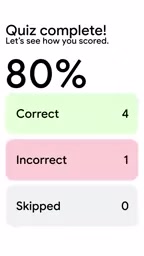
From the perspective of learning science, active recall is more effective than repeated reading. Interactive quizzes force the brain to retrieve information from memory rather than passively rereading notes. AI-generated questions can cover the course materials users upload, eliminating the step of writing questions oneself or searching for question banks.
However, the quality of quiz questions depends on the completeness of the input materials and the AI's understanding of the subject content. For highly specialized courses or those requiring complex reasoning, there is currently no public evaluation data on whether the generated questions are rigorous enough. The video itself also does not explain the distribution of question types, difficulty adjustment, or the wrong-answer review mechanism.
Active recall is a classic concept in cognitive psychology about memory retrieval, referring to learners actively retrieving information from memory rather than passively rereading materials. Alongside it is "spaced repetition," i.e., retrieving multiple times at different time points to slow forgetting. Interactive quizzes are considered effective because each answer is a retrieval practice, and the immediate feedback after a wrong answer can also correct false memories. It is important to distinguish that AI-generated questions based on materials tend to lean toward factual recall and simple comprehension, with limited coverage of higher-order thinking such as application, analysis, and evaluation; if a course assessment focuses on reasoning and transfer, automatic question generation alone may not be enough to simulate real exam difficulty.
Technique 3: Let Google Generate Visualizations
The third technique targets understanding of abstract concepts. Users can directly ask Google to create visual diagrams for the content they are learning, and they can see changes when adjusting parameters in real time.

This is especially useful for subjects such as physics, chemistry, biology, and economics that require understanding relationships between variables. Traditional static illustrations can only show one state, while visualizations with adjustable parameters allow learners to observe the differences in results caused by changing conditions, thereby building a more intuitive understanding of causality.
The demo video does not explain which subjects the visualization supports, whether it can be exported as images or embedded in documents, or the range and precision of parameter adjustment. These details will affect its usability in actual study workflows.
Parametric visualization refers to abstracting variables in a concept into adjustable controls, allowing learners to observe changes in results by dragging or entering values. The key difference from static illustrations is "explorability": static images present results under only one set of conditions, while adjustable visualizations expose causal relationships and help learners form a mental model of "how changing X causes Y to change." This type of interaction is especially common in scenarios such as force analysis in physics, supply and demand curves in economics, and concentration equilibrium in chemistry. Its limitation is that visualizations usually make simplifying assumptions about concepts; if learners are unclear about the boundaries of the model, they may mistake approximate relationships for universal laws.
Who These Three Techniques Are For
From the perspective of feature positioning, these three techniques cover three stages of exam prep: information integration (PDF), active testing (quizzes), and concept understanding (visualization). They are better suited to students who already have course materials and need to improve review efficiency, rather than people learning new knowledge from scratch.
All three techniques rely on AI capabilities in Google Search, which means feature availability will be affected by region, account type, and the pace of product iteration. The video itself is a short feature demo and does not provide performance data, user scale, or formal product release information. Before incorporating them into a daily study workflow, it is worth trying them out on one or two courses to see whether the quality of generated content is stable.
Overall, the logic behind this combination is clear: turn AI from a "question-answering tool" into "an assistive layer in the learning workflow." Whether it can truly help you "lock in your score" ultimately still depends on how users organize input materials and how they treat AI-generated quizzes and diagrams.
One-line Summary
Google Search showcases three AI study techniques: notes-to-PDF, interactive quiz generation, and adjustable visualizations.
Paragraph Summary
The article introduces three study techniques demonstrated by Google Search on a short-video platform, all embedded in the search experience rather than relying on third-party tools. Technique 1 uses AI Mode to merge and format scattered notes into a single PDF, saving time on pre-exam organization; Technique 2 generates interactive quizzes for each course, using active recall to improve review effectiveness; Technique 3 generates visual content on demand with real-time parameter adjustment, helping users understand variable relationships in abstract concepts. The three correspond respectively to information integration, active testing, and concept understanding in exam prep, and are better suited to students who already have course materials and are pursuing review efficiency. The article also notes that the demo did not disclose technical details such as file formats, question limits, or subject coverage, and that feature availability is affected by region, account type, and product iteration. It recommends trying them on a small scale before incorporating them into a daily workflow.
Related articles

Gemini 4 Neon Review: Benchmark Scores Rival Carbon, API Pricing and Quota Breakdown
Google Gemini 4 Neon is now live, benchmark scores closely tracking Carbon, API pricing 3/15 at twice Hydrogen's rate. This article compiles Bilibili creator testing: Neon can replace 90% of Carbon scenarios, AntiGravity quota consumption is only one-third of Carbon, plus subscription channel restrictions and 2API ban risks.

Gemini 4 Helium Coming Soon? Signals of Google Loosening Subscription Restrictions
Google team member hints releases will continue; community speculates Gemini 4 Helium (Flash Lite) may be next. Subscription ban controversy gets a response as product lead says "Soon," suggesting restrictions may be lifted. This article covers Gemini developments, OpenAI Coding Agent and risk management, Doubao real-time audio-video API, and compute business dynamics.

AI-Assisted React Development in Practice: Optimizing a Video App and Handling Errors
A 14-year veteran developer demonstrates AI-assisted React video app optimization: compressing video from 80MB to 5MB (~94%) via ImageKit, plus reliable error handling and retry mechanisms. Includes planning, code understanding, and verification methods for working with AI.