Tidy: A Free Local AI Grammar Correction Tool for Mac That Removes AI-Sounding Language in One Click
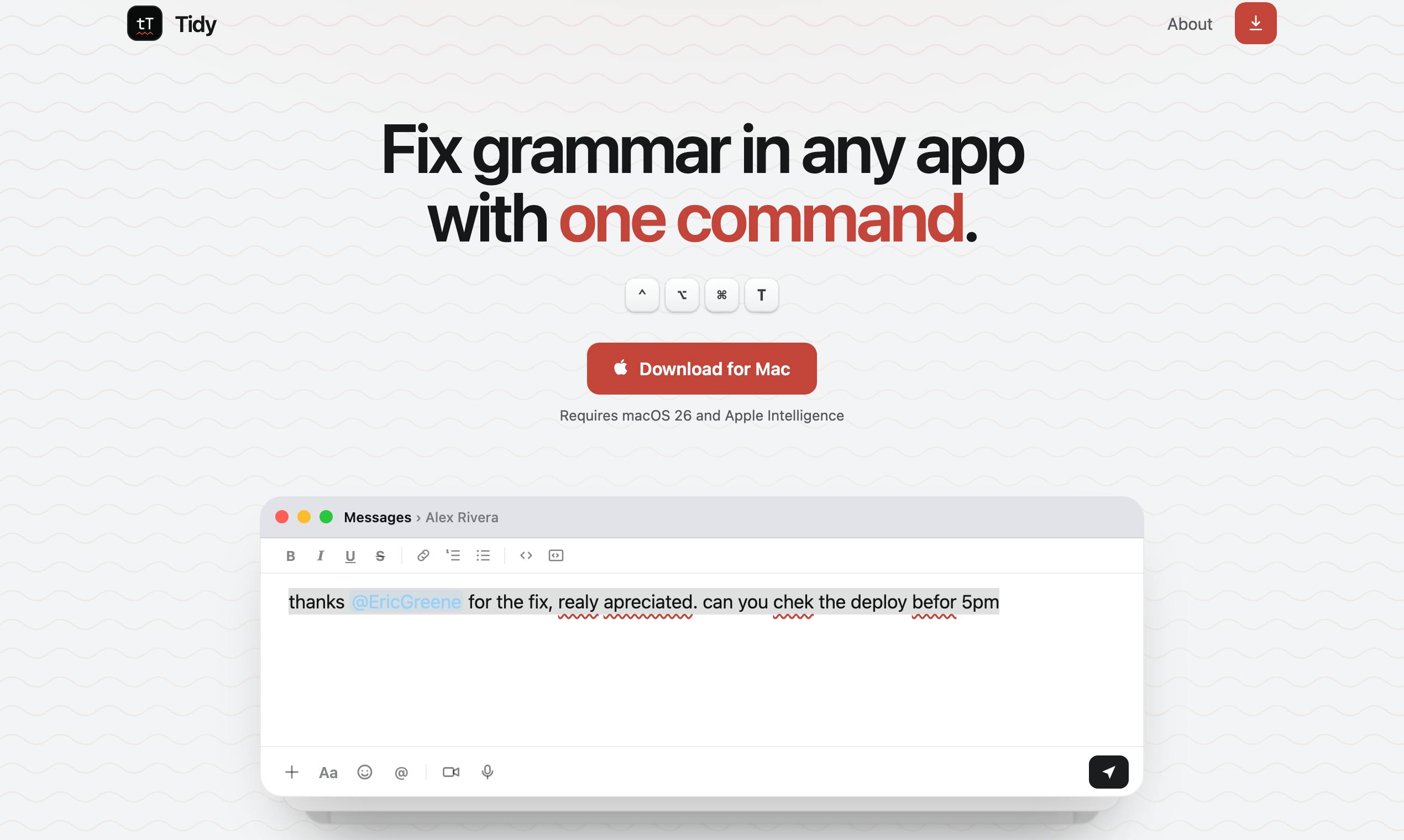
Tidy is a free Mac tool that fixes grammar and strips AI tone locally via Apple Intelligence.
Tidy is a free Mac application that leverages Apple Intelligence to provide on-device grammar correction and AI slop removal across any app. With two simple keyboard shortcuts, users can fix spelling and grammar or transform robotic AI-generated text into natural prose—all without uploading data to any server. It requires macOS 26 with Apple Silicon, representing a growing trend of thin-wrapper apps that deliver value through smart interaction design atop system-level AI capabilities.
In an era overflowing with AI writing assistants, privacy and cost remain persistent pain points. Most tools require uploading your text to cloud servers, creating privacy risks and typically demanding paid subscriptions. But Tidy, a Mac app that recently launched on Product Hunt, offers a different path: a completely free, fully local, use-anywhere grammar correction tool.
Tidy's Core Advantage: Grammar Correction That Truly Works "Anywhere"
Tidy's central selling point is its omnipresence. You don't need to open a specific editor or copy-paste text into some web app. In any Mac application—whether it's an email client, note-taking app, chat tool, or browser—just select a passage of text, press a keyboard shortcut, and the corrected version replaces the original text in place.
This "in-place replacement" relies on macOS's Accessibility framework. macOS provides a comprehensive set of Accessibility APIs that allow authorized applications to read and manipulate UI elements in other apps, including selected content within text input fields. Through these APIs, Tidy can capture text selected by the user in any application, pass it to the local AI model for processing, and then write the corrected text back to the original location. This mechanism is widely used by well-known Mac productivity tools like Raycast and Alfred. It's worth noting that users must explicitly grant Tidy Accessibility permissions in System Settings—which itself serves as a privacy safeguard, since you always know exactly which apps have permission to manipulate text.
The value of this interaction design is that it makes the tool completely "invisible." Traditional grammar checking interrupts your workflow: you have to leave your current app, paste text into another interface, wait for results, then copy it back. Tidy compresses all of that into a single keyboard shortcut, making grammar correction a nearly frictionless action. For users who constantly switch between multiple apps and need to quickly process large volumes of text, this "system-level" integration experience is extremely appealing.
Two Shortcut Functions: Fix Grammar + Remove AI-Sounding Language
Tidy offers two separate functions, each mapped to its own keyboard shortcut, covering the two most common types of corrections needed in everyday writing.
Shortcut One: One-Click Spelling and Grammar Fix
This is the most fundamental and frequently used feature. Select any text, trigger it with one keystroke, and Tidy corrects spelling errors and grammar issues, replacing the original text directly. What you might not notice is that Tidy preserves certain content from being altered: @mentions, dates, and times are all kept intact. This detail shows the developer has a clear understanding of real-world use cases—in social media and collaboration tools, arbitrarily changing @someone or date formats would actually cause problems.
Shortcut Two: One-Click AI Slop Removal
This is Tidy's more distinctive feature. It provides a dedicated shortcut for "stripping AI slop"—transforming any text that reads like machine-generated output into more natural, human-sounding language.
The very existence of this feature is a sign of the times. "AI Slop" is a concept widely discussed in internet communities since 2024, originally coined by social media users to describe text that is obviously AI-generated and lacking in substance. Telltale signs of AI writing style have been widely identified: frequent use of hollow transition phrases like "It's worth noting that" or "In today's fast-paced world," overuse of em dashes and parallel structures, the habitual opening of "Of course!" in responses, and a condescending explanatory tone. This writing style has become a negative signal in social media and workplace communication—LinkedIn is flooded with AI-generated posts, and academic papers have even been published containing residual text like "as an AI language model."
As ChatGPT and other generative AI tools are widely used for drafting text, more and more people want their writing to "sound like a human wrote it." Tidy has keenly captured this demand and addresses it with a dedicated function. In a sense, this represents a kind of AI self-correction—using AI to erase the traces left by AI. This reflects a fascinating paradox: people rely on AI to boost writing efficiency but don't want to be caught using it, and this contradiction has given rise to an entirely new category of "AI de-flavoring" tools.
Privacy and Cost: A Fully Local Apple Intelligence Solution
Tidy's most important technical characteristic is that it runs entirely on-device. It calls on macOS's built-in AI model—Apple Intelligence. This means any text you select is never uploaded to any server; all processing is completed locally on your device.
Apple Intelligence is Apple's on-device AI framework announced at WWDC 2024, first introduced in iOS 18.1 and macOS 15.1. It's based on Apple's custom on-device large language model (approximately 3 billion parameters) and can perform tasks like text comprehension, generation, summarization, and proofreading locally on the device. Unlike OpenAI's GPT series or Google's Gemini, Apple Intelligence follows a "device-first" design philosophy—only complex requests that the local model can't handle are forwarded (with explicit user consent) to Apple's Private Cloud Compute servers. This architecture ensures that most everyday tasks are completed entirely on-chip, generating zero network requests.
This is critical for privacy-conscious users. Imagine correcting an email containing trade secrets, a medical record, or a private journal entry—sending that content to a third-party cloud service carries inherent risk, no matter how polished their privacy policy may be. Tidy completely sidesteps this issue through local processing.
Running locally also brings another direct benefit: it's completely free. Cloud-based AI services incur ongoing compute costs, which is why nearly all of them use subscription pricing. Tidy leverages the system's built-in model, shifting compute costs to hardware the user already owns, enabling it to offer the service at no charge. From a performance perspective, Apple Silicon's Neural Engine is specifically optimized for Transformer architecture inference efficiency, with the M4 chip's Neural Engine delivering 38 TOPS (trillion operations per second). For short-text processing scenarios like Tidy's use case, inference typically completes within a few hundred milliseconds to a few seconds, with negligible impact on energy consumption—it won't noticeably slow down your device or drain your battery.
Requirements: Hardware and System Prerequisites
Free and local doesn't come without trade-offs. Tidy requires macOS 26 with Apple Intelligence, which sets a clear hardware threshold.
Apple Intelligence currently only supports newer devices—Macs equipped with Apple Silicon chips (M-series). This is because on-device inference requires the Neural Engine's dedicated compute power and sufficient unified memory to load model weights. Although the local model has only about 3 billion parameters, loading it into memory still requires several gigabytes of space, and Intel Mac architectures can't efficiently support this workload. This means users with older Intel Macs cannot use Tidy at all. Additionally, Apple Intelligence has varying availability across regions and languages, so whether Chinese-language users can use it smoothly would require specific testing.
In other words, Tidy is a product that has firmly bet on the Apple ecosystem. It has completely tied its capabilities to the local model Apple provides—the upside is zero cost, zero maintenance, and privacy security; the downside is that both its capability ceiling and scope of applicability are constrained by Apple. Notably, the local model's parameter scale is limited by device memory—Apple Intelligence on Mac has roughly 3 billion parameters, far smaller than cloud models like GPT-4 with hundreds of billions of parameters. This means that for complex semantic understanding and deep stylistic rewriting tasks, the local model may underperform compared to cloud-based solutions, but for spelling correction and basic grammar fixes, it's more than sufficient. When Apple upgrades its local model, Tidy will benefit for free; but if the model's capabilities are limited, Tidy has no way to break through those constraints.
The Product Trend of Local AI Applications
Tidy received 86 upvotes on Product Hunt, ranking 10th—not a stunning result, but enough to demonstrate it has tapped into a real need. It is essentially a "thin wrapper" app—the core AI capability comes from the system, and what Tidy provides is excellent interaction design and scenario-specific feature definitions.
"Thin wrapper" apps are applications whose core functionality heavily depends on underlying platforms or third-party APIs, with their own contribution primarily in the interaction layer and scenario adaptation. In the AI space, this concept initially carried a negative connotation—in early 2023, a flood of apps simply wrapped the OpenAI API with minimal added value. But as OS-level AI capabilities mature, the meaning of thin wrapper is undergoing a fundamental shift. macOS, through its Writing Tools API and system-level text processing interfaces, allows third-party apps to call built-in language models for proofreading, rewriting, and other operations. In this paradigm, an app's competitiveness no longer depends on the model itself, but on deep understanding of use cases, polished interaction details, and seamless system integration.
This represents a product direction worth watching in the local AI era. As operating systems begin shipping with powerful built-in local models, the opportunity isn't in training your own model—it's in how to cleverly package these system capabilities into everyday workflows. This mirrors the logic of the early mobile internet era—the most successful apps weren't the most technically complex, but the ones that best leveraged system capabilities like touchscreens, GPS, and cameras. Whoever can design more intuitive keyboard shortcuts, more thoughtful edge-case handling (like preserving @mentions), and more precisely targeted scenarios (like removing AI-sounding language) will carve out a position in this new arena.
For Mac users who meet the hardware requirements, value privacy, and are tired of subscription fees, Tidy is a lightweight tool worth trying. And for product developers, it's more of a signal: application innovation built on the local AI ecosystem is just getting started.
Related articles

Cursor AI Programming in Practice: Build a Student Management System from Scratch in 30 Minutes
A Bilibili creator demonstrates Cursor AI programming: generating a student management system in 30 minutes with natural language. Details on Agent mode, Claude selection, prompt techniques, and thresholds.

Top 20 AI Coding Tools Ranking: From Rock-Solid to Lackluster, a Scored Matrix
Bilibili creator releases top 20 AI coding tools ranking, tiered T0–T4 from rock-solid to lackluster, with Claude Code and Codex tied at T0. This article details the scoring dimensions (capability, reliability, robustness, durability, cost, domestic availability) and tool performances to help developers choose the right AI coding assistant.

Vibe Coding Systematic Tutorial: Master AI-Assisted Programming from Zero
A three-month Vibe Coding tutorial from a Bilibili creator covering Codex, ClaudeCode, and Cursor, from core logic to commercial project practice for beginners.