Trae in Practice: Rapidly Building a Repair Service Management Page with AI

Using Trae AI IDE to rapidly build a full CRUD repair service management page through incremental development.
This article demonstrates how to use Trae, ByteDance's AI-powered IDE, to rapidly develop a repair service management page. By reusing an existing news announcements page structure, writing precise prompts, fine-tuning column widths, testing full CRUD functionality, and adding pagination, the tutorial showcases an efficient AI-assisted development workflow that compresses hours of work into minutes.
Project Background and Implementation Strategy
In hands-on tutorials for AI-assisted development, an efficient development strategy is often more important than writing code from scratch. This section, demonstrated by instructor Huang Junhua, shows how to use AI programming tools like Trae to rapidly implement the "Manage Repair Service Items" page.
Trae is an AI-integrated development environment (IDE) launched by ByteDance, with built-in large language model capabilities. Developers can generate and modify code directly through natural language instructions. Unlike code completion tools such as GitHub Copilot, Trae focuses more on understanding project context and executing cross-file code transformation tasks, giving it a significant advantage in full-page feature development.
The core approach is crystal clear: reuse existing similar page structures. The previously implemented "Manage News Announcements" page shares a highly similar initial structure with the current "Repair Service Items" page. So instead of building from scratch, you directly copy the code framework of the news announcements page and make targeted modifications based on differences in business fields. This "build new from old" development approach is key to boosting efficiency in the AI programming era — letting the model make incremental modifications on top of existing context often gets the job done in just one or two steps.
From a technical perspective, this incremental modification strategy works because it leverages the context window mechanism of large language models. When the model can "see" existing code files, it automatically learns the design patterns, naming conventions, and architectural style within them, then maintains consistency when generating new code. This produces far more accurate results than generating code from a blank file, because the model has concrete "reference samples" rather than relying solely on general training knowledge.
Clarifying Field Differences and Requirement Descriptions
Although the news announcements page and repair service page share similar structures, their fields are completely different. When giving instructions to Trae, precision in requirement descriptions is crucial. This falls under the domain of Prompt Engineering — in code generation scenarios, the quality of the prompt directly determines the usability of the output code. Effective code generation prompts typically need to cover three dimensions: functional boundaries (what to do and what not to do), data structure (which fields are involved and their types), and interaction behavior (what happens on click).
For this specific case, the following points need to be clearly specified:
- No input/creation functionality needed (unlike the news announcements input module)
- No need to display creation time
- Columns to display include: ID, service title, service description, service price, service image, and action column
- Clicking edit should load and display the corresponding modification page

Among these, negative descriptions like "no input functionality needed" and "no need to display creation time" are particularly critical. They help the model eliminate potential ambiguity paths and avoid generating unnecessary code modules. If you only describe "what's needed" without specifying "what's not needed," the AI may generate redundant features based on the complete structure of the reference page.
Interestingly, the instructions didn't explicitly ask the AI to "reference the manage news announcements list," but based on experience with model behavior, the AI automatically references the logic of already-implemented pages above to complete the transformation. This reflects a seasoned developer's deep understanding of AI tool behavior patterns — in a sufficiently rich context environment, the model will proactively reuse patterns from adjacent code.
Page Layout and Column Width Ratio Tuning
After Trae generated the basic functionality, the page could properly display the service items list, but the layout proportions still required manual fine-tuning. This is a classic "last mile" problem in AI programming: the functionality is correct, but visual presentation needs optimization based on actual data characteristics.

In web frontend development, table column width allocation involves core mechanisms of the CSS layout model. HTML table column widths can be specified using percentages, fixed pixels, or auto. When using percentages, the total width of all columns must equal or approximate 100%; otherwise, the browser will redistribute space according to its own layout algorithm, leading to unpredictable display results.
Fine-grained column width allocation based on the actual content length of each field:
- ID column: Short content, width set to approximately 5%
- Service price: Numeric type, 5%
- Service image: Approximately 10%
- Service title: Titles are longer, 20%
- Service description: Most content, 30%
- Action column: Approximately 25%
A particularly important note: the initial ratio settings exceeded 100% in total, causing layout issues. The values needed to be recalculated and adjusted to ensure the total column widths were reasonable, allowing the entire row's content to display harmoniously on a single line. This is a classic frontend issue — AI tends to focus on functional logic correctness when generating code, with insufficient attention to numerical precision on the visual layer. This is a typical scenario where manual intervention for fine-tuning is needed.
Functional Testing: Full CRUD Workflow Verification
After completing the page layout adjustments, a comprehensive test of core CRUD functionality is required. CRUD (Create, Read, Update, Delete) is the most fundamental and frequently used operation pattern in enterprise application development. According to industry statistics, over 70% of pages in small-to-medium business systems are essentially CRUD forms. In traditional development, while these pages aren't logically complex, a single page's complete implementation still takes several hours due to the multiple layers involved — frontend forms, backend APIs, database operations, and parameter validation.
There's an important practical detail here: after modifying code, you need to restart the Spring Boot service for changes to take effect. Spring Boot is currently the most mainstream framework in Java backend development, running web applications through an embedded Servlet container (such as Tomcat). By default, after modifying Java source code, the entire application must be recompiled and restarted for changes to take effect, because the JVM doesn't automatically detect file changes after class loading. Use mvn-related commands to restart the project (typically executing mvn spring-boot:run or first mvn package then running the jar), during which login and operations will be temporarily unavailable. Although Spring Boot provides a DevTools module for hot reloading, in AI-assisted development — where code changes are extensive and may span multiple files — manually restarting is actually more reliable, ensuring all changes are fully loaded.

The testing phase includes:
- Edit functionality: Modify field content and click save, verify data updates correctly
- Delete functionality: Click delete to trigger a confirmation dialog, confirm to successfully remove the record
- Create functionality: Using "AC Installation" and "AC Repair" as examples, enter service title, description, price, and image. For instance, AC installation is set at a fixed fee of 200 yuan per visit, while AC repair is noted as "subject to actual quotation"
The entire workflow verifies the complete integration between the page and backend APIs, with data being correctly created, edited, and deleted. AI programming tools compress this process from hours to minutes. The core value isn't in generating "better" code, but in eliminating the time cost of repetitive coding, allowing developers to focus their energy on higher-value work such as business rule design, exception handling, and user experience optimization.
Adding Pagination Functionality
As service item data grows, the list page needs paginated display. A clear requirement was given to Trae: add pagination functionality to the manage service items page, displaying 5 items per page.
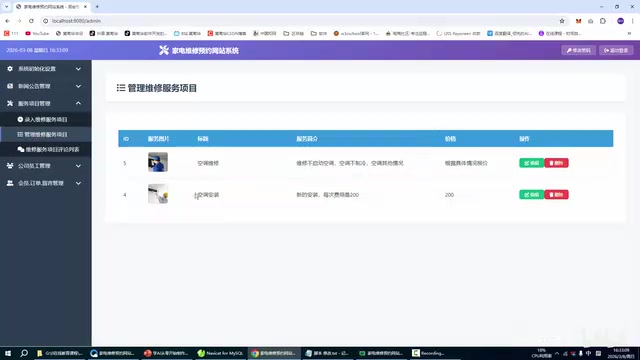
To test the pagination effect, multiple test records were added in bulk at the database level through copy-paste (e.g., AC Repair 01 through 06), accumulating enough data for more than two pages, ideally three pages. In relational databases like MySQL, you can quickly batch-copy existing records using INSERT INTO ... SELECT statements — a fast but cautious-use method. Be mindful of primary key conflicts (no concern if the primary key is auto-incremented) and foreign key constraints. In formal software engineering workflows, test data is typically generated systematically through Data Factory tools or Faker libraries to cover more edge cases. However, in the rapid iteration scenarios of AI-assisted development, directly manipulating the database to verify functionality is a more pragmatic and efficient approach.
After Trae completed the pagination code modifications (which involved extensive changes this time), the page successfully achieved the 5-items-per-page display effect. Page numbers "1, 2, 3" are clickable for switching, and "Previous" and "Next" buttons work correctly. Implementing pagination typically involves coordinated modifications on both the frontend and backend: the backend needs to accept page number and items-per-page parameters, returning the corresponding data slice and total record count; the frontend needs to render the pagination component and re-request data when switching pages. AI tools' ability to simultaneously understand and modify both frontend and backend code is their unique advantage in full-stack development scenarios. From this foundation, additional features like search functionality can be further extended, completing the entire management module's development.
Practical Experience Summary
Although this case is small, it fully demonstrates the efficient workflow of using Trae for AI-assisted web development:
- Reuse over rewrite: Use structurally similar existing pages as templates, letting the AI make incremental modifications. This not only saves time but, more importantly, ensures consistency in code style and architecture across the project
- Be precise in requirement descriptions: Clearly list needed and unneeded features, and fields to display. Incorporating Prompt Engineering thinking into daily development instructions is an essential skill for efficiently using AI tools
- Human-AI collaboration and division of labor: AI handles feature generation; developers handle layout fine-tuning and ratio optimization. Current AI excels at generating logical code but still requires human oversight for visual details, interaction experience, and other aspects requiring "aesthetic judgment"
- Test and verify promptly: Restart the service after each modification and run through the complete CRUD and pagination workflow. This small-step, fast-iteration verification rhythm helps catch issues early and gives the AI a direction for corrections
For CRUD page development in small-to-medium business systems, this Trae AI programming approach can dramatically compress the development cycle, freeing developers from repetitive labor to focus on refining business logic and user experience. As AI programming tools continue to evolve, the workflow of "describe the requirement and the development is done" will increasingly become reality. Mastering how to collaborate efficiently with AI and how to describe requirements precisely will become a developer's core competitive advantage.
Related articles

Frontend to AI Agent Development: A Frontline Architect Explains Career Paths and Opportunities
A frontline AI architect explains the industry changes and practical paths for frontend developers transitioning to AI Agent development: why pure frontend jobs are disappearing, why Agent + full-stack has become mainstream in hiring, and three transformation routes—Agent development engineer, FDE, and remote contracting—along with corresponding learning strategies.

How to Choose an AI Agent Development Course: Five Pitfall-Avoidance Guidelines
A mechanical-engineering career changer's two-year pitfall-tested checklist for screening AI Agent development courses: complete delivery pipeline, resume-worthy projects, real development perspective, update frequency, and coaching feedback—with concrete judgment methods and pitfall-avoidance tips.

Coze AI Agent Building for Beginners: A Zero-Code AI Agent Development Guide
Coze, ByteDance's one-stop AI application development platform, supports zero-code drag-and-drop AI agent building. This article outlines Coze's core concepts, three advantages, differences between the domestic and international versions, and the distinction between agents and apps, helping beginners quickly get started with AI Agent development.