TraeWork vs WorkBuddy: A Hands-On Comparison — How to Choose the Right AI Agent
TraeWork (cloud sandbox, clean code) vs. WorkBuddy (local desktop automation) — choose based on your workflow.
This article compares ByteDance's TraeWork and Tencent's WorkBuddy. TraeWork evolved from a coding IDE and runs tasks in a cloud sandbox, excelling at complex engineering with clean, maintainable code — ideal for developers and large projects. WorkBuddy is a local desktop agent that directly controls your machine, with built-in Expert Teams, Skill Packs, a Knowledge Base, and MCP connectors for powerful local workflow automation. A same-prompt game dev test (both using DeepSeek-V3-Flash) showed TraeWork producing cleaner architecture while WorkBuddy delivered a more polished, higher-performance finished product. Choose TraeWork for engineering-heavy work, WorkBuddy for local office automation — or use both together.
ByteDance's TraeWork and Tencent's WorkBuddy are two of the most talked-about domestic AI agents right now. Both look like "AI does the work for you" tools, but their underlying logic, execution environments, and ideal use cases are quite different. This article draws on real-world usage to break down both tools — from positioning and features to actual output quality — so you can decide which one fits your needs better.
TraeWork: A Cloud Workbench Evolved from a Programming IDE
TraeWork grew out of Trae Code IDE, which was originally built around AI-assisted coding. It offered generous free quotas and fast access to new models, making it popular among developers and curious beginners alike. The upgraded TraeWork is now positioned as a cloud-based Agent workbench — where AI autonomously breaks down complex tasks, invokes built-in skills, and completes work end-to-end inside a cloud sandbox environment, delivering finished outputs directly.
Because of its IDE roots, TraeWork excels at long-chain, complex engineering, and multi-step hybrid workflows. It offers three modes — Work, Code, and Design — and lets you kick off complete work tasks directly. One practical tip: enable manual approval by default, and set up dedicated folders for task materials ahead of time.
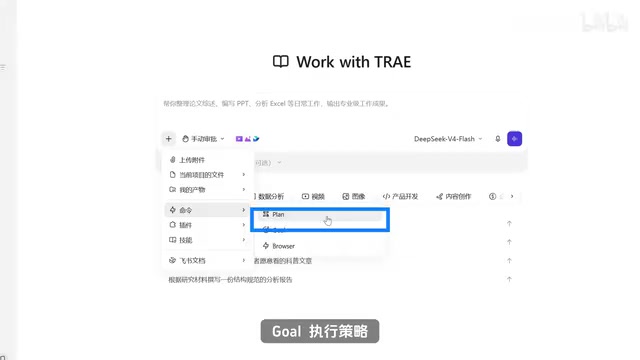
TraeWork supports two main execution strategies: Plan mode pops up an approval dialog before each modification step, executing only after you confirm; Go mode runs the entire task automatically from start to finish. It also includes a built-in Browser tool for web search and page access, plus a cloud sandbox IDE where all code runs on the vendor's cloud infrastructure — complete with Git and a terminal, no local Python or Node.js setup required. Once you upload your project files, the AI can handle full project development, debugging, and troubleshooting.
Pricing and Use Cases
TraeWork uses a credit-based billing system, with new users receiving 500 credits per month. Simple conversations consume relatively few credits, but multi-step Agent tasks, large-scale project debugging, and code execution can burn through them quickly. Overall, TraeWork is best suited for substantial, end-to-end projects — full code engineering, in-depth data analysis, complete presentations, or comprehensive design deliverables.
Cloud Sandbox is the key concept for understanding how TraeWork executes tasks. Unlike running code locally, a cloud sandbox is an isolated execution environment that the vendor spins up on a remote server for each task — code runs, debugs, and reads/writes files there without ever touching your local machine. The benefits: users don't need to install Python, Node.js, Git, or any other dev dependencies; just open a browser and run a full project. Sandboxes are also isolated from each other, so one crashing task doesn't affect others. The trade-off: files produced by a task must be downloaded manually, the tool is unusable offline, and runtime and compute resources are subject to platform quota limits. For non-technical users without a local dev environment, the cloud sandbox actually lowers the barrier to entry. For users who need direct access to existing local files, software, or databases, a local execution approach like WorkBuddyAd may be more straightforward.
WorkBuddy: A Desktop Agent That Operates Your Local Machine
WorkBuddy is Tencent's local desktop-level AI agent, and its defining feature is the ability to directly control your computer — reading and writing local files, operating software, and even remotely controlling another machine (like your home PC). This local execution model is what fundamentally sets it apart from TraeWork's cloud-based approach.
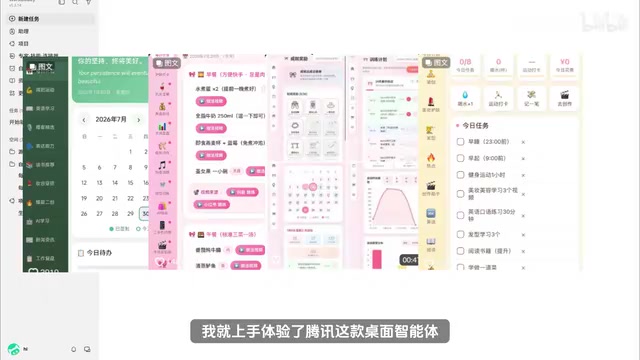
WorkBuddy covers the same three scenario categories — daily office work, code development, and design/creativity — and offers three permission modes: Ask provides suggestions only, without modifying files; Plan requires your confirmation before executing; Craft operates directly on local files (i.e., both Ask and Plan are disabled).
On pricing, WorkBuddy is currently offering its Hunyuan three-model suite free for a limited time. Most plain-text tasks consume no credits, though complex agent workflows still deduct them. Its reasoning capability is solid and well-suited to everyday office work and document handling — though image generation still costs credits, and there can be queuing delays during peak daytime hours, which is a notable pain point.
Experts, Skills, and Knowledge Base
WorkBuddy includes several standout functional designs worth highlighting:
- Expert Team: A large library of pre-built personas covering development, finance, product, investing, and more — no need to write complex prompts from scratch, just invoke the relevant expert;
- Skill Packs: Ready-made skills for batch processing files, spreadsheets, and document parsing — one-click execution for repetitive local tasks;
- Connectors (MCP): Integrates with a variety of external online services;
- Knowledge Base: Once authorized, personal documents, project files, and local folders can be connected directly, allowing the AI to reference that material in its responses — with persistent mounting support.
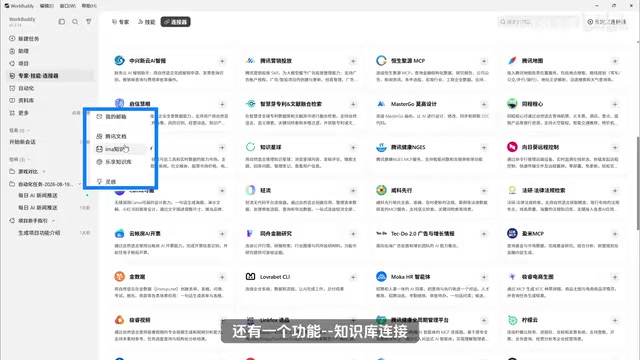
This combination of "Expert Team + Skills + Knowledge Base + Connectors" gives WorkBuddy a clear edge in automating local workflows, and explains why many users set it up as a personalized automation workbench.
MCP (Model Context Protocol) is an open standard proposed and championed by Anthropic in late 2024, designed to unify the interface specifications between AI models and external tools or data sources. Before MCP, each platform had its own proprietary implementation for connecting to external services (calendars, email, databases, third-party APIs), with no cross-compatibility. MCP essentially defines a universal "plug standard" for AI agents — as long as a tool provider supports MCP, any MCP-compatible AI client can call it directly. WorkBuddy's "Connectors" feature is built on this protocol, meaning users can tap into the existing MCP-compatible service ecosystem rather than being limited to the platform's built-in integrations. As the MCP ecosystem expands, the range of supported third-party services continues to grow — which to a significant degree determines the ceiling of WorkBuddy's automation capabilities.
Same Prompt, Two Outputs: A Side-by-Side Test
To minimize the influence of model differences, the same game development prompt was submitted to both tools, with DeepSeekAd-V3-Flash set as the underlying model for both. The output differences were immediately apparent.

TraeWork version: Mouse gameplay felt smooth; the code architecture was clean and readable; sound effects and spark animations were included; the UI was polished. However, it only implemented single-path fruit cutting, rendered in real time during gameplay. Overall, it leaned toward engineering code quality — well-suited for developers who want to study or build on the source.
WorkBuddy version: The finished game felt smooth to play; multi-path cutting was supported; offscreen pre-rendering was implemented for better runtime performance; visual effects, sound design, and interaction completeness were all higher. The trade-off: the code lacked large-scale class encapsulation, so extensive modifications or refactoring would carry a higher cost.
One-sentence takeaway from this test: TraeWork wins on code structure and maintainability; WorkBuddy wins on finished product experience and interaction completeness. As noted, the ideal outcome would be to combine the strengths of both versions — balancing user experience with clean architecture.
Offscreen Pre-rendering is one of the technical reasons the WorkBuddy version outperformed the TraeWork version on performance. The core idea: during game logic frames, complex graphical elements (like particle effects and fruit textures) are drawn in advance onto an off-screen canvas that isn't displayed on screen — cached there for the main render loop to reuse as needed, rather than recalculating every frame. By contrast, TraeWork's version uses real-time drawing, re-executing draw commands each frame, which is more prone to frame rate drops when effects grow complex. This difference ties directly to architectural choices: offscreen pre-rendering typically requires a cleaner separation of rendering layers, which explains why the WorkBuddy version feels smoother visually yet carries a higher cost for large-scale changes — both sides are consequences of the same set of technical decisions.
How to Choose? It Comes Down to Your Core Use Case
Both tools support full cross-platform sync across web, desktop, and mobile apps. The deciding factor is your actual workflow:
- Choose TraeWork if you frequently write code, build complete projects, handle complex multi-step workflows, care about code structure, and need to read the source or iterate on features later;
- Choose WorkBuddy if your work is primarily office-focused, you regularly handle large volumes of local files, need automation capabilities or remote machine control, or want to take advantage of membership benefits;
- Use both when circumstances allow — assign heavy engineering work to TraeWork and local automation to WorkBuddy.
There is no absolute winner between TraeWork and WorkBuddy. Cloud sandbox execution and local execution represent two distinct product philosophies. The most important criterion when choosing an AI agent tool is simply: which one fits your actual needs.
Related articles

9 AI Subscription Plans Compared: The Real Cost Per 100M Tokens Revealed
Bilibili creator tests 9 AI subscription plans from Volcano, Alibaba, Tencent, Baidu, Zhipu, Xiaomi, MiniMax and more, converting them all to real cost per 100M tokens, breaking down fixed-quota vs. three-tier coefficient billing and how caching, time-of-day discounts, and window limits affect actual quota.

Vibe Coding for Beginners: Expressing Intent Instead of Handwriting Code
What is Vibe Coding? A 137-episode Bilibili course defines it: the core is expressing intent, not writing code. This article analyzes Vibe Coding's productivity logic, target audience, and entry expectations to help beginners decide if it's worth learning.

LangChain Beginner's Guide: An Agent Development Roadmap from LangGraph to Deep Agents
Clarify the encapsulation relationship among LangChain, LangGraph, and Deep Agents, and master the learning path and selection logic for agent development frameworks—suitable for beginners in large model development.