TrueForge: Open-Source Universal Agent Runtime — A Low-Cost Alternative to Claude Managed Agents

TrueForge is an MIT-licensed open-source Agent runtime that cuts costs up to 75% compared to Claude managed agents.
TrueForge, open-sourced by TrueFoundry, is a universal Agent runtime (harness) that sits between a bare LLM and a full Agent application, handling tool calls, MCP connections, code sandboxes, and human-in-the-loop flows. Benchmarks show switching from Claude managed agents to TrueForge saves ~30% with the same model, and up to 75% with open-source models at comparable accuracy. It supports OpenAI, Anthropic, Gemini, and local Ollama models, with a REST API and TypeScript SDK for programmatic use. Extensions include Daytona code sandboxes, GitHub-imported skills, and full local model support for complete data sovereignty.
What Is TrueForge: More Than Just Another Coding Agent
When people hear "agent harness," the first instinct is often to compare it with tools like OpenCode or Aider. But TrueForge occupies a very different space. Open-sourced by TrueFoundry under the permissive MIT license, it is fundamentally a universal Agent runtime layer — designed to replace Claude's managed agents, not to compete with purpose-built coding tools.
Understanding its value requires clarifying one concept: an LLM itself does exactly one thing — take tokens in, put tokens out. But a genuinely capable Agent requires much more: tool calling, MCP service connections, code sandboxes, human-in-the-loop approval flows, and so on. The model provides the intelligence; the surrounding machinery is the "harness." TrueForge owns that layer, transforming a bare model into a usable Agent.
It's worth noting that the original video was sponsored by TrueForge, though the author emphasizes the project is entirely free and open source — every demo can be reproduced without paying anything.
MCP (Model Context Protocol) is an open protocol proposed by Anthropic in late 2024, designed to standardize how LLMs connect with external tools and data sources. Think of it like USB-C: as long as different vendors follow the same protocol, things just plug in and work. MCP servers expose Tools, Resources, and Prompts; Agent frameworks call these services through a unified MCP client, eliminating the need to write custom integration code for each external system. As the harness layer, TrueForge handles establishing connections to MCP servers and managing session lifecycles — so the model can invoke external capabilities without needing to know anything about the underlying protocol. This is why adding new tools (Exa, Linear, Notion, etc.) to TrueForge is so fast: if a service provides an MCP server, the integration cost is minimal.
The Key Selling Point: Lower Cost at Equal Accuracy
The TrueForge team published a benchmark on X that's worth examining. The test used 14 tasks from DevRel Enterprise Bench, involving interactions with CRMs, issue trackers, documentation systems, and various tool calls.
The comparison is compelling: the same Opus 4.x model was run on Claude managed agents in one configuration and inside the TrueForge harness in another; a third configuration tested TrueForge paired with the open-source GLM model. Results showed:
- Accuracy was essentially equivalent across all three configurations;
- Switching the same model to TrueForge reduced costs by approximately 30%;
- Using an open-source model cut costs by as much as 75%, with accuracy still holding.
In other words, simply switching to an open-source harness delivers substantial savings without sacrificing performance. Combined with the freedom to use any model — including local ones — this is TrueForge's core competitive advantage.
Installation and Getting Started: A Locally Hosted Web UI
Deployment is lightweight. Copy the npx command from the Getting Started section of the GitHub repo and run it in your terminal. On first run, it downloads dependencies, creates a local SQLite database, and starts a service on localhost that you can open directly in a browser.
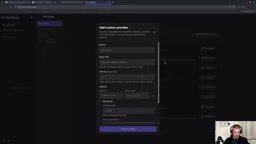
Model configuration is flexible — you can connect OpenAI, Anthropic, or Gemini, or add a custom provider by specifying a base URL (for example, a local Ollama model). Configuration just requires the corresponding API key.
One common misconception worth clearing up: the chat interface you see after opening the app is not TrueForge's main feature. It's a testing sandbox for debugging before you formally save an Agent. Here you can select a model, connect tools, and enable skills — then click "Save agent" to lock the configuration into a permanent Agent definition.
Building a Stock Research Agent
The video demonstrates the full workflow using a "stock research assistant." In settings, you can connect various tools and services — Linear, Notion, and Exa (which requires no authentication and enables web search). With Exa enabled, you can ask the Agent to look up a company's financial data, 10-Q/10-K filings, and generate summary reports.

Here's a key point: everything done in the chat interface is temporary — it is not persisted as the system prompt. What actually defines an Agent is the system prompt, model selection, connectors, and skills set at save time. For example, saving with the system prompt "You are a stock research assistant. The user will provide a ticker symbol or company name; your job is to concisely summarize the most important financial data, key metrics, and analyst reports" — that's what constitutes the Agent's formal definition.
Programmatic API Access: Where the Runtime Layer Truly Shines
The web UI is ultimately just a testing tool. TrueForge's real value as a runtime layer lies in programmatic access. It exposes a REST API (locally at http://localhost:8790/api/v1/sessions) along with a TypeScript SDK; on the Python side, there's no SDK — you can call the API directly with requests.
The typical call flow has two steps: send a POST request to the sessions endpoint with the agent name to start a session, then retrieve the session ID from the response; next, send a user message to the /{sid}/turns endpoint with SSE (Server-Sent Events) streaming enabled. Iterate over each line of the response, parse the JSON, filter for model.message.delta message chunks, and print them in real time — and you'll see the Agent's streaming output right in your terminal.
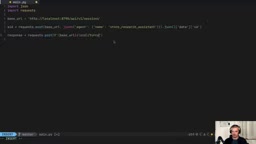
This design means an Agent you've tuned in the web UI can be seamlessly embedded into your own Python application or backend service as the backbone of an entire agentic system.
SSE (Server-Sent Events) is a unidirectional push protocol built on HTTP, where the server can continuously send text event streams to the client without the client needing to poll repeatedly. Compared to WebSockets, SSE is more lightweight, natively supports HTTP/2 multiplexing, and is more proxy- and firewall-friendly — making it well-suited for LLM streaming output, where the server continuously generates data and the client passively receives it. In practice, the response has a Content-Type of text/event-stream, with each message prefixed by data: and separated by two newlines. In Python, set stream=True in requests and iterate over response.iter_lines() to consume the stream. This approach lets a terminal or web frontend render the Agent's output in real time, without waiting for the full response to be generated.
Advanced Capabilities: Code Sandboxes, Skills, and Local Models
TrueForge's extensibility shows up in three areas.
Code Sandbox: By connecting Daytona (a paid service with a free tier), the Agent can actually execute Python code in a sandbox. The video demonstrates a "senior stock research assistant" using matplotlib to generate charts and export them as a PDF report — these charts are produced by real code execution, not scraped from the web. Note that the Daytona API key must have full access permissions.
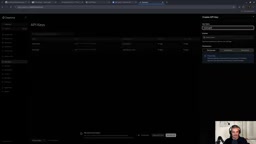
Skills: Skills can be imported from GitHub. Taking an "algorithmic art" skill as an example — without the skill enabled, the Agent produces simple SVG/HTML; with it enabled, the Agent actively consults the skill documentation and produces more sophisticated output with adjustable parameters like particle count.
Local Models: As a vendor-neutral framework, TrueForge supports local models. By adding a custom provider with Ollama's base URL (localhost:11434/v1), manually specifying the model ID and context length, you can run the entire workflow on your own hardware. In the video, the author connects to a Dell Pro Max running a Qwen model (powered by GB10, Dell's version of DGX Spark), achieving the same calling experience as GPT — fully open source, with full data sovereignty.
Daytona is a cloud sandbox platform designed for AI code execution, providing isolated and predictable runtime environments. Compared to executing code directly on the host machine, sandboxing offers several key advantages: process isolation prevents malicious or buggy code from affecting the main system; filesystem snapshots support reset and replay; and network policies allow fine-grained control over traffic. For Agent use cases, a code sandbox is the critical infrastructure that lets a model "actually do things" rather than just "describe how to do things." Daytona's competitors include E2B and Modal — all addressing the same problem: how to give an LLM a safe, reliable "hand" to execute code. TrueForge wraps the Daytona API through an official connector, so users only need to provide an API key without managing sandbox lifecycle themselves.
Conclusion
TrueForge fills a meaningful gap: it isn't a replacement for coding agents, but rather the runtime infrastructure that sits between a bare model and a complete application. For teams looking to escape Claude managed service lock-in and gain better cost control and model flexibility, its MIT license, support for any model (including local ones), and the significant cost savings demonstrated in benchmarks all make it worth evaluating. That said, the demos in the video are relatively simple examples — real-world production value will depend on how many custom MCP servers and skills you can connect to orchestrate genuinely complex workflows.
Related articles

9 AI Subscription Plans Compared: The Real Cost Per 100M Tokens Revealed
Bilibili creator tests 9 AI subscription plans from Volcano, Alibaba, Tencent, Baidu, Zhipu, Xiaomi, MiniMax and more, converting them all to real cost per 100M tokens, breaking down fixed-quota vs. three-tier coefficient billing and how caching, time-of-day discounts, and window limits affect actual quota.

Vibe Coding for Beginners: Expressing Intent Instead of Handwriting Code
What is Vibe Coding? A 137-episode Bilibili course defines it: the core is expressing intent, not writing code. This article analyzes Vibe Coding's productivity logic, target audience, and entry expectations to help beginners decide if it's worth learning.

LangChain Beginner's Guide: An Agent Development Roadmap from LangGraph to Deep Agents
Clarify the encapsulation relationship among LangChain, LangGraph, and Deep Agents, and master the learning path and selection logic for agent development frameworks—suitable for beginners in large model development.