Turning APIs into MCP Servers with Cognipeer Console: A Practical Guide to Tool Exposure for AI Agents

Cognipeer Console auto-converts OpenAPI specs into MCP-compliant tool servers for AI Agent platform governance.
This article covers how Cognipeer Console's MCP Servers feature bridges enterprise APIs and AI Agent tool invocation. The core flow: import an existing OpenAPI spec, let the system auto-generate an MCP-compliant server and tool list, and enable Agents to discover and call tools via a unified protocol — no manual tool definitions required. MCP Hubs provide a curated service discovery catalog for platform teams to centrally manage growing server fleets, while the Monitor panel tracks requests, latency, and errors. The same MCP server definitions are accessible via Console UI, Agent SDK plugin, and Pulse — enabling platform-level governance over AI Agent tooling.
The foundation of a truly capable AI Agent is its ability to discover and call tools with well-defined contracts. Cognipeer Console's MCP Servers feature does exactly this — it converts your existing enterprise APIs into servers compliant with the Model Context Protocol (MCP), enabling any MCP-compatible Agent to plug in and call them out of the box. Based on an official demo, this article walks through the complete workflow: creating a server from an OpenAPI spec, inspecting generated tools, publishing to an MCP Hub catalog, and monitoring runtime behavior.
Creating an MCP Server from an OpenAPI Spec
Open the MCP Servers list in Console — each server represents a group of API endpoints exposed externally via MCP. The demo environment comes pre-loaded with two examples, OMS MCP and DeepWiki, which serve as handy structural references.
When creating a new server, you fill in a name, description, and server key. The critical step is selecting OpenAPI under Tool Source, then providing the upstream Base URL of your target API along with the OpenAPI spec itself — you can paste the JSON/YAML content directly, upload a file, or load it from a URL. The demo shows pasting an OMS OpenAPI spec.
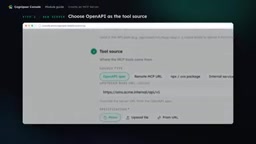
Before creating, run through the Preflight check to confirm the spec parses correctly, then click Create Server. This OpenAPI-based generation approach means teams don't have to manually write MCP tool definitions for every endpoint — they simply reuse existing API documentation, dramatically lowering the cost of integration.
Model Context Protocol (MCP) is an open standard proposed by Anthropic in late 2024, designed to define a unified communication protocol between large language models and external tools/data sources. Think of it like a USB interface that standardizes how peripherals connect — MCP standardizes how AI Agents call tools, whether the underlying system is a database query, REST API, or local file system. The protocol's core primitives are three types: Tools (functions that Agents actively invoke), Resources (data that Agents can read), and Prompts (prompt templates). Claude, Cursor, Zed, and other major AI products now natively support MCP, and the third-party ecosystem is expanding rapidly. Understanding this context helps clarify why the OpenAPI → MCP automatic mapping has real practical value: thousands of existing REST endpoints in an enterprise can be bulk-onboarded into Agent-callable tool ecosystems, without needing separate adapters for each Agent framework.
Inspecting Generated Tools and Exposure Details
Once the server is created, navigate to the Tools tab on the details page to see the tool set automatically mapped from the OpenAPI spec. For the OMS MCP example, exposed tools include Lookup Order, Open Carrier Trace, Check Return and Eligibility, and more.
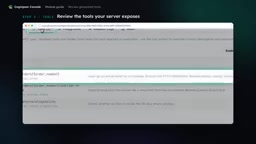
This explicit tool list is precisely where the MCP protocol delivers value — instead of guessing what an API can do, an Agent reads a clear capability contract directly. Back on the Overview page you can confirm the server's OpenAPI tool source, while the Exposure section lets you review how the server is opened to the outside world. Combined with Total Requests and Top Tools, it provides a concise activity view.
MCP Hubs: A Service Discovery Catalog for Teams
MCP Hubs are an enterprise-grade capability within MCP Servers, used to publish a curated catalog of MCP servers. The core use case: a platform team organizes multiple servers that clients should be able to discover together, creating a single, unified discovery entry point.
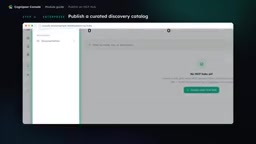
In other words, a Hub essentially acts as a "discovery API." As the number of internal MCP servers grows, scattered individual servers create governance headaches for consumers. Hubs let the platform team proactively curate and selectively expose servers, balancing discoverability with access control — especially important for tool governance in mid-to-large organizations.
Service discovery is a classic problem in microservices architecture: as service instances proliferate, consumers need a centralized registry to look up "who is where and what can they do," rather than hardcoding addresses in code. Consul, Eureka, and Kubernetes Services all embody this idea. MCP Hub solves the analogous problem at the Agent tool layer: as internal MCP servers grow from a handful to dozens or even hundreds, scattered registrations lead to fragmented Agent configurations and difficulty auditing permissions centrally. The Hub acts as a "tool registry" where the platform team curates — deciding which servers are visible externally and under what permissions — while Agents simply subscribe to the Hub endpoint to get the latest list of available tools. This closely mirrors the governance role that API Gateways play in REST ecosystems, just shifted up from network routing to the semantic tool description layer.
Monitoring and Tool Integration on the Agent Side
Once a server is in use, the Monitor panel provides a centralized view of server count, request volume, error signals, latency, and degraded status. One important note: the errors and degraded values shown in the demo were deliberately produced by passing invalid order numbers as illustrative signals — they are not real production reliability metrics. This is an easy point of misinterpretation when reading the panel data.
On the Agent side, open the Build tab in Console Agent and configure the tools available to the Agent under the Tools section. Interestingly, this interface doesn't offer a dedicated "MCP server selector." The same MCP server can also connect through the Agent SDK's MCP plugin, as well as via Pulse settings to connect to an MCP server.
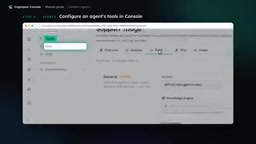
Multiple integration paths mean that whether you're building an Agent visually in Console or orchestrating through code with the SDK, you can reuse the same MCP server definitions — avoiding redundant work.
Complete Workflow Summary
The entire workflow can be summarized in five steps: start from the MCP Servers list; create a server from an OpenAPI spec and complete the preflight check; inspect the generated tools and review exposure details; publish a curated MCP Hub catalog as a discovery API (enterprise edition); and finally use Monitor to observe runtime signals while configuring the tools your Agent needs.
For teams that have already accumulated a large number of REST APIs, the biggest value of this workflow is clear: with almost zero refactoring, existing endpoints are standardized into Agent-consumable tools. Combined with Hub for organization and Monitor for operations, it moves AI Agent tool provisioning from "ad-hoc stitching" to platform-level governance.
Related articles

Apple HomeView Hands-On Review: Is the $300 Smart Home Hub Worth It?
Apple HomeView hands-on: a $300 smart home hub with facial recognition for quick account switching, but no App Store or voice recognition. Is the wall-mounted version worth it? Should you buy the first generation?

Meta Muse Wonder Launch: What It Means for Meta's Return to the Frontier AI Race
Meta releases Muse Wonder and WonderFull, benchmarks reach the frontier, community feedback is polarized. An in-depth look at Meta's return to the frontier AI race, its personal agent strategy, and Zuckerberg's different path.

Apple Home Smart Home Lineup Leaked: LG and Schneider Team Up, UWB Door Lock on Board
Apple Home ecosystem gains new LG and Schneider devices: UWB smart lock with proximity unlock, 2.5K dual-camera doorbell, privacy indoor camera, and AirPods-like seamless pairing.