UI Verify: Let AI Coding Assistants Find and Fix UI Bugs Themselves

UI Verify feeds screenshots of agent-modified interfaces back to coding agents so they can fix UI bugs before users discover them.
UI Verify is a visual testing tool for AI coding agents that addresses the pain point of agents being able to write code but unable to see interface results. It automatically captures screenshots of every screen affected by code changes and feeds them back to the agent, enabling it to identify and fix visual issues like misaligned buttons, wrong colors, and broken layouts before users notice. Integration is extremely low-cost—reportedly one line of code—and it supports mainstream front-end testing stacks like Playwright, Storybook, Vitest, and Bun, as well as iOS and Android apps. Teams at JetBrains, Cura, and Metica already use it, and open-source projects get 50,000 free snapshots per month. The article argues that visual testing is evolving from an auxiliary tool for human review into a necessary component of autonomous agent workflows, filling in the perception step of the perception-feedback loop.
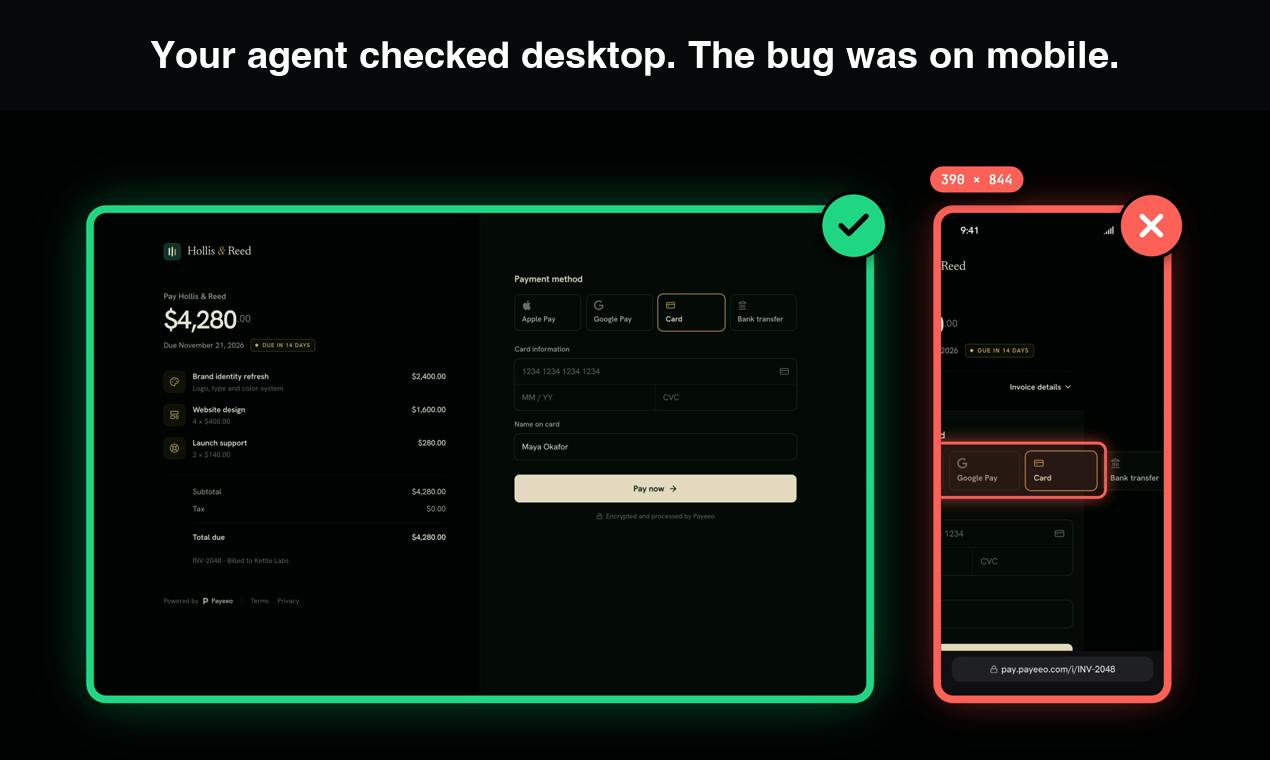
AI coding assistants can write code, yet they often "crash" at the UI level—misaligned buttons, wrong colors, broken layouts. These visual problems often don't surface until users report them. UI Verify, a new product on Product Hunt, aims to solve this pain point: it shows the coding agent every screen affected by its changes, enabling it to find and fix UI bugs on its own before users ever see them.
Product Positioning: Giving AI "Eyes"
The core idea behind UI Verify is straightforward: coding agents fail to fix UI bugs because they "can't see" how their changes actually affect the interface. Traditional visual regression testing tools are built for human developers and require manual review of screenshot diffs. UI Verify hands the entire workflow to the agent—after each code change, the tool automatically captures screenshots of affected screens, feeds them back to the agent, and the agent uses them to determine whether visual issues exist and fixes them on its own. According to the product page, teams at JetBrains, Cura, and Metica are already using the tool, which is a solid credibility boost for an early-stage product.
Coding agents refer to AI systems capable of autonomously planning and executing multi-step programming tasks, such as Claude Code, Cursor Agent, Devin, and GitHub Copilot Workspace. Unlike assistants that only perform inline completions, coding agents read and write multiple files, run commands, execute tests, and iterate based on the results.
Their capability boundaries largely depend on the feedback signals they can obtain: compiler errors and unit test results are structured text that agents can easily digest, whereas interface rendering results are fundamentally pixels that agents cannot see by default. This means agents have a systematic blind spot in scenarios where "the code logic is correct but the visual presentation is wrong." Supplementing agents with visual feedback channels (screenshots, DOM snapshots, layout metrics) is equivalent to expanding their perceptual modalities—a major direction in current agent engineering, and UI Verify is a concrete implementation of this approach.
One-Command Integration, Covering Mainstream Testing Stacks
UI Verify's integration cost is quite low. The official claim is that "one line of code completes the configuration," and it supports mainstream front-end testing tools such as Playwright, Storybook, Vitest, and Bun, while also handling iOS and Android apps. For teams already using these toolchains, there's virtually no need to change existing workflows. It's free to start, and open-source projects get 50,000 free snapshots per month—an appealing offer for indie developers and open-source maintainers.
Why Visual Testing Is Becoming a Key Part of AI Programming
Coding agents' autonomy is rapidly increasing, from generating code snippets to completing full feature development—agents are shouldering increasingly heavy tasks. But correct code logic doesn't equal a correct interface, and pixel-level visual issues are precisely the agent's blind spot. Tools like UI Verify fill in the perception step of the "perception-feedback" loop. When an agent can see the screen after its changes, it has a foundation for self-correction—far more efficient than relying on manual testing or user error reports after the fact. From a broader perspective, visual testing is evolving from "an auxiliary tool for human review" into "a necessary component of autonomous agent workflows."
Visual regression testing is a testing method that detects unexpected UI changes by automatically capturing screenshots and comparing them against baseline images. In traditional workflows, tools (such as Percy, Chromatic, BackstopJS) generate screenshots of the current interface after code commits, perform pixel-level or perceptual comparisons against the last confirmed baseline, highlight added, removed, or changed regions, and then a human developer judges whether the differences are expected changes.
The core value of such tools lies in catching problems that "logic tests can't detect"—such as CSS cascade priority changes, responsive breakpoint misalignment, and layout jitter caused by font loading failures. But the bottleneck is also human: diff images require manual review, otherwise false positives quickly overwhelm the team. UI Verify's difference is that it hands the step of "judging whether differences are reasonable" to the coding agent itself, transforming visual regression testing from a "human review process" into an "agent self-check process"—which is the prerequisite for embedding it into autonomous agent workflows.
Points Worth Noting
The product is currently ranked 15th on Product Hunt with 76 upvotes and 15 comments—moderate discussion heat. Its free tier is friendly to small projects, but its team size and long-term pricing strategy remain unclear. For front-end teams that heavily rely on AI coding agents, UI Verify offers a low-cost opportunity for trial and error—with just one line of configuration, you can determine whether an agent is reliable enough at the visual level.
Related articles
Unlock All Claude Models for Free? Developer Mode + Gateway Configuration Tutorial
A YouTube tutorial claims that enabling Claude desktop developer mode and configuring a third-party gateway allows free use of all models, including Opus 5.5. This article breaks down the steps, analyzes the gateway technical principles, and reveals the triple risks of account bans, data privacy, and service stability, as well as the authenticity of model names.
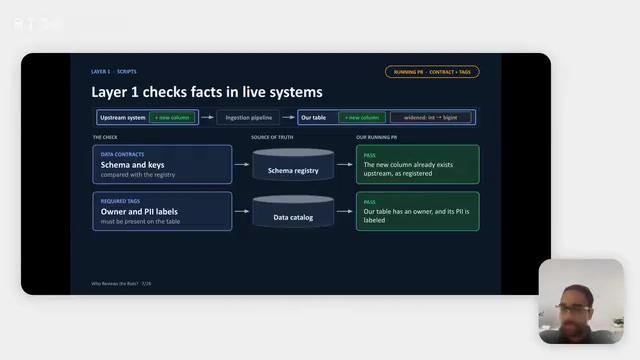
Robinhood's Hybrid AI Reviewer: 60% of Data PRs Auto-Merge
Robinhood's data platform team shares a hybrid AI PR reviewer: deterministic scripts verify facts, AI Agents judge contextual risk, and humans keep key decisions. About 60% of data pipeline PRs merge without human review, cutting review workload ~75%, saving ~132 engineering hours monthly, and reducing related incidents ~30%.

Making Marketing Videos with Claude Code Is More Efficient Than AI Video Generation
Generate marketing videos programmatically with Claude Code—more flexible and cheaper than AI video generators. Reference a style, generate a storyboard, output content as code, and make edits instantly.