Upgrading Your AI Model Broke Your Automation? Ask These Three Questions First

A stronger model can still break your workflow — reliable output contracts matter more than chasing the latest release.
AI models are evolving fast, but blindly upgrading can break existing automation workflows. Failures typically stem from three causes: format changes that break downstream parsing, increased latency that exceeds tolerance limits, and the model helpfully rewriting content in ways that violate step boundaries. The core advice is to self-check with three questions before switching — is the structure compatible, is it fast enough, and does it make better decisions on real business samples? The more mature practice is to treat models as replaceable components, build clear input/output contracts, and maintain a real-world test set so upgrade decisions are based on actual validation, not excitement over novelty.
A Newer Model Isn't Necessarily a Better Fit for Your Workflow
Every time a more powerful AI model drops, many people working in automation instinctively swap it in. The logic seems obvious: if the new model writes better and reasons more deeply, the whole workflow should improve, right?
Reality often says otherwise. A model can be a better writer and a deeper thinker while still breaking the workflow you spent so long building. The problem isn't that the AI got dumber — it's that your automation has hidden dependencies on the model's output behavior, and the new model isn't necessarily honoring those unspoken expectations.

In other words, when automation breaks, the blame usually isn't the AI itself — it's the overlooked gap between "upgrading" and "staying compatible."
Why a Stronger Model Can Still Break Your Pipeline
Workflow failures typically stem from three common causes.
The first is output format changes. Your downstream steps may depend on the model returning a specific JSON structure, fixed field names, or a particular layout. Even if the new model is more accurate, any slight structural difference in its output will cause the parsing step to throw an error and take down everything that follows.
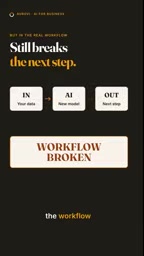
The second is slow responses. More powerful reasoning often means longer processing times. If your automation is latency-sensitive — for example, if there are timeout limits or real-time response requirements — a "smarter but slower" model will bottleneck the entire chain.
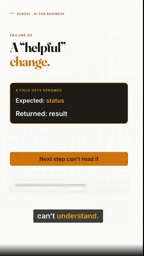
The third is well-intentioned changes the model makes on its own. A new model might spontaneously optimize, expand, or rewrite content that you actually planned to handle in a later step. These "helpful changes" feel considerate to a human reader, but inside a pipeline they're unexpected variables that violate the boundary assumptions between steps.

At their core, all three of these issues are implicit contract problems in automation engineering. Every node in a workflow carries hidden expectations about upstream output — field names, nesting levels, content boundaries — but these expectations are never written down explicitly. In software engineering, interface changes that break downstream systems are managed through version control and Semantic Versioning. But AI model upgrades don't follow that protocol. Their "interface" — meaning their output behavior — can drift at any time due to changes in training data, RLHF preference tuning, or system prompt adjustments. This is why even different versions of the same model (such as GPT-4 Turbo and GPT-4o) can suddenly break a workflow that had been running reliably: the model never promised backward compatibility on output format.
Three Questions to Ask Before Swapping Models
The core advice here is refreshingly practical: before replacing a model, run a quick self-check with three questions.
1. Does It Return the Same Structure?
Verify that the new model's output format is compatible with your existing pipeline. Whether the fields, nesting levels, and data types are consistent directly determines whether your downstream parsing will break. This is the easiest thing to overlook — and the most likely to cause problems.
2. Is It Fast Enough?
Assess whether the response time meets your operational requirements. A model that runs a beat slower may be completely unusable in batch jobs or real-time scenarios, even if the quality of its answers is higher.
3. Does It Make Better Decisions on Your Actual Use Cases?
Don't just look at how the model performs on general benchmarks — test it against your own real samples. Only if it demonstrably makes better judgments in your specific context does the upgrade actually deliver value.
General benchmarks measure a model's average performance on standardized test sets — things like MMLU (Massive Multitask Language Understanding), HumanEval (code generation), or MT-Bench (multi-turn dialogue quality). These leaderboards are useful for comparing model capabilities side by side, but they suffer from distribution shift relative to your specific tasks: your input data, output format requirements, and edge case distribution often differ significantly from benchmark test sets. The right way to evaluate the value of a model upgrade is to maintain a regression test set drawn from real business scenarios, covering typical cases and edge cases that have caused errors in the past, then compare outputs from the old and new models on this data — that's the only way to draw conclusions that are actually meaningful for your workflow.
Newer Is Exciting. Reliable Is Profitable.
The most memorable line from this is: "Newer is exciting. Reliable, though, is profitable."
For teams and individuals who depend on automation to generate real value, having the "latest" model is never the goal — stable, predictable output is. The hidden costs of chasing every new release — debugging, rewriting parsers, handling timeouts, fixing logic misalignments — can easily outweigh whatever quality gains the new model brings.
The more mature approach is to treat models as replaceable components and build clear input/output contracts into your workflow: pin expected formats, set latency ceilings, and maintain a real-world test set. That way, no matter how impressive the next model turns out to be, you upgrade only when you can genuinely benefit — rather than getting pulled along by every version bump.
Ultimately, the robustness of your automation doesn't depend on whether you're running the latest model. It depends on whether you understand what assumptions your pipeline makes about model behavior. Get clear on those assumptions first, then decide whether to upgrade.
Treating models as replaceable components and building "input/output contracts" into your workflow corresponds in engineering practice to two concrete measures: prompt version control and output schema pinning. The former means putting your system prompts and user prompt templates under version control, tracking every change the same way you'd track code. The latter means enforcing JSON Schema validation or using function calling / structured outputs to constrain the model to only return predefined structures, eliminating format drift at the source. Major platforms including OpenAI and Anthropic already offer Structured Outputs features that enforce schema compliance at the API level — currently the most direct way to protect against compatibility issues.
Related articles

Free Unlimited Claude Code Solution: Agnes AI + CC Switch Setup Guide
No paid subscription needed — pair the free AI platform Agnes AI with the open-source tool CC Switch to provide a backend for Claude Code, enabling unlimited free calls to text, image, and video models. This guide covers the full setup, test results, and usage boundaries.

A Complete Zero-Cost Guide to Getting Started with Claude Code for Beginners in China
A beginner's guide to Claude Code for users in China: two installation methods (command line and IDE plugin), full configuration steps for replacing the official API with the free domestic LongCat model, and a hands-on demo of building a small tool with natural language, plus tips.

When the NSA Gets Involved: The AI Supply Chain Crisis Behind Open-Source CVEs and API Key Hijacking
Multiple open-source projects disclosed severe CVEs in one day, PHP flaws alarmed the FBI, and Railway and OpenCode were breached with API keys stolen. This article breaks down the vulnerability window, AI-accelerated exploitation, and the AI supply chain crisis behind the API key black market, with a developer defense checklist.