Vercel CLI Adds Budget Management: Control Team Spending from the Terminal
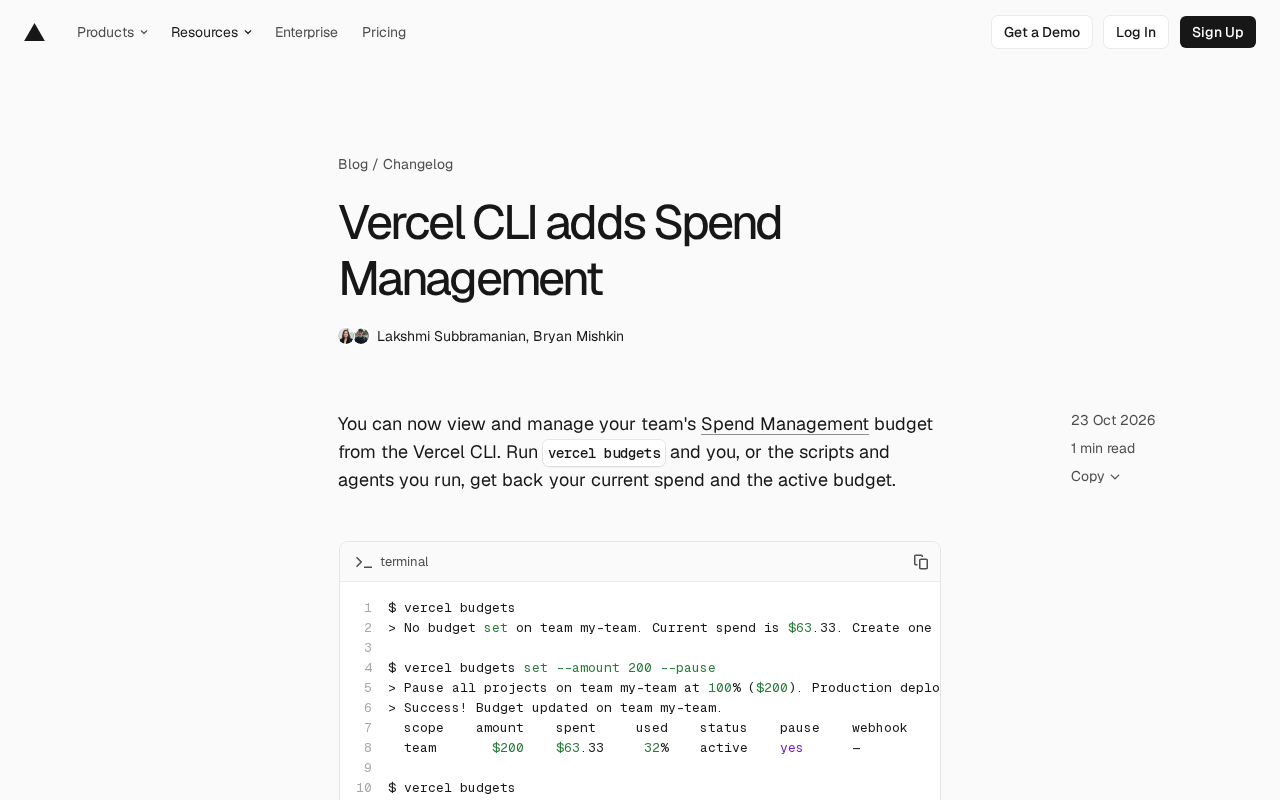
Vercel CLI adds the `vercel budgets` command to view, set, and delete budgets and query alert history from the terminal.
Vercel brings team budget management to the command line, so developers can handle cost governance in the terminal. `vercel budgets` shows current spend and active budgets, `set --amount` sets an amount, and with `--pause`, reaching 100% of the budget pauses production deployments for all team projects; `remove` deletes a budget. `vercel budgets alerts` exposes alert history with `--since`, `--until`, `--limit`, and `--json` filters. Managing budgets requires Owner or Billing; free for Pro, Enterprise needs Flexible Commitment. Note: `--pause` pauses deployments, not billing.
Title
Vercel CLI Adds Budget Management: Control Team Spending from the Terminal
Meta Description
Vercel CLI introduces Spend Management budget features, supporting viewing, setting, and deleting team budgets via the vercel budgets command, plus querying budget alert history and using --pause to suspend production deployments on overspend.
Article Content
Vercel has brought team budget management to the command line. Developers can now view, set, and delete Spend Management budgets directly in the terminal, without switching to the web console to dig through billing settings. For teams accustomed to managing cloud resources with scripts and automation tools, this is a practical update that reduces operational friction.
The Command-Line Entry Point for Budget Management
The core of the new feature is the vercel budgets command. Running it directly returns the team's current spend and active budget information. If the team hasn't set a budget yet, the CLI will also prompt you and include an example creation command.
$ vercel budgets
> No budget set on team my-team. Current spend is $63.33.
Setting a budget is also done via the command line. Use vercel budgets set --amount <dollars> to specify the budget amount; with the --pause flag, production deployments for all projects in the team will be paused when spending reaches 100% of the budget. The output displays the budget scope, amount, spent, usage percentage, status, and whether pause is enabled in table form.
This budget is the same object as the On-Demand Budget shown in the team billing settings. Setting a budget alone does not stop usage—only the --pause flag triggers production deployment suspension when the limit is reached. To delete a budget, use vercel budgets remove --yes, which returns a success message after the operation.
On-Demand Budget is a concept in Vercel's billing system: it targets the on-demand usage a team incurs beyond included allowances (such as function invocations or bandwidth exceeding the plan's included amounts). Unlike a prepaid fixed plan, the On-Demand Budget is a soft cost guardrail—when the threshold is reached, it only sends notifications by default and does not automatically block resource usage. The vercel budgets command described here manages exactly this object, so "setting a budget" itself only changes the monitoring and alerting thresholds; what actually affects deployment availability is the --pause flag. Understanding this helps distinguish between two different governance approaches: "cost visibility" and "hard cost limits."
Alert History Is Also Queryable
Beyond the budget itself, the CLI also exposes budget alert history. Running vercel budgets alerts shows the complete alert log, with support for --since, --until, --limit, and --json filter parameters. Running vercel budgets without a subcommand prints the three most recent alert records.
Alert records include the date, budget scope, triggered threshold, spend at the time, budget amount, and configured actions (such as notify or pause). The alert log in the original example shows the same team triggering the 50%, 75%, and 100% thresholds at different times, with the 100% alert configured with both notify and pause actions. This fine-grained history is valuable for investigating unexpected spending or auditing how budget policies are enforced.
Threshold alerts are a common design in budget monitoring: a single budget can be configured with multiple percentage milestones (such as 50%, 75%, 100%), each triggering an independent record when reached, and each can be bound to different actions (notify, pause). This tiered design gives teams progressive reminders as costs approach the limit, rather than only being notified at the moment of overspend. The three thresholds triggering in sequence in the original example shows that alerts are cumulatively recorded by tier, rather than keeping only the last one. When querying alert history, --since/--until filter by time window, --limit controls the number of returned records, and --json outputs a machine-parsable format for integration with external monitoring or logging systems.
Permissions and Availability
Managing budgets requires the Owner or Billing role—a sensible permission design that prevents regular members from accidentally affecting team billing. Regarding availability, Spend Management is free for Pro teams, while Enterprise teams must be on a Flexible Commitment plan.
From a product perspective, Vercel's decision to make budget capabilities CLI commands clearly caters to platform engineering and DevOps scenarios. Budget checks can be embedded in CI pipelines or scheduled scripts, and the --json output for alert history means it can be integrated with external monitoring systems. Compared to manually checking in the web console, the command-line interface makes cost governance easier to automate.
Flexible Commitment is a contract billing model for Vercel Enterprise in which a team commits to a minimum spend over a period in exchange for more flexible usage arrangements and pricing terms. Spend Management requiring Enterprise teams to be on this plan means the budget and alerting capabilities are positioned as features for enterprise customers with formal business contracts, rather than being available by default to all Enterprise accounts. Making it free for Pro teams reflects Vercel's product strategy of helping small and mid-sized teams establish cost monitoring habits at low cost. Before use, it's advisable to confirm your team's current billing plan type to avoid command failures due to permission or plan mismatches.
A Detail Worth Noting
The behavior of --pause needs to be understood carefully: it pauses production deployments for all projects—it does not simply stop billing. Once the budget reaches 100%, production environment releases become unavailable until the budget is adjusted or pause is disabled. For teams with heavy production traffic, this means budgets need sufficient headroom, or the pause threshold must be coordinated with your business release cadence. The prompt the CLI gives when setting this up also states this clearly, which is a fairly honest design choice.
Overall, this update does not introduce new billing concepts—it exposes existing Spend Management capabilities through the command line. For teams already using the Vercel CLI to manage projects and environment variables, the learning curve is essentially zero; for teams that haven't yet established cost monitoring habits, the queryability of alert history provides a low-barrier starting point.
One-line Summary
Vercel CLI adds the vercel budgets command, supporting viewing, setting, and deleting budgets and querying alert history from the terminal.
Paragraph Summary
Vercel has brought team budget management to the command line, letting developers handle cost governance in the terminal without switching to the web console. The core vercel budgets command shows current spend and active budgets, vercel budgets set --amount sets an amount, and with the --pause flag, spending reaching 100% of the budget pauses production deployments for all team projects; vercel budgets remove deletes a budget. Additionally, vercel budgets alerts exposes alert history queries with --since, --until, --limit, and --json filters. Managing budgets requires the Owner or Billing role; it's free for Pro teams, and Enterprise requires a Flexible Commitment plan. The article specifically notes that --pause pauses production deployments rather than stopping billing, so teams need to leave budget headroom.
Related articles
LLaMA-Factory in Practice: A Complete No-Code Guide to Fine-Tuning Large Models
An introduction to LLaMA-Factory, the open-source fine-tuning tool: its 60.1K-star background, supported models and algorithms, local vs. cloud deployment, and CUDA setup steps.

Zeng Ming's Deep Retrospective: Why OpenAI May Not Be the Ultimate Winner — and Why the Corporate System Will Disappear
Zeng Ming's deep retrospective on the AI endgame: model companies are just infrastructure, OpenAI and Anthropic won't be the final winners; the next battle is the Agent entry point standard; the corporate system will disappear as AI restructures collaboration, and only mission-driven companies can survive the cycle.
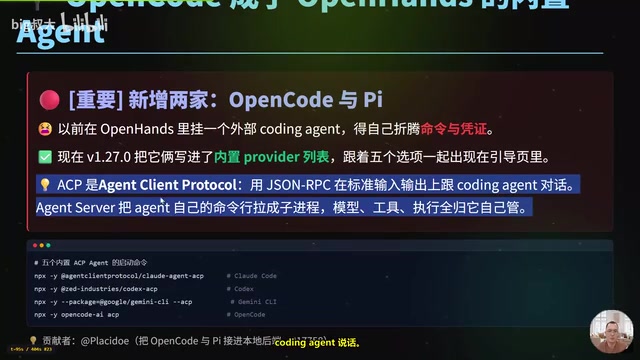
OpenHands v1.28.0: OpenCode and PI Added as Built-in Agents, API Keys Requestable In-Conversation
OpenHands ships 5 releases in 21 days: v1.27.0 adds OpenCode and PI as built-in agents, v1.28.0 enables in-chat key requests. ACP integration, credential reuse, model list changes, and upgrade advice.