Vercel MCP Deployment Cards: Real-Time Deployment Debugging in ChatGPT

Vercel MCP launches interactive deployment cards viewable in ChatGPT and other clients.
Vercel MCP now renders deployment info as interactive cards via the MCP Apps extension in ChatGPT and compatible chat clients. Cards show live status, build logs, source and commit details, and a Visit button for the live URL; logs can be sent to the model for troubleshooting, with full-screen view and multi-project switching. The open_deployments tool finds deployments by project, repo, or commit and filters by environment. Unsupported clients fall back to plain text.
Vercel's MCP service has received a noteworthy update: your deployments can now be presented as interactive cards directly within ChatGPT and other chat clients that support MCP Apps. This means developers can view deployment status, read build logs, and even hand logs to the model for troubleshooting—all without leaving the conversation interface.
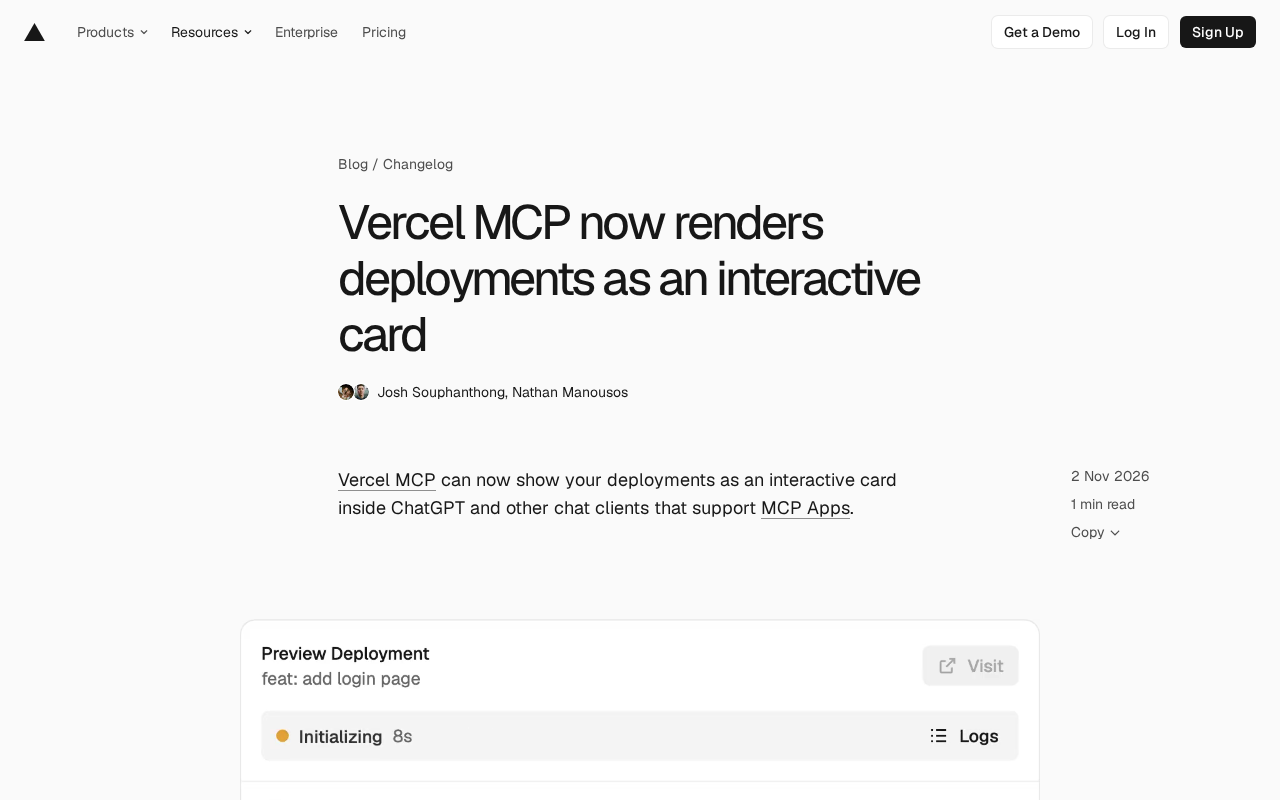
From Text to Cards: The Interaction Upgrade Brought by MCP Apps
In the past, retrieving deployment information via MCP typically returned a text response. Now Vercel MCP leverages the MCP Apps extension to render deployment data as an interactive card. The card displays real-time deployment status, build logs, and source and commit details. Once the deployment URL is ready, a Visit button appears on the card—click it to access the live environment.
This interaction model changes the debugging workflow. You can send build logs directly into the chat and have the model analyze them; you can also open a full-screen view to read logs carefully below the card. For repositories linked to multiple projects, the card also provides a project list, making it easy to switch between projects.
MCP (Model Context Protocol) is an open protocol proposed by Anthropic in late 2024 to standardize how large language models connect to external tools and data sources. It uses a client-server architecture: chat applications act as MCP clients, calling tools and resources exposed by various MCP servers through a unified JSON-RPC interface. Developers only need to implement an MCP server once for a given service, and it can be reused by any client that supports the protocol—avoiding separate integrations for each platform. Vercel is providing exactly such an MCP server, opening up deployment query capabilities to chat clients.
The MCP Apps extension adds a UI layer on top of the base protocol. Standard MCP tool calls only return structured data or text, whereas MCP Apps allows servers to declare and return renderable interface components (such as cards and forms) that clients embed inline in the conversation flow. This means tool results are no longer limited to a block of text—they can carry interactive elements like buttons and full-screen views. The fallback mechanism described in this article is precisely a design premise of this extension: clients that don't support UI rendering fall back to plain-text results.
Feature Details: Deployment Lookup and Fallback Compatibility
This card is Vercel MCP's first MCP App, built on the MCP Apps extension. The underlying open_deployments tool supports finding deployments by project, repository, or commit, and can filter by environment. This gives developers more flexible query options, especially in complex multi-environment, multi-project scenarios.
On compatibility, clients that don't support the app extension aren't left behind. They still receive deployment status, preview URL, and commit information—just presented as plain text. This fallback strategy ensures Vercel MCP's usability across different chat clients.
open_deployments is a "tool" definition in MCP—a callable function that the server declares to the model, with a name, description, and input parameter schema. The model decides whether to call it based on conversational intent and passes filter conditions according to the schema, such as project identifier, repository name, commit hash, or target environment (production, preview, etc.). The server executes the query and returns results to the client, which then decides whether to present them as a card or text. Understanding this helps clarify that the card's presentation form is decoupled from the tool's data query—the same tool output can drive a rich UI or fall back to plain text.
How to Get Started
If you use ChatGPT, you can connect to Vercel MCP through its Connectors settings. Once connected, invoke the relevant tools in a conversation and you'll see deployment cards. For other clients that support MCP Apps, the connection method is similar, depending on the client's support for MCP extensions.
Connectors is the entry point in ChatGPT for managing external service connections, where users complete authorization and register MCP servers. The connection process is typically based on OAuth or API tokens; once authorized, ChatGPT can call the tools exposed by that server on the user's behalf. It's important to distinguish between "connecting to an MCP server" and "supporting MCP Apps rendering"—two levels of capability: the former determines whether tools can be called, the latter determines how results are displayed. So even if a client has connected to Vercel MCP, if it hasn't implemented the MCP Apps extension, you'll still see deployment information in text form.
Impact on Development Workflows
Embedding deployment status and logs directly into the chat interface reduces the cost of switching between tools. Previously, developers might need to open the Vercel console or a terminal to view build logs; now this information is available directly in the conversation context and can be immediately interacted with via the model. This "conversational operations" model can shorten the path from discovering a problem to pinpointing it—especially valuable for fast-iterating teams.
That said, this feature currently still depends on client support for MCP Apps. ChatGPT connects via Connectors, and support levels may vary across other clients. As the MCP ecosystem expands, these interactive cards are expected to become a common form in chat clients.
One-line Summary
Vercel MCP launches its first interactive deployment card, letting you view status and logs within ChatGPT and other clients.
Paragraph Summary
Vercel's MCP service has been updated, using the MCP Apps extension to render deployment information as interactive cards directly within ChatGPT and other chat clients that support the extension. The cards display real-time deployment status, build logs, source and commit details, and provide a Visit button to reach the live environment once deployment is ready; build logs can also be sent to the model for troubleshooting, with full-screen viewing and multi-project switching supported. The underlying open_deployments tool can find deployments by project, repository, or commit and filter by environment. Clients that don't support MCP Apps automatically fall back to plain-text output, retaining status, preview URL, and commit information to ensure compatibility. This change reduces the cost of tool switching and makes "conversational operations" possible.
Related articles

9 AI Subscription Plans Compared: The Real Cost Per 100M Tokens Revealed
Bilibili creator tests 9 AI subscription plans from Volcano, Alibaba, Tencent, Baidu, Zhipu, Xiaomi, MiniMax and more, converting them all to real cost per 100M tokens, breaking down fixed-quota vs. three-tier coefficient billing and how caching, time-of-day discounts, and window limits affect actual quota.

Vibe Coding for Beginners: Expressing Intent Instead of Handwriting Code
What is Vibe Coding? A 137-episode Bilibili course defines it: the core is expressing intent, not writing code. This article analyzes Vibe Coding's productivity logic, target audience, and entry expectations to help beginners decide if it's worth learning.

LangChain Beginner's Guide: An Agent Development Roadmap from LangGraph to Deep Agents
Clarify the encapsulation relationship among LangChain, LangGraph, and Deep Agents, and master the learning path and selection logic for agent development frameworks—suitable for beginners in large model development.