Vercel Spend Management Adds Project and Product Budgets with Automatic Deployment Pause on Overrun
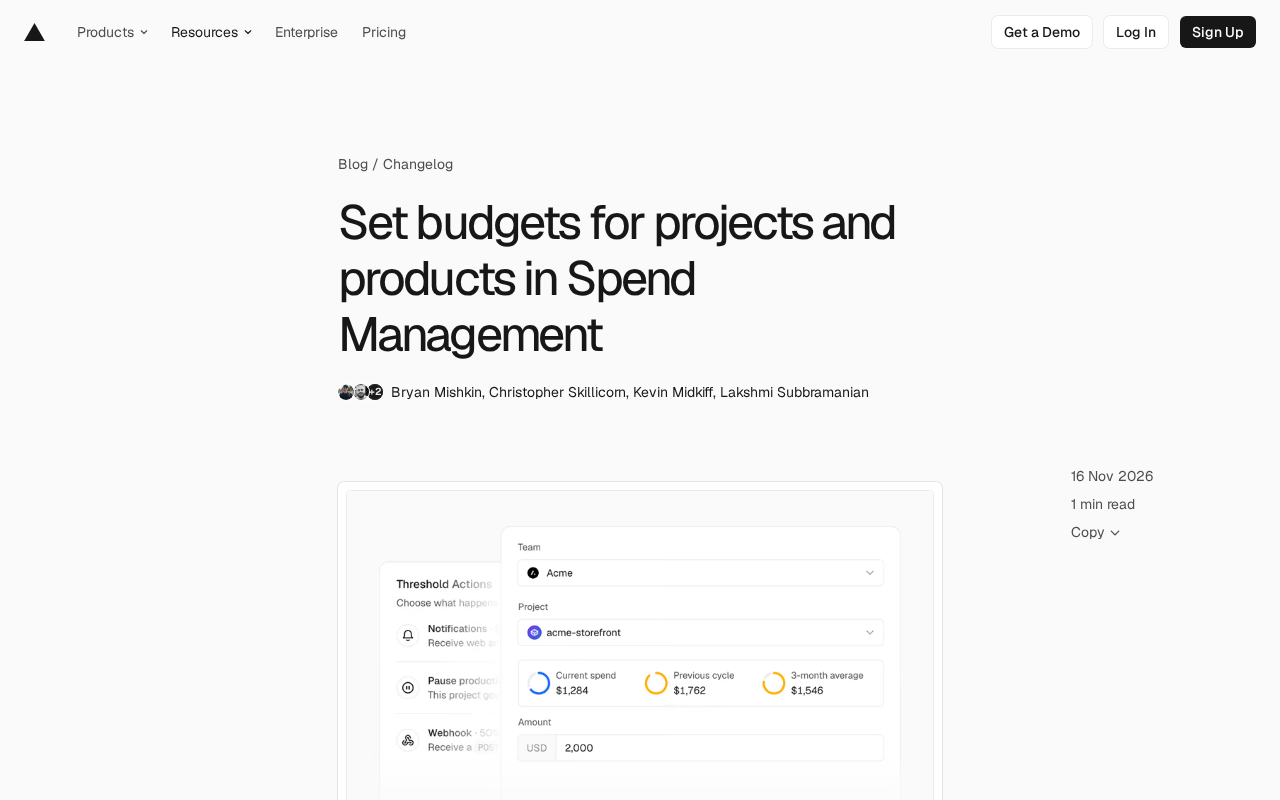
Vercel Spend Management adds project and product budgets, with automatic production deployment pause on project overspend.
Vercel's Spend Management now offers project budgets and product budgets in addition to team budgets, creating a three-dimensional cost view across team, project, and product. Project budgets track single-project spending and can automatically pause that project's production deployments when the cap is reached, without affecting other projects. Product budgets aggregate spend for a product category (like Fast Data Transfer) across projects, but only support monitoring and notifications, not auto-pause. All budgets send notifications at 50%, 75%, and 100% consumption. Management is centralized on the new Spend Management page, and Vercel CLI provides budgets list and budgets set commands for scripting and CI integration. The feature is free for Pro teams and Enterprise teams on the Flexible Commitment plan.
Vercel's Spend Management feature has received a practical update: in addition to the existing team budgets, it now supports budgets for individual projects and individual products. For teams running multiple projects on Vercel and worried about one part of the business quietly eating up the bill, this is a cost-control measure worth paying attention to.
From Team Budgets to Fine-Grained Budgets
Previously, Spend Management revolved mainly around team-level budgets, where managers could only see the overall team spend and receive notifications when thresholds were hit. This coarse-grained approach has a natural flaw: when an experimental project or a bandwidth-heavy product suddenly ramps up, the team budget triggers its alert first, but it's hard to immediately tell where the money went.
The new update pushes budget granularity down to the project and product levels. Project budgets track spending for a single project, while product budgets track spend for a particular product category (e.g., Fast Data Transfer) across the entire team. Both coexist with existing team budgets, forming a three-dimensional cost view across team, project, and product.
Project Budgets: Automatically Pause Production Deployments
The core value of project budgets isn't just "visibility" but "control." Vercel offers an option for project budgets: when the budget reaches its cap, automatically pause the project's production deployments.
This design is critical for teams running multiple projects in parallel. Suppose a team maintains both a main site and an internal tool, and the internal tool's costs spike due to abnormal traffic. When the project budget triggers, only that project's production deployments are paused, leaving the main site unaffected. The documentation explicitly notes that pausing does "not pause other projects," preventing a single overspending project from damaging the entire business.
There's one limitation to note: the ability to automatically pause production deployments is available only for team budgets and project budgets—product budgets do not support auto-pause. In other words, product budgets currently remain at the "monitor + notify" level.
A Production Deployment in Vercel's workflow refers to the build and release that pushes code to the corresponding production environment domain. Vercel internally divides deployments into two categories: Preview and Production. The former is used for branch previews and PR reviews, while the latter directly serves live traffic. Automatically pausing production deployments means new commits will no longer trigger new production builds and releases, but already-running production instances typically won't be taken offline immediately as a result—whether existing services continue to respond depends on the specific deployment configuration. This capability is therefore essentially a "brake" rather than a "power cut": it stops costs from continuing to grow on a per-deployment basis while giving the team a window to investigate the cause of overspending, adjust budgets, or clean up resources. Understanding this helps you correctly assess its real impact on business continuity when configuring it.
Product Budgets: Track Single-Product Spend Across the Team
Product budgets solve a different kind of problem: the same product may be consumed by multiple projects. Take Fast Data Transfer as an example—multiple applications in a team may all generate data transfer costs. Project budgets can only show each application's situation separately, but product budgets can aggregate this expense at the team level.
This perspective is very helpful for resource governance. When you notice that the product budget for Fast Data Transfer is being consumed at an abnormal rate, you can drill down to specific projects to identify which application is transferring large amounts of data. The documentation's example confirms this usage: setting a product budget for "Fast Data Transfer" with an amount of 50.
Fast Data Transfer is a usage-based product in Vercel's billing system, referring to the traffic costs incurred when data is transferred between Vercel's edge network and users, and between functions and external sources. It is billed by the amount of data transferred and is independent of dimensions like request count and compute duration, making it easy for multiple projects to consume simultaneously without notice. In Vercel's product billing model, similar usage-based items include function invocations, build minutes, image optimizations, and more. Aggregating budgets by product dimension essentially means viewing costs "by resource type" rather than "by project ownership"—consistent with the common cloud-provider approach of allocating costs by service tags, and well-suited for identifying single-item expenses that are diluted across multiple applications yet astonishing in total.
Threshold Notifications and Management Entry Point
Regardless of budget type, Vercel sends notifications when consumption reaches the 50%, 75%, and 100% marks. This tiered alerting design gives teams two buffer opportunities to adjust resources or increase budgets before actual overspending occurs.
The management entry point is centralized on the new Spend Management page. Here you can manage all budgets, view spending for the current billing cycle, and confirm which thresholds have been triggered. For developers who prefer the command line, Vercel CLI also provides corresponding capabilities.
Vercel CLI is the official command-line tool from Vercel, using the `vercel` command to handle deployments, environment variable management, domain binding, and more, with authentication relying on an access token generated after local login. The `vercel billing budgets` subcommand brings budget management into the same CLI system, allowing budget configurations to be versioned and automated like other infrastructure configurations. When used in CI pipelines, you need to pre-configure a token with appropriate permissions in the pipeline environment, and note that budget operations are account-level changes—it's recommended to pair them with approval workflows or dedicated service accounts to avoid accidental changes affecting your live billing strategy.
# List all budgets
vercel billing budgets list

# Set a $100 project budget and pause production deployments at 100%
vercel billing budgets set --project my-app --amount 100 --pause

# Set a $50 product budget
vercel billing budgets set --product "Fast Data Transfer" --amount 50
This CLI support means budget configurations can be incorporated into scripts or CI workflows without having to log into the console and do it manually each time.
Who Can Use It, and What It Costs
Spend Management is available free of charge to Pro teams and Enterprise teams on the Flexible Commitment plan, with no additional cost. Additionally, customers in the private beta for Organizations can set a unified budget for all teams under the organization, enabling centralized cost control for multi-team organizations.
A Brief Observation
The thinking behind this update is clear: move cost control from "reviewing the bill after the fact" to "stopping losses in real time." Although automatically pausing production deployments is aggressive, it turns the cost ceiling into an enforceable hard constraint rather than an easily overlooked alert email. For teams using Vercel as their production environment, it's recommended to at least configure budgets and enable pausing for critical projects, while using product budgets to monitor volatile resource items—forming a two-layer defense.
One reminder: automatically pausing production deployments is an operation that shouldn't be taken lightly. Before configuring it, confirm the team has a corresponding recovery process to avoid normal business being mistakenly halted due to improper budget settings.
One-line Summary
Vercel Spend Management adds project- and product-level budgets, with automatic production deployment pause on project overspend.
Related articles

Gemini 4 Neon Review: Benchmark Scores Rival Carbon, API Pricing and Quota Breakdown
Google Gemini 4 Neon is now live, benchmark scores closely tracking Carbon, API pricing 3/15 at twice Hydrogen's rate. This article compiles Bilibili creator testing: Neon can replace 90% of Carbon scenarios, AntiGravity quota consumption is only one-third of Carbon, plus subscription channel restrictions and 2API ban risks.

Gemini 4 Helium Coming Soon? Signals of Google Loosening Subscription Restrictions
Google team member hints releases will continue; community speculates Gemini 4 Helium (Flash Lite) may be next. Subscription ban controversy gets a response as product lead says "Soon," suggesting restrictions may be lifted. This article covers Gemini developments, OpenAI Coding Agent and risk management, Doubao real-time audio-video API, and compute business dynamics.

AI-Assisted React Development in Practice: Optimizing a Video App and Handling Errors
A 14-year veteran developer demonstrates AI-assisted React video app optimization: compressing video from 80MB to 5MB (~94%) via ImageKit, plus reliable error handling and retry mechanisms. Includes planning, code understanding, and verification methods for working with AI.