Vibe Coding in Practice: A Full Breakdown of an Open-Source Live2D AI Desktop Pet Project
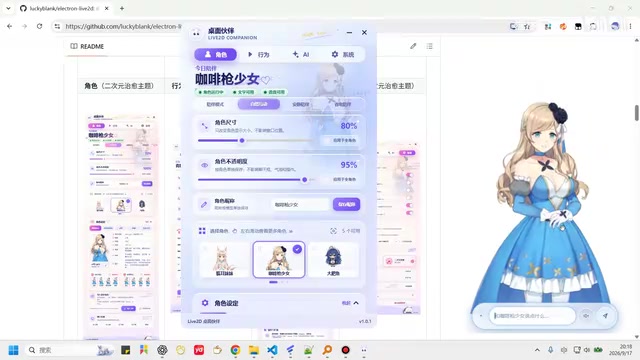
A developer used Vibe Coding to build a full-featured open-source Live2D desktop pet with AI chat and TTS.
A developer leveraged Vibe Coding to deliver a complete Electron-based open-source Live2D desktop pet for Windows. The project features AI text chat (with DeepSeek), cloud TTS voice replies (Alibaba Cloud and Zhipu AI), external message ingestion in both direct and AI-processed modes, five deeply customizable characters, and polished interaction details like opacity control, mouse-through locking, and themed speech bubbles. The UI mockups were AI-generated and open-sourced with the project, making it a valuable real-world reference for the full Vibe Coding product development pipeline.
A developer used Vibe Coding — a workflow where AI is deeply involved in the coding process — to build an open-source Live2D desktop pet project. Built on Electron and currently supporting Windows, it integrates AI text chat, voice replies, external message ingestion, and more, with a UI driven by AI-generated design mockups. This is not just a fun desktop companion tool — it's a concrete example of Vibe Coding moving from concept to a fully deliverable product.
Dual-Theme Design and Overall Architecture
The project is built with the Electron framework. Right-clicking the desktop pet brings up a settings panel that offers two complete themes: a glass-morphism style and a cozy healing aesthetic. According to the author, these design mockups were generated using AI web tools and will be open-sourced alongside the project, making it easy for others to reuse the assets for secondary development.
In terms of product completeness, this is far more than a simple demo. It covers multiple modules including AI configuration, character management, behavioral interaction, and system settings, with smooth UI transitions — demonstrating that the Vibe Coding approach is well capable of delivering mid-complexity desktop applications.
Electron is a cross-platform desktop application framework developed by GitHub. It allows developers to build native desktop applications using web technologies like HTML, CSS, and JavaScript by bundling the Chromium rendering engine with the Node.js runtime. This lets web developers build apps for Windows, macOS, and Linux with a low barrier to entry. Major applications like VS Code, Slack, and Discord are all built on Electron. For Vibe Coding scenarios, Electron is an ideal choice — AI is far better at generating code for web tech stacks than for traditional desktop frameworks like C++/Qt, and Electron's rich documentation and community resources help AI produce accurate, runnable code.
Core Features: Text Chat and Voice Replies
The app's core capabilities revolve around AI conversation. Before use, you need to fill in model parameters on the AI configuration page — text chat relies on a text model (DeepSeekAd is used in the demo), while voice replies require an additional voice model to be configured. The author has integrated TTS services from Alibaba Cloud and Zhipu AI; users simply need to enable them and enter their own API keys. The number of conversation turns to keep in context is also configurable.
In practice, right-clicking the pet and selecting "Start Conversation" lets you chat with it. If the voice option is enabled, the pet will synthesize its replies into speech via TTS. A conversation history panel can be expanded on the left, and you can click a speaker icon to replay previous voice responses. This dual-channel "text + voice" reply approach gives the desktop pet a noticeably stronger sense of companionship compared to text-only tools.
TTS (Text-to-Speech) is technology that synthesizes text content into natural-sounding speech. Both Alibaba Cloud and Zhipu AI offer cloud-based TTS APIs powered by deep learning, supporting multiple voices, speech rates, and emotional styles, billed per usage. Compared to local TTS engines, cloud-based TTS produces more natural audio quality, but requires an internet connection and introduces some latency and cost. These services typically use API keys as identity credentials, which users must register for and apply on the respective platforms. Having users supply their own API keys rather than embedding them is standard practice for open-source projects — it protects the author from costs and legal risks incurred by others' usage.
External Message Ingestion: Direct and AI-Processed Modes
One of the more imaginative features is external message ingestion. When enabled, a test panel appears that supports two forwarding modes:
- Direct mode: Bypasses AI processing entirely — whatever message you send is forwarded as-is and displayed directly in the speech bubble above the pet.
- AI Q&A mode: Messages are first passed through the configured text model for processing before being output.
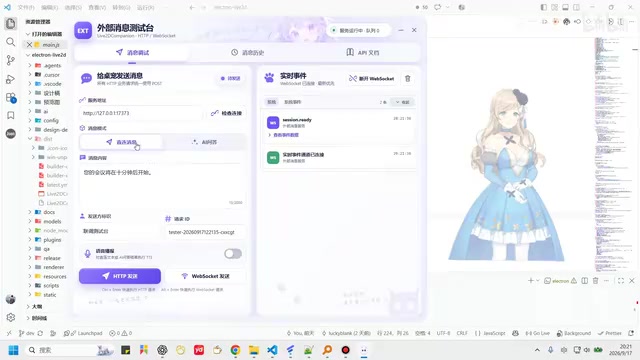
Either mode supports optional voice readout via TTS synthesis. The full call chain is displayed on the right side when sending a message, making debugging straightforward. For long text messages, users can set a character count threshold (45 characters in the demo) beyond which the content automatically expands or collapses. This external messaging mechanism means the desktop pet can serve as a notification or message display hub for other systems, offering solid extensibility.
A Highly Customizable Character System
The app includes five built-in characters, including a recently popular anthropomorphic GPT character design. Each character supports deep customization — character descriptions, world-building lore, and action/expression bindings. Users can also import their own models, though they'll need to complete the action mapping themselves after importing.
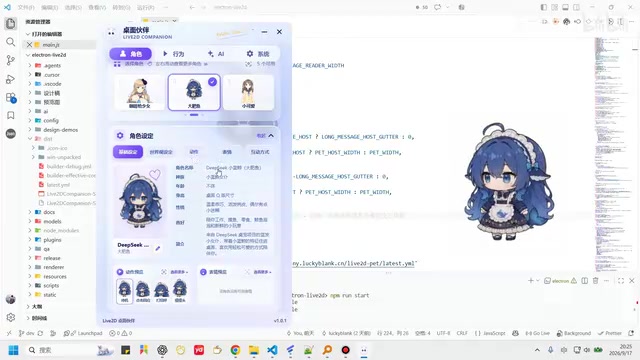
Interactions are divided into two categories: "Desktop Gestures" and "Right-Click Interactions." Desktop gestures cover actions triggered by single or double clicks on the character's body, which can be freely enabled or disabled. The right-click context menu supports custom ordering and toggle controls for each item. There are also behavioral settings like "proximity following," where the pet reacts when the mouse moves nearby.
Live2D is an animation technology designed for 2D illustrated characters. By layering the original artwork and defining skeletal parameters, it achieves smooth dynamic effects like breathing, blinking, head-turning, and facial expressions — without requiring frame-by-frame hand-drawn animation. Live2D is widely used in virtual streamers (VTubers), game characters, and desktop pets. In this project, "action mapping" refers to associating the predefined action tags in a Live2D model (e.g.,
idle,tap_body) with software interaction events (e.g., double-click, voice playback). Imported custom models often have inconsistent action tag naming, so users must manually complete this binding configuration.
Interaction Details and System Settings
The project shows considerable attention to detail. The pet's size can be adjusted in the settings panel, or by hovering over the pet and using the scroll wheel for real-time scaling. Opacity is adjustable to prevent the pet from obscuring other desktop elements. The right-click menu also offers a "Lock Pet" function — when locked, the pet becomes mouse-transparent, so it doesn't interfere with interacting with windows underneath.
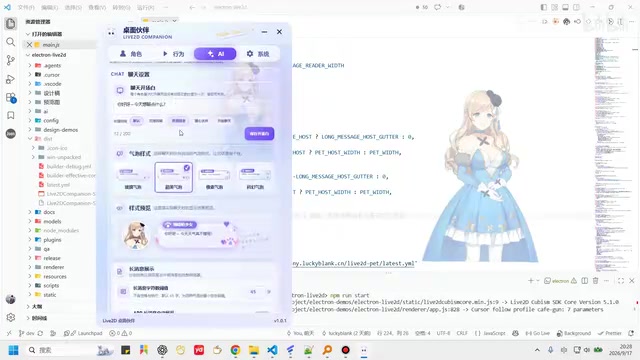
The speech bubbles have also been thoughtfully designed — each of the two themes comes with four bubble styles that switch with the theme. The system settings page includes a "Pet Dynamic Background" toggle: when enabled, the pet in the settings panel sways and reacts to mouse movement, though it's intentionally frame-rate-limited due to its CPU cost, so it's recommended to enable only as needed. Additional features include background border detection, an opening greeting setting, version update checks, and a notification in the bottom-right corner when a new version is available at launch.
A Note on Vibe Coding in Practice
What makes this project worth paying attention to isn't just the completeness of the desktop pet itself — it's what it demonstrates about Vibe Coding across a full product development pipeline: from AI-generated UI mockups, to Electron app coding, to multi-model integration (text, TTS, external messaging), with AI deeply involved throughout.
For developers looking to take on similar projects, this is a solid reference point. The project is open-source, and the author provides a GitHub link and email on the contact page for submitting issues or direct feedback. Whether you want to try a companion-style desktop pet or study real-world Vibe Coding engineering practice, this project offers concrete and verifiable material.
Vibe Coding was coined by OpenAI co-founder Andrej Karpathy in early 2025 to describe a development paradigm where developers describe requirements in natural language, AI generates and iterates on the code, and humans primarily handle validation and directional oversight. Unlike traditional "AI-assisted programming," Vibe Coding emphasizes that humans can ship functional software without deeply understanding every line of code. The concept quickly sparked widespread debate — supporters argue it dramatically lowers the barrier to software development, while critics point to security and maintainability risks that arise without proper code review. This project is a concrete real-world application of that paradigm in a mid-complexity desktop application context.
Related articles

9 AI Subscription Plans Compared: The Real Cost Per 100M Tokens Revealed
Bilibili creator tests 9 AI subscription plans from Volcano, Alibaba, Tencent, Baidu, Zhipu, Xiaomi, MiniMax and more, converting them all to real cost per 100M tokens, breaking down fixed-quota vs. three-tier coefficient billing and how caching, time-of-day discounts, and window limits affect actual quota.
Vibe Coding for Beginners: Expressing Intent Instead of Handwriting Code
What is Vibe Coding? A 137-episode Bilibili course defines it: the core is expressing intent, not writing code. This article analyzes Vibe Coding's productivity logic, target audience, and entry expectations to help beginners decide if it's worth learning.

LangChain Beginner's Guide: An Agent Development Roadmap from LangGraph to Deep Agents
Clarify the encapsulation relationship among LangChain, LangGraph, and Deep Agents, and master the learning path and selection logic for agent development frameworks—suitable for beginners in large model development.