Wake: A Single-File Rust Tool That Aggregates AI Agent Chat History from Codex, Cursor, and More

Wake is a single-file Rust tool that unifies chat histories from Codex, Cursor, and other AI coding assistants.
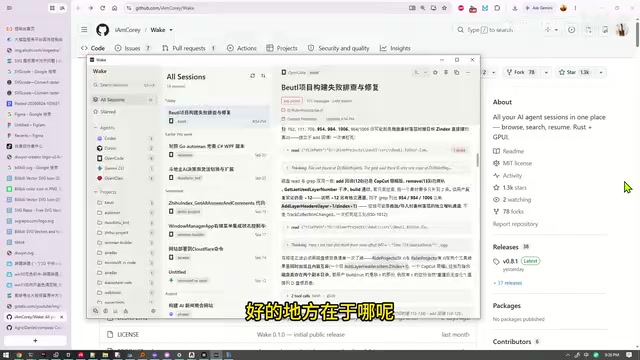
Wake is a lightweight aggregation tool built to solve the problem of AI coding assistant chat histories scattered across your system. Written in Rust and distributed as a single ~81.2MB executable requiring no installation, it reads and displays conversation histories from Codex, OpenCode, Cursor, Gemini, and other AI Agents in one unified interface. Testing revealed incomplete detection for Gemini and Anthropic-related tools, due to a lack of standardized local storage formats across clients. Overall, Wake is focused and unassuming — a great fit for developers who use multiple AI tools and frequently need to revisit past conversations.
A Small Tool Built to Solve the Scattered AI Chat Problem
When you're juggling multiple AI coding assistants — Codex, OpenCode, Cursor, Gemini, and others — a real pain point quickly emerges: each tool stores its conversation history independently, scattered across different corners of your system. Trying to revisit a key discussion with an Agent often means hunting through multiple clients one by one.
Wake was built specifically for this scenario. Its purpose is clear: consolidate the historical chat records from all the AI Agent tools on your machine into a single interface, giving fragmented conversation data one unified home.
Single File, Written in Rust — Lightweight Is the Biggest Selling Point
Wake's most immediately appealing quality is its form factor: the entire application is a single executable file, weighing in at just ~81.2MB, with no complex installation required. Download it, double-click to run, close it when you're done — no bloated dependencies, no background services left behind.
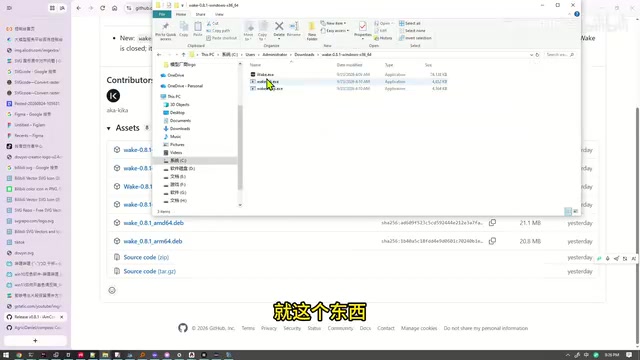
Built in Rust, this explains its snappy startup and response times. Rust's performance and memory-safety characteristics make it an ideal fit for tools that need to frequently read and index local session files, keeping things lean and stable. For users who just want to quickly browse past conversations, this "launch and go" form factor is far more welcoming than a heavy always-on application.
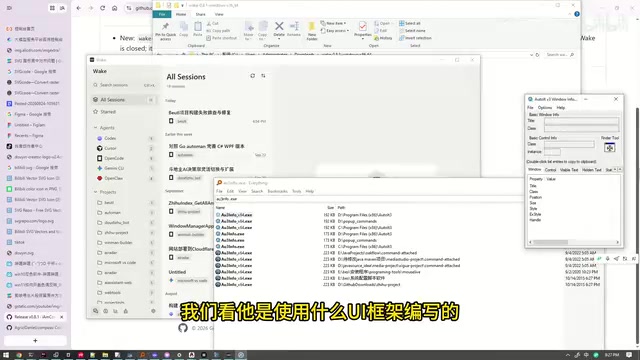
From a technical inspection, the UI layer appears to be built on related frontend technologies, giving it the feel of a typical modern desktop utility.
Rust is a systems programming language developed primarily by Mozilla Research, with its 1.0 release in 2015. Its core design goal is to guarantee memory safety at compile time through an "Ownership" system — without relying on garbage collection — achieving performance close to C/C++ with greater safety guarantees. For a tool like Wake, Rust offers two key advantages: first, the compiled binary can statically link all dependencies, making single-file distribution a natural fit; second, there's no runtime overhead, so latency when reading and indexing local files is extremely low. In recent years, more and more developer-facing CLI tools and desktop utilities (like ripgrep and the Zed editor) have chosen Rust as their foundation — Wake's technical choices align squarely with this trend.
Agent Coverage
In hands-on testing, Wake successfully identifies and reads conversation histories from several mainstream AI tools, including Gemini, OpenCode, Cursor, and Codex. This covers most of the Agent-style products developers rely on day to day.
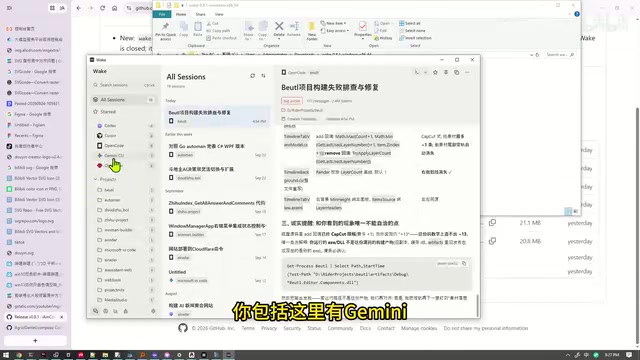
That said, it's worth being honest: detection isn't perfectly comprehensive. During testing, some of Gemini's conversations (and those from Anthropic-related tools) weren't successfully found. This is likely due to differences in the storage paths and formats different tools use for their session data. In other words, Wake's aggregation covers the majority of use cases, but it can't guarantee 100% capture of every record from every client.
Different AI coding assistants store local session data in varying paths and formats. Cursor typically keeps conversation data in an application-specific SQLite database or JSON files; Codex (OpenAI's command-line Agent) records task context in a specific directory structure; and the local cache paths for Claude/Anthropic tools differ across operating systems. Wake needs to implement separate path detection and format parsing logic for each tool — which is why its coverage has blind spots for certain clients. At its core, the problem is that these tools lack a unified session storage standard, leaving aggregation tools to adapt to each one individually. As the AI tool ecosystem continues to expand, this kind of format fragmentation is likely to persist for the foreseeable future.
Who Should Use It
If you're a developer or creator who heavily uses multiple AI coding assistants and frequently needs to look back at previous Agent conversations, Wake offers a low-friction solution: no changes to your existing workflow — just open it occasionally to browse your unified conversation history.
Its value lies precisely in being light. It doesn't try to be a sprawling management platform; it just does one specific, concrete thing (aggregating and viewing chat history) quickly and simply. This reflects a broader trend in the AI tool ecosystem: as Agent-based products multiply, the demand for auxiliary tooling and data management around them is growing fast — and with AI-assisted development, the time it takes to build such small utilities has shrunk dramatically.
Summary
Wake isn't a feature-heavy product. Its philosophy is straightforward: use Rust to build a single-file, lightweight, fast session aggregator that brings together conversation records scattered across your various AI Agents. Support for Codex, OpenCode, Cursor, and other mainstream tools is its core strength, while incomplete compatibility with Gemini and some other clients is a current limitation worth noting. For efficiency-minded users juggling multiple tools, it's worth a try.
Related articles

Free Unlimited Claude Code Solution: Agnes AI + CC Switch Setup Guide
No paid subscription needed — pair the free AI platform Agnes AI with the open-source tool CC Switch to provide a backend for Claude Code, enabling unlimited free calls to text, image, and video models. This guide covers the full setup, test results, and usage boundaries.

A Complete Zero-Cost Guide to Getting Started with Claude Code for Beginners in China
A beginner's guide to Claude Code for users in China: two installation methods (command line and IDE plugin), full configuration steps for replacing the official API with the free domestic LongCat model, and a hands-on demo of building a small tool with natural language, plus tips.

When the NSA Gets Involved: The AI Supply Chain Crisis Behind Open-Source CVEs and API Key Hijacking
Multiple open-source projects disclosed severe CVEs in one day, PHP flaws alarmed the FBI, and Railway and OpenCode were breached with API keys stolen. This article breaks down the vulnerability window, AI-accelerated exploitation, and the AI supply chain crisis behind the API key black market, with a developer defense checklist.