Watchbird: A Notch-Style Notification Bar for AI Coding Assistants on Windows

Watchbird adds a notch-style notification bar to Windows that centralizes AI coding agent confirmations with diff previews and keyboard shortcuts.
Watchbird addresses a specific pain point of AI coding assistants: agent confirmation requests getting buried in background windows. It places a persistent notch-style notification area at the top of the Windows screen, unifying pending interactions from tools like Claude Code, Codex, and Copilot CLI. It supports inline diff previews and one-key approval via Ctrl+Alt+Y, with no window switching required. The tool runs entirely locally with no account or telemetry, auto-backs up configs before changes, and uses a one-time purchase model with a 15-day free trial.
When Your AI Coding Assistant Is Waiting — and You Don't Know It
A recurring pain point with AI coding assistants: agents frequently pause to wait for your confirmation. They want to edit a file, ask you a question, or have you review an execution plan — but these requests often get buried in a terminal window or background process. You end up constantly switching windows, or missing the interaction entirely, leaving an otherwise efficient automated workflow stuck in place.
Watchbird is a desktop tool built specifically for this problem. Its core idea is straightforward: place a persistent notification area at the top of your Windows screen — styled like a smartphone notch — that surfaces pending interactions from your AI coding assistants, so you always know when an agent is waiting on you.
Core Features: Diff Preview and One-Key Approval
Watchbird's most practical design choice is bringing interactions to the top of your screen, so you never have to jump to a specific terminal or editor.
When an agent wants to modify a file, Watchbird displays a diff (change comparison) directly in the notification area. You can quickly review what changed without breaking your flow, and decide whether to approve it.
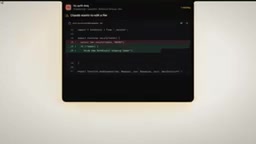
Once you're satisfied, just press Ctrl + Alt + Y and the agent continues executing. This "glance at the diff, press a shortcut" interaction rhythm eliminates the overhead of repeatedly switching windows — a meaningful quality-of-life improvement for developers who want to review every change before it goes through.
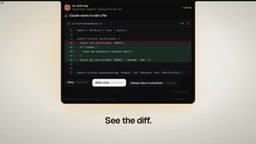
Beyond file edit approvals, Watchbird also lets you answer questions the agent raises and review its execution plans — all from the same notification bar, without opening anything else.
A diff is a standard format in software development for showing the specific changes between two versions of a file — deleted lines typically shown in red, additions in green. In the context of AI agents autonomously modifying code, diff previews are especially valuable: they let a developer assess in seconds whether the agent's changes match expectations, without opening the full file. In traditional workflows, this usually means switching to an editor or terminal to run git diff. Watchbird surfaces this directly in a persistent notification layer, reducing the cognitive cost of context switching.
Broad Compatibility with Popular Coding Assistants
Watchbird isn't built for a single tool — it's designed for the broader landscape of CLI-based AI coding assistants. The official demo explicitly names Claude Code, Codex, and Copilot CLI, noting support for over ten tools in total ("and seven more").
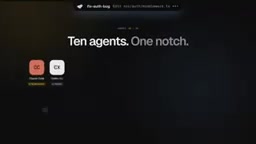
For developers who work with multiple coding assistants simultaneously, this unified interaction layer means you don't have to watch separate windows for each tool — all pending confirmations are collected in one place at the top of your screen.
Claude Code (by Anthropic), Codex (OpenAI's code model and related CLI tooling), and Copilot CLI (the command-line form of GitHub Copilot) all fall under the "agentic coding" umbrella — they don't just autocomplete code, they can autonomously read and write files, execute terminal commands, break down tasks, and work through them step by step. A defining characteristic of these tools is that they frequently request human confirmation to manage risk, creating numerous "waiting for approval" checkpoints. Watchbird acts as a lightweight approval hub between these tools and the developer — and its value scales linearly with the number of agents running simultaneously.
Privacy and Security: A Local-First Approach
With data security a widespread concern, Watchbird positions local processing as a key selling point.
According to the official description, all processing happens on your own PC — no account registration required, no telemetry collected. For teams and individuals working with sensitive codebases, a no-cloud, no-trace design reduces compliance and data leakage concerns.
It also backs up every configuration entry before making changes and supports one-click removal of anything it writes. Even if you decide to stop using it, you can cleanly revert to your original state with no residual configuration left behind.
Telemetry refers to the mechanism by which software automatically collects user behavior data, error logs, or usage statistics and reports them back to the developer. Many modern development tools enable telemetry by default, citing product improvement — but this raises compliance concerns when working with commercial codebases or confidential projects, since code snippets, file paths, and even query content can be gathered as "usage data." A "no telemetry" commitment means the tool establishes no external network connections to report data during local operation — particularly appealing to users in industries like finance or healthcare that have strict restrictions on data leaving the premises.
Pricing: One-Time Purchase with a 15-Day Trial
Unlike the wave of developer tools that have adopted subscription models in recent years, Watchbird uses a buy-once model — pay once and use it indefinitely, with no monthly or annual renewal.
It also offers a 15-day free trial, giving users a chance to verify it fits their workflow before committing. For developers experiencing subscription fatigue, a one-time purchase is often a more appealing proposition.
Takeaway: It Solves an Underrated Pain Point
Watchbird isn't a new AI model or a breakthrough in programming capability — it's an interaction layer. It targets a specific usability problem that emerged as AI coding assistants went mainstream: the visibility and efficiency of human-in-the-loop confirmation steps.
As more developers integrate CLI agents like Claude Code, Codex, and Copilot CLI into their daily work, the frequency of "agent waiting for human approval" moments will only increase. Surfacing those requests at the top of the screen, supporting keyboard shortcuts for quick approval, and committing to local processing with a one-time price — Watchbird's positioning is clear and pragmatic.
That said, the available information is largely from official marketing materials. Actual stability, the precise compatibility details for all ten-plus supported tools, and exact pricing still warrant hands-on validation. For Windows users who make heavy use of CLI coding assistants, the 15-day trial is worth taking for a spin yourself.
Related articles

Free Unlimited Claude Code Solution: Agnes AI + CC Switch Setup Guide
No paid subscription needed — pair the free AI platform Agnes AI with the open-source tool CC Switch to provide a backend for Claude Code, enabling unlimited free calls to text, image, and video models. This guide covers the full setup, test results, and usage boundaries.

A Complete Zero-Cost Guide to Getting Started with Claude Code for Beginners in China
A beginner's guide to Claude Code for users in China: two installation methods (command line and IDE plugin), full configuration steps for replacing the official API with the free domestic LongCat model, and a hands-on demo of building a small tool with natural language, plus tips.

When the NSA Gets Involved: The AI Supply Chain Crisis Behind Open-Source CVEs and API Key Hijacking
Multiple open-source projects disclosed severe CVEs in one day, PHP flaws alarmed the FBI, and Railway and OpenCode were breached with API keys stolen. This article breaks down the vulnerability window, AI-accelerated exploitation, and the AI supply chain crisis behind the API key black market, with a developer defense checklist.