What Are APIs and API Keys? A 4-Minute Explainer Using DeepSeek's Docs

A door-and-key analogy breaks down APIs and API Keys so anyone can understand how AI tools really work.
Using the analogy of "API as a door, API Key as the master key," this article walks beginners through a real DeepSeek API request — covering curl, JSON, model parameters, and system/user roles. A live Mac terminal demo proves that web chat and direct API calls are fundamentally identical, with the webpage simply wrapping JSON data in a friendly UI. Master this mental model and you'll instantly understand why every third-party AI tool asks for an API Key.
For many people just getting started with AI, "API" and "API Key" are terms that seem to appear everywhere — whether you're configuring a third-party AI tool or reading official documentation, you simply can't avoid them. Yet clear, accessible explanations are surprisingly rare. This article is based on a beginner-friendly AI tutorial from a Bilibili creator, using DeepSeek's official documentation alongside hands-on terminal demos to help you fully understand these two unavoidable terms — from concept to practice.
API: A Door to AI's Real Capabilities
The most intuitive analogy is this: an API is a door, and behind that door lies AI's real capabilities — things like generating code, creating images, or answering questions. But it's not a door anyone can just push open. You have to present a set of credentials in exactly the right format, and only then will the door open and return results to you.
Open up DeepSeekAd's official documentation and you'll find a sample code snippet for calling the chat API. Most people freeze up the first time they see it — it looks like something out of a hacker movie. But reframe it and it becomes simple: that code is essentially just "knocking on the door in the required format." The URL in the documentation is the entrance to DeepSeek's API door. Send your content in the format it expects, and it sends back the AI's response.
Breaking Down a Real API Request
Each part of the sample code corresponds to a specific action in that "knocking" process.

The curl at the beginning means "initiate a network request" — think of it as "starting to knock." The next line declares that communication will use JSON format. JSON is simply an agreed-upon way for computers to talk to each other, and this particular API door only accepts keys in that format.
Further down is the API Key you've probably heard about. It's essentially the master key that unlocks DeepSeek's API door. The door will only let you access the AI behind it once it recognizes this key.
What Are Parameters Like model and messages?
Beyond the master key, a request includes a bunch of other parameters — think of them as secondary keys. Only when all of them are correct together will the door fully open:
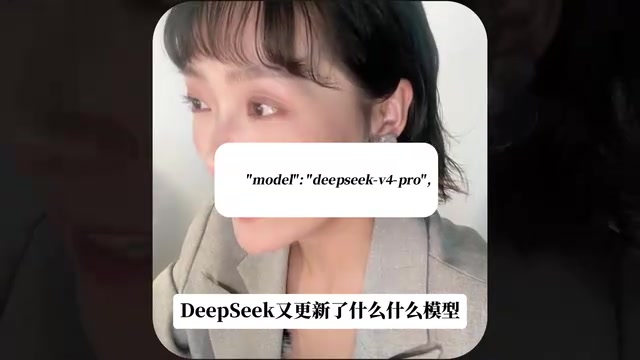
- model: Specifies which model to use — this is what people mean when they say "DeepSeek just released a new model." The example uses DeepSeek v4 Pro.
- messages: The actual conversation content, typically involving two roles:
system: Instructions for the AI, such as "You are a helpful assistant" — essentially a hidden persona or background prompt.user: What you actually say. This is the most important part of the entire request.
Here's the key insight: when you type "hello" into a chat interface, that webpage ultimately packages your message into this exact same format and sends it to DeepSeek's API. The webpage is just handling the input box and the visual interface (UI). It's always the API behind the scenes that's actually answering you.
JSON (JavaScript Object Notation) is a lightweight data exchange format that looks roughly like this: {"role": "user", "content": "Hello"}. It uses curly braces to wrap key-value pairs and square brackets for lists — structured, machine-readable, and human-friendly. JSON originated in the JavaScript ecosystem but is now natively supported by virtually every programming language, making it the de facto standard for Web API communication. That "strange-looking block of text" you see in an API request is essentially a JSON document telling the server: "Here's who I am (API Key), here's the model I want, and here's what I said." Once the server processes the request, it packages the result as JSON too — containing the AI's response text along with metadata like token usage.
Hands-On: Knocking on the Door Directly from the Terminal
To prove that "chatting on a webpage and calling an API are fundamentally the same thing," the creator went ahead and manually called the DeepSeek API directly from the Mac terminal. Think of the terminal as a window that lets you communicate directly with the underlying system.
The steps were straightforward: fill in your API Key, change the content field to a sentence in Chinese, paste it into the terminal, and hit enter. DeepSeek responded with an answer, along with a large chunk of accompanying data.
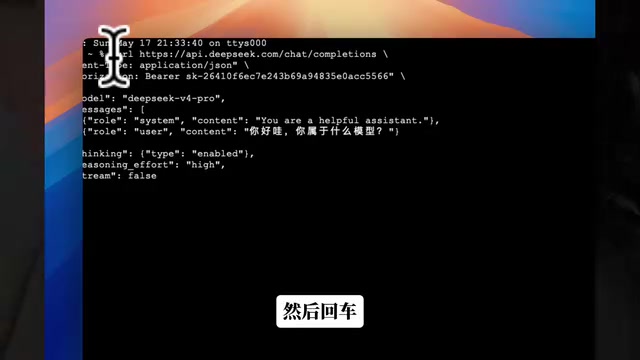
In all that returned data, the only thing that really matters is the AI's actual reply. This confirms the core point: there's no fundamental difference between chatting on a webpage and making an API call. The webpage simply takes that JSON data and automatically organizes it into a user-friendly interface.
In other words, the underlying essence of many AI products is just "an interface + an API call." The real power lies in the model behind it, and the API is simply how you connect to that model.
How to Get Your Own API Key
Getting your master key isn't complicated: head to the DeepSeek website, click to create an API Key, copy and save it immediately, then top up a few dollars and you're ready to start experimenting.
Once you understand this, you'll also understand why third-party AI tools (like CC Switch, which lets you switch between different large models) frequently ask you to enter an API Key — at its core, you're simply letting that software use your key to knock on the door of the corresponding model's API on your behalf.
One important security note: if your API Key is ever leaked, anyone can use it to drain your account balance. A few rules worth keeping in mind: ① Never hardcode your API Key directly into code and push it to a public platform like GitHub; ② Use environment variables (e.g., DEEPSEEK_API_KEY=xxx) or a dedicated secrets manager to store it; ③ If you suspect your key has been compromised, revoke it immediately on the official website and generate a new one. Also, API calls are billed by token (roughly corresponding to the amount of text), so it's a good idea to set a spending limit or only top up a small amount when experimenting — this way, a bug that triggers a loop of repeated calls won't rack up unexpected charges.
One-Line Summary
- The API is the door — AI's real capabilities live behind it;
- Opening that door requires a set of credentials organized in a specific format;
- The API Key is the primary key in that set.
Once you understand APIs and API Keys, you've grasped the underlying logic behind almost every AI tool out there. Whether you're configuring tools like Claude Code or Codex down the road, or building your own AI applications, this "knocking on the door" mental model will save you a lot of trial and error.
Related articles
WorkBuddy Beginner's Guide: How This Chinese AI Agent Works For You
WorkBuddy is a Chinese AI Agent often called the domestic alternative to Codex. Learn how it moves beyond Q&A to directly operate your computer, with connectors, Skills, and expert agents.
MiniMax Code Open-Sources to Rival ZCode; Claude Code Gains AGENTS.md Compatibility
MiniMax Code open-sources to rival ZCode; Claude Code 2.1.277 adds AGENTS.md compatibility. Daily roundup covering AI coding tools, Ascend chip roadmap, and Rust supply chain security.
The Elias Thorne Phenomenon: Why AI Chatbots Keep Fabricating the Same Fictional Person
Why do AI chatbots keep inventing a fictional person named Elias Thorne? This article unpacks LLM hallucination mechanics, training data bias, and model collapse risks.