What Is a Tool in an AI Agent? Understanding Claude's Tool Calling Mechanism

A Tool is an external mini-program Claude is allowed to request, executed by the user's environment and returning text results—the bridge from conversation to action.
The article breaks down the core of Claude's tool calling mechanism: a Tool is a small program Claude is allowed to request, composed of a name, functional description, and input parameters. The key point is that Claude never executes tools itself—it only sends requests, and the host program that owns the tool executes them on the user's computer, then returns results as text for Claude to read and decide the next step. This 'request → execute → read → decide' loop is the foundation of an AI Agent's multi-step reasoning. All operations Claude performs on your account must go through this tool layer, creating a controllable, auditable, and secure architecture. This is also the underlying logic for understanding MCP, tool ecosystems, and Agent security debates.
What Is a Tool in an AI Agent? Understanding Claude's Tool Calling Mechanism
When you use an AI assistant like Claude, it seems capable of doing everything—looking up data, writing code, analyzing files. But you might not know that Claude itself doesn't directly perform any of these operations. Behind the scenes, a key mechanism is at work: Tools.
This concept is central to understanding how AI Agents work. Based on a technical explainer video, this article breaks down the definition of a Tool, its execution flow, and its role in the AI Agent system.
What Is a Tool? A Precise Definition
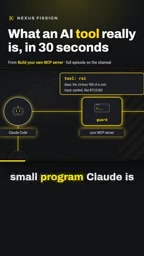
A Tool is a small program that Claude is allowed to request invocation of. It has three basic elements:
- Name: identifies the tool's identity
- Functional description: a one-line explanation of what it can do
- Input parameters: what information it needs to receive in order to work
The key phrase in this definition is "allowed to request." A tool is not a capability of Claude itself, but an external callable resource provided to it. You can think of it as a menu—Claude sees what options are available and decides what to order. How the kitchen prepares the dish is none of Claude's concern.
Function Calling is the underlying technical mechanism that makes this definition work. Large language models can only output text on their own and cannot directly trigger external programs. Function Calling works like this: when sending a request to the model, a list of tools is attached alongside it (typically each tool's name, purpose, and parameter structure described in JSON Schema). When generating a response, the model can choose to output a structured invocation instruction instead of ordinary text. The upper-layer program parses this instruction, executes the corresponding function, and sends the result back to the model as the next round of conversation content. Claude's Tool mechanism is a concrete implementation of this paradigm. Understanding Function Calling helps grasp a key point: what's called "the model calling a tool" is essentially the model generating text in an agreed-upon format—the actual execution always happens in the external host program.
How Does Claude Call a Tool? Breaking Down the Execution Flow
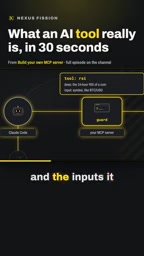
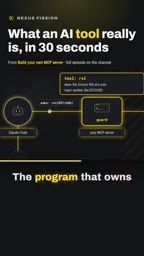
Many people mistakenly believe Claude runs tools itself. The opposite is true: Claude never executes any tool on its own.
The whole process works like this:
- Claude determines it needs a tool and sends a request (e.g., "run the RSI indicator for Bitcoin")
- The program that owns the tool does the actual work on your computer, using your code
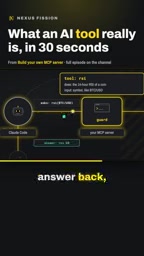
- The execution result is returned to Claude as text
- Claude reads the returned result and decides what to do next
This design has an important implication: computation happens in your environment, and Claude is only responsible for decision-making and interpretation. This also explains why invoking tools may consume your local resources.
The execution "on your computer, using your code" mentioned above involves an often-overlooked architectural concept: client-server separation. The Claude model runs on Anthropic's servers, while the tool's execution environment is the caller—which could be your local dev machine, a cloud server, or the backend of some integration platform. Messages travel between the two over the network: the client sends the conversation history and tool definitions to the model, the model returns an invocation request, and the client executes it and sends the result back. This means the tool's compute consumption, data access permissions, and network overhead are all borne by the client, while the model provider is only responsible for inference. This separation also determines how security responsibility is divided: how much permission to grant a tool and what data it can read or write depend on how the client defines it, not on the model itself.
Returning Results and Deciding the Next Step
After a tool finishes executing, the returned result must be in a text format that Claude can read. This seems simple, but it actually determines the operating logic of the entire system.
Once Claude receives the text result, it decides its next action based on that result—it might continue calling another tool, provide a final answer, or revise its previous judgment. This "request → execute → read → decide" loop is the foundation of an AI Agent's multi-step reasoning capability.
Interestingly, Claude's ability to process returned results directly determines the quality of the Agent's task completion. If the returned data is poorly formatted or incomplete, Claude's subsequent decisions will also be affected.
All Operations Are Completed Through Tools
One statement in the video is worth noting: everything Claude does to your account is accomplished through tools like these.
This statement reveals a security boundary. Claude won't bypass tools to directly touch your account, files, or system. Every operation must pass through the tool layer—and tools are defined and authorized by you (or the platform you use).
From an engineering perspective, this architecture brings several benefits:
- Controllability: you know exactly what Claude is allowed to do
- Auditability: every tool invocation is recorded and traceable
- Security: operations without defined tools cannot be executed
The MCP (Model Context Protocol) mentioned in the video is key context for understanding the evolution of the tool ecosystem. Before MCP emerged, each time a new tool was integrated, developers often had to write adapter code for a specific platform, making it hard to reuse tools across different applications. MCP was proposed and open-sourced by Anthropic. It defines a standardized communication specification that lets tool providers implement a server just once and have it callable by any MCP-compatible client (such as Claude Desktop or various IDE plugins). You can think of it as a "USB-C port for AI tools": by unifying the plug shape, devices and peripherals can be freely combined. MCP gives tool discovery, authorization, and invocation a common layer, and it turns "which tools Claude can request" from a hardcoded list into a dynamically extensible ecosystem.
Why Does This Concept Matter?
Once you understand the Tool mechanism, you can grasp the underlying logic behind many current discussions in the AI Agent field. Whether it's the rise of the MCP protocol, the tool ecosystem building efforts of various platforms, or debates about Agent security, they all essentially revolve around three questions: "which tools Claude can request, how those tools execute, and how results are returned."
A Tool is not just a technical detail—it is the bridge for AI moving from "conversation" to "action." Without tools, Claude can only generate text; with tools, it can look up data, call APIs, and operate software—truly becoming an Agent.
Related articles

WorkBuddy Full Tutorial: Build an AI Office Automation Agent from Scratch
A complete WorkBuddy tutorial: installation, three working modes, multimodal picture book video practice, expert team agent building, and workflow configuration for low-cost AI office automation.

WorkBuddy Agent Complete Guide: From Beginner to Automation in 7 Days
Based on Bilibili's 256-episode WorkBuddy masterclass, this systematically breaks down Tencent's AI office workbench core capabilities: Agent principles, Skill encapsulation, cross-platform connectors, scheduled automation, knowledge bases, and zero-code development, with learning path recommendations.

8 AI Accounts, 7 Failed: An Honest Review of Using AI to Get Work Done
Only 1 of 8 AI-run Bilibili accounts succeeded. We break down the real difference between "performing AI" and "using AI to get work done."