What Is Codex? A Complete Installation Guide for OpenAI's Next-Gen AI Coding Agent

A complete guide to OpenAI's 2025 Codex AI coding agent — what it is, how it compares to Claude Code, and how to install it.
OpenAI's 2025 Codex is no longer just a code autocomplete tool — it's a full AI coding agent that autonomously analyzes, builds, and delivers complete projects in a cloud sandbox. Available as a CLI, IDE extension, web app, or desktop application, Codex costs roughly $2.50 per project (vs. ~$10.26 for Claude Code) and excels at frontend UI tasks. Installation requires Git, Node.js, and VS Code as prerequisites, followed by downloading the official installer and configuring your OpenAI API Key.
What Exactly Is Codex?
Many people get confused the first time they hear the name Codex, because it actually refers to two very different things. The original Codex was an AI model OpenAI released in 2021 — essentially the "brain" behind GitHub Copilot, acting like a co-pilot that deeply understands code. You'd give it a comment like "write a sorting function," and it would generate the corresponding code. The significance of that early product was that it was the first time natural language (the everyday language people use to communicate) could be understood by a computer and converted into code — earning it the title of "the pioneer of AI-assisted programming."
The Codex we're talking about today is a brand-new AI coding agent that OpenAI relaunched under the same name in 2025. It's no longer just a co-pilot that autocompletes a line of code — it's an "AI programmer" capable of independently taking on entire tasks. You hand it an assignment, and it autonomously analyzes, runs, and tests everything in a cloud environment before delivering a complete, working solution. The whole process runs end-to-end on its own. As one analogy puts it: it's essentially a junior-level "worker."
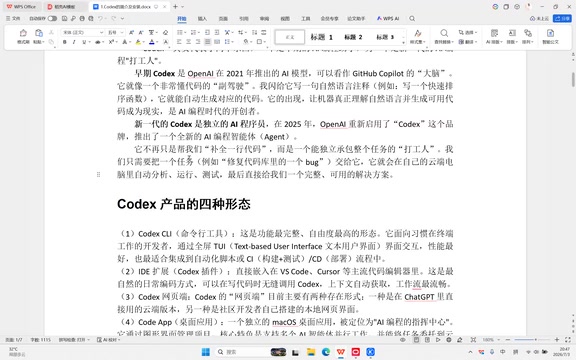
AI Agent is the key concept for understanding the new Codex. Unlike the earlier "autocomplete tool," an agent has the ability to autonomously plan and execute multi-step tasks. It doesn't just passively receive instructions and return a block of text — it actively breaks down goals, invokes tools (such as running code, reading/writing files, and executing tests), and decides the next step based on intermediate results. Take building a webpage with login functionality as an example: a standard AI model gives you a code snippet, while an agent will create the files itself, write the frontend, implement the backend logic, run tests, fix errors, and hand you the complete project. This "autonomous closed-loop" way of working is the most fundamental difference between the 2025 version of Codex and the GitHub Copilot era.
The Four Forms of Codex
Codex currently comes in four usage forms, catering to different development workflows:
Command-Line Interface (CLI)
This means operating through a terminal window — the kind you open by pressing Win+R and typing CMD. It's the most feature-complete and flexible form, designed for developers who are comfortable working in a terminal.
IDE Extension
Embedded as a plugin into mainstream code editors like VS Code and Cursor, this is the form most closely integrated into everyday coding workflows.
Web App
Usable directly in a browser with no local installation required.
Codex App (Desktop Application)
This is a standalone desktop app positioned as the "command center" for AI-assisted programming. It manages projects through a graphical interface, and its standout feature is support for running multiple AI agents in parallel, delegating tasks to cloud sandbox environments for execution. It's ideal for complex, long-running tasks. Because it's currently the most widely used and offers the best experience, this tutorial focuses primarily on the desktop app.
How Does Codex Differ from Claude Code?
Before diving into the installation, it's worth understanding how Codex compares to the previously popular Claude Code (CC) — this will help you decide which tool fits your needs.
On price, Codex is significantly cheaper. For the same project, Codex costs roughly $2.50, while Claude Code may cost around $10.26 — a cost difference of nearly four times.
On stability, Codex reportedly avoids issues like rate limiting, account bans, and capability degradation — implying these have been pain points for Claude Code users.
On practical focus, the two tools have different strengths: Claude Code leans toward logical correctness, code structure, and feature implementation, making it a better fit for backend development (e.g., Django, Flask); Codex pays more attention to UI details, color design, animations, and user prompts, making it a favorite among frontend developers (HTML, CSS, JS, etc.).
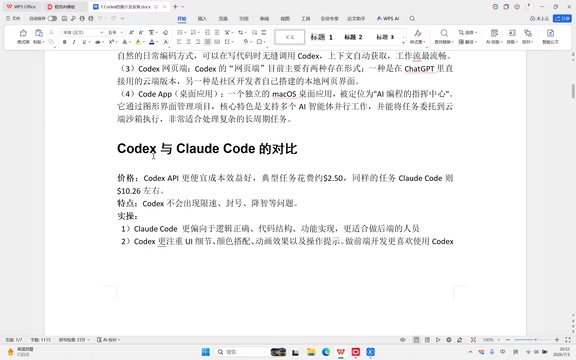
Claude Code is an AI coding tool from Anthropic, powered by the Claude model family (such as Claude 3.5/3.7 Sonnet). It's known for strong logical reasoning and rigorous code structure, excelling at complex business logic, multi-file refactoring, and backend architecture design. The root of the difference between the two tools lies in how their underlying models were trained: OpenAI's GPT-4o/o series has an edge in natural language understanding and multimodal capabilities (interpreting images, design mockups, etc.), which makes Codex better at "reading" UI requirements and reproducing visual details. The Claude series, on the other hand, has been specifically optimized for long-context processing and logical consistency, making it more suitable for backend tasks that demand strict correctness. In practice: favor Codex for frontend projects, and consider Claude Code for backend or full-stack projects with complex logic.
Three Prerequisites Before Installation
Before installing Codex, you'll need three foundational tools: Git, Node.js, and VS Code. Downloading each one from their respective official websites can be time-consuming, so using the "Huorong App Store" (火绒应用商店) is recommended — it's a relatively clean software manager with no ads.
The process is straightforward: search for Git, Node.js, and VS Code in the Huorong App Store search bar, then click install for each. Once installed, you can verify the versions via command line:
- Type
git --versionto check the Git version (e.g., 2.49.0 on Windows) - Type
node --versionto check the Node.js version (e.g., v24.14.0)
After VS Code is installed, a shortcut icon will appear on your desktop. Opening it reveals an interface with a file explorer on the left, an editing area in the center, and an agent panel on the right. Note that what we're installing here is the standalone Codex application, not the Codex plugin inside VS Code — these are two different things.
Each of these three tools plays an indispensable role. Git is a distributed version control system that Codex uses to track code changes, manage project history, and interact with platforms like GitHub for pulling and pushing code. Node.js is the server-side runtime environment for JavaScript; the Codex CLI itself is built on Node.js, so even if you're not building Node projects, it's a required dependency for installing the command-line tool. VS Code is the most widely used code editor today, with a built-in terminal and a rich plugin ecosystem, making it the ideal environment for running and reviewing Codex-generated code. Missing any one of these three may cause errors or prevent the installation from completing.
Installing the Codex Main Application
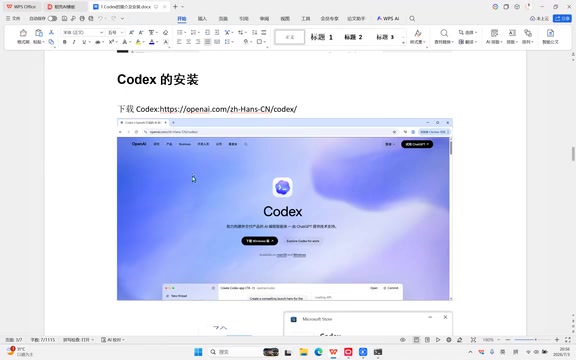
With the three prerequisites in place, it's time for the most critical step: installing Codex itself. Note: Codex is not available in the Huorong App Store — you'll need to download it directly from the official website.
On the official website, you'll find a Windows download entry. The file you download is called codex install — it's not the software itself, but rather a downloader provided through the Windows software store. Double-clicking this downloader is what actually triggers the download of the main Codex program.
The first time you open Codex, you'll see a "Set start with Codex" onboarding page asking you to enter an OpenAI API Key starting with sk. Fill that in and click Continue, and you'll be taken to a use-case selection screen (student, data analysis, sales, design, product, etc.) — student users can simply select "student." After that, you'll land on Codex's main interface: a toolbar on the left, an input box on the right, and options like New Chat and Search on the left panel. The interface defaults to English on first launch.
Creating a Workspace and Starting a Conversation
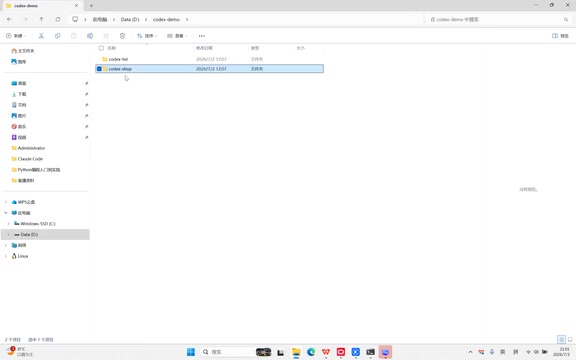
One of Codex's key advantages is the ability to run multiple tasks simultaneously, so it's a good idea to create separate folders for different projects.
The approach is straightforward: right-click in your file explorer (on the D, E, or F drive) to create a new folder — for example, a folder called codex demo — then add subfolders inside it like codex list, codex shop, and so on. Name them however you like.
There are two ways to import folders into Codex:
- Open Folder: Click File → Open Folder in the interface and select the target folder.
- Drag and Drop: Drag the folder directly into Codex's Project area, and it will automatically be added to the project list.
Once you've imported multiple folders, you can select which project to chat in from the bottom of the interface. After selecting one, you can type in the input box — for example, asking Codex which model it's currently using. After pressing Enter, the interface will show a "spinning" state — one of three possible task states (in progress, completed, awaiting input). A spinning indicator means the task is currently running.
Summary
This article has outlined the core concepts behind Codex and its installation process. Codex is OpenAI's next-generation AI coding agent, launched in 2025, available in four forms: CLI, IDE extension, web app, and desktop application — with the desktop app being the most commonly used. Compared to Claude Code, it offers advantages in price and stability, and excels at frontend-related tasks. Installation requires Git, Node.js, and VS Code as prerequisites, followed by downloading and running the installer from the official website, configuring your OpenAI API Key, and creating a workspace to start multi-task parallel development. The specific techniques for using Codex effectively are the natural next step in the learning journey.
Related articles

Cohere's Open-Source Critique and Anthropic's IPO on the Same Day: Coincidence or Strategy?
Reddit users spotted that Cohere's critique of open-source models was published the same day Anthropic filed for IPO, sparking debate over closed-source vendors' public comments and commercial motives.

NYC ROS Developers Meetup: Talks from Four Robotics Companies
The NYC ROS developer meetup takes place Thursday at Google's office, featuring talks from Fauna Robotics, Intrinsic, Tangent Robotics, and Cohesive Robotics. Free, with food, open RSVP and call for speakers.

Local AI King: The Compute Gap and Competitive Anxiety Behind 12M Tokens a Day
A Reddit developer jokes about being a local AI king using 12M tokens a day—then gets humbled by someone using 34M tokens per minute. Exploring the compute gap, token anxiety, and how developers balance local vs. cloud automation.