Winq: Control Your Mac with Eye Gaze and Blinks, No Extra Hardware Required

Winq is a tool that controls your Mac with gaze, blinks, and facial gestures—no extra hardware, with local privacy processing.
Winq is a Mac app on Product Hunt that uses the built-in camera to track eye movement and facial features, letting users switch windows with gaze, trigger clicks with single-eye winks, bind shortcuts to facial gestures, and get real-time feedback in the notch. It needs no extra hardware, has a brief calibration process, and processes everything locally so video never leaves the device. Positioned as an efficiency tool for general users rather than just accessibility. It has 62 votes and ranks 19th under productivity and user experience. Its real-world experience depends heavily on calibration accuracy, lighting, and camera performance; whether it can maintain low false-trigger rates and high responsiveness will determine its long-term productivity value.
In the pursuit of efficiency in desktop interaction, the mouse, keyboard, and trackpad have long dominated. A new Mac app called Winq, recently launched on Product Hunt, aims to rewrite the rules with a more natural approach—you can switch windows and trigger shortcuts simply by moving your eyes, blinking, or even making a face.
Core Interaction: Replacing the Mouse with Eye Gaze and Facial Movements
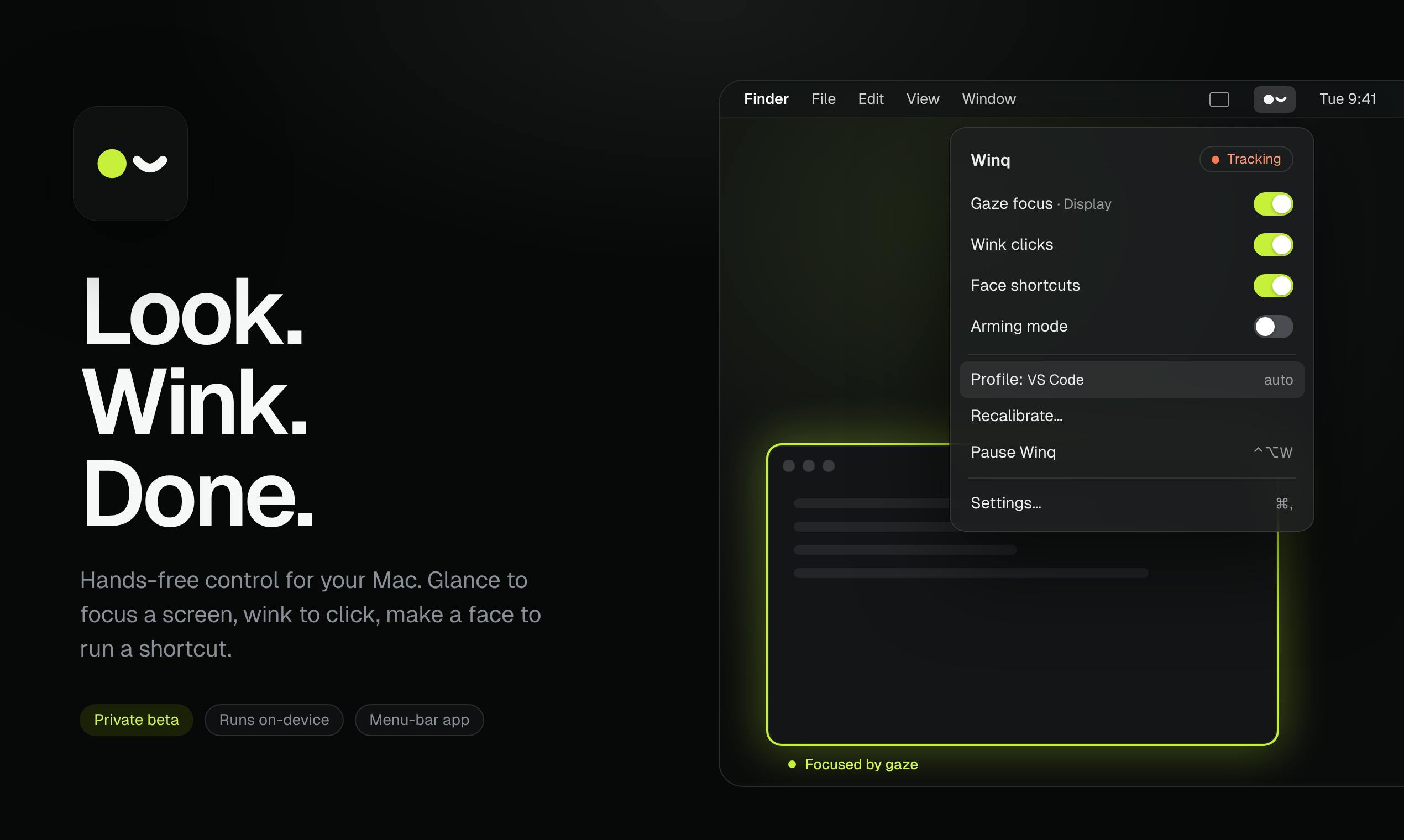
Winq's core concept is to use your Mac's built-in camera to continuously track your facial features and eye movements, converting them into on-screen action commands. According to its official description, it primarily offers four interaction methods:
- Gaze-based focus switching: When you look at a window, it automatically becomes the active window, with no need for mouse clicks or keyboard shortcuts.
- Single-eye wink click: Left-eye winks and right-eye winks are mapped to two separate actions, each of which can trigger a different mouse click or shortcut.
- Facial gesture shortcuts: You can bind specific facial expressions or movements—such as opening your mouth or raising your eyebrows—to frequently used actions, enabling completely hands-free control.
- Notch island real-time feedback: A small real-time indicator appears in the screen notch area, showing what action or gaze direction Winq is currently detecting, reducing confusion caused by accidental triggers.
Based on the product description, Winq doesn't stop at being positioned as an "accessibility tool"—it aims to be an efficiency-enhancement tool for general users.
Eye tracking is not an entirely new technology, but in consumer desktop applications it has long been limited by precision and hardware cost. Early solutions mostly relied on dedicated infrared cameras or eye trackers, such as products from brands like Tobii, which are expensive and require additional wearable or installed devices. In recent years, as ordinary RGB cameras and machine learning models (such as facial landmark detection based on convolutional neural networks) have matured, usable gaze direction estimation has become possible using only a laptop's built-in camera. The basic principle is: first locate the eye region through face detection, then identify pupil and iris positions, and combine this with head pose to infer the gaze point. However, such solutions without dedicated hardware see noticeably reduced precision under changing lighting, glare on glasses, and rapid head movement—which is why tools like Winq need continuous calibration and feedback mechanisms.
Single-eye wink detection differs from ordinary binocular blinking—it requires distinguishing the independent movement of the left and right eyelids. Technically, systems typically calculate the Eye Aspect Ratio (EAR), detecting a wink event by monitoring a sudden drop in the EAR value of one eye. The challenge: natural blinking is frequent (about 15-20 times per minute), and without filtering it would frequently trigger accidental actions; meanwhile, a deliberate wink may be misjudged as a facial tic or expression change. Therefore, tools like Winq often need to set trigger thresholds, cooldown periods, and allow users to customize sensitivity. The advantage of single-eye winks as an interaction signal is that the motion is small and can be repeated quickly, but the downside is that prolonged use can cause eye fatigue, and some users are naturally unable to independently control one eyelid.
No Extra Hardware Needed, Privacy by Design Throughout
Winq's most notable practical advantage is that it doesn't rely on any extra hardware. It directly uses the Mac's built-in camera and requires only a brief guided calibration process to get started, greatly lowering the barrier to trying it.
On privacy, the official emphasis is that all facial tracking computation is done locally on the device, and video footage never leaves the device. This is crucial for a tool that involves camera permissions, especially when users need to keep the camera on for continuous tracking over long periods. Local processing not only reduces privacy leakage risk but also reduces dependence on network connectivity, theoretically providing lower latency.
Exploring "Hands-Free Operation" for Productivity Tools
Winq's niche can be summarized as "alternative input methods" for productivity tools. In recent years, from voice control to eye tracking, the industry has been trying to free users from the mouse and keyboard. Winq's differentiation lies in integrating gaze, blinks, and facial gestures into a lightweight system, and leveraging Mac's existing hardware ecosystem for rapid deployment.
According to the Product Hunt page, Winq currently has 62 votes and ranks 19th among products of the day, categorized under productivity and user experience. For a newly launched tool, this result shows it has already attracted a group of early users interested in desktop interaction innovation.
However, the actual experience of facial-tracking tools depends heavily on calibration accuracy, ambient lighting, and camera performance. Whether Winq can maintain low false-trigger rates and high responsiveness across different usage scenarios will determine whether it's just a fleeting novelty or a productivity tool that can truly integrate into daily work.
Alternative input modalities are an important branch of human-computer interaction, aimed at breaking through the physical limitations of the mouse and keyboard, covering both accessibility assistance and efficiency enhancement scenarios. Voice control (such as macOS's Voice Control) is suitable for text input and global commands, but has privacy and noise issues in public places; eye tracking is suitable for pointing and selection, but "click" confirmation often requires blinking or dwell time; facial gestures provide a middle layer of shortcut commands. Systems that fuse these modalities (multimodal interaction) are usually more reliable than single modalities, because the ambiguity of one signal can be resolved by another. Winq uses gaze for focus switching, blinks for clicks, and facial gestures for shortcuts—precisely reflecting this layered design approach—but its long-term usability still depends on whether the coordination between modalities is natural and whether the false-trigger rate is low enough.
One-line Summary
Winq is a productivity tool that controls your Mac with gaze, blinks, and facial gestures—no extra hardware needed, with privacy-preserving local processing.
Paragraph Summary
Winq is a Mac app launched on Product Hunt that tracks eye movement and facial features through the built-in camera, letting users switch windows with gaze, trigger clicks with single-eye winks, bind shortcuts to facial gestures, and get real-time detection feedback in the notch area. It requires no extra hardware, has a brief calibration process, performs all computation locally, and keeps video data on-device. It's positioned as an efficiency-enhancement tool for general users, not just accessibility assistance. It currently has 62 votes, ranks 19th, and is categorized under productivity and user experience. Its actual experience depends heavily on calibration accuracy, lighting, and camera performance; whether it can maintain low false-trigger rates and high responsiveness will determine whether it has long-term productivity value.
Related articles

Free Unlimited Claude Code Solution: Agnes AI + CC Switch Setup Guide
No paid subscription needed — pair the free AI platform Agnes AI with the open-source tool CC Switch to provide a backend for Claude Code, enabling unlimited free calls to text, image, and video models. This guide covers the full setup, test results, and usage boundaries.

A Complete Zero-Cost Guide to Getting Started with Claude Code for Beginners in China
A beginner's guide to Claude Code for users in China: two installation methods (command line and IDE plugin), full configuration steps for replacing the official API with the free domestic LongCat model, and a hands-on demo of building a small tool with natural language, plus tips.

When the NSA Gets Involved: The AI Supply Chain Crisis Behind Open-Source CVEs and API Key Hijacking
Multiple open-source projects disclosed severe CVEs in one day, PHP flaws alarmed the FBI, and Railway and OpenCode were breached with API keys stolen. This article breaks down the vulnerability window, AI-accelerated exploitation, and the AI supply chain crisis behind the API key black market, with a developer defense checklist.