Wireless GPU Cracks Two Major Local AI Challenges: Wi-Sci Hands-On Analysis
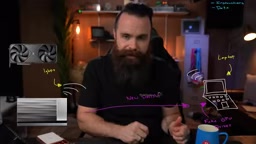
Wi-Sci uses a proprietary protocol and SSD scheduling to make wireless GPUs and hundred-billion-parameter models work on consumer hardware.
Wi-Sci demonstrates a wireless GPU computing solution that uses a proprietary protocol to compress PCIe-level communication into Wi-Fi bandwidth, enabling a laptop to remotely call an RTX 5090 and run games at 92 FPS. It also leverages MoE sparse activation with four optimizations—expert-aligned chunking, hot expert residency, computation splitting, and scheduler preloading—to run the 750-billion-parameter DeepSeek 4.1 Flash at 8-15 tokens/second on a 32GB VRAM device. The scheduler supports fast switching between multiple AI apps, reducing switch time from 18 seconds to 4-8 seconds and enabling multiple home devices to share a GPU. Though it's an engineering prototype with fluctuating speeds, it shows the feasibility of running massive models on consumer hardware.
A GPU That "Isn't Yours" Is Rewriting the Rules of Local AI
Imagine this: your thin-and-light laptop suddenly shows an RTX 5090 in Task Manager—and can actually use it to run Cyberpunk 2077 and Blender renders. This isn't remote desktop, and it isn't cloud gaming—the game logic still runs locally, but the GPU is called remotely over Wi-Fi. Even more extreme: a device with only 32GB of VRAM can run the 750-billion-parameter DeepSeekAd 4.1 Flash model at full quality, while traditional setups would need over 500GB of memory.
This is the scenario demonstrated by Wi-Sci (Wireless Computing Infrastructure). After an in-depth hands-on, YouTube creator Chuck put it bluntly: "This thing makes no sense at all, but it just works." Based on his hands-on video, this article breaks down how this solution uses a proprietary protocol and SSD scheduling to simultaneously solve two seemingly unsolvable problems: wireless GPU communication and local inference of massive models.
How a Wireless GPU Fools the Operating System
Proprietary Protocol Replaces PCIe: From "Impossible" to "Good Enough"
Desktop-class GPUs rely on PCIe to communicate with the host, with bandwidth as high as 512 gigabits per second and response times under one microsecond. Wi-Fi's theoretical bandwidth is only about 1 gigabit per second, with round-trip latency around 1.5 milliseconds—seemingly small, but Chuck used an analogy to drive the point home: if PCIe takes 1 second to transfer an image, Wi-Fi would take 25 minutes. Games exchange thousands of instructions and data per second; at that latency, the picture would stutter into a slideshow.
Wi-Sci's solution isn't to increase bandwidth, but to reduce the amount of communication. They developed a proprietary protocol whose core idea is "make the GPU and host talk less":
- Batched instruction compression: package and compress multiple instructions before sending, without waiting for acknowledgment;
- Incremental data transfer: send only the data that changes, avoiding redundant transmission;
- Predictive responses: the GPU sends likely-needed responses in advance without waiting for the host to ask;
- Compressed video stream return: the GPU compresses rendered results before sending them back to the laptop.
These four tricks compress the originally required 8 gigabits per second of bandwidth down to about 400 megabits. In testing, the laptop ran Cyberpunk 2077 at 92 frames per second, with Wi-Fi usage steady at around 400 megabits.
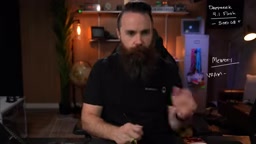
PCIe (Peripheral Component Interconnect Express) is the standard serial bus between current computer motherboards and high-speed peripherals such as GPUs and SSDs. Its bandwidth doubles with each generation: PCIe 4.0 x16 has about 64 gigabits per second of bidirectional bandwidth, while the 512 gigabits per second mentioned in the article corresponds to PCIe 5.0/6.0 multi-lane aggregation or GPU internal interconnect (such as NVLink) levels. More critical is latency: PCIe round-trip latency is at the sub-microsecond level, while Wi-Fi round-trip latency is at the millisecond level—three orders of magnitude apart. This latency difference is fatal to the game rendering pipeline, because the GPU needs to frequently synchronize per-frame draw instructions and resource states with the CPU. Therefore, Wi-Sci's proprietary protocol must fundamentally change the communication model rather than simply compressing data.
Disguised Driver: Making the Laptop "Believe" It Has a 5090
A protocol alone isn't enough. The operating system and games must believe this GPU is a local device, or they can't use it. Wi-Sci installs a "fake driver" that makes Windows and game engines recognize the remote GPU as a local PCIe device. Chuck saw the 5090 prominently listed in Task Manager, and the game never noticed anything unusual.
The essence of this solution is turning the GPU into a network service while preserving the semantics of a local call. For gaming scenarios, it relies on a "local front end, remote back end" architecture—game logic, input, and output all run on the laptop, with only rendering computation offloaded to the wireless GPU.
The "Memory Wall" of Local AI and How SSD Saves the Day
Why Large Models Can't Run: The Gulf Between VRAM and Memory
Today's strongest open-source local models (such as Kimi K3, GLM 5.3, and DeepSeek 4.1) have intelligence approaching frontier closed-source models, but at the cost of enormous memory requirements. Take DeepSeek 4.1 Flash as an example: running it at full quality requires over 500GB of memory. Even a Mac Studio with 512GB of memory struggles to run it comfortably, let alone the 32GB of VRAM on consumer GPUs.
Traditional solutions can only put model weights on an SSD and load them on demand. But SSDs are far slower than VRAM: the RTX 5090's VRAM bandwidth is about 1.8TB per second, DDR5 memory about 90GB per second, and an SSD only 14GB per second. More critically, LLM inference requires transferring a large amount of weights for every token generated, and SSDs perform terribly on small random reads—effective bandwidth may drop to 1-5 gigabits per second, causing each word to take seconds or even minutes.
MoE Models Bring a Turning Point, But Not Enough
DeepSeek 4.1 Flash is a Mixture of Experts (MoE) model with 384 experts, only 6 of which are activated per token generation. This means only about 15GB of weights need to be transferred each time, rather than all 508GB. In theory, this could bring per-token generation time down from "unusable" to a dozen seconds—still too slow.
The problem is that the router dynamically selects experts, so it's impossible to know in advance which 6 will be used for the next word; therefore, the entire model must remain accessible. If everything is placed on the SSD, the random-read bottleneck remains.
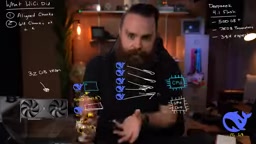
Mixture of Experts (MoE) is a sparsely activated model architecture. Traditional dense models invoke all parameters for each token generation, whereas MoE models split the feed-forward network into multiple "expert" subnetworks and use a learnable router to dynamically select a small number of experts for each token. For example, DeepSeek 4.1 Flash has 384 experts but activates only 6 per token, greatly reducing the computation and weight reads per inference. However, the router's selection is data-dependent and cannot be predicted before inference, so all expert weights must remain accessible. This poses a storage challenge: active experts need to be read quickly, and inactive experts cannot be completely discarded. Wi-Sci's optimizations revolve around efficiently managing these expert weights.
Wi-Sci's Four Optimizations: Making SSD Run at Near-Memory Speed
Wi-Sci applied four engineering optimizations for SSD inference, each targeting a pain point:
- Expert-aligned chunking: rewrite the model file so that each expert is the same size and aligned to 64 chunks, greatly improving SSD sequential read efficiency and raising bandwidth from 1GB per second to about 11.5GB per second.
- Hot expert residency: keep the most frequently selected experts resident in VRAM and RAM, so only about 1GB of experts need to be pulled from the SSD in real time.
- Computation splitting: weights from the SSD or RAM are processed by the CPU, while weights from VRAM are processed by the GPU, avoiding data movement.
- Scheduler preloading: preload the model from SSD into memory in advance during application switches, reducing wait times.
In testing, DeepSeek 4.1 Flash achieved a generation speed of about 8-15 tokens/second on the Wi-Sci box, with most experts hitting the GPU cache. Chuck used a custom visualization tool to show the expert selection process: 61% of responses came from the GPU, and SSD read speeds stayed above 10GB/second.
SSD random-read performance is far lower than sequential-read performance, a physical characteristic determined by NAND flash. When read requests are scattered across different flash blocks, the SSD must frequently switch pages and blocks, causing effective bandwidth to plummet. The "expert-aligned chunking" mentioned in the article essentially re-lays out the model file so that each expert's weights are stored contiguously on the SSD and aligned to the flash page size (e.g., 64KB), thereby converting random reads into sequential reads. In addition, "hot expert residency" exploits the skewed distribution of expert selection in MoE models—a few experts are called frequently, and keeping them resident in VRAM/RAM avoids a large number of SSD reads. Computation splitting is a heterogeneous computing strategy: the CPU processes weights from SSD/RAM, and the GPU processes weights in VRAM, reducing data movement overhead on the PCIe bus. Together, these optimizations raise the SSD's effective bandwidth from 1GB per second to about 11.5GB.
The "Home GPU" Vision: Real-World Performance of the Shared Scheduler
Why GPUs Don't Share Well
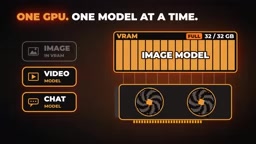
GPUs are inherently bad at multitasking. When one model (such as image generation) fills 32GB of VRAM, switching to another model requires swapping the former out completely and loading the latter from the SSD. This process can take a dozen seconds, creating a disjointed experience. Wi-Sci's scheduler attempts to solve this problem: it "parks" inactive models on the SSD while retaining context for fast recovery. When the user switches back, the model loads quickly from the SSD rather than loading from scratch.
Chuck used a demo to compare the difference with and without the scheduler: switching from an image model back to a chat model took about 17-18 seconds without the scheduler and only about 4 seconds with it; the reverse switch dropped from about 18 seconds to about 8.6 seconds. Although there is still latency, it's now within a usable range.
Multiple Devices Calling at Once: Mac, Phone, and Tablet Can All Use It
In the demo, a Mac connected to the Wi-Sci box over Wi-Fi, using Figma to generate images, Love Art to generate video, and DaVinci Resolve to render video. The GPU scheduled across multiple tasks; although it couldn't truly run them in parallel, the switching cost was greatly reduced. Chuck believes this "home GPU" model lets phones, tablets, and laptops all share a desktop-class GPU, similar to the old scenario of a family sharing one computer.
Real-World Limitations and Industry Significance
Wi-Sci is currently an early engineering prototype; the version Chuck received was packed in a suitcase full of bubble wrap. The product offers two versions, RTX 5090 and 5060 Ti, and is already open for pre-order, with shipping expected in eight weeks. In testing, both wireless gaming and local large-model inference worked, but there were still fluctuations: generation speed varied between 3-15 tokens/second depending on expert hit rate and cache state.
From an industry perspective, Wi-Sci's value lies not in any single technical breakthrough but in system-level integration: using a proprietary protocol to solve wireless latency, using file-format optimization to unlock SSD bandwidth, and using a scheduler to achieve GPU time-sharing. Together, these three make "running hundred-billion-parameter models on consumer hardware" go from impossible to barely usable.
Chuck's remark at the end of the video may represent how most viewers feel: "I was skeptical the whole time, but it really does work." For local AI enthusiasts, this offers a brand-new path that doesn't depend on the cloud; for the hardware industry, it hints at the possibilities of GPU sharing and wirelessization. Of course, all of this still needs to be validated through mass production and ecosystem adaptation.
One-line Summary
Wi-Sci uses a proprietary protocol and SSD scheduling to make wireless GPUs and hundred-billion-parameter models work on consumer hardware.
Paragraph Summary
Wi-Sci demonstrates a wireless GPU computing solution that uses a proprietary protocol to compress PCIe-level communication into Wi-Fi bandwidth, enabling a laptop to remotely call an RTX 5090 and run games at 92 frames per second. At the same time, it leverages the sparse activation characteristics of MoE models, combined with four optimizations—expert-aligned chunking, hot expert residency, computation splitting, and scheduler preloading—to let a device with 32GB of VRAM run the 750-billion-parameter DeepSeek 4.1 Flash at 8-15 tokens/second. The scheduler also supports rapid switching between multiple AI applications, reducing switch time from 18 seconds to 4-8 seconds and enabling multiple home devices to share a GPU. Although it is currently an engineering prototype and speeds fluctuate, it demonstrates the feasibility of running massive models on consumer hardware.
Related articles

9 AI Subscription Plans Compared: The Real Cost Per 100M Tokens Revealed
Bilibili creator tests 9 AI subscription plans from Volcano, Alibaba, Tencent, Baidu, Zhipu, Xiaomi, MiniMax and more, converting them all to real cost per 100M tokens, breaking down fixed-quota vs. three-tier coefficient billing and how caching, time-of-day discounts, and window limits affect actual quota.

Vibe Coding for Beginners: Expressing Intent Instead of Handwriting Code
What is Vibe Coding? A 137-episode Bilibili course defines it: the core is expressing intent, not writing code. This article analyzes Vibe Coding's productivity logic, target audience, and entry expectations to help beginners decide if it's worth learning.

LangChain Beginner's Guide: An Agent Development Roadmap from LangGraph to Deep Agents
Clarify the encapsulation relationship among LangChain, LangGraph, and Deep Agents, and master the learning path and selection logic for agent development frameworks—suitable for beginners in large model development.