witr: A Linux Process Tracing Tool for Quickly Identifying Why a Process Is Running

witr traces why Linux processes are running by reconstructing their full startup chain from any entry point.
witr (Why Is This Running) is an open-source tool that shifts Linux troubleshooting from "what's running" to "why is it running." It traces process startup chains from multiple entry points—PIDs, ports, containers, or files—identifying whether processes were launched by systemd, cron, supervisor, or shell sessions. Built in Go as a single static binary with cross-platform support, it offers both an interactive TUI and script-friendly output with proper exit codes for automation integration.
A Blind Spot in Operations That's Been Overlooked
Every Linux system administrator and developer is familiar with the classic commands ps, top, and lsof. They can quickly tell you what processes are running on the system, how many resources they're consuming, and which files and ports they've opened. But when you're jolted awake by an alert in the middle of the night, staring at an unfamiliar process or a mysteriously occupied port, the question you really need answered isn't "what's running" — it's "why is it running?"
This is exactly the gap that witr (Why Is This Running) aims to fill. This open-source tool, which reached #7 on Product Hunt, elevates the troubleshooting approach from "current state snapshot" to "causal tracing."
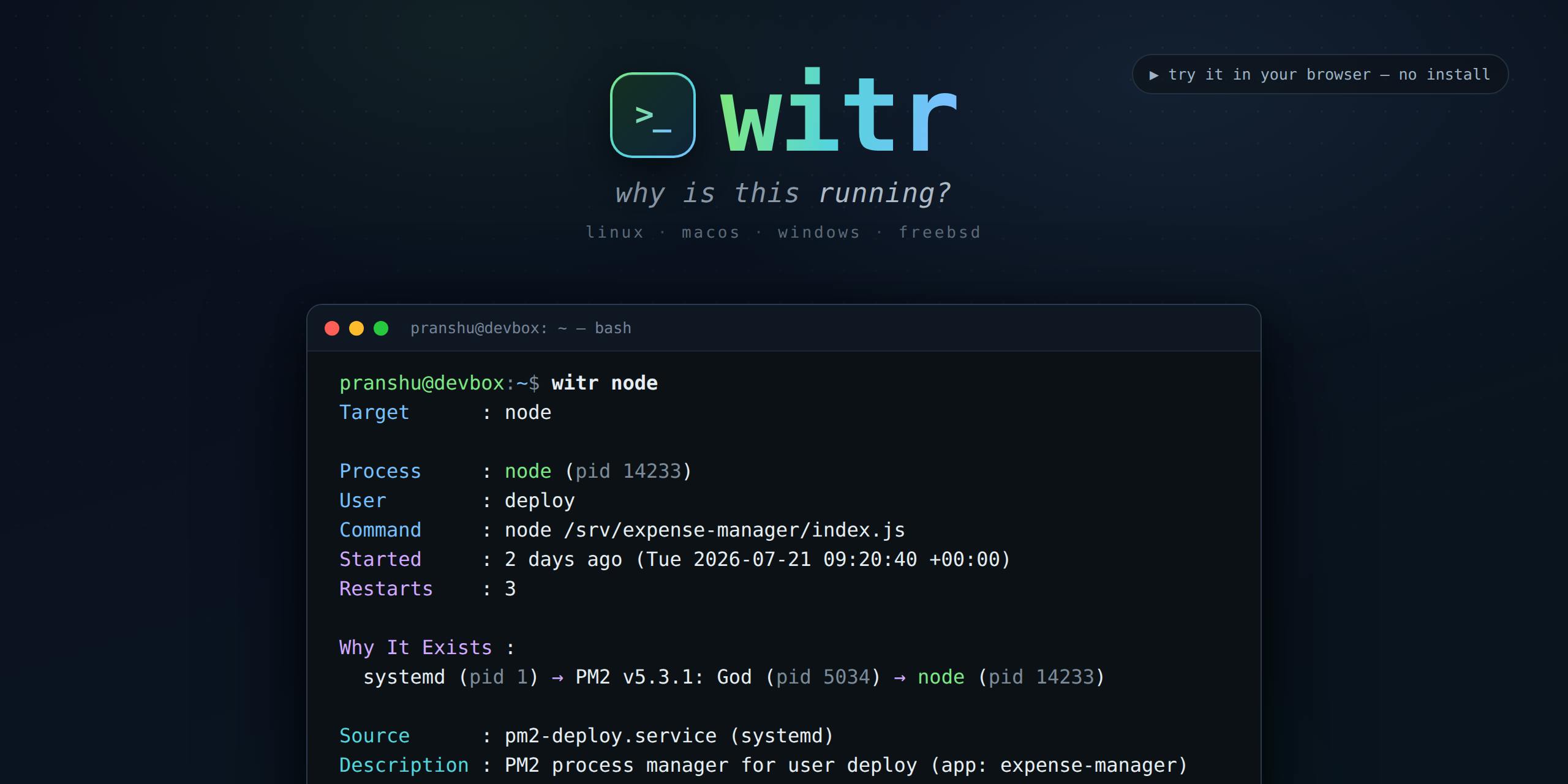
Traditional tools give you cross-sectional information: process PID, CPU usage, memory consumption. What witr provides is a vertical "chain of responsibility" — it traces back whether a process was started by systemd, guarded by supervisor, or spawned from a shell session or cron job. This shift in perspective is profoundly significant for troubleshooting.
Understanding Process Management Systems: systemd, supervisor, and cron
To understand witr's value, you first need to understand the common sources of process startup in Linux systems. systemd is the de facto standard init system and service manager in modern Linux distributions (such as Ubuntu 16.04+, CentOS 7+, Debian 8+). It replaced the traditional SysVinit and introduced the concept of unit files to declaratively manage services, mount points, timers, and other system resources. systemd uses cgroups (control groups) to track and isolate processes, meaning that even when a service forks child processes, systemd knows their ownership — something traditional SysVinit couldn't do, as it relied on PID files to track processes and easily lost associations when fork chains became complex. cgroups themselves are a resource isolation mechanism provided by the Linux kernel; systemd uses them to create independent control groups for each service, and all child processes spawned by that service are collected under the same cgroup hierarchy. This provides a reliable basis for ownership determination by tools like witr.
supervisor is a process management tool written in Python, commonly used to manage application processes that lack self-daemonizing capabilities. It defines managed programs through INI-format configuration files and provides start, stop, restart, and log collection functionality. Unlike systemd, supervisor runs in user space and doesn't require root privileges to manage processes, making it widely used inside containers, virtual environments, and scenarios where non-root users need to manage applications. Processes managed by supervisor typically have supervisor itself as their parent process, providing witr with a clear identifier for tracing.
cron is the Unix system's scheduled task scheduler. It periodically executes commands according to time expressions in crontab files (consisting of five fields: minute, hour, day, month, and weekday). Commands executed by cron are started with the cron daemon as their parent process, but the true trigger reason needs to be traced back to the corresponding user's crontab file or configuration in the /etc/cron.d/ directory. Notably, systemd also offers timer units as a modern alternative to cron, supporting more granular time control and dependency management — further increasing the complexity of determining "who triggered this process."
These three form the most common sources of process startup in Linux systems, and understanding their hierarchical relationships is the foundation of troubleshooting.
witr Core Features: Multi-Entry Process Tracing
Tracing the Startup Chain from Any Entry Point
witr's core capability is "multi-entry tracing." You can point it at:
- Process or PID: Directly target a suspicious process
- Port: Determine exactly who's occupying port 8080
- Container: Clarify process ownership in containerized environments
- File: Find out which process has locked or opened a specific file
Regardless of which entry point you start from, witr traces upward to reconstruct the complete startup chain: who started it (systemd / supervisor / shell / cron), when it was started, where it was started from, and any noteworthy warnings.
From PPID to Causal Chain: Going Beyond Simple Process Trees
The Linux kernel maintains PPID (Parent Process ID) information for each process. Through the PPid field in /proc/<pid>/status, you can trace parent-child relationships level by level, forming a tree rooted at PID 1 (typically systemd or init). The pstree command works on exactly this principle — it reads status information for all processes in the /proc filesystem, builds a tree structure based on PPID relationships, and presents it with indentation or ASCII graphics. /proc is Linux's virtual filesystem that occupies no disk space; the kernel exposes process and system state information as files within it. Each running process has a directory named after its PID, containing pseudo-files like status (state information), cmdline (startup command line), environ (environment variables), and cgroup (control group membership).
However, a simple PPID chain cannot fully answer the question "why is it running?" PPID has a fundamental limitation: when a parent process exits, child processes get "adopted" (reparented) by PID 1, and the original parent-child relationship information is lost. Furthermore, when a process is triggered by cron, its parent process is the cron daemon, but the real "reason" lies hidden in the crontab configuration; when systemd restarts a crashed service, understanding the Restart=always configuration is what explains the restart behavior; when a process detaches from a terminal via nohup or disown, it's difficult to trace its origin from the process tree alone.
witr's value lies in not only tracing the process tree but also correlating to specific configuration sources and trigger mechanisms. It checks the process's cgroup path to determine systemd ownership, parses the corresponding unit file for configuration details, queries crontab entries to confirm scheduled task origins, and transforms technical parent-child relationships into understandable causal explanations. This is analogous to upgrading from "who spawned this process" to "who decided this process should exist."
This design directly addresses operational pain points. Consider a common scenario: a port is occupied, preventing a service from starting. With lsof -i :8080 you can get the PID, but figuring out which service unit manages this process and whether it's safe to kill often requires several more commands and digging through multiple configuration files. witr builds this mental model directly into a clear causal chain.
Interactive TUI and Script Mode
witr's product design accommodates both human interaction and automation use cases:
Interactive TUI mode: Running witr bare launches a terminal interface with four tabs: Processes, Ports, Containers, and Locks. You can visually explore the system's running state like browsing a file manager.
TUI (Terminal User Interface) is an interaction paradigm between pure-text CLI and graphical GUI. It leverages terminal ANSI escape sequences to achieve colors, cursor movement, region refreshing, and other visual effects. ANSI escape sequences are a set of control instructions beginning with the ESC (ASCII 27) character, first standardized in the 1970s for the VT100 terminal and still supported by virtually all modern terminal emulators (iTerm2, Windows Terminal, GNOME Terminal, etc.). Through these sequences, programs can control text color (foreground/background), cursor position, screen clearing, scroll regions, and more, effectively "drawing" GUI-like interfaces on a character grid.
Common TUI frameworks in the Go ecosystem include Bubble Tea (developed by the Charm team, using an Elm architecture functional programming model) and tview (built on the tcell low-level library, providing a more traditional component-based API). They offer component-based development patterns for building tabs, lists, tables, and other interface elements. Bubble Tea has become particularly popular in recent years — its Model-Update-View design pattern makes state management in TUI programs clear and predictable, and it's used by well-known projects like GitHub CLI (gh). The advantage of TUI mode is that it provides rich interactive experiences without requiring X11/Wayland graphical environments, making it especially suitable for SSH remote connections to servers — and production troubleshooting scenarios happen predominantly in SSH sessions. witr's four-tab design essentially organizes different system views into a unified navigation structure, reducing the cognitive cost of switching between multiple commands.
Script mode:
--shortoutputs a one-line causal chain, suitable for quick viewing--jsonoutputs structured data with real exit codes, which is crucial for integration into monitoring scripts, CI/CD pipelines, or alerting systems
Exit Codes: The Foundation of Automation Integration
In Unix philosophy, process exit codes are one of the fundamental mechanisms for inter-process communication. Per POSIX standards and long-standing convention, 0 indicates success and non-zero values indicate different types of errors. Exit codes are passed to the parent process through the wait() system call, and the shell stores the most recent command's exit code in the special variable $?. Conditional logic in shell scripts (if, &&, ||), CI/CD step success/failure determination, and monitoring system health checks (such as the Nagios plugin specification which explicitly defines 0=OK, 1=WARNING, 2=CRITICAL, 3=UNKNOWN) all depend on the correctness of exit codes.
A typical automation scenario: witr port 8080 --json && echo "expected" || alert "unexpected process on 8080". If witr returns a non-zero exit code when the port is not in use and 0 when it is occupied, this script works reliably. In more complex scenarios, different non-zero values can represent different states (e.g., "port not in use" vs. "insufficient permissions to query"), allowing callers to make fine-grained decisions.
Many tools print error messages to standard output but always return 0, making it impossible for automation scripts to reliably determine execution results — this problem is particularly insidious in shell scripts because errors won't stop script execution (unless set -e is configured) and may only manifest as more serious failures much later. witr's explicit commitment to "real exit codes" means it can be used in automation scenarios like "check if port 8080 is occupied by an unexpected process, and trigger an alert if so" without needing to parse output text.
Attention to exit codes is a detail that many developer tools easily overlook. A CLI tool that correctly returns exit codes can truly integrate into the automation ecosystem, rather than being merely a pretty display for human eyes.
Engineering Implementation: Single Static Binary with Cross-Platform Deployment
Zero-Dependency Go Implementation
witr is written in Go and delivered as a single statically compiled binary file, covering Linux, macOS, Windows, and BSD. This technical choice embodies the restraint that utility software should have:
- Zero-dependency deployment: No runtime environment needed, no package manager required — just download and run
- Cross-platform consistency: The same tool behaves uniformly across different systems, reducing cognitive burden
- Suitable for emergency scenarios: Troubleshooting often happens in production environments or on unfamiliar machines; a self-contained binary can be deployed at any time
Why Go Has Become the Language of Choice for CLI Tools
Go's static compilation means the compiler packages all dependencies (including the C runtime library when using CGO_ENABLED=0) into a single executable that doesn't depend on any shared libraries on the target system. Specifically, setting CGO_ENABLED=0 disables cgo (Go's bridge for calling C code), forcing the compiler to use Go's native system call interface and network stack (such as using Go's pure DNS resolver instead of getaddrinfo from the system's libc), producing a truly statically linked binary. This file can run on any machine with the same OS/architecture, regardless of whether the target machine has glibc, musl, or any other C library implementation installed.
This stands in stark contrast to tools requiring interpreters and dependency packages like Python or Ruby — deploying a Python tool typically requires the correct version of the Python interpreter, pip package manager, virtual environment, and potentially system-level C library dependencies. Any broken link can render the tool unusable. In operational emergency scenarios, the target machine may have restricted network access (unable to pip install), unavailable package managers (yum/apt sources unreachable), or system Python versions incompatible with the tool's requirements. In these situations, the ability to simply scp a binary file over is critical.
Go's cross-compilation is also remarkably simple — by setting the GOOS (target OS: linux/darwin/windows/freebsd) and GOARCH (target architecture: amd64/arm64/386) environment variables, you can compile binaries for all platforms on a single machine without installing cross-compilation toolchains. For example, running GOOS=linux GOARCH=amd64 go build on macOS produces a Linux x86_64 executable. This allows CI/CD pipelines to produce release artifacts for all platforms in a single build environment, greatly simplifying the release process.
This technical approach has been validated by numerous successful projects: Docker CLI, kubectl, Terraform, Hugo, fzf, ripgrep (though implemented in Rust, it follows the same static binary distribution paradigm), and more all use this distribution model. Rust is Go's main competitor in this space, also supporting static compilation and cross-compilation with advantages in performance and memory safety, but Go's faster compile times and lower learning curve have given it a first-mover advantage in the operations tooling domain.
Go's dominance in the CLI/operations tooling space is once again confirmed — from Docker and Kubernetes to the various developer tools emerging in recent years, the combination of static binary + cross-platform has become virtually the standard paradigm for this category.
witr's Position in the Operations Tool Ecosystem
The Causal Perspective Complements Traditional Process Management Tools
witr's true innovation isn't in technical complexity but in product perspective. It doesn't try to replace ps, top, or lsof; instead, it adds a layer of "causal explanation" on top of them. This "subtractive" positioning actually makes its value proposition exceptionally clear.
From a tool ecosystem perspective, witr fills the gap between ps/top (process state snapshots), pstree (process tree visualization), systemctl status (single service status queries), and journalctl (log queries). Previously, a complete "why is it running" investigation might require: lsof -i :8080 → get PID → cat /proc/<pid>/cgroup → determine systemd slice → systemctl status <service> → check unit file → understand startup configuration. witr compresses this multi-step manual process into automated output from a single command.
For operations newcomers, witr lowers the barrier to understanding Linux process management systems (systemd, cron, supervisor, etc.); for senior engineers, it eliminates the tedium of switching between multiple commands and manually piecing together context. In today's increasingly complex world of containerization and microservices, process ownership relationships are more intricate than ever — a process in a Kubernetes Pod might pass through containerd → runc → pause container → application container across multiple layers of nesting. A tool that can quickly clarify the "chain of responsibility" genuinely has its place.
Long-Term Considerations for an Open-Source Project
As an open-source project led by individual developer Pranshu Parmar, witr's sustainability and community activity remain to be seen. Its performance on Product Hunt demonstrates it touches a real need, but the moat for open-source utility projects typically lies in long-term maintenance, edge case coverage (such as various non-mainstream process managers, complex container nesting relationships), and community ecosystem.
Additionally, it's worth noting the implementation details behind the cross-platform promise — the systemd and cron tracing logic on Linux differs vastly from macOS's launchd and Windows' service management mechanisms. launchd is the service management framework Apple introduced starting with macOS 10.4, unifying the functionality of multiple traditional Unix daemons including init, cron, and inetd. It declares service configuration through XML-format plist (Property List) files, and service startup conditions can be based on various triggers like time, file changes, and network status. Windows' SCM (Service Control Manager) is an entirely different architecture where services are registered in the registry and managed through sc.exe or PowerShell's Get-Service, with process hierarchy and permission models fundamentally different from Unix systems.
This means witr's "causal tracing" depth may vary significantly across platforms: on Linux it can leverage the rich /proc filesystem, cgroup information, and systemd D-Bus API for detailed information, while on macOS and Windows it may need to rely on different system APIs. Whether feature completeness is consistent across platforms is worth verifying before use.
Summary
witr is a quintessential "small but beautiful" developer tool that redefines system troubleshooting with a simple yet precise question — "Why is this running?" By tracing the startup chain from any entry point (process/port/container/file), combined with an interactive TUI and script-friendly output, plus the pragmatic engineering choice of a single cross-platform binary, it has found a clear foothold in the operations tool ecosystem.
If you frequently need to investigate questions like "who started this process/port," witr is worth adding to your toolbox. Of course, as an emerging project, it's recommended to first validate its performance on your platform in a test environment before deciding whether to incorporate it into your production troubleshooting workflow.
Related articles

LynnReal-Omni: 32B Unified Video Diffusion Model Goes Open Source with Multi-Task Coverage in Four Steps
LynnReal-Omni is a 32B unified video diffusion model on MiniMax H3, covering text-to-video, pose guidance, style transfer, restoration in 4 steps. Flash version generates 540p video in 377ms on one H100.

Anthropic Co-Founder: AI 'Kill Switch' May Need to Be Mandatory by Law
Anthropic's co-founder tells the BBC that AI 'kill switches' may need to be legally mandated. We analyze the industry logic, technical challenges, and the tension between regulation and innovation.

The AI Data Center Boom Is Colliding With Cities Scarred by Heavy Industry
The AI data center boom is clashing with post-industrial communities. Philadelphia's case reveals structural conflicts between AI growth, energy use, water, and environmental justice.