WorkBuddy Beginner's Guide: Getting Started with AI Agent Digital Employees from Scratch

WorkBuddy is a Chinese AI Agent that handles file organization, image generation, and video creation directly on your computer.
WorkBuddy is a Chinese-made AI Agent designed for everyday users. Unlike traditional conversational AI that can only advise, it takes action directly on your computer — organizing folders, generating slides, creating images, and producing short videos. Compared to overseas tools like Codex, it's easier to install, comes with a Chinese Skill marketplace, integrates with WeCom, and offers free credits on signup. It features three modes: Default for direct execution, Plan for complex multi-step tasks, and Ask for simple queries. Prompts quality is the key factor in getting great results.
What Is WorkBuddy: An AI Digital Employee That Actually Does the Work
If you've used conversational AI tools like ChatGPT or Wenxin Yiyan, you're probably familiar with the back-and-forth pattern — you ask a question, it gives an answer. These traditional large language models are great at answering questions, analyzing content, and making suggestions, but when it comes to actually getting things done, you still have to do the work yourself.
WorkBuddyAd takes a different approach. A Bilibili content creator described it in a tutorial series as "a Chinese alternative to Codex" — at its core, it's an AI Agent that can work directly on your computer. Within the scope you authorize, it can carry tasks all the way through to completion: drafting proposals, building spreadsheets, analyzing data, generating posters, developing software, and even taking control of your browser and office applications.
Here's the simplest example: faced with a document full of inconsistent formatting, mixed symbols, and messy layout, a traditional AI will tell you how to fix it — but you'd still have to do it yourself. WorkBuddy, on the other hand, will find the file on your desktop and automatically clean up the formatting. You just send the instruction and wait for the result. That's the core difference between an AI Agent and a traditional language model.
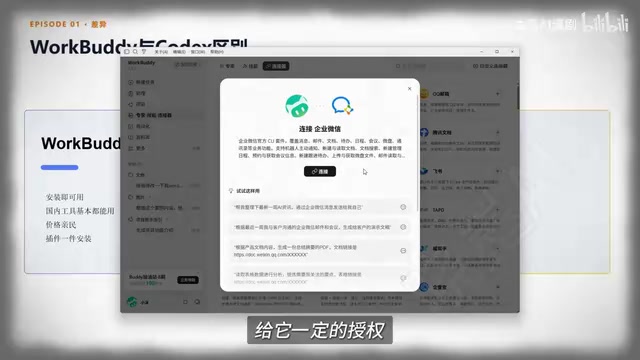
Why WorkBuddy Is a Good Starting Point for Beginners
Both WorkBuddy and tools like Codex are AI Agents, but Codex and similar overseas tools offer high flexibility at the cost of a steeper learning curve — users need a solid grasp of code, environment setup, and workflow orchestration. WorkBuddy is more beginner-friendly in several key ways:
- Easy installation: Just search for the product name in your browser, go to the official website, download, and install. No complex network configuration required.
- Rich connectors: Built-in connectors let you authorize integrations with tools like WeCom (Enterprise WeChat) and other common office software, so the AI can participate in your actual workflow within defined limits.
- Affordable: New users receive credits upon registration and can claim daily allowances, which is enough to cover everyday tasks for light users — unlike many overseas products that require a paid subscription to unlock real value.
- Skills and Expert ecosystem: A built-in Chinese Skill marketplace lets you install common capabilities with one click. There are also role-specific "Experts" that function like on-demand digital employees.
For individuals and businesses with limited budgets who still want a low-cost "digital employee," a solution that fits domestic office workflows and has a low deployment barrier is genuinely practical.
The fundamental difference between an AI Agent and a standard large language model lies in the closed-loop capability of "Perception → Decision → Action." Traditional LLMs only handle the "Decision" step — providing text-based advice or answers. An Agent additionally has the ability to perceive its environment (reading files, accessing a browser, calling external APIs) and execute actions (creating folders, filling out forms, clicking UI elements). This is typically implemented via a "Tool Use" mechanism: the underlying model can choose to call a set of predefined tools during inference, continuing to reason after each tool returns a result until the task is complete. This loop is also known as the ReAct (Reasoning + Acting) framework. Because Agents can actively operate a computer, safety boundary design is critical — WorkBuddy's "Allow Full Access" toggle reflects exactly this concern. When disabled, the Agent will explicitly ask for user confirmation before performing sensitive operations, preventing accidental mistakes.
Installation and Your First Real Task: Organizing a Messy Folder
The installation process is very straightforward: search for WorkBuddy in your browser, go to the official website, choose the Mac or Windows version, download, and double-click to install. As a domestic product, the interface and features are clearly labeled. You start with 2,000 credits — more than enough for a beginner to get going.
The interface breaks down into three sections:
- Left panel: Quick-access entries for modules like Projects and Experts
- Center: The workspace where you send all your instructions
- Right panel: A results preview area where you can browse generated outputs directly
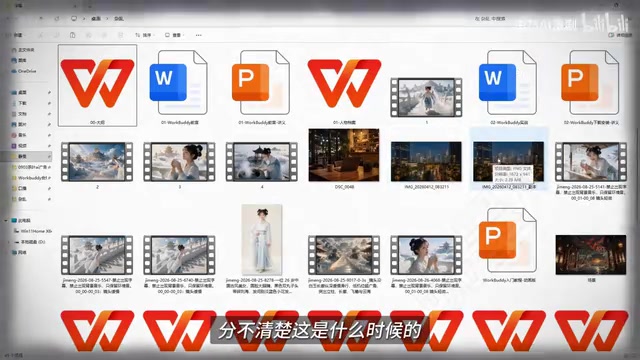
The first hands-on task is organizing a folder. Before starting, select your target workspace (the messy folder), then give instructions in natural language — for example, "Organize the folder contents by date and category." WorkBuddy will show its thinking and execution process: it first takes stock of the folder's contents (novel drafts, videos, images, teaching materials, and their modification dates), then creates named subfolders by category and files everything accordingly.
One safety detail worth noting: there's a "Allow Full Access" permission toggle in the interface. It's recommended to keep this disabled. When it's off, the Agent will proactively ask for your confirmation before any sensitive operation, which is safer. The entire file organization task consumed just 9 credits in the demo.
The workflow can be summarized in four steps: Open the app → Enter your task → Select a project → Receive the result.
Three Work Modes: Choosing the Right Mode for Each Task
WorkBuddy offers three work modes — think of them as three employees with different working styles. You can switch between them directly at the top of the interface.
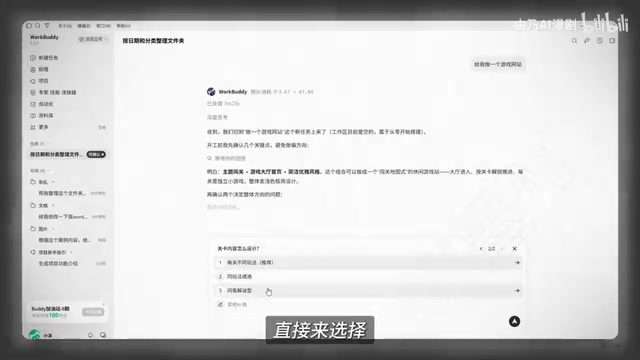
Default Mode (Execution Mode)
The most commonly used mode. Best for simple, well-defined tasks — it just gets to work, like organizing a folder. It also includes an "Enhance Prompt" feature: click it and the app will automatically refine your instruction to produce a more structured result. Very beginner-friendly.
Plan Mode
Designed for complex tasks. It will ask clarifying questions and lay out a plan before taking any action, waiting for your approval before proceeding. For example, if you ask it to "build a gaming website," it will first ask about the site type, theme, and other details, gradually building a complete plan — and only start executing once you've confirmed everything looks right.
Ask Mode
The mode closest to traditional AI — it answers questions but doesn't take action. The difference is that it can read local files. Ask it "how many assets are in this folder" and it will read the directory and give you a direct answer (e.g., 15 scripts, 10 images, 9 videos). It consumes the fewest credits and is ideal for simple queries, reading local files, and data analysis.
The selection logic is straightforward: use Ask for simple questions (saves credits, doesn't touch files), use Default mode for tasks that require action, and use Plan for complex, multi-step work. Forcing a simple task through Default or Plan mode just wastes credits unnecessarily.
These three modes correspond to two classic task-planning strategies in AI Agent design. Default and Ask modes fall under "single-step / direct execution" — best when task boundaries are clear and no dynamic adjustment is needed. Plan mode corresponds to the "Plan-and-Execute" paradigm, where the Agent first generates a structured list of steps, which the user reviews before execution begins, with room for human feedback at each stage. This phased approach significantly reduces error rates for complex, multi-tool tasks because the goal of each step is defined before execution starts. The "Enhance Prompt" feature is an application of "Prompt Optimization" in prompt engineering — the system expands a vague natural-language instruction into a structured prompt with constraints, format requirements, and boundary definitions, reducing ambiguous interpretation by the model. This is especially helpful for users who are new to writing effective prompts.
Multimodal Capabilities: From Generating Storybooks to Producing Short Videos
WorkBuddy's multimodal capabilities can be summed up as "it can handle almost anything" — documents, images, videos, and presentations are all covered. The interface provides quick-access entries for document processing, slide generation, image generation, and video generation.
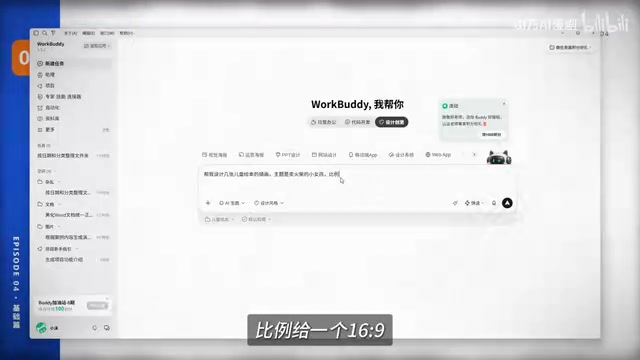
The tutorial walks through a complete end-to-end example: creating a children's illustrated storybook short video based on The Little Match Girl.
Step 1 — Generate storybook illustrations: From the design entry point, choose a design style and give the instruction "design several children's storybook illustrations," set a 16:9 aspect ratio, and let it optimize the prompt. The optimized prompt will specify key scenes and color style (soft and warm, suitable for young children), resulting in more accurate outputs. The generated images are built out in the right-side canvas; unnecessary text can be removed on command, individual elements can be adjusted with a selection tool, and all images are automatically saved in the same folder.
Step 2 — Convert images to video: Drag in the generated images or reference them using the @ workspace function, then give the instruction "generate a storybook short video based on these images," asking it to automatically add transition effects, narration, and optimize for landscape playback. The final render is a 25-second animated storybook video with AI-generated subtitles. You can continue the conversation afterward to add voiceover narration or make other adjustments.
The key takeaway here is simple: learn to communicate in natural language, and write your prompts as specifically as possible. Whether it's documents, presentations, images, or videos, the platform generally provides example templates — just swap in your own content to get started quickly.
"Multimodal" refers to a model's ability to understand and generate multiple types of data — text, images, audio, video — rather than being limited to a single input/output format. What WorkBuddy is doing here is orchestrating a workflow that chains together multiple specialized models: the image generation step calls a text-to-image model (similar to Stable Diffusion or its Chinese equivalents), while the video generation step calls an image-to-video model (similar to Runway Gen series, or Chinese tools like Jimeng or Kling). This "multi-model chaining" approach is the mainstream technical architecture for current AI Agent products — each specialized model handles the modality it excels at, while the Agent layer manages task decomposition, parameter passing, and result integration. The quality ceiling of the final output is determined by the capabilities of each underlying model, while prompt quality directly affects whether parameters are correctly passed to the corresponding model — which explains why the tutorial repeatedly emphasizes writing prompts as specifically as possible.
Getting Started: Don't Let the Tool Collect Dust in Your Bookmarks
The core value of WorkBuddy and similar domestic AI Agents is transforming "AI suggestions" into "AI execution" — giving everyday users a low-barrier, low-cost way to have an authorized, controllable digital employee.
For beginners, the most effective way to learn is to follow along and do: start by completing something simple like file organization to build confidence, then understand when to use each of the three modes to avoid wasting credits, and finally experiment with multimodal creation. The ceiling of what the tool can do often comes down to how clearly you can write your prompts — not the tool's inherent limitations. Future tutorials in this series will go deeper into Experts, Skills, and Connectors — those are the features that truly unlock WorkBuddy's productivity potential.
Related articles

Automate Job Search with AI Agents and Residential Proxies for Precise Matching
Build an AI Agent with MCP and residential proxies to bypass recruitment site anti-scraping and geo-restrictions, scrape thousands of DevOps jobs, then have Claude score and rank each against your resume. Includes proxy comparison experiments, project structure, and cost analysis—filtering only, no auto-submission.

The AI Task Assistant That Knows When to Back Off: A Cure for Activation Struggles
One Small Step is an AI assistant for task initiation struggles, using agentic decisions for guilt-free reminders, timely retreat, and cross-platform task management. The developer shares real test results on 13 tasks and architectural trade-offs.

FastAPI: A High-Performance Python Framework and a Production-Ready API Development Powerhouse
FastAPI is a high-performance web framework based on Python type hints, supporting async and automatic OpenAPI docs. With over 100k GitHub stars, this article analyzes its core strengths, production readiness, and selection advice.