WorkBuddy Beginner Tutorial: How AI Agents Can Operate Your Computer and Get Work Done

A Bilibili creator's step-by-step WorkBuddy tutorial teaches zero-foundation users to use AI Agents to operate their computers and complete tasks.
The article introduces a self-produced step-by-step WorkBuddy tutorial by a Bilibili creator, arguing that the key difference between AI Agents and traditional large models is whether they can directly operate a computer and push tasks to results rather than just give advice. It explains why WorkBuddy is chosen as an entry tool—low barrier to entry, connectors for office scenarios like WeCom, controllable cost, and a built-in Chinese Skill marketplace and expert roles—and outlines a three-part course of basics, advanced topics, and hands-on practice. It also cautions that the tutorial carries a promotional stance and that office software authorization involves permission and data security considerations.
AI has been trending for years, but most people still use it in a "ask a question, get an answer" mode—it can offer suggestions, but it can't actually finish the work for you. A tutorial series on Bilibili, billed by its creator as "the most complete and detailed WorkBuddy guide on the internet," tries to answer one question: if AI could directly operate your computer and complete tasks on your behalf, how would the way we work change?
From "Giving Advice" to "Delivering Results": The Core Difference of AI Agents
According to the demonstration in the Bilibili creator's tutorial, when a traditional large model is faced with a poorly formatted document, it usually tells you "you can unify the body text formatting like this," but you still have to do the actual work yourself. When a WorkBuddyAd-style AI Agent receives the same instruction, it finds the document on your desktop on its own and completes the formatting and beautification—all the user has to do is wait for the task to finish.
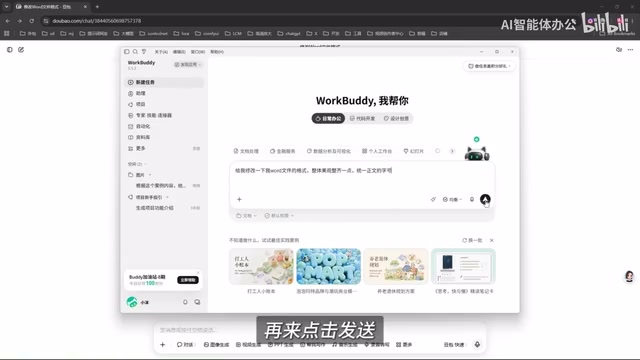
The creator sums up this difference bluntly: traditional large models are good at Q&A, analysis, and offering suggestions, while the focus of an AI Agent is to push a task through to a result within the scope you've confirmed and authorized. It's more like a digital employee taking your instructions—able to operate a computer, invoke tools, and get things done directly. The PPT creation case shown in the tutorial confirms this too—after providing requirements, the AI helped complete an entire slide deck, including animations.
Such tools are not unique to WorkBuddy; Codex and other intelligent agents capable of invoking tools and executing workflows belong to the same direction. There's only one criterion for judging them: can they directly take action?
AI Agent refers to a form of large-model application that can perceive its environment, make autonomous decisions, and invoke tools to execute actions in order to accomplish a goal. Compared with traditional conversational large models, an Agent typically has three capabilities: planning, memory, and tool invocation. It breaks the user's goal into subtasks, maintains context during execution, and operates external resources such as files, browsers, and office software through APIs or system interfaces. ReAct, Plan-and-Execute, and similar approaches are common reasoning frameworks. An Agent's execution chain generally includes intent understanding, task planning, tool selection, action execution, and result verification, and it may replan based on feedback when necessary. Therefore, when evaluating an Agent product, beyond the model's own reasoning ability, you should also look at the range of tools it can invoke, execution stability, and whether the human confirmation mechanism is well designed.
Why Beginners Should Start with WorkBuddy
The creator makes a set of comparisons in the course to explain the reasons for choosing WorkBuddy as an entry-level tool.
Low barrier to entry
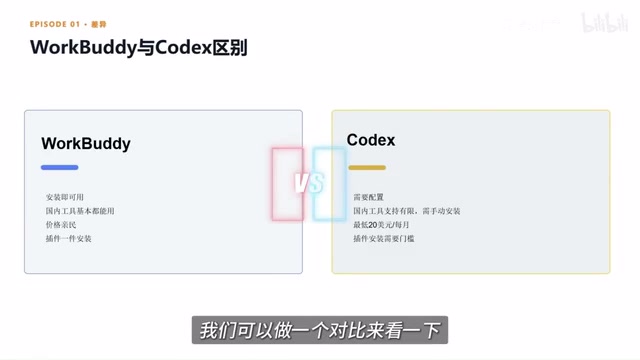
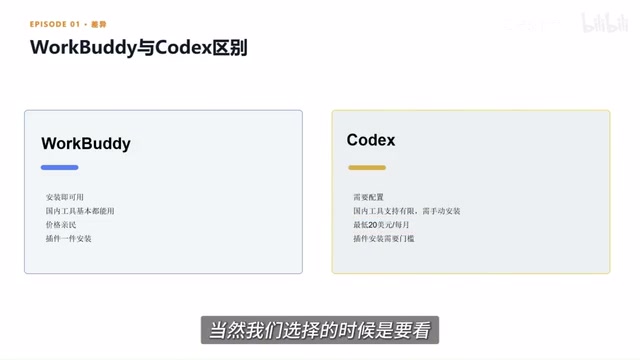
Open a browser, search for the product name, and complete the download and installation onto your local computer—the whole process is very intuitive. By contrast, tools like Codex offer greater freedom but require understanding code, configuring environments, and invoking workflows, placing higher demands on technical background.
Connectors open up office scenarios
A connector is essentially an entry point that authorizes AI to use a certain piece of software or service. The tutorial demonstrates a scenario connected to WeCom (Enterprise WeChat): after authorization, the AI can help reply to messages and can also organize chat history or communication content into documents. This lets AI not only "know how to do something" but also participate in completing the entire process within the permitted scope.
Connector can be understood as a standardized adaptation layer between an Agent and external systems. It typically obtains access tokens through authorization protocols such as OAuth, and then reads and writes data through the APIs opened by the target platform. Office suites such as WeCom, Feishu, and DingTalk all provide interfaces for messages, contacts, documents, and calendars, and connectors wrap these interfaces into actions that an Agent can directly invoke. On security, the principle of least privilege is generally followed: when authorizing, users select only the necessary scopes, tokens can be revoked at any time, and sensitive operations often require secondary confirmation. Enterprise environments also involve issues such as cross-border data transfer, log auditing, and compliance retention, so the service provider's data processing terms should be confirmed before integration.
Controllable cost
At registration, the platform provides a certain number of credits, and a certain quota can be claimed every day, which for light users basically covers daily experimentation and basic tasks. The creator notes that some overseas products require subscription payments and only deliver value when usage is large enough. What really matters when choosing a tool is whether it fits your work scenario.
Plugin and Skill marketplace
The platform has a built-in Chinese Skill marketplace, where common capabilities can be installed to your computer with one click. A so-called Skill can be understood as an already-trained professional tool or work capability. The platform also offers "expert" roles, similar to digital employees for different positions—when a team needs a senior development engineer to build a process from scratch, they can directly find the corresponding expert and invoke it with one click.
Skill differs from a plugin: plugins tend to provide interfaces and capability extensions, while Skills place more emphasis on packaged task workflows and operating standards, usually including prompt templates, tool invocation order, and output format conventions, making the Agent perform more stably in specific scenarios. One-click installation in the marketplace essentially distributes these configurations to the local runtime environment. Expert roles are personified configurations that layer domain knowledge and behavioral constraints on top of a general Agent—for example, when working as a "senior development engineer," it prioritizes engineering processes and coding standards. Such mechanisms lower the threshold for ordinary users to write complex prompts, but the results depend heavily on the maintenance quality of the Skill, and when installing third-party Skills you should also pay attention to the scope of permissions they request.
Course Structure: A Three-Part Path of Basics, Advanced Topics, and Hands-On Practice
This tutorial took three months to complete. The author says that while preparing the lessons, they re-examined the entire field from a beginner's perspective and browsed a large number of WorkBuddy tutorials on various websites, finding the quality uneven, so they integrated the core knowledge points and reorganized the content using case demonstrations.
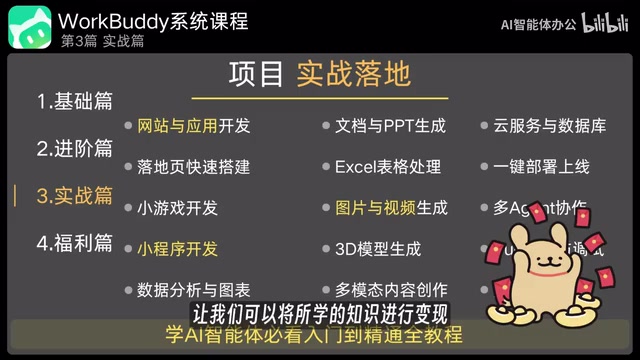
The course is divided into three parts:
- Basics: step-by-step installation, getting to know the interface, and building a foundation in the simplest way possible;
- Advanced topics: capabilities such as batch file modification, automatic bug fixing, installing add-ons, and task automation;
- Hands-on applications: real projects such as website mini-games, mini-programs, PPTs, spreadsheets, images, and videos, turning theory into practical applications.
The accompanying "Green Book" and course notes cover all the materials involved in the course, solving the problem of note-taking during learning. The creator's goal is for learners to turn what they learn into real applications—and even into income.
A Few Sober Observations
The positioning of this course is clear: it targets users with zero foundation and lowers the barrier to using AI Agents. From the demonstrations, WorkBuddy can indeed save a great deal of manual operation in scenarios such as document processing, PPT generation, and office software connections.
It should be noted that the tutorial is self-produced by the creator, and its assessments of the tool's ease of use and cost advantages carry a promotional stance. Expressions such as "beats paid products" and "the most complete on the internet" are the creator's personal judgments, and the actual experience still depends on specific work scenarios. In addition, AI Agents require user authorization when executing tasks, and when connecting to office software such as WeCom, permission boundaries and data security deserve advance assessment.
For beginners who want to experience a "digital employee" with a low barrier to entry, starting with a tool that is intuitive, compatible with domestic office scenarios, and cost-controllable is a pragmatic choice. The subsequent installation and hands-on steps are the real test of this course's quality.
One-line Summary
A Bilibili creator has released a step-by-step WorkBuddy tutorial teaching zero-foundation users to use AI Agents to directly operate their computers and complete tasks.
Paragraph Summary
The article introduces a self-produced step-by-step WorkBuddy tutorial by a Bilibili creator. Its core argument is that the key difference between AI Agents and traditional large models lies in whether they can directly operate a computer and push tasks through to results, rather than merely giving suggestions. The tutorial chooses WorkBuddy as the entry-level tool for reasons including low barrier to entry, connectors that open up office scenarios such as WeCom, controllable cost, and a built-in Chinese Skill marketplace and expert roles. The course is divided into basics, advanced topics, and hands-on practice, with an accompanying Green Book and course notes. The article also notes that the tutorial carries the creator's promotional stance, that assessments of ease of use and cost are subjective, and that authorizing office software involves permission boundaries and data security that users must evaluate themselves.
Related articles

Running a Local LLM on a Laptop CPU: Ollama + Qwen3 Gives a Desktop Pet a Brain
An ordinary laptop without a GPU can run a local LLM: a Bilibili creator uses Ollama plus open-source Qwen3 8B on pure CPU to give an original desktop pet a local brain, with DeepSeekHarness handling plugin development and three rounds of debugging — 0 yuan, works offline, privacy stays on-device.

AgentScope 2.0 in Practice: A Guide to Enterprise-Level AI Agent Development in Java
AgentScope 2.0 is Alibaba's Java enterprise-grade distributed agent framework. This article explains why it suits server-side AI applications, contrasts client-side AI apps in permissions, state management, and concurrency, and outlines a practical learning path from environment setup to project integration.

GPT-6 Astra Directly Edits Weights to Fix Models? Full Analysis of the MIT Paper and Leaks
MIT paper shows GPT-6 Astra repairs small models by directly editing weights, raising math scores from 7.9% to 48.1%; OpenAI internal charts hint an unreleased model leads on BenchCAD 2.0; Fable 5.5 pure-code movies and the Claude WiFi radar incident analyzed.