WorkBuddy Full Workflow Explained: From Principles to Practice, Understanding AI Office Agents in One Article
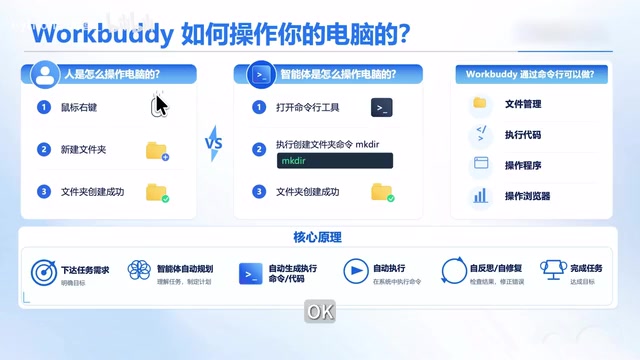
WorkBuddy is a command-line driven desktop agent that completes office tasks through a planning—execution—feedback—self-repair loop.
Based on a Bilibili zero-foundation tutorial, this article analyzes the underlying operating logic of WorkBuddy as a desktop agent. WorkBuddy is not a chatbot, but operates the computer through command-line driving and connects to external tools via connectors, the MCP protocol, and APIs, forming a complete task loop. Its workflow is: the large model understands requirements and decomposes tasks, decides the execution method for each subtask (command, API, or writing code on the spot), WorkBuddy executes and returns results, automatically repairs and retries on failure, looping until completion. The article clarifies the division of labor between the agent (capability framework/body) and the large model (decision-making brain), and points out the criteria for task suitability: whether the required operations and connections are supported by the framework, and whether the judgment and planning are within the large model's capabilities. Finally, it gives practical advice: tasks with clear rules and decomposable steps are best suited for WorkBuddy, and irreversible operations should be validated on a small scale first.
WorkBuddy is becoming a popular tool in China's AI office space. A zero-foundation tutorial on Bilibili claims to cover the complete path from beginner to industry implementation with 28 knowledge points, but what's more noteworthy than the course outline is how it reveals the underlying logic of how such AI agents operate — only by understanding "how it works" can you judge which tasks should be handed to it and which shouldn't.
What WorkBuddy Actually Is: A Desktop Agent, Not a Chatbot
According to the definition in the Bilibili creator's tutorial, WorkBuddyAd can be understood as a China-adapted version of Codex — the interface layout and operation logic are basically identical, but it has done three things for domestic users: no special network environment required, usable without configuration, and free quota provided. The more critical difference lies in ecosystem adaptation: it can connect to mainstream domestic office software, consolidating work that previously required switching back and forth between multiple applications (organizing materials, analyzing spreadsheets, executing repetitive tasks) into a single entry point for unified handling.
This positioning determines its essential difference from ordinary AI chat products: it doesn't just chat with you, it can actually operate your computer to get work done. The course structure, refined over nearly three months (four sections: introduction, cases, advanced, industry), also confirms this — the focus is not on prompt techniques, but on building workflows.
Core Mechanism: Command-Line Driven, Not Simulating Manual Operations
The first step to understanding WorkBuddy's capability boundaries is to grasp how it operates a computer. The tutorial makes a clear comparison: the human process of operating a computer is "look at screen → mouse click → keyboard input," with many steps and low efficiency; if AI took this path too, it would also need real-time screenshot recognition of the interface, at extremely high cost.
WorkBuddy chose another path — command-line driven. When you say "create a folder called Course Materials on the desktop," the large model first determines the type of request (create folder, what's the name), then generates a corresponding command and hands it to WorkBuddy for execution, and the folder is created immediately. By clicking the small arrow in the interface, users can see the actual command content executed.
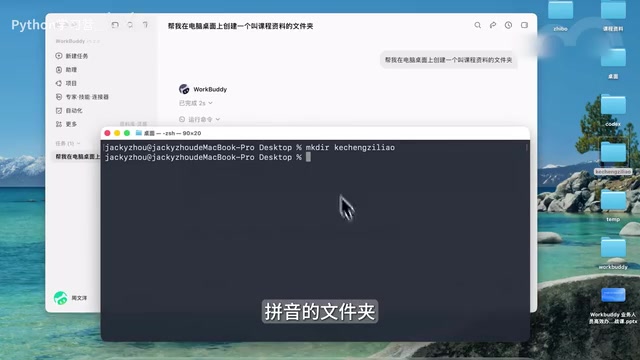
This breakdown contains an elegant mapping: the command is conceived by the "brain," corresponding to the large model; the command is executed by the "hand," corresponding to WorkBuddy. Together, the two replace human thinking and operation.
From this we can derive its capability scope: operating files and folders, launching programs, controlling browsers, executing technical tasks; when simple commands can't get it done, having the large model write a Python or Node script on the spot and then execute it; even installing software and completing operations through scheduling software.
Command-line driven (CLI, Command-Line Interface) refers to operating a computer through text instructions rather than a graphical interface. Unlike mouse clicks, command-line operations are atomic, scriptable, and low in resource consumption — a single command can precisely describe an operation intent, with no need to render an interface. For AI agents, the command line is a naturally friendly interface: large models excel at generating structured text (i.e., commands), and operating system kernels already provide rich command-line tools. Therefore, WorkBuddy doesn't need to simulate manual clicks like RPA (Robotic Process Automation); it directly invokes system commands, achieving higher efficiency and reliability. This also explains why it can quickly execute tasks like file operations and program launches, with the execution process fully recorded and auditable.
Capability Extension: Connectors, MCP, and APIs to Connect External Systems
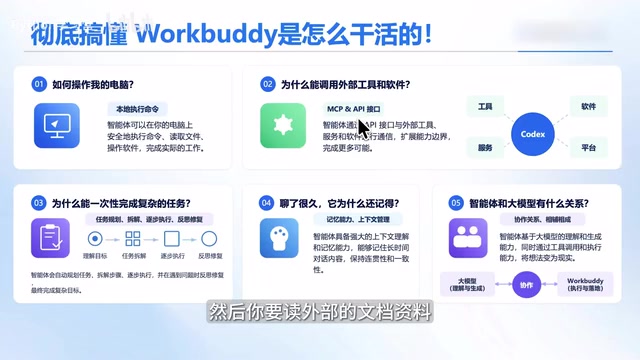
Scheduling the local computer alone cannot cover complete business scenarios. Sending emails, booking meetings, route planning, reading external documents — these tasks require connecting to external services. The tutorial points out that WorkBuddy provides multiple ways to connect external tools: connectors, the MCP protocol, and API interfaces. Email can integrate with QQ Mail, meeting booking connects to meeting tools, route planning connects to Amap, and document reading connects to Feishu Docs or Tencent Docs.
The significance of this layer is: local operation capability plus external integration capability is what constitutes a complete task loop. Evaluating whether a task can be handed to WorkBuddy essentially means judging whether the "operations" and "connections" it requires are both within the coverage scope.
MCP (Model Context Protocol) is an open protocol proposed by Anthropic, aimed at standardizing how large models connect to external tools and data sources. Traditionally, each time an external service (such as email, calendar, maps) is integrated, developers need to write customized adapter code; MCP defines a set of universal interface specifications so that any tool supporting the protocol can be directly invoked by large models. For WorkBuddy, supporting MCP means it can dynamically expand its capability boundaries — users can access new business systems through MCP servers without waiting for official one-by-one integration. This complements connectors (pre-built integrations for ordinary users) and APIs (programming interfaces for developers), together forming a three-tier system for external tool access.
Workflow Breakdown: The Loop of Planning, Execution, Feedback, and Self-Repair
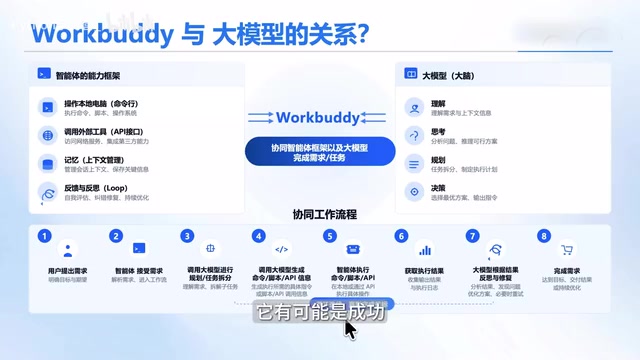
This is the most informative part of the entire tutorial. The process by which WorkBuddy completes complex tasks can be broken down into several stages:
- Requirement understanding and task decomposition: After the user presents a requirement, the large model is responsible for understanding, thinking, and planning, breaking the big requirement into small tasks.
- Deciding execution method for each task: For each small task, the large model judges whether to use command-line, call an API, or write a script on the spot, then generates commands or code and hands them to WorkBuddy for execution.
- Result feedback and self-repair: Execution doesn't always succeed. After WorkBuddy obtains execution logs or results, it passes them back to the large model, which judges success or failure; on failure, it analyzes the cause, fixes the problem, and re-executes.
- Loop until completion: Each task goes through the "execute—feedback—repair" loop, and only after all tasks are completed is the entire requirement considered delivered.
This iterative loop with error self-repair explains why agents can handle tasks of certain complexity — it doesn't get it right in one shot, but advances through trial and error.
The tutorial also mentions that WorkBuddy has memory capability: it automatically remembers your name, preferences, and work style, and over time develops a rapport like a work buddy. This is quite valuable for long-term use scenarios, but it also means early interactions require a certain "running-in period."
Self-repair is a key feature that distinguishes agents from traditional automation scripts. Traditional scripts interrupt upon encountering environmental changes or unexpected errors and require manual intervention; agents with self-repair capability feed error information as new context to the large model, which analyzes the cause of failure and generates a correction plan. This process typically relies on a "reflection" mechanism: the model not only executes tasks but also evaluates execution results, forming an "execute—observe—reflect—correct" loop. WorkBuddy passing execution logs back to the large model is precisely to provide a basis for reflection. This mechanism enables agents to handle a certain degree of ambiguity and uncertainty, but it also brings additional time and token consumption, so for simple, deterministic tasks, direct execution is often more efficient.
Agents and Large Models: The Division of Labor Between Framework and Brain
The tutorial finally clarifies an easily confused relationship: agents and large models complement each other. WorkBuddy, as a capability framework, provides "body"-level capabilities such as operating the computer, scheduling external tools, context memory management, and task processing flow; the large model is the brain, responsible for requirement understanding, planning, task decomposition, and decision-making.
The practical value of this division framework is: when you evaluate whether a business scenario is suitable for WorkBuddy, you can ask two questions separately — does the framework support the operations and connections this task requires? Can the large model handle the judgment and planning this task requires? Only when both answers are affirmative is it worth investing.
Practical Recommendations
Based on the principles disclosed in the tutorial, a few judgments are worth considering: tasks with clear rules, decomposable steps, and required tools within the integration scope are best suited for WorkBuddy; tasks requiring complex interpersonal judgment or depending on unintegrated systems still need human backup in the short term. In addition, since the execution process involves failures and retries, for tasks involving irreversible operations (such as batch deletion or external sending), it's recommended to validate on a small scale first before opening up.
The tutorial also provides a hands-on manual (covering installation, case breakdowns, Skill customization, and industry implementation) and 12 commonly used Skills. For readers who want to get started, starting from Skill reuse is more efficient than building workflows from scratch.
One-line Summary
WorkBuddy is a command-line driven desktop agent that completes office tasks through a planning—execution—feedback—self-repair loop.
Paragraph Summary
Based on a Bilibili zero-foundation tutorial, this article analyzes the underlying operating logic of WorkBuddy as a desktop agent. WorkBuddy is not a chatbot, but operates the computer through command-line driving and connects to external tools via connectors, the MCP protocol, and APIs, forming a complete task loop. Its workflow is: the large model understands requirements and decomposes tasks, decides the execution method for each subtask (command, API, or writing code on the spot), WorkBuddy executes and returns results, automatically repairs and retries on failure, looping until completion. The article clarifies the division of labor between the agent (capability framework/body) and the large model (decision-making brain), and points out the criteria for task suitability: whether the required operations and connections are supported by the framework, and whether the judgment and planning are within the large model's capabilities. Finally, it gives practical advice: tasks with clear rules and decomposable steps are best suited for WorkBuddy, and irreversible operations should be validated on a small scale first.
Related articles

Qwen4 Architecture Preview Open-Sourced: 125B Parameters, 512 Experts, Designed for VRAM-Constrained Hardware
Qwen4 isn't released yet, but its architecture is previewed via open-source Qwen3.8 Flash Next: 125B params, 6B activated per token, 512 experts, 262K context, built for VRAM-limited hardware. This article covers official confirmations, key config.json metrics, and local deployment tests on 24G memory.

Run 8K Images on 6GB VRAM! Hands-On Test of Fudan's Open-Source MOSS-Image Model
Fudan OpenMouse team and Shanghai MOSS Intelligence open-source MOSS-Image, a 500M-parameter DT architecture text-to-image model that runs locally on 6GB VRAM with precise text rendering, structured layout control, and 4K Token prompt support—ideal for e-commerce posters and local deployment by individual creators.

Overseas Blogger Tests Local Deployment of 100B-Parameter MoE Model: Key Lessons on Quantization and Tool Calling
Overseas blogger tests local deployment of Alibaba's Qwen 3.8 Flash Next 100B MoE model on a Strix Halo mini PC and CUDA workstation, revealing how quantization precision affects tool-calling success and the real-world performance of the Strata and GUFO inference engines.