WorkBuddy Getting Started Guide: Turning AI from a Chat Tool into an Office Employee

WorkBuddy is a desktop AI Agent that turns AI from a chatbot into a real office worker for everyday tasks.
This article introduces WorkBuddy, a desktop AI Agent that can directly operate your local computer to complete real tasks — batch file management, spreadsheet processing, website development, and collaborative office work — rather than just outputting text suggestions. Compared to Codex, WorkBuddy has a lower learning curve, works right out of the box, and is deeply integrated with Chinese office tools like Feishu and DingTalk, making it more suitable for everyday office workers. The key takeaway is a mindset shift: stop asking AI questions and start managing AI like an employee.
From AI Question-Asker to AI Manager
Many people have been using AI for a while now — memorizing prompt templates, trying all kinds of tricks — yet their salaries haven't budged. The author makes a pointed observation: prompts are essentially suggestions, and suggestions aren't worth much. Execution is what counts. That's precisely why tools like WorkBuddyAd exist — to transform AI from "giving advice" into "actually getting things done."
Traditional web-based AI (whether Tongyi Qianwen, Doubao, or GPT) is fundamentally a Q&A tool with no access to your local files. It might seem like we're using AI, but in reality, most of the actual work still requires us to operate the mouse and keyboard ourselves. The AI just comes up with ideas; the grunt work of execution still falls on us. In other words, we end up working for the AI.
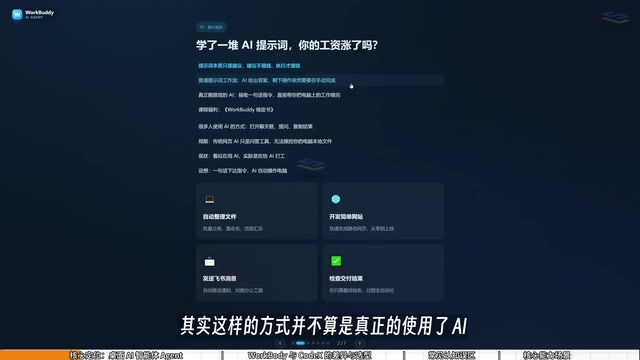
WorkBuddy is designed to close that gap. It's a desktop AI Agent — not just a chat window. You give it tasks in plain language, just like talking to a real person, and it automatically handles the research, execution, and delivery. The core value proposition: it can directly operate your local computer to complete real office tasks, rather than just handing you an instruction manual.
What Exactly Is WorkBuddy
Simply put, WorkBuddy can be understood as a domestic alternative to Codex — an AI assistant that can work directly inside your computer. It has a much lower barrier to entry, requires no complex network setup or configuration, and is extremely beginner-friendly.
The range of scenarios it covers is impressively broad: drafting proposals, building spreadsheets, analyzing data, creating content, generating posters, developing simple software, and even taking over your browser to operate various applications — delivering results directly to you in one go.
The video emphasizes that learning WorkBuddy isn't really about learning the interface — it looks very similar to Tongyi Qianwen, Doubao, or GPT — but about shifting your mindset: from "asking AI questions" to "managing AI to do work." As the author puts it: you're the manager, WorkBuddy is your employee, and your computer is your company.
The fundamental difference between an AI Agent and a regular chat AI lies in tool-calling capability. A standard LLM can only generate text, while an Agent framework grants AI permission to invoke external tools — including reading and writing the file system, executing code, controlling a browser, calling APIs, and more. In technical terms, an Agent completes tasks through a "perceive-plan-act" loop: first understanding user intent, then breaking it down into executable steps, and finally calling tools step by step while dynamically adjusting subsequent actions based on intermediate results. This architecture upgrades AI from "outputting suggestions" to "executing tasks" — a critical leap in moving AI from the lab into real-world productivity scenarios. WorkBuddy is essentially this Agent capability packaged into a user-friendly desktop application.
How WorkBuddy Differs from Codex
Given that Codex is more powerful, why bother learning WorkBuddy? The video offers a vivid analogy.
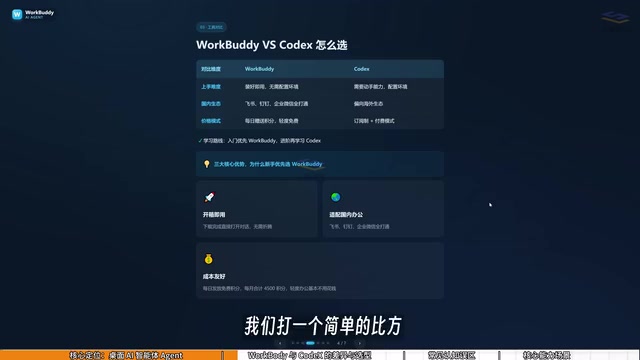
If Codex is a special forces soldier, then WorkBuddy is a "college student special forces soldier." Codex is formidable, but it needs a commanding officer to lay out a detailed battle plan — you have to specify exactly which file, which directory, which parameters to use. That requires a certain level of technical skill and experience. WorkBuddy, on the other hand, is like a capable and obedient college student. It may not handle the most complex tasks, but simple ones like "send this file to someone" or "organize these documents" are well within its abilities.
The key differences between the two can be summarized as follows:
- Learning curve: WorkBuddy is ready to use right after installation — no environment setup, no command-line required. Codex demands stronger technical ability and a programming background.
- Ecosystem compatibility: WorkBuddy is deeply integrated with domestic office tools like Feishu, DingTalk, WeCom, and Tencent Docs. Codex is oriented toward overseas ecosystems and has limited support for Chinese office software.
- Usage cost: WorkBuddy gives away free credits daily, with additional thousands of credits available during promotions. Collecting credits every day for a month adds up to at least 3,000 credits. Codex, by contrast, runs on a subscription model — you're paying real money even while you're still learning.
The recommended learning path from the video: for regular office workers, start with WorkBuddy to get real work done. For most jobs, WorkBuddy is more than sufficient. Only when you genuinely outgrow it should you move on to learning Codex — this minimizes your learning costs.
Codex is an AI coding agent product from OpenAI. Its core capability is autonomously completing programming tasks inside an isolated cloud sandbox — cloning repositories, modifying code, running tests, submitting PRs, all without human intervention. It excels at complex software engineering tasks, requiring users to clearly articulate technical requirements, understand code structure, and have enough debugging ability to verify outputs. For this reason, Codex is most accessible to users with a development background. For everyday office tasks — organizing documents, processing spreadsheets, generating reports — its advantages aren't as clear-cut, and the learning curve is relatively steep. This is precisely why the video author recommends WorkBuddy as the entry point for office workers rather than jumping straight to Codex.
Avoid These Three Common Misconceptions
Beginners often carry a few mistaken beliefs when approaching tools like this. The video takes time to address them directly.
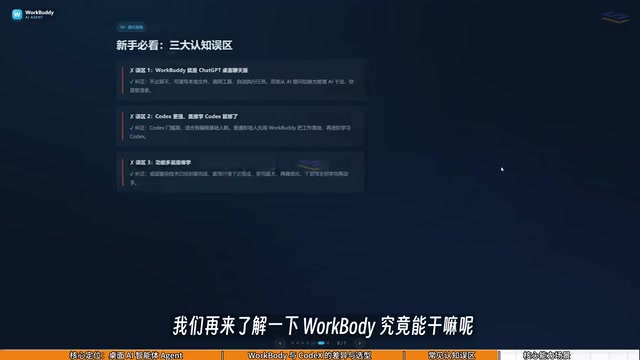
Misconception #1: WorkBuddy is just a desktop GPT wrapper. That's not accurate. WorkBuddy doesn't just chat — it reads local files, calls tools, and executes tasks automatically. Your mindset needs to shift from "asking AI questions" to "managing AI to do work."
Misconception #2: Codex is more powerful, so I should just learn Codex. In reality, Codex has a much higher barrier to entry and is better suited for people with a programming background. Regular office workers should prioritize WorkBuddy first.
Misconception #3: It has so many features, it must be hard to learn. WorkBuddy's interface is highly similar to mainstream AI chatbots. What you actually need to learn isn't the interface — it's the shift in thinking from asking questions to issuing commands that make it operate your computer. You can absolutely follow along by watching tutorials while working in the app at the same time.
What Can WorkBuddy Actually Do
So what specific tasks can this "AI employee" handle?
File management is the most typical use case — batch sorting, batch renaming, and consolidating information from multiple documents. The video gives a relatable example: when recording tutorials, files are named 01, 02, 03, 04. But if one lesson is too short and needs to be merged into the previous one, the naming sequence ends up as 1, 3, 4 — a gap that's tedious to fix manually. Just tell WorkBuddy to automatically rename the files, and it handles it.
Beyond that, it can process documents and data (weekly reports, Excel spreadsheets), develop websites, support collaborative work alongside Feishu and DingTalk, and periodically generate work summaries. None of this is theoretical — given a reasonable instruction, WorkBuddy will execute it directly.
Saving Money: Remember to Check In Daily for Credits
Cost is what most people care about most. WorkBuddy uses a credit-based system, which makes it more economical than the subscription-based Codex.

Here's how it works: after logging in to WorkBuddy, click your avatar in the lower left, find the "Buddy Station" option, and click to check in and collect your daily credits. Credits accumulate, so anything unused today carries over to tomorrow. Checking in every day for a month nets you at least 3,000 credits, and promotions can push that even higher. For users still in the learning phase and feeling their way around, this significantly lowers the cost of experimentation.
Wrap-Up
The real value of this tutorial isn't in the step-by-step instructions — it's in helping newcomers build the right mental framework: understanding the fundamental difference between a regular AI chatbot and a desktop AI Agent, recognizing that WorkBuddy is an "AI employee" rather than a chatbot, and weighing the trade-offs between WorkBuddy and Codex in terms of learning curve, ecosystem fit, and cost.
For professionals working in China, if you're bogged down by tedious file organization, repetitive spreadsheet work, or recurring report generation, desktop Agents like WorkBuddy genuinely offer a low-barrier path to greater productivity. Of course, whether you actually get the most out of it still comes down to that one key shift — evolving from an AI question-asker into an AI manager.
Related articles

Free Unlimited Claude Code Solution: Agnes AI + CC Switch Setup Guide
No paid subscription needed — pair the free AI platform Agnes AI with the open-source tool CC Switch to provide a backend for Claude Code, enabling unlimited free calls to text, image, and video models. This guide covers the full setup, test results, and usage boundaries.

A Complete Zero-Cost Guide to Getting Started with Claude Code for Beginners in China
A beginner's guide to Claude Code for users in China: two installation methods (command line and IDE plugin), full configuration steps for replacing the official API with the free domestic LongCat model, and a hands-on demo of building a small tool with natural language, plus tips.

When the NSA Gets Involved: The AI Supply Chain Crisis Behind Open-Source CVEs and API Key Hijacking
Multiple open-source projects disclosed severe CVEs in one day, PHP flaws alarmed the FBI, and Railway and OpenCode were breached with API keys stolen. This article breaks down the vulnerability window, AI-accelerated exploitation, and the AI supply chain crisis behind the API key black market, with a developer defense checklist.