WorkBuddy in Practice: Building AI Agent Automated Workflows and File Batch Processing
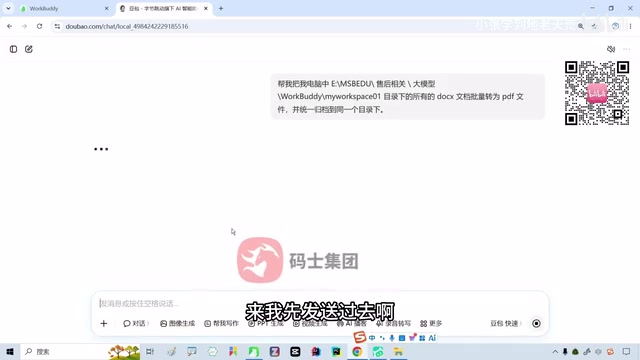
Ordinary large models can only give plans, while AI Agents like WorkBuddy can directly operate a computer and deliver results.
Using a Bilibili creator's hands-on demonstration as the thread, the article contrasts the essential difference between ordinary large models and AI Agents: Doubao can write a complete script for batch Word-to-PDF conversion but cannot touch the local file directory—the plan is given, but the work still has to be done by yourself. WorkBuddy, as an AI Agent tool, can after user authorization autonomously scan directories, check the environment, install dependencies, perform conversions, and archive files. The entire task was completed in about seven minutes, all four files were successfully converted, and only 6.55 credits were consumed (new users receive 2000 credits). The article emphasizes that Agents have self-correction capability but also points out their applicable boundaries—suitable for repetitive tasks with clear workflows, while complex scenarios require evaluating more advanced solutions; understanding tool boundaries is more meaningful than pursuing full automation.
Why Can't Ordinary Large Models Help You?
Many people have gotten used to handling everyday needs with large model products like Doubao, ChatGPT, and DeepSeekAd, but these are essentially more like an "advisor"—they can understand problems and generate solutions, yet cannot directly operate your computer.
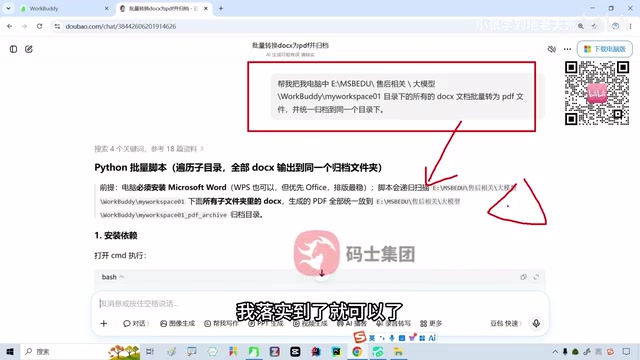
Bilibili creator Teacher Shanyao demonstrated with a real scenario: batch-converting a set of Word documents in a certain directory to PDF and archiving them uniformly. Doubao quickly produced a complete Python script and step-by-step instructions—the code was written clearly—but the file directory didn't budge, because ordinary large models have no ability to access the local file system, invoke software, or execute commands. The plan was given, but the work still had to be done by yourself.
This is exactly the problem AI Agents are meant to solve: not only understanding the task, but also entering your work environment, invoking tools, operating on files, checking results, and ultimately delivering a finished product. WorkBuddy is one representative of this type of tool.
What Is WorkBuddy: From "Giving Advice" to "Delivering Results"
WorkBuddy belongs to the AI Agent category of tools, and its core difference from ordinary large models lies in execution capability. It retains the understanding and reasoning abilities of large models while connecting to local files, the command line, and various system tools, enabling it to translate natural language requirements directly into actual operations.
In the creator's words, this is a shift from "answering questions" to "executing tasks," and from "giving advice" to "delivering results." In terms of interface, it is much the same as tools like Codex, with the core being an input box plus a task execution area.
Before use, you need to download and install it, then log in to your account. New users receive 2000 credits upon login, and task execution deducts credits based on consumption. In the demonstration, the creator consumed a total of 6.55 credits to complete the entire conversion task. At this ratio, the gifted credits can support a considerable number of everyday tasks.
The core difference between AI Agents and traditional large models lies in the "Tool Use / Function Calling" capability. A large model itself is merely an inference engine: it takes text in and outputs text, and cannot directly read or write files or execute commands. To make the model "take action," an execution framework must be built around it: the model autonomously decides which tool to call based on the task (such as file reading, Shell commands, or a Python interpreter), the tool returns the result to the model after execution, and the model then determines the next action. This loop of "reason—call—observe—reason again" is the basic operating mechanism of an Agent, commonly known in the industry as the ReAct pattern. Products like WorkBuddy embed large models into such an execution loop, which is why they can scan directories, install dependencies, convert files, and self-correct.
In Practice: Batch Word-to-PDF Conversion with Automatic Archiving
Step 1: Describe the Requirements Clearly
Paste the same prompt previously given to Doubao into the WorkBuddy input box: batch-convert all DOC/DOCX documents in a specified directory on the computer to PDF and archive them uniformly into the same folder. The more specific the requirement description—including the full path, file types, and target operations—the more accurately the Agent can execute.
Step 2: Authorization and Waiting
After sending, WorkBuddy requests access permission. After you click allow, it begins autonomous execution: first scanning the directory contents to confirm which files are present, then checking the runtime environment and installing dependencies itself if necessary. The entire process requires no manual intervention, and the intermediate execution steps are displayed in a collapsed form.
The creator specifically mentioned that this task took about seven minutes. During this time, the Agent handles various situations—for example, automatically installing when the environment is missing, or re-catching a failed step and trying another approach. This self-correction capability is an important difference between Agents and script tools.
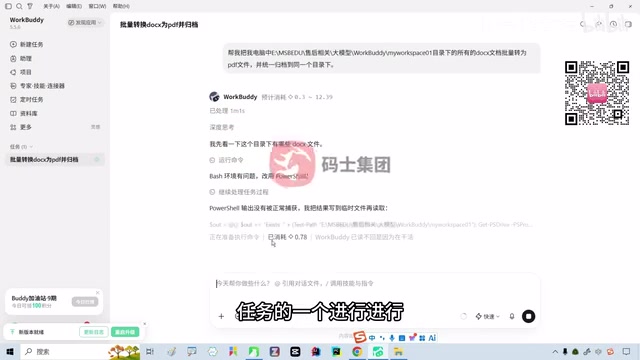
An Agent's "self-correction" relies on observing execution results and re-deciding. In traditional scripts, an error at any step interrupts the process and requires manual troubleshooting; whereas an Agent reads the command output or error message after each step, determines the cause of failure, and then decides whether to retry in a different way—for example, automatically running an install command when it detects a missing Python library, or switching to a built-in system conversion tool. This capability comes from the large model's semantic understanding of error messages, not from pre-written exception-handling logic. The cost is slower execution speed and credit consumption that increases with the number of attempts, so the clarity of the task description directly affects both the success rate and the cost.
Step 3: Accept the Results
Upon completion, WorkBuddy gives a prompt indicating successful conversion and provides a preview of the generated PDFs. After opening and checking them, the creator confirmed that the converted PDFs matched the content of the original DOCX files with no issues. All four files were successfully converted and archived to the specified directory.
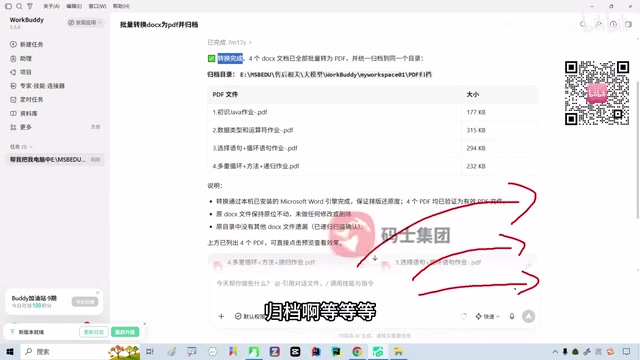
Throughout the entire process, the user did only three things: describe the requirements, authorize, and accept the results. Compared with the traditional approach—manually converting one by one or using WPS's paid batch feature—the efficiency difference is obvious.
Credit Mechanism and Usage Recommendations
WorkBuddy uses a credit system: new users receive 2000 credits, and tasks deduct credits based on actual consumption. The creator mentioned that referring new users to register can earn credit rewards, which is also why many people have been forwarding it on WeChat Moments recently—a side indication that usage of the tool is rising.
It is worth noting that the creator encountered a version update prompt during recording. Such AI tools iterate extremely quickly, and their interfaces and features may change at any time; when learning, simply refer to the actual version in use.
Applicable Boundaries: Not Every Scenario Should Use an Agent
The creator offered a pragmatic judgment at the end: WorkBuddy is suitable for relatively simple tasks with clear workflows, such as file batch processing, format conversion, and directory organization. If the work scenario is more complex, you may need to consider more advanced AI Agent products. WorkBuddy is not the only Agent tool available; choosing according to need is the reasonable approach.
This point deserves attention. The value of AI Agents lies in automating repetitive office tasks with clear rules, not in replacing all complex decision-making. Understanding the boundaries of a tool is more practically meaningful than blindly pursuing "full automation."
Key Takeaways
- Ordinary large models can generate plans but cannot execute them; AI Agents fill in the "taking action" gap
- WorkBuddy accesses the local environment through authorization and can autonomously complete file scanning, format conversion, archiving, error correction, and other operations
- New users receive 2000 credits, and a single batch-processing task consumes about 6.55 credits
- During task execution, the Agent has self-correction capability and can handle environment issues on its own
- The tool is suitable for repetitive tasks with clear workflows; complex scenarios require evaluating more advanced solutions
Related articles

ReelRoom: An Android Video Editor Powered by a 1M Token Context Window
ReelRoom is an Android video editor built on Gemini 4 Neon and a 1M token context window. It scans thousands of camera roll clips, categorizes them by scene, and generates publishable videos. This article breaks down its technical logic and impact on creator tools.

Sanders Talks AI: Billionaire Tax, Superintelligence Ban, and the Democracy Crisis
Bernie Sanders discusses the democracy crisis, a 5% annual billionaire tax, Medicare reform, and his support for banning superintelligence development.

Super-Hot Rock Geothermal: A New Solution to Data Centers' Energy Woes
Super-hot rock geothermal startups target data center power demand, claiming terawatt-scale delivery almost anywhere. We analyze the technology, its fit with data centers, and real-world challenges like drilling costs and regulation.