WorkBuddy Practical Guide: Build Your AI Office Automation Agent from Zero

WorkBuddy is a desktop AI Agent that turns non-technical office workers from questioners into managers, executing tasks directly rather than providing suggestions.
The article points out that most people still use AI at the chat Q&A stage, while the real efficiency bottleneck lies in execution. WorkBuddy, as a desktop AI Agent, can directly operate local files, call tools, and automatically complete task chains, achieving the leap from "suggestions" to "execution." Compared with CodeX, WorkBuddy has a lower barrier, deeply adapts to domestic office software, and offers free points, making it suitable for non-technical people to start with. The article corrects three misconceptions: WorkBuddy is not a GPT wrapper, there's no need to skip it and learn CodeX directly, and the learning focus is mindset shift rather than feature memorization. Four actionable scenarios include batch file management, document and data processing, lightweight website development, and collaboration and periodic tasks. The core is learning to break down tasks, give instructions, and accept results like a manager.
Why You Need a Desktop AI Agent, Not Just a Chatbot
Most people still use AI in the "open a chat box, ask a question, copy the answer" mode. This approach solves the information access problem, but it doesn't touch the real efficiency bottleneck—execution. As the Bilibili tutorial opening asks a pointed question: after learning so many prompts, did your salary go up? The answer is often no. The reason is simple: prompts are essentially suggestions, and suggestions aren't valuable—execution is.
WorkBuddyAd is positioned precisely to fill the gap between "suggestions" and "execution." It is a desktop AI agent that can directly read local files, call system tools, and automatically break down and complete task chains. You just give instructions in natural language, such as "classify the images in the Downloads folder by date" or "organize this week's Feishu documents and generate a report," and it will automatically handle research, execution, and delivery—you only need to check the final result.
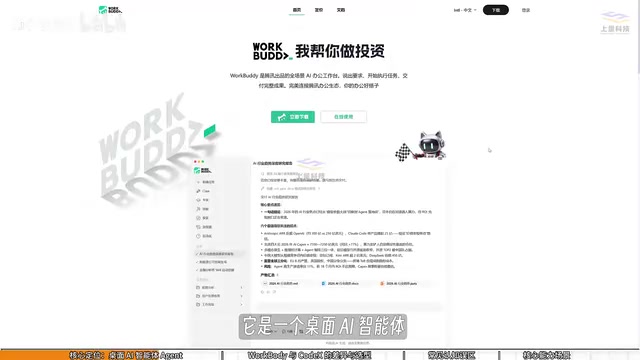
The significance of this shift lies in role restructuring: you go from "the person asking AI questions" to "the person managing AI to get work done." Your computer is your company, and WorkBuddy is your employee. Understanding this is more important than learning any specific feature.
WorkBuddy vs CodeX: The Difference Between a College Student and a Special Forces Soldier
Many people hear about CodeX before encountering WorkBuddy, so a question arises: since CodeX is more capable, why learn WorkBuddy? The tutorial uses a precise analogy—CodeX is a special forces soldier, WorkBuddy is a college student. Special forces have strong combat power, but they need a commander to formulate detailed battle plans: which file to operate on, which directory, which parameters—all depend on professional judgment. College students have limited abilities but are obedient and easy to direct; give them a simple task and they'll execute it.
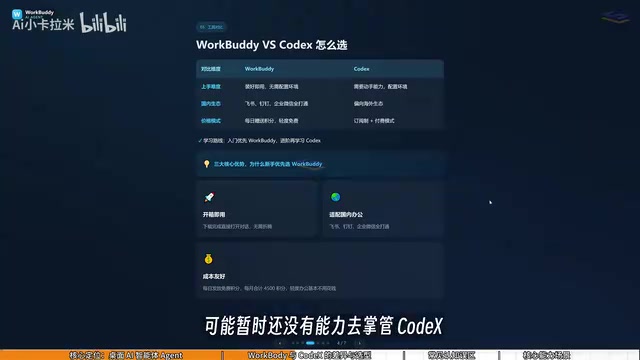
The differences manifest in three dimensions. First, the learning curve: WorkBuddy works right after installation, no environment configuration or command-line input needed; CodeX has significantly higher hands-on requirements, suitable for those with programming backgrounds. Second, ecosystem adaptation: WorkBuddy deeply integrates with domestic office suites like Feishu, DingTalk, WeCom, and Tencent Docs; CodeX leans more toward overseas ecosystems with limited support for domestic office software. Third, usage cost: WorkBuddy offers daily check-in points and extra points during events, accumulating at least three thousand points per month; CodeX uses a subscription model, requiring real money even during the learning phase.
For the vast majority of office workers, mastering WorkBuddy alone is sufficient to cover daily office automation needs. If you later find it insufficient, then advance to learning CodeX—this path has the lowest learning cost.
CodeX (OpenAI Codex) is a code generation model launched by OpenAI, a specialized application of large language models. It can understand natural language instructions and generate code, supports multiple programming languages, and first became famous as the underlying model for GitHub Copilot. CodeX's core strengths are code completion, function generation, and cross-language conversion, but its use typically requires some programming foundation, such as calling via API or integrating into an IDE. For non-technical users, steps like configuring API keys and installing dependency libraries can be barriers. Additionally, CodeX primarily targets the English technical ecosystem, with limited adaptation to Chinese office scenarios. Therefore, it is more suitable for developers or users with some technical background, rather than entry-level office workers.
Three Common Misconceptions to Correct Before You Start
Misconception 1: WorkBuddy is just a GPT desktop version in a wrapper. Not accurate. GPT-type products are still essentially dialogue tools that output text suggestions; WorkBuddy, beyond dialogue, can read local files, call tools, and automatically execute tasks. It is an executor, not an advisor.
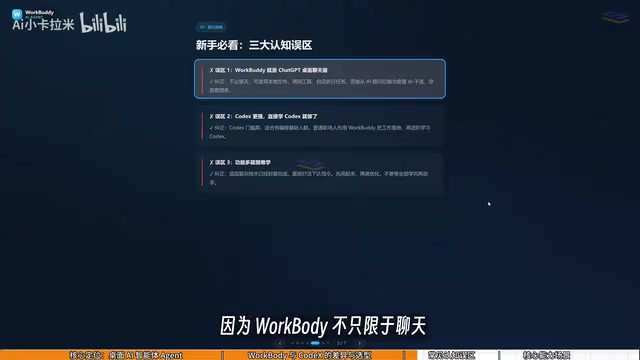
Misconception 2: CodeX is stronger, so I should learn CodeX directly. Different thresholds, different target audiences. Office workers without programming foundations who jump straight into CodeX will likely get stuck at the environment configuration stage, with learning costs far exceeding benefits. WorkBuddy's positioning is to let non-technical people first get AI working and get tasks done.
Misconception 3: Too many features, hard to learn. In reality, WorkBuddy's interface is highly similar to products like Tongyi Qianwen, Doubao, and GPT, so the operation logic isn't unfamiliar. What really needs to change isn't interface operation skills, but questioning mindset—switching from "asking questions" to "giving commands." You don't need to memorize every button; you just need to learn to clearly describe task objectives.
AI Agent refers to a software system that can perceive the environment, make autonomous decisions, and execute actions to achieve goals. Unlike traditional chatbots, an Agent not only generates text responses but can also call tools, operate files, access network services, and chain multiple steps into automated workflows. Its core capabilities include task planning, tool use, and memory management. For example, a desktop Agent can read local folders, rename files, generate reports, and send emails—all without human intervention. Typical AI Agent applications include office automation, personal assistants, and RPA (robotic process automation). Understanding the Agent's "execution" attribute helps distinguish it from purely conversational AI.
Four Actionable Scenarios: From File Management to Collaborative Office Work
The practical scenarios listed in the tutorial are not just theory—each corresponds to a real office pain point.
Batch file management. The most typical example is course recording: files named 01, 02, 03, 04, and midway a lesson needs to be merged into the previous one, causing the numbering to break into 01, 03, 04. Renaming them one by one manually is tedious and error-prone, but WorkBuddy can directly execute automatic renaming—solved with one sentence.
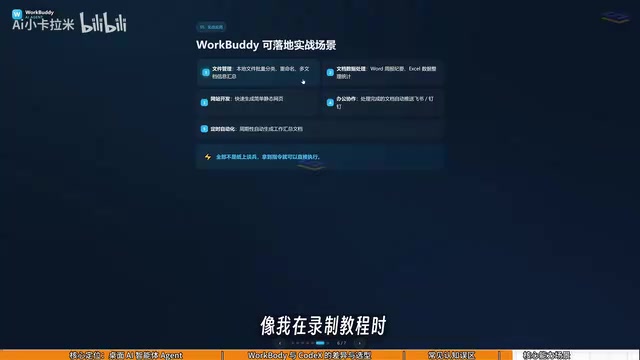
Document and data processing. Weekly report generation, Excel spreadsheet organization, multi-document information aggregation—these repetitive tasks can all be handed to the Agent, with humans only needing to check output quality.
Lightweight website development. The tutorial mentions that WorkBuddy can complete simple website building, lowering the delivery threshold for non-technical people.
Collaboration and periodic tasks. Deep integration with Feishu and DingTalk means processes like sending messages and generating periodic work reports can run automatically.
The common characteristics of these four scenarios: clear rules, high repetitiveness, time-consuming manual execution but low decision value—exactly the areas where AI Agents excel.
Weekly report generation is one of the typical application scenarios for AI Agents. Traditional weekly reports require manually collecting information from multiple sources (such as emails, documents, task management tools) and then organizing it into structured text. An Agent can automatically access these data sources, extract key progress, issues, and plans, and generate a weekly report according to a preset template. For example, WorkBuddy can connect to Feishu documents and DingTalk task lists, summarize completed items for the week, and output as Word or PDF. This not only saves time but also reduces human omissions. Similarly, Excel spreadsheet organization involves data cleaning, format adjustment, and formula calculation—an Agent can perform these operations through natural language instructions, reducing dependence on advanced Excel features.
From Questioner to Manager: The Mindset Shift Is the Core of Learning
The most valuable part of this tutorial isn't the step-by-step instructions for any specific feature, but the mental model it repeatedly emphasizes. Learning WorkBuddy is essentially not learning a piece of software, but learning how to manage a digital employee. You need to learn to break down tasks, describe objectives, and accept results—these abilities overlap with traditional prompt techniques, but the focus shifts from "how to ask well" to "how to manage clearly."
The accompanying "Green Book" materials and the daily check-in points mechanism lower the trial-and-error cost at the entry stage. For zero-basis users, a reasonable path is: install and log in, claim points, start practicing instruction description with low-risk tasks like file management, and gradually transition to multi-step collaborative tasks. Don't worry about not being able to learn all the features—learning by doing and task-driven learning is more effective than systematically grinding through every feature.
Related articles

Automate Job Search with AI Agents and Residential Proxies for Precise Matching
Build an AI Agent with MCP and residential proxies to bypass recruitment site anti-scraping and geo-restrictions, scrape thousands of DevOps jobs, then have Claude score and rank each against your resume. Includes proxy comparison experiments, project structure, and cost analysis—filtering only, no auto-submission.

The AI Task Assistant That Knows When to Back Off: A Cure for Activation Struggles
One Small Step is an AI assistant for task initiation struggles, using agentic decisions for guilt-free reminders, timely retreat, and cross-platform task management. The developer shares real test results on 13 tasks and architectural trade-offs.

FastAPI: A High-Performance Python Framework and a Production-Ready API Development Powerhouse
FastAPI is a high-performance web framework based on Python type hints, supporting async and automatic OpenAPI docs. With over 100k GitHub stars, this article analyzes its core strengths, production readiness, and selection advice.