WorkBuddy Practical Guide: From Installation to AI Office Agent

A guide to WorkBuddy installation, three modes, and high-quality prompts based on a Bilibili tutorial
Based on a WorkBuddy tutorial by a former Tencent designer on Bilibili, this article covers the AI office agent's positioning, installation and daily credits, and a first task of automatically categorizing the Downloads folder. It explains the Ask, Plan, and Full Access modes, presents the three-element prompt formula and five advanced techniques, and concludes that conservative permissions and precise prompts are two principles worth keeping.
Tencent's WorkBuddy, an AI office agent, is changing how many people handle their daily tasks. A tutorial created over several months by a former Tencent designer on Bilibili attempts to explain this tool's core gameplay all at once. Based on that tutorial, this article outlines key aspects of WorkBuddy—installation and configuration, the three work modes, and how to write high-quality prompts—to help readers build a reusable AI office methodology.
1. What Is WorkBuddy: A Digital Employee on Standby
WorkBuddyAd's positioning is not complicated: it is like a 24/7 online digital worker that can connect to mainstream domestic office software and handle tasks such as copywriting and planning, code writing, and Excel reports. Unlike ordinary chatbots, it can directly operate local files, break down tasks, and execute complex workflows.
According to the Bilibili creator in the tutorial, many people only treat WorkBuddy as a chat tool, ask a few simple questions, and stop—barely tapping 1% of its functionality. This observation points to a common problem in current AI tool usage: a clear gap between tool capabilities and user awareness.
2. Installation and Initial Setup: Get Your First Task Running in Three Minutes
Download and Installation
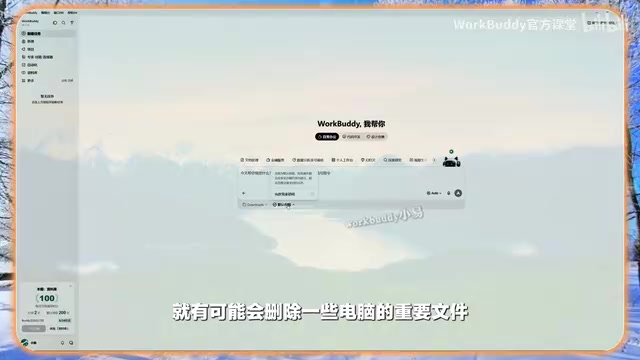
Search for WorkBuddy in a search engine, find the official site, and hover over "Download Now" to see options for different systems. Choose the installer for your system, double-click it, and follow the prompts. The tutorial recommends not installing on the C drive; you can manually change the location during installation.
Claim Daily Credits
The first thing to do after opening the software is not to ask questions, but to claim credits. Click the avatar in the lower-left corner to log in, then go to "Buddy Gas Station" to claim them. You can claim 100 credits per day, and credits accumulate. For non-heavy use, the free credits are basically enough.
First Hands-On Task: Automatic Folder Categorization
Below the input window, select a workspace and click "Open Local Folder" to limit WorkBuddy's management scope to a specific directory. The tutorial uses the "Downloads" folder as an example, which contains a mix of PNG, MP4, installers, documents, and other files. Then give an instruction in natural language: "Help me organize my Downloads folder. Categorize the files by type, putting each type into its own folder."
WorkBuddy first presents a categorization plan, listing the number and specific extensions for each file type, and then asks whether to execute. Users can choose to execute directly or back up first and then execute. After execution, the files in the Downloads folder are neatly categorized by type, and system files are automatically skipped. This task consumed 28 credits.
3. Three Core Work Modes: Choose the Right Mode Before Acting
WorkBuddy offers three work modes. Understanding their differences helps improve task success rates and reduce wasted credits.
Ask Mode: Ask Only, Don't Act
Click the plus sign in the lower-left of the input window and switch to Ask mode under "Mode." In this mode, WorkBuddy is similar to a traditional large language model: it only answers questions and does not operate on local files. In the tutorial demonstration, when asked to delete a text file, it indicates that it is currently in Ask mode and that the mode must be switched to execute.
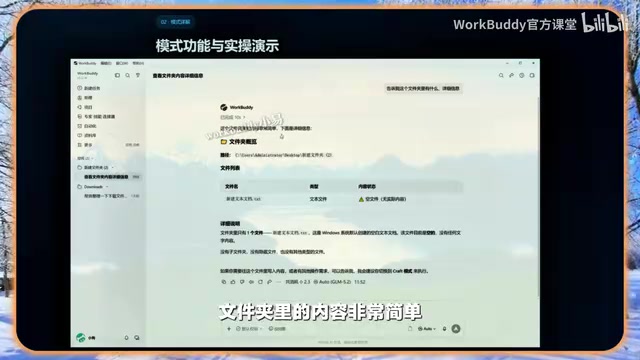
A large language model (LLM) refers to a neural network model trained on massive amounts of text that can understand and generate natural language, such as the GPT series, Claude, and Tongyi Qianwen. In traditional chat scenarios, the model only outputs text and does not touch files or system interfaces on the user's device. WorkBuddy's Ask mode essentially wraps the large model as a pure conversational entry point; the model has no file system read/write permissions, so when a user asks it to "delete a file," it can only prompt a mode switch. Understanding this difference helps determine when to use pure Q&A and when the agent must be granted operational permissions.
Plan Mode: Plan First, Execute Later
When Plan mode is enabled, WorkBuddy first plans the task and waits for user confirmation before executing. The tutorial compares this process to "a college-student employee first preparing a work plan, then asking the boss whether to execute it." It is suitable for operations that require careful evaluation.
Allow Full Access: Get Straight to Work
Under "Default Permissions," you can enable "Allow Full Access." Once enabled, the AI reduces confirmation steps and directly performs various operations. The tutorial warns that this mode may involve sensitive operations, such as file modification or deletion. In testing, file deletion operations are moved to the recycle bin rather than permanently deleted, but the tutorial still recommends not enabling this permission unless necessary.
In most cases, using default permissions without enabling Ask or Plan mode is sufficient.
The key difference between an agent and an ordinary chatbot lies in "tool calling": the model can decide during reasoning to call external functions such as file read/write, command execution, and network requests, and then continue to the next step based on the returned results. Permission settings are precisely what draw boundaries for this capability—under default permissions, every sensitive operation requires user confirmation, equivalent to manual approval; enabling full access omits the approval step and lets the model execute autonomously in succession. The industry generally recommends the "principle of least privilege," granting only the minimum permissions necessary to complete the task. This is also why the tutorial advocates not enabling full access unless necessary.
4. High-Quality Prompts: Three Elements and Five Techniques
Why Prompts Matter
The tutorial uses a comparison to illustrate the problem: if you only say "Help me write a summary," the AI can still produce output, but it may be far from expectations, forcing the user to revise repeatedly and consume credits through repeated interactions. The clearer the requirements, the higher the first-run success rate, and the credits saved can be used for more tasks.
The Three-Element Formula: What to Do, What's Available, How It Should Be
- What to do: The task goal and type, for example, "Generate a sales data analysis report."
- What's available: The source of raw data, ideally specified down to directories and materials so the AI can integrate them.
- How it should be: Output format requirements, such as a Word document, including tables and line charts, and a page limit.
The tutorial's high-quality example is: "The data files are in such-and-such directory, containing such-and-such data; analyze certain metrics; output a Word document with a bar chart comparison, no more than two pages." Only when input, processing, and output are all clearly specified can the AI execute precisely.
Five Advanced Techniques
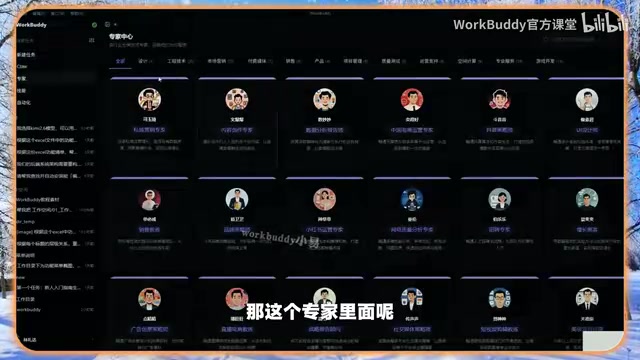
- Set a role: Before the instruction, tell the AI its current role, for example, "You are a financial director with ten years of experience. Review the payment terms of the contract and point out financial risks." The tutorial also mentions that WorkBuddy has a built-in "Expert Center" offering preset roles such as UI designer, brand planner, architect, and technical documentation engineer, which can be summoned directly.
- Provide reference samples: Give an example format for the desired result, for example, a weekly work report should include items completed this week, plans for next week, and matters requiring coordination.
- Take small steps and iterate gradually: Break complex tasks into multiple steps—first have the AI analyze the data, then generate charts, and finally integrate them into a Word report. Each step allows timely correction and avoids comprehension deviations and long waits caused by one very long instruction.
- Tell the AI what not to do: Clearly stated exclusions are as important as clear requirements, for example, what content should not be generated in a product introduction.
- Specify the output format: Excel spreadsheets, Word documents, Markdown text, HTML web pages, etc.—state the output standard in advance.

Prompt engineering refers to organizing the structure of input text, role settings, constraints, and examples to guide the model toward outputs that better match expectations. It works because large models are highly sensitive to wording, format, and examples in context: for the same task, adding a role description or one or two reference samples can significantly change output quality. The tutorial's "what to do, what's available, how it should be" plus the five techniques are all verified common methods in prompt engineering. The core idea is to turn vague requirements into clear specifications that the model can execute.
5. From Tool to System: A Few Observations
The value of this tutorial lies not only in listing features but in presenting a methodology for using AI office tools: first define permission boundaries, then choose a mode based on task risk, and finally use structured prompts to reduce communication costs. These three steps are interlocking and indispensable.
The tutorial's metaphor of "treating WorkBuddy as a college-student employee under your supervision" is worth pondering. It implies the real level of current AI agents—they can do work, but they need clear instructions and appropriate oversight. Expecting one sentence to accomplish a complex task often backfires.
Another easily overlooked detail is credit consumption. Organizing a folder consumes 28 credits, which may not seem like much, but repeated trial and error quickly adds up. High-quality prompts are essentially a means of cost control, a point repeatedly emphasized in the tutorial.
For users hoping to introduce AI agents into their daily workflows, it is advisable to start with low-risk tasks—such as file categorization, format conversion, and preliminary data organization—to gradually build expectations for the tool's behavior before expanding to complex scenarios such as report generation. Keeping permission settings conservative and prompts precise are two principles worth sticking to.
One-line Summary
A Bilibili tutorial-based guide to WorkBuddy's installation, three modes, and high-quality prompt writing
Paragraph Summary
Based on a WorkBuddy tutorial created by a former Tencent designer on Bilibili, this article systematically outlines how to use this AI office agent. It first introduces its positioning—a digital employee that can directly operate local files and break down and execute complex tasks—then explains downloading and installation, claiming 100 daily credits, and running the first task with "automatic categorization of the Downloads folder." The core section distinguishes the three work modes—Ask, Plan, and Allow Full Access—and emphasizes that choosing a mode based on task risk can improve success rates and save credits. The prompt section presents the three-element formula "what to do, what's available, how it should be" and offers five advanced techniques: setting a role, providing samples, iterating in small steps, clearly stating exclusions, and specifying output format. Finally, it points out that conservative permissions and precise prompts are two principles worth sticking to.
Related articles

Bilibili's Hit Dify Tutorial: A Practical Guide to Building 20+ AI Apps from Scratch
A distilled guide to Bilibili's top-rated Dify tutorial: Windows + Docker deployment, MySQL connection, five app types, model integration strategy, and publishing.

Agent Skills Beginner's Guide: From Concepts to Multi-Agent Collaboration in Practice
A comprehensive guide to Agent Skills: core concepts, components, the importance of Description, standardization, beginner learning paths, and multi-agent collaboration.

One Neuron Detects Both Cats and Cars? We Reproduced It and Found a New Explanation
The cat-car neuron reinterpreted: researcher Cammarata argues it distinguishes pointy from round, not cats from cars. We reproduced the experiment and found the new explanation holds on most inputs—but cars are the exception. The interpretability debate continues on language models.