WorkBuddy Practical Tutorial: Full 300-Episode Installation and Workflow Walkthrough

A 300-episode WorkBuddy tutorial on Bilibili: a domestic Codex alternative that gets AI to actually do your work.
A Bilibili creator released a complete 300-episode WorkBuddy tutorial, positioned as a domestic-friendly alternative to Codex. WorkBuddy has a similar interface but simpler setup, lower device requirements, free quota, and direct integration with domestic office software for tasks like material organization, document generation, and spreadsheet analysis. The tutorial spans four modules with 28 knowledge points and includes a companion "Blue Book" with installation guides, case studies, Skill customization, and 12 common Skills. The creator notes a key misconception: most users treat it as just a chat window.
In today's flood of AI tools, it's not easy to find a product that truly fits the domestic office environment, has a low learning curve, and can genuinely boost efficiency. A Bilibili creator recently released a complete WorkBuddy tutorial that has drawn widespread attention — a full 300 episodes, from installation to hands-on practice, aiming to solve one core pain point: make AI tools stop being chat toys and start being assistants that actually do work for you.
What Is WorkBuddy: A Domestic-Friendly Alternative to Codex
The creator gives a straightforward positioning at the start: WorkBuddyAd can be understood as a domestic alternative to Codex. The interface and interaction logic are basically the same as Codex, but key optimizations have been made for domestic users.
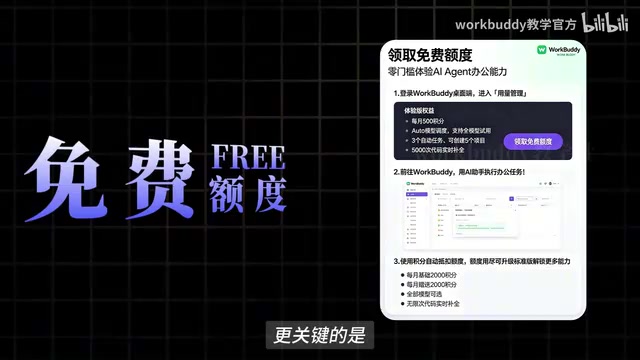
The differences show up on three levels. First is the setup barrier — WorkBuddy doesn't require complex network configuration or environment setup, and it doesn't demand much from your device. Second is cost — it offers free quota for users to try out. The most critical point is that it can directly integrate with commonly used domestic office software, meaning tasks that previously required constant switching between multiple apps — organizing materials, generating documents, analyzing spreadsheets, handling repetitive operations — can now potentially all be handed over to WorkBuddy.
In the creator's own words: "It's not just there to chat with you — it can actually do work for you." That line hits on a common misconception in how people use AI tools today.
Codex was originally a code generation model and accompanying development tool launched by OpenAI, typically taking the form of an agent interface that can understand natural language instructions, automatically read and write files, execute terminal commands, and complete multi-step tasks. It formed a mature "conversation-as-operation" workflow early on among overseas developer circles, but using it usually requires a stable overseas network, API key configuration, and some command-line basics. WorkBuddy is called a "domestic alternative" precisely because it retains the Codex-style interaction logic while replacing those prerequisites with a localized approach better suited to domestic users: no extra network configuration needed, low hardware requirements, and direct integration with mainstream domestic office software file formats and operation interfaces. Understanding Codex's product form helps clarify WorkBuddy's capability boundaries — it's not a simple chatbot, but a desktop-level automation assistant built for task execution.
A Common Misconception: Treating a Productivity Tool as a Chat Window
The creator bluntly points out an awkward reality in the tutorial: many people open WorkBuddy and just ask it a few simple questions. The tool itself is powerful, but ends up being used as an ordinary chat window.
This "using a cannon to swat a fly" phenomenon is actually common as AI tools spread. Users are used to conversational interaction but don't realize that the core value of such tools lies in automated workflow integration. WorkBuddy's real potential is in connecting operations scattered across multiple apps into a complete processing pipeline.
Once you recognize this problem, you understand why the creator spent nearly three months putting this course together — the barrier isn't installation, it's a shift in mindset.
Course Structure: 28 Knowledge Points Across Four Major Modules
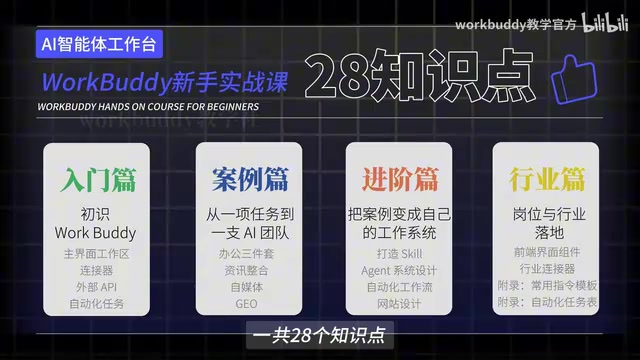
The tutorial is positioned as a "hands-on course for beginners," divided into four modules: Introduction, Advanced, Subscription, and Industry Applications, totaling 28 knowledge points. The course design follows a progressive logic from basic operations to real office scenarios. The creator emphasizes that "it's fine if you don't know how to code, and it's fine if you've never touched AI" — as long as you follow along and practice, you can gradually hand off repetitive, time-consuming work to AI.
From course titles like "nanny-level tutorial" and "understand the complete workflow in one video," it's clear the content focuses on hands-on practice rather than theory. For professionals who want to systematically master WorkBuddy, this full-process coverage from installation to scenario implementation can genuinely lower the learning cost.
Companion Materials and Skill Customization
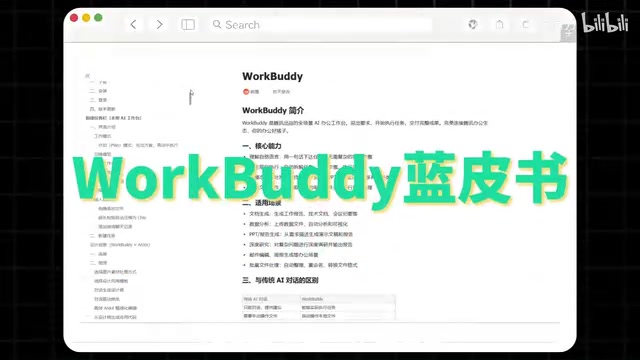
Beyond the video course, the creator also put together a companion document (called the "Blue Book"), covering four major modules: installation instructions, case breakdowns, Skill customization, and industry applications, plus 12 commonly used Skills organized for direct hands-on practice.
The Skill mechanism is one of the key features that sets WorkBuddy apart from ordinary chat tools. Through predefined Skills, users can solidify the processing logic for specific scenarios into reusable automation capabilities. The compilation of 12 common Skills effectively helps users get past that initial stage of "not knowing what it can do."
At the end of the video, the creator encourages viewers to like, bookmark, and reply "Blue Book" in the comments to get the materials, with a special reminder: "After you get it, I suggest you watch and do at the same time — don't let this tool just sit in your bookmarks." That's both practical advice and a reflection of a common pitfall in AI learning — the illusion that bookmarking equals mastering.
In AI Agent tools, a Skill typically refers to a packaged, repeatedly callable capability module that solidifies the operation steps, decision rules, and tool invocation methods for a specific scenario. Unlike ordinary prompts, a Skill is closer to an "executable workflow template": users only need to provide input, and the Skill internally handles reading files, calling interfaces, generating results, and a series of other actions automatically. The value of this mechanism lies in making tacit experience explicit — for example, "convert meeting recordings into structured minutes" or "batch-organize reimbursement screenshots and generate a spreadsheet" can both be distilled into a Skill for multiple team members to reuse. For beginners, Skills solve the startup problem of "not knowing what to ask AI to do"; for advanced users, they're the foundational unit for productizing and scaling personal workflows.
The Learning Logic of Efficiency Tools
The design approach of this tutorial raises a question worth pondering: When it comes to AI tools, what exactly should we be learning?
The core capability of tools like WorkBuddy isn't about the quality of a single Q&A — it's about whether it can embed itself into your daily workflow. The creator spent nearly three months organizing the course, focusing on "real office scenarios" rather than listing features, and that itself shows the direction — learning an AI tool is essentially about redesigning the way you work.
For users still on the fence, the creator's advice is direct: if you're only going to seriously learn one AI tool this year, WorkBuddy is worth prioritizing. Free quota lowers the cost of trial and error, integration with domestic office software reduces migration friction, and all that's left is to spend the time actually using the tool.
One-line Summary
A 300-episode WorkBuddy tutorial on Bilibili: a domestic alternative to Codex that gets AI to actually do your work.
Paragraph Summary
A Bilibili creator released a complete 300-episode WorkBuddy tutorial, positioned as a domestic-friendly alternative to Codex. WorkBuddy's interface logic is similar to Codex, but setup is simpler, device requirements are lower, free quota is provided, and it directly integrates with commonly used domestic office software, unifying material organization, document generation, spreadsheet analysis, and other repetitive tasks. The tutorial is divided into four modules — Introduction, Advanced, Subscription, and Industry Applications — with 28 knowledge points in total. The companion "Blue Book" covers installation, case studies, Skill customization, and industry applications, plus 12 commonly used Skills. The creator highlights a common misconception: most users treat WorkBuddy as just a chat window and fail to unlock its workflow automation potential. The core message is that learning AI tools is essentially about redesigning the way you work.
Related articles

Bilibili's Hit Dify Tutorial: A Practical Guide to Building 20+ AI Apps from Scratch
A distilled guide to Bilibili's top-rated Dify tutorial: Windows + Docker deployment, MySQL connection, five app types, model integration strategy, and publishing.

Agent Skills Beginner's Guide: From Concepts to Multi-Agent Collaboration in Practice
A comprehensive guide to Agent Skills: core concepts, components, the importance of Description, standardization, beginner learning paths, and multi-agent collaboration.

One Neuron Detects Both Cats and Cars? We Reproduced It and Found a New Explanation
The cat-car neuron reinterpreted: researcher Cammarata argues it distinguishes pointy from round, not cats from cars. We reproduced the experiment and found the new explanation holds on most inputs—but cars are the exception. The interpretability debate continues on language models.