WorkBuddy Step-by-Step Guide: Master AI Agent Automation from Zero

A Bilibili tutorial recommends WorkBuddy as an entry-level AI Agent, covering its positioning, capabilities, and four advantages.
Based on a Bilibili creator's tutorial, this article introduces WorkBuddy, an AI Agent dubbed the "domestic Codex alternative." It contrasts traditional LLMs (Q&A and suggestions) with AI Agents (controlling your computer, invoking tools, completing tasks within authorization), and explains WorkBuddy's four advantages for beginners: low barrier to entry, domestic office ecosystem compatibility via connectors, affordable cost, and efficient Chinese Skill marketplace installation. It also covers the 28-point course and Blue Book resources.
In today's world of endless AI tools, choosing an agent that can truly do work for you has become a common dilemma. In a recent tutorial, a Bilibili creator stated bluntly: "If you can only learn one AI tool this year, make sure it's WorkBuddy." What makes this product, dubbed the "domestic alternative to Codex," so special?
Based on the core content of that tutorial and hands-on demonstrations, this article breaks down WorkBuddyAd's positioning, capability boundaries, and getting-started path.
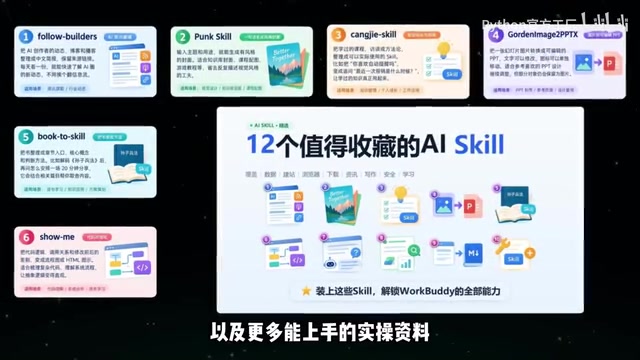
What Is WorkBuddy: More Than Chat, a Digital Employee
WorkBuddy's interface layout and interaction logic are basically identical to Codex, but the creator emphasizes that it's "better suited to the Chinese context"—no special network environment required, no complex configuration, and free to use. More importantly, it adapts to various mainstream domestic office software, unifying work that previously required switching back and forth between multiple applications.
The creator summarizes its capabilities as: organizing materials, generating documents, analyzing spreadsheets, and executing repetitive tasks. It doesn't just chat with you—it actually gets work done.
This difference is vividly demonstrated in the demo. Facing a document with messy formatting—inconsistent punctuation and mismatched body text—a traditional AI would offer suggestions: "You could unify the body text formatting like this." But you'd still have to do the actual work yourself. With WorkBuddy, a single instruction is all it takes: it automatically locates the document on your desktop and completes the formatting and layout beautification while you simply wait for the result.
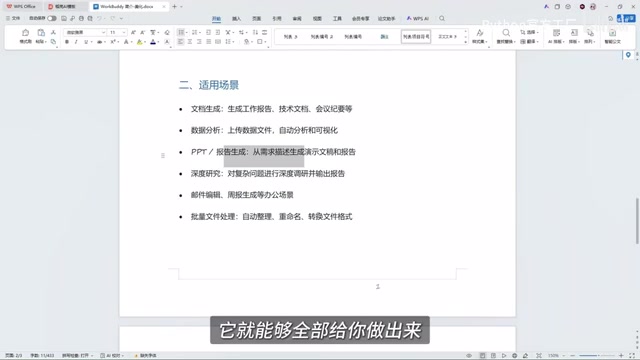
Traditional LLMs vs AI Agents: What's the Core Difference
The creator highlights the key distinction through comparison: traditional large models excel at Q&A, analysis, and offering suggestions; AI Agents focus on driving tasks to results within the scope you confirm and authorize.
"It's not just you say something and it replies—it's more like a digital employee taking your instructions, able to control your computer, invoke tools, and directly complete tasks for you."
This capability isn't limited to editing documents. The PPT example shown in the tutorial was completed by AI after the creator provided requirements—including animation effects. Tools like this are collectively called AI Agents; Codex and other agents capable of invoking tools to execute workflows fall into a similar category. The criterion is simple: can it directly take action for you?
Typical Architecture and Operation of AI Agents
AI Agents are typically powered behind the scenes by large language models, but additionally incorporate modules for task planning, tool invocation, memory, and execution feedback. When a user issues a goal, the Agent first breaks it down into steps, then progressively executes by calling external tools such as the local file system, browsers, office software APIs, or "connectors," feeding intermediate results back for confirmation. Unlike traditional large models with "one Q&A, one output," Agents possess multi-turn autonomous looping capability, continuously operating within authorized scope until the task is complete. Therefore, when evaluating an Agent, beyond the strength of the underlying model, what matters more is whether its tool ecosystem, permission management, and task orchestration are reliable.
Why Start with WorkBuddy: A Four-Dimension Comparison
The creator explains from four dimensions why WorkBuddy is better suited for most entry-level users.
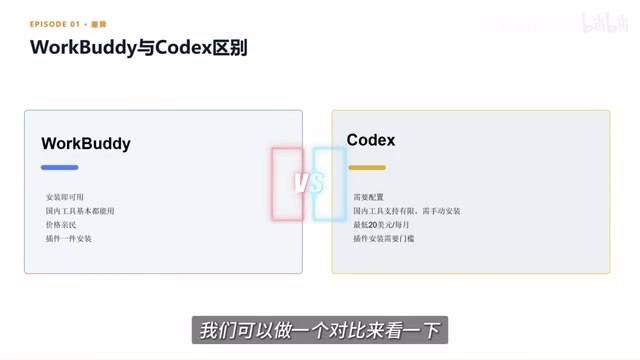
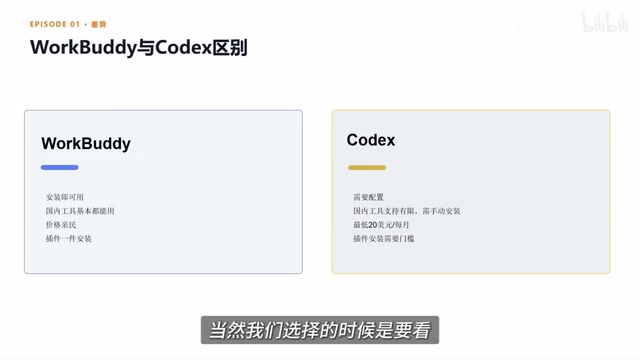
Low barrier to entry. Open a browser, search for the product name, download and install it on your computer—the process is very intuitive. By contrast, tools like Codex offer greater flexibility but require understanding code, configuring environments, and invoking workflows—a clearly higher technical threshold.
Compatible with the domestic office ecosystem. WorkBuddy offers a "connector" feature that can link to commonly used office software. The creator gives an example: connect and authorize it with WeCom, and it can help reply to messages and compile chat records into documents. The value of connectors lies in letting AI not only know how to do something, but also participate in completing the entire process within your permitted scope.
Affordable cost. Upon registration, the platform provides daily claimable credits, which light users can basically use to complete daily experiences and basic tasks. Some overseas products require subscription payments and only deliver value with heavy usage.
Efficient Skill and plugin installation. The platform has a built-in Chinese Skill marketplace where common capabilities can be installed to your computer with one click. A Skill can be understood as a pre-trained professional tool or work capability. The platform also offers "Expert" roles—like digital employees for different positions. If your team needs a senior development engineer to build a process from scratch, you can directly find the corresponding expert and invoke it with one click.
What Are "Connectors" and "Skills"
A connector is essentially an authorized integration mechanism: users go through OAuth or the platform's authorization flow to let an AI Agent securely access external services like WeCom, documents, and spreadsheets, thereby reading necessary information and performing operations. The key is "controllable permissions"—AI acts only within the scope the user grants. A Skill is closer to a pre-packaged capability bundle that may include prompt templates, tool invocation logic, and fixed workflows. After one-click installation, users can give the Agent a certain professional skill, such as batch formatting, generating reports in specific formats, or writing documents according to industry standards. Together, these allow non-technical users to quickly extend an Agent's capability boundaries without writing code from scratch or configuring complex workflows.
Course System and Supporting Resources
The creator spent nearly three months refining this hands-on course for beginners, divided into an introductory section, case studies, advanced topics, and industry applications—28 knowledge points in total, progressing from basic operations to real office cases and then advanced workflows. The accompanying "WorkBuddy Blue Book" covers four major areas: installation, case breakdowns, Skill customization, and industry implementation. Additionally, 12 commonly used Skills and uploadable hands-on materials are provided.
Selection Advice: The Right Fit Is the Best Fit
The creator reminds readers at the end that choosing a tool depends on whether it suits your work scenario. For most entry-level users, learning an AI Agent that's easy to deploy, compatible with domestic office scenarios, and cost-controllable is a very practical starting point. "Getting a digital employee at a low cost is an excellent choice."
The next lesson will start with installation, using the simplest and most direct approach to get the tool truly working.
One-line Summary
A Bilibili tutorial recommends WorkBuddy as an entry-level AI Agent tool, analyzing its positioning, capabilities, and four-dimension advantages.
Paragraph Summary
Based on a Bilibili creator's tutorial, this article introduces WorkBuddy, an AI Agent tool dubbed the "domestic alternative to Codex." It first distinguishes traditional large models from AI Agents: the former excels at Q&A and suggestions, while the latter can control your computer, invoke tools, and directly complete tasks within user authorization. It then explains from four dimensions why WorkBuddy suits entry-level users: low barrier to entry, compatibility with the domestic office ecosystem (connecting to WeCom via connectors), affordable cost, and efficient installation through a Chinese Skill marketplace. The article also covers the accompanying 28-knowledge-point course and Blue Book resources, and advises users to choose tools based on their work scenarios—getting a "digital employee" at low cost is a pragmatic starting point.
Related articles

Zero-Cost Local Jarvis: Open-Source Voice Cloning and Task Automation in Practice
AI Workshop shows how to build a zero-cost local Jarvis with Ollama and Voice Studio: local model switching, open-source voice cloning, file retrieval, and tool-calling tests, with setup steps and hardware trade-offs.

Mistral Large 4 Released: 1T-Parameter MoE Tops Western Open-Source Leaderboard
Mistral releases its flagship Mistral Large 4: a 1T-parameter MoE architecture activating only 49B parameters at inference, trained from scratch on 3,800 Grace Blackwell GPUs, topping the Western open-weight leaderboard with third-party endorsements in law, finance, and cybersecurity.

Mistral Large 4 Review: Can Europe's Strongest Open-Source Model Challenge the US and China?
Mistral Large 4 (L-Charm) review: trillion-parameter MoE, standout cybersecurity benchmarks but behind Kimi K3 in software engineering, 3,800 GPUs, a key step for European sovereign AI.