Z-Image in Practice: A Complete Tutorial to Generate Cinema-Quality Ancient Chinese Beauty Portraits in 3 Minutes

A complete ComfyUI workflow guide for generating hyper-realistic ancient Chinese portraits using Z-Image Turbo.
This tutorial covers the full ComfyUI workflow for Z-Image Turbo, a model generating cinema-quality ancient Chinese character portraits. It details the image-to-text prompting method, node configuration including Qwen text encoder and VAE setup, critical KSampler parameters (Steps 20, CFG 1, Denoise 1), and batch generation techniques—enabling beginners to produce photorealistic results in minutes.
Why Z-Image Is Creating Buzz in the AI Creative Community
Recently, an image generation model called Z-Image has sparked intense discussion across AI creative communities. Based on a hands-on demonstration by Bilibili creator Teacher Aqi, this model requires no complex deployment environment and no stacking of multiple LoRA weights—yet it enables beginners to generate cinema-quality, hyper-realistic ancient Chinese style character images in just three minutes.
Its core highlight lies in the extreme faithfulness to detail—from skin texture and the direction of individual hair strands to the intricate patterns on hairpins, everything is rendered with remarkable precision. This makes it highly practical for creating ancient Chinese costume portraits, AI short drama characters, and even commercial-grade assets. This article walks through the complete ComfyUI workflow and provides an in-depth analysis of its technical characteristics.
Core Approach: Image-to-Text Method for Prompt Generation
The entire workflow doesn't start with writing prompts from scratch. Instead, it uses an image-to-text approach. The creator's method is: first find a reference image with the desired look, upload it to an AI (Doubao was used in the demonstration), and have the model reverse-engineer a high-quality prompt from the image.
Image-to-Text essentially leverages the visual understanding capabilities of Multimodal Large Language Models (Multimodal LLMs). These models (such as Doubao, GPT-4V, Gemini, etc.) learn to map visual features to natural language descriptions through pre-training on massive image-text pairs. In the AI art domain, creators reverse this capability: feeding an ideal reference image into the model and having it output structured prompt descriptions covering composition, lighting direction, character pose, costume details, and more. Compared to manually writing prompts, this method captures many visual features that are difficult to express precisely in words, such as specific color atmospheres and lighting relationships.
This approach offers two clear advantages:
- Lower barrier to entry: Beginners often struggle to precisely describe their desired visual style in words. By leveraging a multimodal model's image-to-text capabilities, they can quickly obtain well-structured, accurately descriptive prompts.
- Style controllability: By locking down the style foundation through a reference image and then letting Z-Image render the details, you can more consistently reproduce the expected results.
Once the prompt is obtained, simply copy it into the ComfyUI workflow to begin the image generation phase.
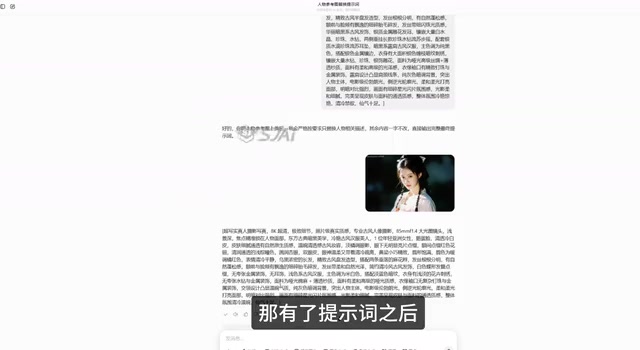
ComfyUI Workflow Setup in Detail
ComfyUI is a node-based image generation workflow editor. Unlike traditional WebUIs (such as Automatic1111), it breaks down the entire generation pipeline into visual functional nodes (such as model loading, text encoding, sampling, decoding, etc.), and users build custom generation pipelines by connecting nodes. The advantage of this design lies in its high flexibility—users can precisely control parameters and data flow at each stage, and it's easy to reuse and share complete workflow configuration files. For models like Z-Image that require specific node combinations to achieve optimal results, ComfyUI's node-based architecture is particularly well-suited.
Z-Image Model and Node Configuration
After pasting the prompt back into the workflow, you need to pay close attention to the configuration of several key nodes. Based on the demonstration, the recommended setup is as follows:
-
Base Model: Use a UNet loader to load the Z-Image Turbo fine-tuned model—this is the core source of photorealistic quality. UNet (U-shaped Network) is the backbone architecture of current mainstream image generation models. Its encoder-decoder structure combined with skip connections enables simultaneous processing of global semantics and local details during the denoising process. As a fine-tuned model, Z-Image Turbo is likely built upon base architectures like SDXL or Flux with targeted training, accumulating large amounts of high-quality training data in the domain of realistic Eastern aesthetic character portraiture.
-
CLIP / Text Encoding: Use a Qwen-series type as the text encoder. The text encoder is responsible for converting human-readable prompts into vector representations that the model can understand. Traditional Stable Diffusion uses OpenAI's CLIP model as its text encoder, but its understanding of Chinese and long texts is limited. The Qwen-series encoder is a derivative component of Alibaba's large language model, offering stronger comprehension of Chinese semantics and more accurately capturing subtle descriptive differences in Chinese prompts—which is especially important for ancient Chinese themes that involve extensive traditional cultural elements.
-
VAE: Use a unified AE and VAE solution. VAE (Variational Autoencoder) handles image compression and decoding in the diffusion model pipeline. During generation, the model actually performs denoising operations in a low-dimensional latent space, and the VAE decoder ultimately restores the latent space representation back to pixel-level images. The quality of the VAE directly affects the final image's color fidelity, detail sharpness, and overall appearance.
The creator specifically emphasized that the reason the textures look so realistic is largely due to the training quality of the Z-Image Turbo fine-tuned model itself, rather than relying on complex post-processing.
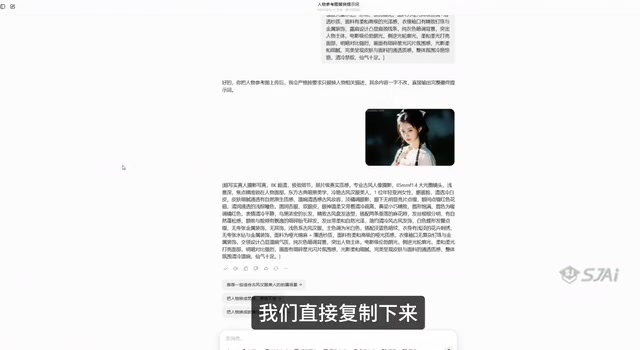
Resolution Settings and Batch Generation Tips
In the Empty Latent node, you can set the output image aspect ratio. The demonstration used a 9:16 portrait ratio, which is ideal for mobile display or vertical short drama content.
An advanced technique worth noting: the creator connected a prompt list node to the text encoder. This node supports inputting multiple sets of prompts at once, enabling simultaneous generation of multiple images—for example, generating characters of different genders and styles, producing five images in a single batch. The prompt list node is a batch processing tool in ComfyUI that allows users to input multiple prompt sets in list form, and the system automatically iterates through the list to generate corresponding images one by one. This mechanism essentially automates repetitive manual operations, making it particularly suitable for style exploration, character variant generation, or large-scale asset production. Combined with ComfyUI's queue execution feature, creators can step away from the computer after setup and let the system automatically complete all generation tasks. For creators who need to sift through large volumes of assets, this batch capability significantly boosts efficiency.
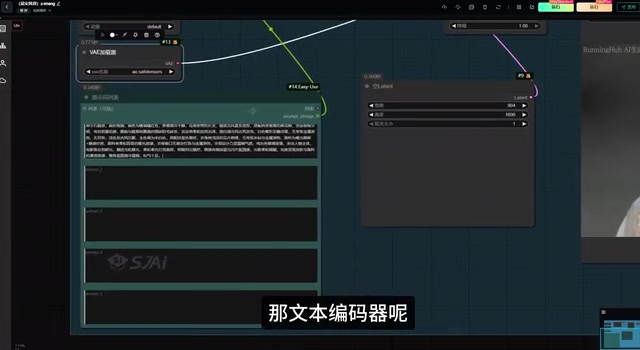
Key Parameter Configuration: Avoiding Common Beginner Pitfalls
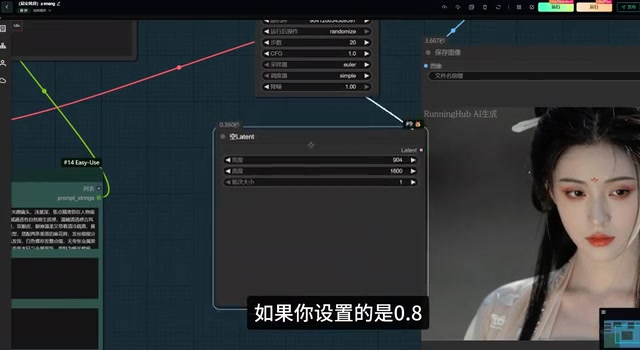
In the KSampler, parameter settings directly determine whether generation succeeds or fails. The creator's recommended configuration is:
- Steps: 20
- CFG Value: 1
- Denoise: Must be set to 1
There's an easily overlooked detail here: Denoise must be set to 1. The creator explicitly warned that setting it to 0.8 or any other value will most likely result in "blurry" images—meaning the output will suffer from blurriness and loss of detail. All other parameters can remain at their defaults.
This actually reflects a characteristic of Turbo-class fine-tuned models. Turbo models are typically optimized using Adversarial Distillation or Consistency Distillation techniques. The core idea is to have a student model learn the multi-step denoising results of a teacher model, thereby achieving comparable image quality in fewer sampling steps. This optimization compresses what originally required 50+ steps down to 4-20 steps. However, the trade-off is that the model becomes more sensitive to parameter changes—particularly CFG (Classifier-Free Guidance) and denoise strength. Excessively high CFG leads to oversaturation or artifacts, while a non-full denoise value disrupts the step-mapping relationships the distilled model has learned internally, causing generation quality to drop dramatically. Therefore, applying parameter conventions from standard SD models (such as CFG 7-12, denoise 0.7-0.8) will actually backfire.
Z-Image Output Quality and Use Case Analysis
Based on the demonstration results, Z-Image's ancient Chinese style characters excel in several dimensions:
- Skin Texture: Delicate and natural, avoiding the common "plastic look" of traditional AI-generated art. This plastic appearance typically stems from models over-smoothing skin textures during training or losing high-frequency details during VAE decoding. Z-Image has clearly made targeted optimizations in training data quality and diversity, enabling the model to generate natural skin with subtle structures like pores and capillaries.
- Lighting and Shadows: Characters feature well-defined lighting layers that approach real photography quality. Good lighting performance indicates the model has a deep understanding of three-dimensional spatial relationships, capable of generating physically plausible brightness variations on facial contours and clothing folds based on assumed light source directions.
- Hair and Accessories: Individual hair strands are clearly distinguishable, hairpin patterns are crisp, and detail density is high. Hair has always been one of the challenging aspects of image generation, as it involves numerous repetitive yet non-identical elongated structures that demand high-frequency detail generation capability from the model.
Based on these characteristics, this model is particularly suitable for:
- Ancient Chinese costume portraits and photography-style asset creation
- Character generation for AI short dramas
- Continuous content production requiring consistent character appearances
Conclusion: A Low-Barrier, High-Quality AI Photorealistic Generation Solution
The significance of Z-Image lies not only in image quality itself, but in how it dramatically lowers the barrier to high-quality photorealistic generation. No need to stack LoRAs (Low-Rank Adaptation, a technique that performs lightweight fine-tuning on pre-trained models through low-rank matrices—traditional workflows often require stacking multiple LoRAs to separately control style, character features, and detail quality), no complex parameter tuning needed. Combined with the image-to-text assisted workflow, even beginners can quickly produce usable assets.
Of course, the workflow described in this article primarily comes from a single creator's demonstration, and actual results may vary depending on GPU performance, model version, and prompt quality. Interested creators are advised to use the officially recommended parameters as a baseline, test with small batches first, and then fine-tune according to their specific needs. Overall, for creators pursuing Eastern aesthetics and photorealistic quality, Z-Image is worth adding to your toolkit and giving a try.
Related articles

Cursor AI Programming in Practice: Build a Student Management System from Scratch in 30 Minutes
A Bilibili creator demonstrates Cursor AI programming: generating a student management system in 30 minutes with natural language. Details on Agent mode, Claude selection, prompt techniques, and thresholds.

Top 20 AI Coding Tools Ranking: From Rock-Solid to Lackluster, a Scored Matrix
Bilibili creator releases top 20 AI coding tools ranking, tiered T0–T4 from rock-solid to lackluster, with Claude Code and Codex tied at T0. This article details the scoring dimensions (capability, reliability, robustness, durability, cost, domestic availability) and tool performances to help developers choose the right AI coding assistant.

Vibe Coding Systematic Tutorial: Master AI-Assisted Programming from Zero
A three-month Vibe Coding tutorial from a Bilibili creator covering Codex, ClaudeCode, and Cursor, from core logic to commercial project practice for beginners.