Zero-Cost AI Video Workflow: A Practical Breakdown of How to Hit 10K+ RMB in Brand Deals in Two Months

A Bilibili UP host shares a standardized AI video production line that went from zero to 10K+ RMB monthly brand deals using only the Doubao agent and Cdance 2.5.
The article breaks down a Bilibili creator's complete AI video workflow for going from zero to 10K+ RMB monthly brand deals using only the Doubao agent paired with the built-in Cdance 2.5 model. The core argument is that the bottleneck in AI video isn't visual quality but process standardization: structured topic benchmarking against viral videos, four-part outlines that lock in the attention curve, one-shot-one-content storyboard templates, batch-produced unified image assets to prevent style drift, standardized color and loudness parameters with 1080p 60fps export, and publishing with AI declarations and highlight thumbnails. The author emphasizes production-line thinking—tools will iterate, but the reusable granularity management method remains unchanged, and individual income results shouldn't be taken directly as expectations.
Title
Zero-Cost AI Video Workflow: A Practical Breakdown of How to Hit 10K+ RMB in Brand Deals in Two Months
Meta Description
A breakdown of a Bilibili creator's zero-cost AI video workflow: from viral topic selection, four-part outlines, one-shot-one-scene prompts, to unified image assets, Cdance 2.5 motion generation, and post-production loudness parameters—a complete standardized production line for hitting 10K+ RMB in brand deals in two months.
Article Content
The AI video space never lacks tutorials—what it lacks is a standardized process that can close the commercial loop. A creator on Bilibili shared their complete workflow for going from zero to 10K+ RMB in monthly brand deals, using only the Doubao agent paired with the built-in Cdance 2.5 model the entire time. No professional drawing skills required, and no switching between multiple software tools. The value of this workflow isn't in the tools themselves, but in stringing topic selection, outlines, storyboards, assets, generation, and post-production into a replicable production line.
Topic Selection Determines the Traffic Ceiling, Not Visual Quality
Many beginners pour all their energy into visuals while neglecting the very first step. According to the UP host's observations, the root cause of AI videos getting no traffic is often outdated topics lacking conflict and hooks—viewers swipe away within seconds. His approach is to open short video ranking platforms, lock onto a target niche, filter for viral AI short dramas with over 1 million views and high comment counts in the past 30 days, and compile the titles, opening hooks, and core plot summaries into reference material, then hand it to AI to batch-generate topics and score them.

The essence of this step is imitating viral structures validated by data, rather than creating from thin air. Structured prompts play a key role here—by clearly writing out the niche, benchmark material, and scoring dimensions, the AI's output becomes filterable.
Structured Prompt refers to breaking a task down into explicit fields and constraints, rather than describing it loosely in natural language. In the topic selection stage, it typically includes fields such as niche positioning, benchmark material characteristics, and scoring dimensions (e.g., conflict intensity, number of twists, emotional hook types). The advantage of this approach is that it turns a vague "help me come up with a topic" into comparable, scorable output, giving the AI's batch-generated results filtering value. For beginners, structured prompts are a lever to compensate for inexperience—they force creators to clarify their judgment criteria before asking.
The Outline Is the Key Step Beginners Most Often Skip
Skipping the content outline and going straight to scriptwriting usually results in a messy final cut with blurry focus. The UP host emphasizes that viral videos need their overall rhythm planned in advance, and the opening three seconds must have a strong hook to grab attention. If you can't picture it in your head, you can use structured prompts to have AI build the outline in segments—the prompt must specify four things: work type, four-part structure, duration allocation, and content direction.
The four-part structure combined with duration allocation essentially locks in the audience's attention curve at the script stage. Do this step solidly, and the subsequent storyboards won't go off track.
One Shot, One Content: The Master Template Mindset for Storyboard Prompts
Ordinary prompts most easily lead to visuals disconnected from dialogue and chaotic shots. The UP host's script insists on "one shot, one content": the master prompt template fixes style atmosphere, image quality, and sound descriptions, while the visual prompt includes shot count, time range, shot size, camera position, focal length, depth of field, lighting, visual content, and sound. For the sound portion, he explicitly writes "no background music throughout" to prevent AI from adding it on its own.
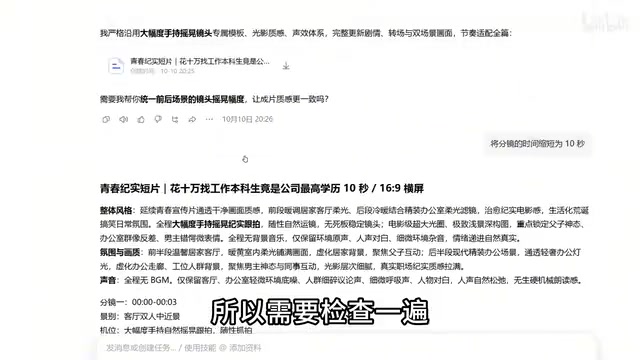
After generating prompts, you must manually check three things: whether the plot is coherent between shots, whether the visual descriptions match the dialogue, and whether AI has added unnecessary embellishments. AI occasionally modifies prompts and dialogue based on its own understanding, and these embellishments may not align with creative intent. Once a template works, you can use the reference function to attach the prompt and have AI continue processing the next plot segment with the same template.
Shot size, camera position, focal length, and depth of field are the four foundational parameters of cinematic language. Shot size refers to the subject's proportion within the frame (wide shot, full shot, medium shot, close-up, extreme close-up), determining the psychological distance between audience and character; camera position is the camera's location relative to the subject (eye level, high angle, low angle), affecting power dynamics and emotional orientation; focal length determines perspective compression—telephoto compresses the background, wide-angle exaggerates space; depth of field controls the layering of sharp and soft areas—shallow depth of field highlights the subject, deep depth of field establishes the environment. Specifying these four in AI video prompts can significantly reduce shot chaos caused by the model's free interpretation, and is also the technical foundation that makes "one shot, one content" executable.
Unified Image Assets: The Hidden Prerequisite for Batch Production
Generating visuals while making videos is the direct cause of characters changing faces, outfits jumping, and styles splitting. The correct order is to batch-produce a full set of image assets with AI before generating video: fix the facial features, hairstyles, and costumes of protagonists and supporting characters, unify the art style, filters, and color tones for the entire series, and prepare key plot scenes. This asset set both ensures continuity in the final cut and greatly improves batch production efficiency.
In the motion video generation stage, the UP host uses a tool with the built-in Cdance 2.5 model throughout, suited to manga drama creation scenarios—after importing unified image assets and prompts, it automatically renders dynamic shots. According to his description, character movements are more natural, camera work is smoother, and image stability is noticeably improved.

Cdance 2.5 is a video generation model released by ByteDance (part of the Seedance series), supporting text-to-video and image-to-video, with targeted optimization for camera continuity and physical plausibility, often integrated into agent tools like Doubao for creators to call directly. For manga drama creation, its image-to-video capability is especially critical: after importing unified character assets, the model uses reference images to constrain character appearance, reducing face changes across shots. Understanding the model's capability boundaries—it excels at motion rendering but isn't good at maintaining character consistency from nothing—is what makes clear why "assets first" is an indispensable step in the workflow.
Post-Production and Publishing: The Underestimated Quality Watershed
AI-generated first cuts are only half-finished products. The UP host's post-production practice includes: when one or two shots aren't satisfactory, splicing gacha videos to reduce token consumption; unifying color temperature and saturation across the entire film; normalizing loudness to around 0 dB, keeping background music around -12 dB with a fade-out; and finally exporting at 1080p 60fps. These parameters may seem trivial, but they're the distance between a final cut and "brand-deal-ready quality."
The publishing stage also affects initial traffic. Choose a plot highlight for the thumbnail—clean visuals, clear theme, no cluttered text labels, paired with simple large text or handwritten-style fonts over character imagery. When publishing, fill in the AI creation declaration; according to the UP host's experience, initial traffic will be noticeably better than similar beginner works.
Loudness Normalization is a basic audio post-production operation. Dialogue typically uses 0 dB as the peak reference, and background music is compressed to around -12 dB to create dynamic separation between dialogue and score in the mix, preventing the BGM from overpowering the lines. Fade-out treatment prevents the abrupt auditory jolt of music cutting off at the end. After uploading, platforms also perform secondary loudness normalization—if the original mix has excessive dynamics, normalization can cause dialogue to fluctuate in volume. Therefore, mixing to a unified standard upfront is the prerequisite for consistent listening experience across platforms, and is also the concrete manifestation of "brand-deal-ready quality" in the audio dimension.
What's Truly Reusable in This Workflow
Tools will iterate, models will update, but the core of this workflow is production-line thinking: topic selection relies on data benchmarking rather than inspiration, outlines lock in rhythm, storyboard templates ensure consistency, assets-first prevents style drift, and post-production parameters are standardized. For zero-foundation creators, the barrier isn't technical—it's whether you're willing to break each step down to an executable, checkable granularity. The UP host's mention of "landing an ad in the first month, 10K+ RMB in brand deals in two months" is an individual result from a single source and shouldn't be taken directly as an expectation, but the standardization level of the workflow itself is worth learning from.
One-line Summary
A Bilibili UP host shares a standardized AI video production line that went from zero to 10K+ RMB monthly brand deals using only the Doubao agent and Cdance 2.5.
Paragraph Summary
The article breaks down a Bilibili creator's complete AI video workflow for going from zero to 10K+ RMB monthly brand deals using only the Doubao agent paired with the built-in Cdance 2.5 model. The core argument is that the bottleneck in AI video isn't visual quality but process standardization: topic selection should be based on structured benchmarking against million-view viral videos from the past 30 days rather than creating from scratch; outlines use a four-part structure to lock in the attention curve in advance; storyboards insist on one shot one content with master templates plus references to ensure stylistic consistency; unified image assets must be batch-produced before video generation to avoid face changes and color tone splits; post-production unifies color temperature, saturation, and loudness parameters and exports at 1080p 60fps; when publishing, fill in the AI creation declaration and use highlight imagery for thumbnails to boost initial traffic. The author emphasizes that the core of this workflow is production-line thinking—tools will iterate but the reusable granularity management method remains unchanged, and individual income results shouldn't be taken directly as expectations.
Related articles

Frontend to AI Agent Development: A Frontline Architect Explains Career Paths and Opportunities
A frontline AI architect explains the industry changes and practical paths for frontend developers transitioning to AI Agent development: why pure frontend jobs are disappearing, why Agent + full-stack has become mainstream in hiring, and three transformation routes—Agent development engineer, FDE, and remote contracting—along with corresponding learning strategies.

How to Choose an AI Agent Development Course: Five Pitfall-Avoidance Guidelines
A mechanical-engineering career changer's two-year pitfall-tested checklist for screening AI Agent development courses: complete delivery pipeline, resume-worthy projects, real development perspective, update frequency, and coaching feedback—with concrete judgment methods and pitfall-avoidance tips.

Coze AI Agent Building for Beginners: A Zero-Code AI Agent Development Guide
Coze, ByteDance's one-stop AI application development platform, supports zero-code drag-and-drop AI agent building. This article outlines Coze's core concepts, three advantages, differences between the domestic and international versions, and the distinction between agents and apps, helping beginners quickly get started with AI Agent development.