Zero-Cost Claude Code: Free API Access and Multimodal Hands-On Test

Claude Code + free Agnes AI models + CC Switch routing = a zero-cost coding assistant.
This article covers a zero-cost way to use Claude Code: Agnes AI, a self-developed platform with all modules free and unlimited, serves as the backend model provider, while the open-source router CC Switch handles API forwarding and model mapping. Setup has three steps—get an Agnes API key, add a custom provider in CC Switch and fetch the model list, then enable local routing. Tests show the text model can produce operations dashboards and business landing pages, the image model supports text-to-image and face-preserving image-to-image, and the video model delivers coherent expressions with occasional flaws like cloned passersby. The author considers it ideal for developers and creators who don't want to pay, but advises using it only for non-sensitive projects and learning due to stability and privacy risks of free third-party APIs.
Claude Code is widely regarded as one of the most powerful AI coding assistants available today, but the official subscription isn't cheap. Recently, a Bilibili creator shared a "zero-cost" solution: by using the Agnes AI free model platform together with the CC Switch routing tool, Claude Code can call text, image, and even video generation models for free, without limits. This article breaks down the setup process and evaluates real-world results based on that video.
Why This Solution?
Claude Code handles code generation and task execution, but it must connect to a backend model. The official approach requires a paid subscription, or manually integrating third-party APIs—either way, you pay. The new path the creator found: use Agnes AI as a free backend, with CC Switch handling API forwarding.
Agnes AI is not a wrapper or proxy service—its text, image, and video models are all self-developed, directly competing with first-tier players like OpenAI and Google. Most importantly, it opens all module APIs completely free: no time limit, no usage cap. According to figures cited by the creator, in the first week after opening for free, the text model exceeded 10,000 calls, image generation exceeded 2 million images, and video generation exceeded 2 million seconds. For users, this is a genuine benefit.
Model Mapping is one of the core features of routing tools like CC Switch. Internally, Claude Code calls different model identifiers for different tasks (e.g., one model for code generation, another for lightweight planning). Without intervention, these requests go straight to the official backend. Model mapping works by building a lookup table at the routing layer that rewrites any model name the frontend might send into a model name actually available on the backend. So even if Claude Code requests a model that doesn't exist on the Agnes platform, the router redirects it to Agnes 2.0 Flash, avoiding 404s or authentication failures. The mapping table typically supports multiple concurrent rules—this is the key mechanism that lets a third-party backend "impersonate" the official API.
Division of Labor Among the Three Tools
- Claude Code: The frontend execution tool—writes code, handles tasks, calls models.
- Agnes AI: The model platform providing free APIs, covering text, image, and video generation.
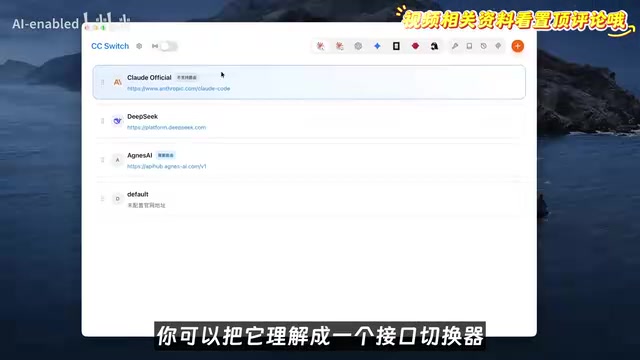
- CC Switch: An open-source, free API switcher that centrally manages Claude Code's backend address and model mapping.
The creator summed it up plainly: Claude Code does the work, Agnes AI provides the free models, and CC Switch connects them.
Step-by-Step Setup: From API Key to Routing
Step 1: Get a Free Agnes API Key
Open the Agnes AI API platform, go to "API Keys" in the left menu, click "Create new key," and name it whatever you like.
API Key is a credential string generated by the platform—essentially an "access card" for calling model APIs. Every request to the gateway must include it in an HTTP header (usually the Authorization field); the server uses it to identify the caller, track usage, and enforce rate limits. The "auth field" option in CC Switch specifies which request header this credential goes into and with what prefix (e.g., Bearer). Since the key grants account access, a leak lets others use your quota—so never commit it to a public code repository; keep it in a local config file or environment variable. Keys on free platforms can generally be revoked and recreated in the dashboard at any time.
Step 2: Configure a Provider in CC Switch
Open CC Switch, switch to the Claude Code tab in the top toolbar, and click the "+" in the top right to add a provider: choose Cloud Provider as the type, then "Custom Provider." Then fill in:
- API Key: Paste the Agnes key you just copied.
- Request URL: Enter the Agnes gateway address, used to forward Claude Code's requests.
- API Format: Select the auth field and keep the default.
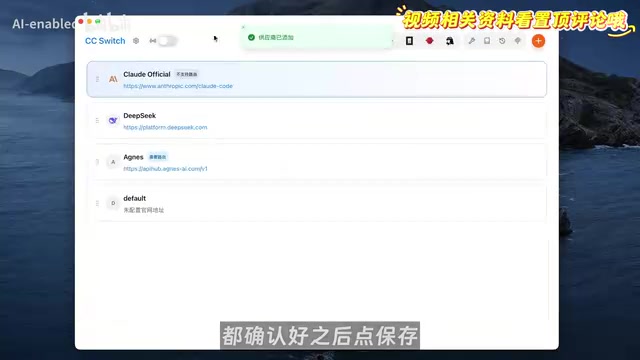
After filling these in, click "Fetch Model List." If a list of model names appears, you've successfully connected to Agnes. Next, set up model mapping: map all the models Claude Code might call to Agnes 2.0 Flash, so that no matter which model the frontend requests, it actually goes to the free backend. Confirm and save; Agnes will appear in the provider list.
Step 3: Enable Local Routing
Configuring the provider alone isn't enough—CC Switch needs to actually forward requests. Click "Settings" in the top left to open the routing interface, turn on "Local Routing," then enable the Claude routing switch. Back in the provider list, find Agnes and click "Enable." From then on, all Claude Code requests are forwarded through CC Switch to the free Agnes gateway. Type the Claude command in a terminal and send a "hello"—if you get a reply, the setup works.
Hands-On: What Can the Free Models Do?
Text Model: From Data Review to a Business Landing Page
The creator tested with real video operations data (100+ entries across multiple platforms). Calling Agnes 2.0 Flash in Claude Code, they asked for an operations review dashboard—the output included charts, filters, and detail views, cleanly laid out and ready for daily review. Then they escalated to "a business partnership landing page to send to brands," which was equally complete, with data snapshots and partnership options. From a plain table to a review dashboard to a business page—all done entirely with the free model.
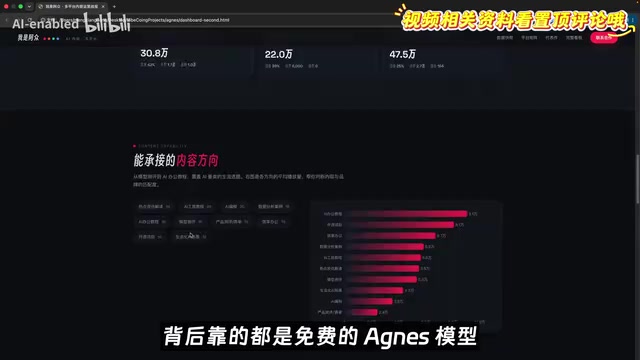
Image Generation: Text-to-Image and Image-to-Image
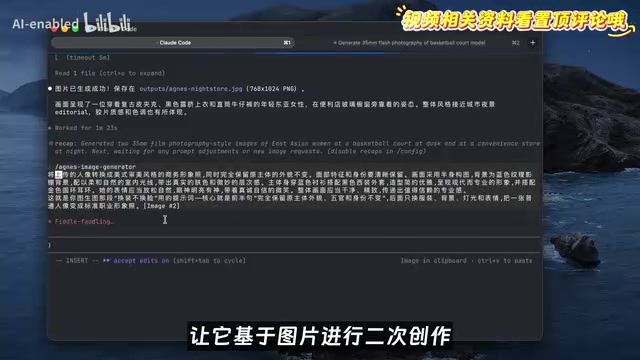
Since Claude Code can only connect to text models, the creator built a Skill that specifically calls Agnes's image generation model. Type a prompt in the chat box, Claude Code automatically invokes the Skill, and the image is generated directly into the project directory.
Text-to-image test: the prompt was "35mm film workplace-style portrait." The output had film grain, flash highlights, skin texture and pores, and a convincing street-sports vibe. The creator noted that with paid image models, even a slightly decent result costs a few dimes per image, and AI image generation often requires repeated attempts—costs add up. On Agnes it's completely free—generate as many as you want.
Image-to-image test: given a reference photo, the model recreated it as a standard professional headshot—half-body composition, natural expression, genuine smile, same face, but with clothes, background, and lighting all replaced. This "change the outfit, keep the face" capability can turn casual photos into résumé or LinkedIn avatars.
Video Generation: Coherent Expressions with Occasional Flaws
Using a prompt to generate a short video of "a red-haired female singer singing," the result was a half-body close-up with visible curly strands and backlit highlights. The creator found the expression progression most impressive: from eyes closed in buildup to mouth open singing to a frowning, immersed look—lip movements and breathing rhythm stayed coherent, without the stiffness common in AI.
The video model does occasionally glitch: in another nighttime street video, the woman and background looked realistic, but a passerby on the left suddenly "cloned" into two people. The creator took it lightly—it's free and unlimited, so just generate a few more; as long as the main subject is stable, that's enough.
Who Is This For?
For developers and content creators who want to try Claude Code without paying for a subscription, this combo lowers the barrier. One caveat: free third-party APIs come with uncertainty around stability, data privacy, and long-term availability—so use them only for non-sensitive projects and learning. The creator's tests show the free models reach a "usable" level across text, image, and video, especially suited to image and video scenarios that require lots of trial and error.
This article is based on content shared by a Bilibili creator. For configuration details, refer to the official documentation and the latest versions of the tools.
Background Notes
Text-to-image and image-to-image are the two basic input modes for image generation models. Text-to-image takes only a text prompt, and the model synthesizes the image from scratch—results are fairly random, so "gacha-style" retries (tweaking prompts or generating multiple times to pick the best) are common. Image-to-image takes an additional reference image alongside text; the model preserves parts of the original structure (such as the face or composition) while transforming style, clothing, and background per the prompt—common for outfit changes, style transfer, and avatar creation. The two consume compute differently; image-to-image generally requires stronger detail preservation, making it an important indicator of whether a model is practical.
Related articles

Uber Deploys ChatGPT Work Company-Wide: AI in the Workplace Enters the Scaled Implementation Phase
Uber deploys ChatGPT Work to 30,000+ employees, extending it from engineering to all roles. We analyze its expert-engineer pairing, end-to-end automation, and questions of AI control and power concentration—insights for scaling AI in the workplace.

Shift at Midnight Hands-On: When "ID Verification" Becomes Alien Hunting
Shift at Midnight blends ID verification with horror survival in a four-player co-op game. We break down its inspection mechanics and chaotic humor.

Zelensky Recounts the Outbreak of War: I Need Ammunition, Not a Ride
Zelensky recalls the first day of war in a YouTube interview: farewell to family, rejecting Biden's evacuation offer with "I need ammunition, not a ride," and how Bucha shaped his stance on compromise and peace talks.