AI Agent Controls Graphic Editor via MCP: Codex + PhotoCraft in Practice

Codex agent connects directly to PhotoCraft via MCP for precise layer-level editing and a local creative pipeline.
The article presents a Czech creator's demo: a Codex agent connects to PhotoCraft via MCP, directly opening local design files and operating on their layer structure for precise single-layer edits like "move down 6 points" or "uppercase the letters" rather than regenerating the whole image. The demo also shows converting a webpage screenshot into an editable layered design file. The approach emphasizes full localization for privacy-sensitive scenarios, and a Skills mechanism locks in brand style. The article envisions a local creative ecosystem connecting Word, Excel, and video tools, while noting the demo lacks performance data and practical challenges remain.
AI image generation is no longer novel, but letting AI directly control a layer-based graphic editor like a designer is the step that truly transforms workflows. A Czech creator demonstrated on YouTube how a Codex agent connects to the graphic tool PhotoCraft via MCP (Model Context Protocol) to perform layer-level operations on local design files. The core value of this approach isn't "generation"—it's "editing": the agent no longer redraws the entire image, but precisely adjusts individual layers the way a human would.
From "Regeneration" to "Layer Editing": A Paradigm Shift
The pain point of traditional AI image generation is obvious: every modification requires regenerating the entire image. In the video, the creator states bluntly that images generated with GPT "can't be touched anymore"—wanting to adjust a text position or font size means re-prompting and re-generating, often resulting in visual artifacts and style drift.
The Codex + PhotoCraft combination changes this. The agent directly opens design files on the local disk, recognizes their layer structure, and modifies only the target layers according to instructions. The video demonstrates a typical scenario: the agent generates text on a banner, the creator notices it sits too high and asks to "move it down 6 points," and the agent immediately executes and replies "hotovo" (done), with the text landing precisely on the reference line. A follow-up request to uppercase all letters also applies only to the text layer, leaving the rest of the image untouched.
This ability to "precisely operate on a single layer" means AI is no longer a black-box generator but an operator that understands the structure of design files.
MCP (Model Context Protocol) is a standardized protocol proposed and open-sourced by Anthropic in late 2024, designed to let AI models connect to external tools and data sources in a unified way. It uses a client-server architecture: the AI application acts as the client, communicating with servers implementing the MCP interface via JSON-RPC, while servers expose the capabilities of specific software (reading/writing files, calling APIs, manipulating layers) as model-callable "tools." In this article's scenario, PhotoCraft only needs to implement an MCP server registering operations like "create text layer," "move layer," and "export file" as tools, and the agent can invoke them on demand during reasoning—without custom integration code for each piece of software. This decoupled design is the key prerequisite enabling agents to reach deep into the operational layers of professional software.
Screenshot to Layered Design File: The Real Power of the MCP Protocol
The second demo in the video better illustrates MCP's potential. The creator takes a casual screenshot of a webpage, hands the image to the agent, and asks it to "turn this into a design file with layers." Although processing takes some time, the final output is a complete, layer-editable project file—each element can be moved and adjusted independently, comparable to building it manually in the editor.
According to the creator, the MCP protocol is what allows the agent to call PhotoCraft's underlying operation interfaces. The agent doesn't "see" the screenshot and draw a new image; it organizes recognized elements into structured layer objects written to the file. From the video, the resulting layer structure is clear and can be further edited with the agent or manually.
Local Files + Skills: Dual Guarantees for Privacy and Brand Consistency
Another highlighted advantage is full localization. The agent reads and writes project folders on disk; files are never uploaded to any cloud service. The creator specifically mentions concerns about client materials—"some information I might not want anyone to see"—and local processing is more convincing in privacy-sensitive commercial scenarios.
The Skills mechanism addresses brand consistency. Creators can configure specific style skills for the agent so it consistently follows brand guidelines rather than drifting randomly with each generation. In the video, the agent uses skills to accurately understand task intent and complete the full flow of "generate image → produce variants → export," all closed-loop on the local disk.
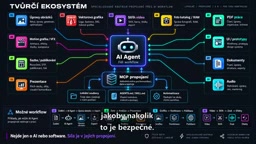
Skills here refer to reusable capability packages preset for the agent, typically consisting of documentation, examples, and optional scripts that describe the execution standards and preferences for a class of tasks. Unlike one-off prompts, skills are automatically loaded by the agent during relevant tasks, stably constraining output style and process. In this approach, brand guidelines (color schemes, fonts, layout rules) can be written into a skill so the agent follows the same constraints for every design task, avoiding style drift from generation to generation. Skills and MCP complement each other: MCP provides the tool interfaces for "what can be done," while skills define the methodology for "how it should be done." Only together can they enable the agent to complete a controllable local loop from generation to export.
Connecting the Creative Ecosystem: Beyond Graphics
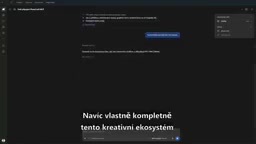
The latter part of the video envisions something bigger: this local creative ecosystem can connect Word documents, Excel spreadsheets, video editing tools, and more. The creator's vision is to prepare a publishing plan and let the agent pass data between spreadsheet, graphic, and video tools—completing pipelines from data analysis to presentations, from asset organization to video editing—while all files stay local.
The value for enterprises lies in time cost. Repetitive layout adjustments, asset format conversions, and cross-tool data transfer can all be delegated to the agent locally. However, it should be noted that the video is primarily a demo and provides no specific performance data or large-scale test results; the actual productivity gains still require more practical validation.
Layer is the basic organizational unit of graphic editors like Photoshop and Figma. Each layer independently stores one type of content (text, shape, image, adjustment effect, etc.) along with properties like position, size, opacity, blend mode, font, and size. A design file is essentially a structured collection of these layer objects and their hierarchical relationships, not a flat bitmap. This is precisely why an agent that can parse and write layer objects can achieve precise editing—"change only the target layer, leave the rest untouched." In contrast, traditional text-to-image models output pixel results lacking addressable internal structure, so any modification requires redrawing the whole image. Understanding layer semantics is exactly where the difficulty lies: in real projects, messy layer naming and complex nested groupings are the main challenges when an agent operates on design files.
Implications for the Direction of AI Design Tools
What makes this case noteworthy is that it points to a pragmatic direction for AI tools: rather than pursuing end-to-end "one-click image generation," let the agent go deep into the operational layers of existing professional software and become the designer's collaborator. Protocols like MCP are making such deep integration feasible—the agent doesn't need to replace Photoshop or Figma; it learns to operate them.
Of course, this path has barriers: the agent must accurately understand layer semantics, correctly handle complex file structures, and be able to roll back when errors occur. The video shows a smooth ideal case; how much of a challenge messy layer naming and complex nested design files will pose in real projects remains to be seen. But at least from the demo, "AI operating a graphic editor" has moved from concept to a usable toolchain.
One-line Summary
Codex agent connects directly to PhotoCraft via MCP for precise layer-level editing and a local creative pipeline.
Paragraph Summary
The article presents a Czech creator's demo: a Codex agent connects to the graphic tool PhotoCraft via the MCP protocol, directly opening local design files and operating on their layer structure to achieve single-layer precise edits like "move down 6 points" or "uppercase the letters"—rather than regenerating the whole image. The demo also shows converting a webpage screenshot into an editable layered design file, with the agent calling underlying interfaces to write structured layer objects. The approach emphasizes full localization—files are never uploaded to the cloud—making it suitable for privacy-sensitive scenarios; the Skills mechanism locks in brand style to avoid generation drift. The article further envisions a local creative ecosystem connecting Word, Excel, and video editing tools, while noting the demo lacks performance data and that practical challenges with complex layer files remain to be verified.
Related articles

Build an AI Super Employee System at Zero Cost: A Full Breakdown of Automated Agent Workflows
A deep breakdown of the AI super employee system demoed on Bilibili: agent orchestration, digital human voiceovers, map and enterprise lead generation, 24/7 customer service, and legal modules. We analyze the business logic and compliance risks behind zero-cost signup to help entrepreneurs judge the real ROI of this AI digital employee system.

The Essential Difference Between Chatbots and AI Agents: Crossing from Conversation to Execution
What's the difference between a chatbot and an AI agent? Based on the MCP series on the Learn Tech channel, this article uses examples like booking flights and summarizing notes to explain: a chatbot only gives answers, while an agent actually completes tasks through a think-act-observe loop. It breaks down the four core components—model, tools, memory, and goal—as well as MCP's role as a bridge, and discusses agents' applicable boundaries and permission risks.

Free GitHub Repo: 342 Hours of AI Courses, from Math to MCP Servers
A free GitHub repo offers 342 hours of AI courses: 523 lessons across 20 phases, from math fundamentals to agent building and MCP servers. Nearly 100,000 learners have started.