AI Agent Practical Guide: Three Levels of Use to Double Your Productivity
A three-level framework for using AI Agents to delegate tasks, stack capabilities, and double your productivity.
This guide breaks down AI Agent usage into three progressive levels: handing off routine tasks like filling spreadsheets or transcribing videos; stacking capabilities through CLI interfaces, Skills (proven playbooks), and plugins; and giving the Agent complex goals — from trip planning PDFs to Final Cut Pro rough cuts — to execute autonomously. The article also covers Projects for long-term workflows and closes with a reminder that while Agents handle execution, judgment and decision-making always remain with the human.
The same AI chat interface has now split into two very different modes of use. Some people are still stuck in the "ask AI how to do it, then do it yourself" phase. Others simply hand over a folder, let the AI read documents, organize data, generate spreadsheets, and deliver a finished product. The latter approach represents the most important shift in AI applications today — AI Agent.
This article is based on hands-on sharing from a Bilibili creator, offering a systematic breakdown of AI Agent usage and techniques. Whether you're an office worker in any industry or an independent professional, this framework can work for you.
The Fundamental Shift: From "Answering Questions" to "Completing Tasks"
The logic of a regular chat interface is straightforward: you ask, it answers, the conversation ends. An Agent works completely differently — you hand it a goal, and it thinks one step, acts one step, checks the result, then decides the next move. If it goes off course, it changes direction; if it lacks information, it keeps looking — until the job is truly done.
This approach is called ReAct (Reason + Act), and it's the core mechanism that allows an Agent to navigate through a task. In the past, AI delivered a response. Now, an Agent delivers a completed piece of work.
One technical detail worth noting: traditional AI chat interfaces have a Token limit per response — there's a fixed maximum length for any single reply. In the Agent context, this limitation essentially disappears. It works autonomously round after round, picking up where it left off until the entire task is delivered.
This is why, since Claude Code popularized the concept earlier this year, OpenAI's Codex and Agent applications from various companies have all been evolving toward maturity. The usage patterns have largely converged — just pick whichever one feels comfortable and get started.
About ReAct: The ReAct framework was proposed by Google researchers in 2022. The name stands for Reasoning and Acting. Its core idea is to have language models alternate between "Thought" and "Action" steps, observing environmental feedback (Observation) after each action before deciding the next step. This closely mirrors how humans solve problems: analyze, act, observe results, adjust. Traditional generate-only models can't handle complex tasks that require multiple steps and depend on intermediate results. ReAct allows Agents to dynamically correct their path based on actual progress, rather than "guessing" all steps upfront. Major modern Agent frameworks — including LangChain, AutoGen, and Claude Code — all use ReAct or a variant of it as the underlying task-execution logic.
Level One: Hand Off Your Routine Tasks Directly
The simplest practice is to hand your mechanical, repetitive tasks directly to the Agent.
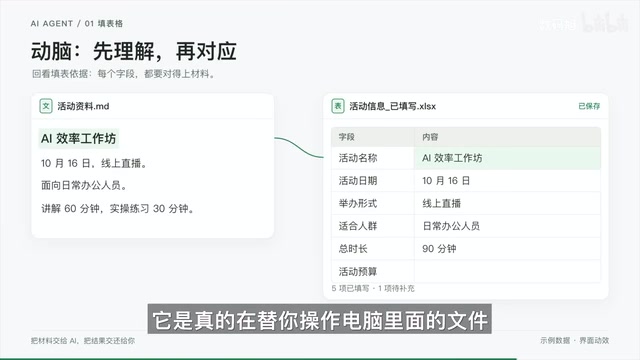
Filling out spreadsheets is the most typical example. You have an Excel template to fill in, you have all the content, but moving it over is tedious. Just say: "This Excel file is the template, here's my source material — please fill in as much as you can based on the template." You'll see it does two things: first, it acts — it actually operates the file on your computer rather than explaining how to fill it in yourself; second, it thinks — before filling anything in, it figures out what each column needs and which part of your material maps to it.
Handing over a video and asking about its content is more challenging. Large models can't directly process audio, but the Agent figures out its own approach: it first extracts the audio from the video, then uses an open-source speech-to-text model to transcribe it, and finally reads through the transcript to summarize it for you. You don't need to explain a single step — it constructs its own pipeline for "listening" to the video.
Looking up current information and building a comparison table reveals yet another capability. Ask it to compile a full Mac mini lineup with specs and current prices — this kind of information is often outdated inside the model's training data, so it opens a browser on its own and navigates Apple's website page by page, just like a human would, before organizing everything into a table.
These three small tasks collectively show that this assistant already has three core abilities: directly operating the computer, figuring out its own approach when no ready-made capability exists, and searching the web when information is insufficient. This reflects a fundamental shift in mindset — from now on, there's a hands-on operator between you and your computer. Your job is to give instructions and review the output, not to do the work yourself.
Level Two: Stacking Capabilities onto Your Agent
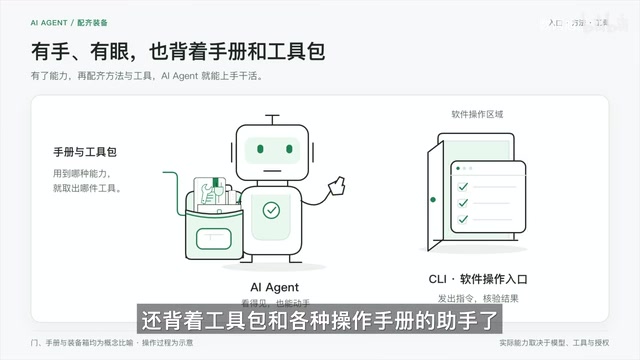
An Agent's capabilities are not fixed — they can be layered on top. There are three main ways to do this: CLI, Skills, and Plugins.
CLI: A Door Built for Programs
Take Lark (Feishu) documents as an example. Lark is not a public webpage — it has its own access controls and interaction logic, so an Agent can't read it out of the box. But Lark officially provides something called the Lark CLI. Think of a CLI as a door the software built specifically for other programs to enter, complete with a manual explaining how to use it. The graphical interface is for humans; this door is for programs — and Agents are particularly good at using it.
Just say "help me install the Lark CLI." Once installed and the manual is read, tell it "update this content to my Lark document [title]" — and it can do it directly. Many software tools offer this kind of door, including the Google Workspace suite, Notion, GitHub, and Mac's built-in Shortcuts. Just ask your Agent whether your go-to apps have one.
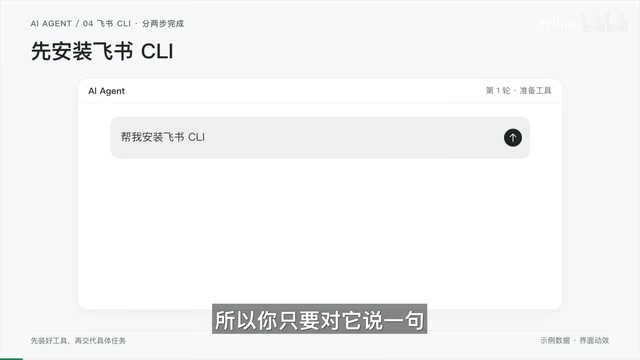
About CLI: CLI stands for Command Line Interface — a text-based interface that software provides for other programs or scripts to call. Unlike a human using a mouse to click through a graphical interface, a CLI lets another program trigger the same functions using standardized text commands — such as "create document," "read content," or "update field." For Agents, the value of a CLI lies in its predictability: each command has a fixed input/output format that won't break when the UI gets redesigned, and it can execute in bulk at high speed. Many enterprise and developer tools provide official CLIs, including Lark, Notion, and GitHub, as well as cloud platforms like AWS and Vercel. The easiest way to check whether a software has a CLI is to search "[software name] CLI" or "[software name] API."
Skills: A Proven Playbook from Someone Else
Say you want to download a video at the highest available quality. By default, the Agent might only fetch a lower-resolution version, because many platforms store their highest-quality video and audio as separate files. You can say "find me a Skill for downloading the highest-quality video from [platform]." Once installed, it has the complete workflow: check which formats the site offers, download the best video and audio streams separately, merge them, and verify the file plays correctly.
A Skill is essentially a proven playbook that someone else has already worked out. The online Skill libraries are already enormous — just ask your AI to find one. Even more useful: the workflows you develop through your own trial and error can be turned back into Skills. If you spent an afternoon getting some process to work, just add: "Summarize what we just did into a Skill." Reuse it next time. The longer you use it, the smoother the Agent becomes.
Plugins: A Complete Set of External Professional Capabilities
Plugins take Skills and CLIs a step further — they're like connecting the model to a full suite of external professional tools. Take creating animated visuals for AI content as an example: large models are already good at writing web code, and open-source animation framework plugins can combine with this to turn a brief into an animated video. Once the plugin is installed, just say "turn this explanation into a 10-second animation" — it designs the visuals, generates the animation, previews it, and renders it. The Agent is simply plugging into a production pipeline someone else built, yet it achieves capabilities that would have seemed out of reach before.
Level Two summary: CLI is the door into software, Skills are the playbook, and plugins are the full equipment kit. Combined with Level One, your Agent is now an assistant with eyes and hands, carrying a toolbox and a stack of operating manuals.
Level Three: Give It a Complex Goal and Let It Execute Autonomously
The first two levels involve giving the Agent a specific, defined task. Level Three flips the approach — you give it a bigger, more complex goal and let it mobilize all its capabilities to achieve it on its own.
At this point, the Agent can see, hear, and search. It can operate a browser, think, write, and control software. When a CLI or plugin is available, it uses them; when they're not, it looks at the screen and moves the mouse and types like a human — this is Computer Use. Think of it as having an all-around assistant living inside your computer.
Trip planning is an introductory example. Give it a rough itinerary: leaving from City A, visiting City B for three days, interested in hot pot and the beach, check for rain or typhoons, arrange a day-by-day schedule, and generate a PDF. It checks the weather along the route, figures out which day is best for the beach and which rainy days should have indoor activities, then produces a PDF with everything arranged — meals, attractions, and all — with a weather risk advisory at the end. The "output" here isn't just a block of text; it's an actual PDF file.
Breaking down work goals into a to-do list uses CLI, reasoning, and Computer Use together. Take a monthly goals document in Lark, break it down into this week's tasks, and log them into a reminder app. The Agent uses the Lark CLI to pull the goals document, thinks through how to break them down, and because the to-do app doesn't have a CLI, it uses Computer Use to open the app and enter each task one by one.
Editing a video in Final Cut Pro is the most complex case — and the most stunning. Hand it talking-head footage, a script, and B-roll materials with the instruction to complete a rough cut. Here's what it does: it transcribes the audio into timestamped text, cross-references the script to identify and remove repeated takes; it then finds Apple's official documentation, learns the FCPXML format (Final Cut Pro's project file format), and translates editing decisions into a project file; it reviews the B-roll, judges which clips should be layered over which lines based on context; and finally uses Computer Use to bring everything onto the timeline inside FCP.

In all honesty, running this entire workflow takes considerable time, and a rough cut is not a finished edit. But the real value of Level Three is this: aside from higher-level decision-making, everything else — given enough time and tokens — is potentially something the Agent can handle for you. The only thing you need to do is clearly articulate the goal.
About Computer Use: Computer Use refers to an AI Agent's ability to directly control a computer's graphical interface — moving the mouse, clicking buttons, typing text, taking screenshots, and observing screen changes — just like a human would. Anthropic first publicly demonstrated this capability with Claude 3.5 Sonnet in October 2024. Its significance lies in the fact that even when software has no CLI and no open API, an Agent can still complete operations by "seeing the screen and moving the mouse," effectively turning any software with a graphical interface into a callable tool. Currently, Computer Use is slower and less reliable than CLI-based interactions and is prone to errors on complex interfaces. In practice, it's typically used as a fallback when CLI isn't available, not as the preferred approach.
Projects: A Dedicated Workspace for Long-Term Tasks
The rapport built up across different scenarios can be organized into a Project — essentially a dedicated workspace for an ongoing piece of work. Related materials, rules, and conversation history are all stored in the project. Once inside, the Agent knows who it's working for and what standards to follow.
For example, a scriptwriting Project might contain a persona profile, language style preferences, writing guidelines, and dozens of past scripts. When starting a new script, just provide a topic and a rough idea — it will produce a first draft in the established voice.
A Critical Reminder: Hand Over Tasks, Not Judgment
The idea of "delegating as much as possible to AI" doesn't mean handing over your judgment and responsibility along with it. The decision-maker is always the human. The ceiling of what AI can achieve is your own level of understanding. What AI can do right now is improve efficiency — but what makes work outcomes excellent isn't the AI. It's you.
Before tackling any task, ask yourself: can this be handed to AI? If yes, try handing it to an Agent first. What AI truly gives you is the freedom to invest the time you save into things more worth pursuing — and developing your own judgment and understanding will always be the most important thing of all.
Related articles
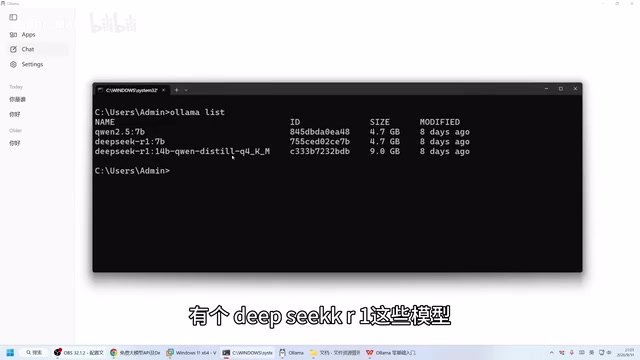
Ollama Beginner's Guide: Run Large Language Models Locally on Your Own Computer
Run LLMs locally with Ollama — fully offline, private, and free. This guide covers installation, CLI and Web UI usage, model download, and hardware requirements.
OpenAI Agents API Public Beta Hands-On: Managed Sandbox, Artifacts, and Skills in Action
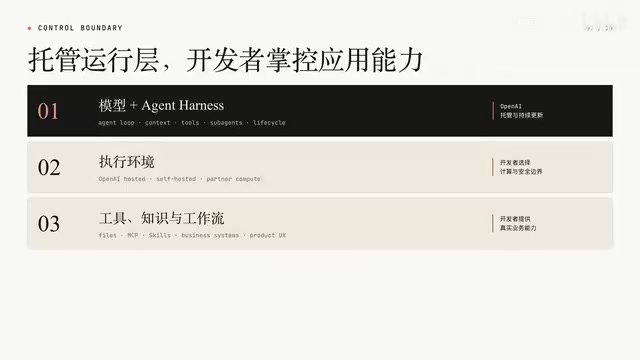
OpenAI's public beta Agents API opens the Codex Agent Harness to developers. This hands-on walkthrough covers managed sandboxes, Artifacts, Skills, and two real request workflows.

Running Local AI on a 24GB MacBook Air: Why I Chose Qwen 9B
Running local LLMs on a 24GB M5 MacBook Air: why Qwen 3.5 9B wins on memory, translation quality, vision capability, and practical workflow setup.