AI Agent Skill Script Development: When to Write and When to Never Write

A practical decision framework for when to write (and never write) scripts in AI Agent Skill development.
This article outlines a design decision framework for AI Agent Skill scripts. The core principle: scripts compensate for LLMs' weaknesses in precise computation, external system integration, and output stability. Write scripts for database/API calls, fixed computation, and reusing existing code. Never write scripts for colloquial intent recognition (use a dedicated model), frequently changing business rules (use config + Prompt instead), or high-risk operations (even if scripted, never allow auto-execution — require human review).
In AI Agent development, many developers default to using pre-built Skills without ever stopping to ask a critical question: When creating a Skill, when should you write a code script — and when should you absolutely never write one? This isn't just a common interview question; it directly determines the stability, cost, and maintainability of your Agent system.
This article draws from relevant tutorials to systematically outline the design logic and decision-making principles behind Skill scripts, helping developers avoid costly mistakes in real-world projects.
The Essence of Skill Scripts: Compensating for LLM Weaknesses
To understand when to write a script, you first need to understand the role scripts play in the Agent architecture.
Large language models excel at comprehension, reasoning, and natural language processing — but they're inherently poor at precise computation, integrating with external systems, and producing stable output formats. Scripts exist precisely to handle these "dirty jobs" that LLMs can't do well.
In other words, scripts and LLMs are complementary: the model handles intent understanding and language generation, while scripts handle deterministic tasks that demand precision. You can certainly have an LLM generate a Skill for you, but whether that Skill needs a script is a judgment call developers must make themselves.
When You Must Write a Script
Based on real-world use cases, there are three scenarios where attaching a script to a Skill is almost always necessary.
Connecting to External Systems and Databases
When an Agent needs to query a database or call a third-party API, without a script it will likely probe repeatedly — retrying multiple times on bad parameters, burning through Tokens, inflating context memory, slowing responses, and frequently mangling call parameters.
Once these capabilities are encapsulated in a script, the Agent can directly invoke a fixed interface, eliminating all that wasted effort and dramatically improving both stability and efficiency.

Token consumption is one of the core costs in an Agent system. Every LLM inference is billed based on the number of input + output Tokens. Multiple retries not only directly increase costs but also cause the Context Window to fill up rapidly. Most major LLMs have context windows ranging from 8K to 128K Tokens — once conversation history grows too long, the model may start "forgetting" earlier information, leading to erratic behavior. Encapsulating external system calls as scripts essentially compresses an uncertain multi-turn exploration into a single deterministic call: it saves money and prevents context contamination.
Fixed Computation and Format Processing
For deterministic tasks like numerical aggregation, timestamp conversion, and JSON assembly, handing them off to an LLM tends to produce miscalculated numbers, malformed outputs, and occasional hallucinations — the results are highly unstable.
Hardcoding the logic in a script and letting it handle format conversion and calculation keeps output predictable and eliminates random failures.
Reusing Existing Scripts
For scripts that already exist — ops scripts, build scripts, and so on — there's no need to have an LLM recreate the entire logic from scratch using prompts. Complex logic rarely transfers cleanly, and doing so is pure reinvention of the wheel.
The right approach is to call the existing script directly and use it as-is.

When You Should Never Write a Script
Conversely, there are three scenarios where forcing a script-based implementation will lead to catastrophic maintenance costs or even production incidents.
Colloquial Semantic Understanding and Intent Recognition
Take e-commerce customer service as an example. When users say things like "I want to grab some bubble tea" or "I want to order food," these expressions need to trigger downstream ordering logic. If you try to handle intent recognition with a script, you'll end up writing mountains of if-else branches and regex patterns to enumerate every possible way a user might phrase something.
The problem: the moment users rephrase themselves, the script breaks. You'll be patching code endlessly, making it messier over time with ever-exploding maintenance costs. These tasks should be delegated to an intent recognition model, not hard-coded scripts.
An Intent Recognition Model is specifically designed to map natural language input to predefined intent categories. Unlike general-purpose LLMs, it's typically fine-tuned on large volumes of conversational data and can handle diverse user phrasings at very low inference cost. In engineering practice, intent recognition often serves as the first routing layer of an Agent — determining what the user wants to do before handing off to the corresponding Skill for execution. This avoids burdening a general LLM with classification decisions it's not optimized for, and prevents brittle rule-based code from having to maintain endless expression variants.
Frequently Changing Business Rules
Business rules change constantly. If they're implemented in scripts, every product requirement change means modifying code, debugging, and redeploying — iteration cycles grind to a halt.
A better approach is a configuration + Prompt combination: update a config to change behavior, no code changes required, dramatically accelerating iteration speed.
The "configuration + Prompt" pattern is a common Agent engineering practice: frequently changing business rules (such as discount strategies, approval thresholds, or tone guidelines) are written into external config files or knowledge bases. The Agent reads and injects them dynamically into the Prompt at inference time, without any code changes or redeployments. This approach downgrades "requires a code change" to "edit a config file," enabling product and operations teams to adjust Agent behavior autonomously and significantly shortening iteration cycles. In contrast, hard-coding business rules into scripts locks product decision-making inside the engineering layer.
High-Risk Operations
For dangerous actions like deleting data or modifying production configurations, if these are handed to a script with auto-execution enabled, the Agent could trigger them under insufficient conditional checks and cause an immediate production outage.
A key distinction here: scripts for these operations can be written, but they must never be handed to the Agent for automatic execution. A human review step is mandatory — a person must intervene and confirm before anything runs.

The One-Line Decision Principle
The next time an interviewer asks "when should you write a Skill script and when shouldn't you," remember this framework:
- Write a script when: the task involves precise computation, connecting to external systems, or reusing existing scripts
- Don't write a script when: the task involves intent recognition, frequently changing rules, or high-risk operations
The core logic behind this principle is straightforward — hand deterministic, precision-demanding tasks to scripts; hand flexible, understanding-dependent tasks to the model; and always reserve space for human intervention on high-risk operations. Master this dividing line, and you'll make far more sound engineering decisions when designing Skills for your Agent.
Related articles
Shared Memory for AI Coding Assistants via MCP: Stop Explaining Your Code Over and Over
AI coding assistants forget everything between sessions. Learn how MCP and the mFlow platform enable shared memory, auto-docs, and multi-assistant collaboration.
Screen Record with Clippy to Feed AI Coding Assistants: A Faster Development Workflow
A developer shares how to use screen recorder Clippy with AI coding agents like Claude and Codex: narrate demos to generate structured links, letting agents access screenshots, transcripts, and summaries without costly frame-by-frame processing.
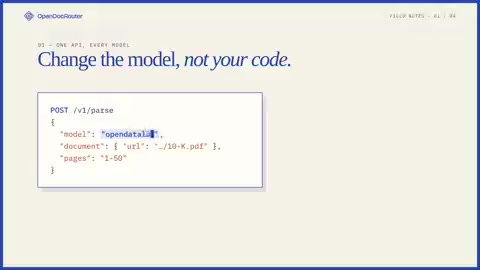
OpenDocRouter Launches: A Unified API Aggregating 130+ Document Parsing Models
OpenDocRouter launches a unified document parsing API aggregating 130+ frontier and open-weight OCR/VLM models, with at-cost pricing, rate limit management, bounding box layout services, and automated routing.