AI Auto-Generated CAD Drawings: A Complete Guide to Installing and Using the Skill Plugin

Generate complete CAD drawings from text prompts using a free, open-source AI Skill plugin compatible with Codex, Claude, and Gemini.
This guide introduces a Skill-based plugin that enables AI Agents to automatically generate CAD drawings from natural language prompts. Compatible with Codex, Claude, and Gemini, the open-source tool requires no drafting expertise. The article covers installation steps, how to invoke the Skill, real-world test results, and an honest look at the tool's productivity benefits and current limitations.
From Manual Drafting to AI Generation: A Leap in Efficiency
For engineers, designers, and manufacturing professionals, creating CAD drawings has traditionally been a time-consuming task requiring specialized expertise. Conventional workflows demand that designers master dedicated drafting software, be well-versed in various industry standards, and invest significant time fine-tuning every detail.
Today, with the maturation of AI Agent technology, this workflow is being fundamentally reimagined. This article introduces a CAD generation plugin built on a "Skill" mechanism — simply enter a prompt, and the AI produces a complete, usable drawing. The plugin has attracted approximately 7.6K stars in the open-source community and is compatible with multiple mainstream AI Agents including Codex, Claude, and Gemini, making it highly versatile.

What Is the Skill Mechanism?
The Core Value of Skills
A "Skill" can be thought of as a capability extension module for AI Agents. It packages domain-specific knowledge, workflows, and tool-calling capabilities into reusable plugins, enabling general-purpose large language models to handle tasks that previously required specialized software.
To understand the Skill mechanism, it helps to first understand what an AI Agent is. An AI Agent is an artificial intelligence system capable of autonomously perceiving its environment, formulating plans, and executing multi-step tasks. Its key distinction from traditional "question-and-answer" LLMs lies in its Tool Use and continuous reasoning capabilities. The Skill mechanism is essentially a modular packaging of Agent capabilities — similar to the app ecosystem on a smartphone, where each Skill represents a specialized capability bundle for a vertical domain that can be invoked by different underlying models. This design philosophy is aligned with OpenAI's Function Calling and Anthropic's Tool Use API, but places greater emphasis on cross-model portability and deep integration of domain knowledge.
In the CAD generation context, the Skill plays a dual role as both "translator" and "executor": converting a user's natural language description into precise drawing parameters, then invoking the underlying drawing logic to output a CAD file that meets engineering standards. The greatest advantage of this approach is that users need no professional drafting skills whatsoever — as demonstrated in real-world testing: "The AI handled everything from start to finish. I don't even know how to do this myself, yet it produced a finished drawing."
The Practical Significance of Multi-Agent Compatibility
The plugin's compatibility with multiple AI Agents is also worth noting. Support for Codex, Claude, Gemini, and others is made possible through standardized API interface design and model-agnostic prompt engineering. Different large models each have their strengths in instruction comprehension, code generation, and structured output: Codex (based on the GPT series) excels at code generation tasks; Claude is known for long-context understanding and precise instruction-following; Gemini offers strong multimodal comprehension capabilities. By decoupling the Skill's core logic from the underlying model, developers allow users to freely switch between engines without changing their workflow — a reflection of the prevailing "model-neutral" plugin architecture trend.
As a result, regardless of which AI tool you prefer, you can plug into this Skill system. Users aren't locked into a single model ecosystem and can flexibly switch underlying models based on their needs and budget — a particularly practical feature in today's highly fragmented AI tool landscape.
Complete Installation and Usage Walkthrough
Step 1: Install the Skill Plugin from the Marketplace
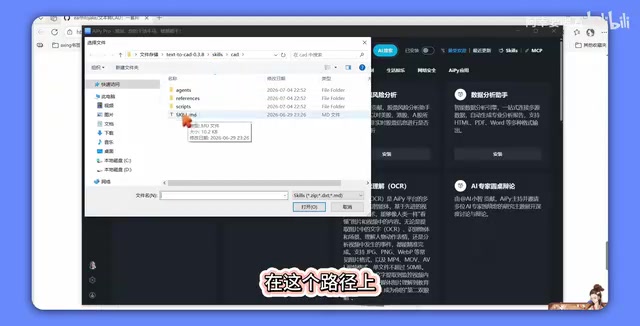
The process is straightforward. First, open the software that supports Skills and navigate to the "Marketplace" page. Click on "Skills," then select "Install from file." Locate the plugin file you downloaded locally, click to open it, and confirm the installation.
Installation takes only a moment — real-world testing shows it completes in about 10 seconds. Once successfully installed, click "Close" and you'll see the CAD Skill listed under your installed plugins.

Step 2: Load and Invoke the Skill
Scroll down through your installed Skills list, find the CAD-related Skill, and click to use it. The system will load the corresponding interface. Once the interface is ready, copy and paste your prepared prompt into the input box, click Run, and the AI will automatically begin generating the complete drawing.
Expect to wait a moment during generation — this is normal processing time as the AI reasons through and renders the drawing. Once complete, you'll have a finished CAD drawing ready to view. It's worth noting that CAD drawings are typically stored in formats such as DWG or DXF. DXF (Drawing Exchange Format) is an open standard developed by Autodesk and is widely used to exchange drawings between different software applications. It is precisely this highly structured file format — with its clear syntactic rules — that allows AI to generate compliant output, unlike the uncertainty inherent in open-ended creative tasks.

Step 3: Verify the Output Quality
To confirm output quality, you can compare the generated result against official examples from the open-source repository on GitHub. Real-world testing shows the results are identical, indicating that the plugin delivers stable, reliable output capable of reproducing official example quality — rather than erratic, unpredictable generation. Additionally, the software is currently free to use, further lowering the barrier to entry.
The Value and Limitations of These Tools
Real-World Productivity Impact
AI-generated CAD drawings represent a prime example of deep integration between AI Agents and vertical professional domains. This approach compresses complex professional workflows down to two steps — "enter a prompt, wait for output" — dramatically lowering the technical barrier to drafting. For small and medium-sized businesses, independent designers, and educational settings alike, tools like this can significantly boost efficiency and reduce labor costs.
From a broader perspective, this validates a clear trend: AI is rapidly evolving from a "conversational assistant" into an actual production tool. When large models gain the ability to invoke professional tools and adhere to industry standards, what they deliver is no longer just a text response — it's an engineering deliverable ready for direct use.
Limitations to Keep in Mind
That said, it's important to stay grounded. CAD drawings demand extreme precision because of the physical constraints of manufacturing: in machining, a tolerance deviation of 0.01 millimeters can cause parts to fail during assembly; in architectural drawings, structural calculations depend on precise geometric relationships. The core challenge facing AI-generated drawings today is the "hallucination problem" — large models may generate content that appears correct but contains faulty parameters. Beyond that, handling complex constraints (such as multi-part fit relationships and material mechanical properties) requires systematic reasoning, not mere pattern recognition. Engineering drawings must also conform to international or national standards such as ISO, ANSI, or GB, covering dozens of rules including line type conventions, dimensioning methods, and tolerance notation — placing significant demands on AI's ability to follow rules consistently.
The demonstration cases shown so far are relatively simple and have not yet fully illustrated generation quality under complex drawings or multi-constraint conditions, nor the precision of outputs in real-world engineering scenarios. For now, AI-generated drawings are best positioned as "high-quality first drafts" that still require review and correction by a qualified professional. Furthermore, prompt quality directly determines output quality — to obtain a useful drawing, users still need the ability to articulate requirements clearly and possess basic domain knowledge. The idea of "zero-skill, one-click generation" is conceptually appealing, but in real professional contexts, human-AI collaboration remains the more pragmatic path.
Conclusion
The practice of AI-generated CAD drawings demonstrates the enormous potential of the Skill mechanism in specialized vertical domains. This plugin is compatible with multiple mainstream AI Agents, open-source, free to use, and has a low barrier to entry — offering a brand-new path toward automation for traditional drafting work. While its performance in precision-critical and complex scenarios still awaits further validation, this direction is undoubtedly worth following closely. It reveals the genuine possibility of AI becoming truly embedded in professional workflows. For practitioners looking to improve drafting efficiency, it's well worth installing and trying for yourself — let the actual output speak to its real-world value.
Key Takeaways
Related articles

Uber Deploys ChatGPT Work Company-Wide: AI in the Workplace Enters the Scaled Implementation Phase
Uber deploys ChatGPT Work to 30,000+ employees, extending it from engineering to all roles. We analyze its expert-engineer pairing, end-to-end automation, and questions of AI control and power concentration—insights for scaling AI in the workplace.

Shift at Midnight Hands-On: When "ID Verification" Becomes Alien Hunting
Shift at Midnight blends ID verification with horror survival in a four-player co-op game. We break down its inspection mechanics and chaotic humor.

Zelensky Recounts the Outbreak of War: I Need Ammunition, Not a Ride
Zelensky recalls the first day of war in a YouTube interview: farewell to family, rejecting Biden's evacuation offer with "I need ammunition, not a ride," and how Bucha shaped his stance on compromise and peace talks.