Build a Smart World Cup Calendar with AI Agent in 6 Minutes — Auto-Push Schedules to WeChat

Use an AI Agent to build a personalized World Cup calendar with WeChat push alerts — no coding needed.
The 2026 World Cup's 39-day schedule means endless late nights for Asian fans. This guide shows how to use an AI Agent (like Hermes Agent or Codex) to generate a smart single-file HTML match calendar in ~6 minutes — with intelligent recommendations, team tracking, and auto WeChat notifications — all through plain-language instructions, zero code required.
The 2026 USA/Canada/Mexico World Cup spans 39 days. With so many matches kicking off in the early hours of the morning for viewers in Asia, fans face an impossible choice: stay up and wreck your body, or sleep and miss everything. Is there a way to never miss the matches that matter — while cutting out the pointless all-nighters?
This article is based on a hands-on walkthrough by Bilibili creator "AI实验派" (AI Lab派). It introduces a zero-code solution: using an AI Agent to build your own dynamic World Cup schedule calendar in about 6 minutes, then linking it to WeChat for automatic match notifications. One caveat upfront — no tool can actually cancel time zones. But a smart enough calendar can help you identify the must-watch matches worth losing sleep over, and let post-match recaps handle the rest.
The Core Idea: Let an AI Agent Be Your Product Manager
At its heart, this approach uses an AI Agent to generate a fully functional single-file HTML page that acts as your personal match-watching assistant. No coding required — you simply describe what you want in plain language, like a product manager, and let the Agent handle the rest.
The fundamental difference between an AI Agent and a traditional chatbot lies in autonomy and tool-calling capability. An AI Agent can perceive its environment, plan multi-step actions, and execute them — rather than just responding to one message at a time. Its core capability is "Tool Use" — the Agent can automatically select and invoke external capability modules (referred to as "Skills" in this context) based on the task at hand. Different Agent platforms manage Skills differently: some have pre-installed skill packs that the Agent selects autonomously; others require users to manually install and activate them. This reflects the fragmented state of today's Agent ecosystem — from OpenAI's GPT Actions to Anthropic's Claude tool-calling protocol, implementations remain inconsistent, and users switching platforms often need to reconfigure everything from scratch.
The creator demonstrated two main tools: Hermes Agent and Codex. The key difference — Hermes Agent can integrate with WeChat, Feishu, and other social platforms to push match updates on a schedule; Codex can only generate a web page with no social app integration, making it suitable for users who just want a local calendar. Other Agents capable of connecting to social apps, such as OpenClawAd and WorkBody, can also get the job done.
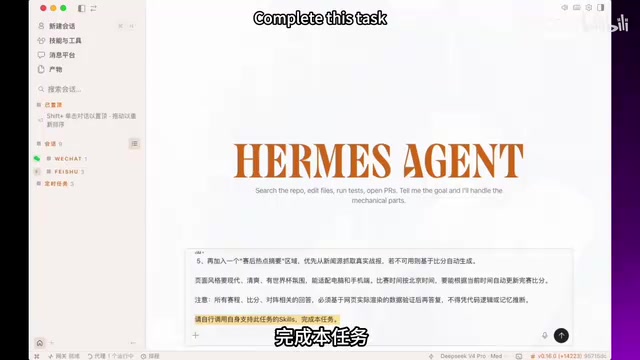
The One Crucial Line in the Prompt
The prompt used by the creator reads roughly: "Help me create a customized 2026 World Cup super calendar webpage — generate a single-file HTML that can run directly…" There's one detail worth highlighting: the final line of the prompt — "Please invoke any Skills you support that are relevant to this task to complete it."
For Hermes Agent, this line causes it to automatically call its built-in website-building and front-end design skills. For other Agents, you may need to manually find and install the relevant Skills first, then invoke them one by one — in which case this final line can be omitted. This reflects the variation in how "Skills" are invoked across today's Agent ecosystem.
How to Quickly Refine the Generated Page
After submitting the prompt, Hermes Agent quickly produced a fairly complete HTML page and provided a local access URL — just paste it into your browser. The initial result was already quite solid.
Why single-file HTML is well-suited for AI generation comes down to a key technical logic: a single-file HTML bundles CSS styles, JavaScript logic, and HTML structure all inline into one .html file. No server, no database, no back-end configuration — just double-click or paste a local path into your browser. Modern browsers handle this well — JavaScript can manage complex state (like adding and removing items from a "watch list"), and the LocalStorage API can persist user data locally. More importantly, this architecture is naturally suited to AI generation: the model only needs to output a single continuous block of text, without coordinating dependencies across multiple files. This significantly reduces the error rate in AI-generated code.
Next comes the "product manager" phase: wherever something looks off, just tell the AI in plain language. For example, the creator noticed a layout felt too cramped, took a screenshot, uploaded it, and wrote: "The spacing between the smart recommendation toggle and the box below is too tight — please increase it." After the fix, a browser refresh reflects the change almost exactly as described. This "screenshot + natural language feedback" iteration loop is one of the most intuitive advantages of building with AI Agents today — you don't need to know CSS, you just need to know how to communicate.
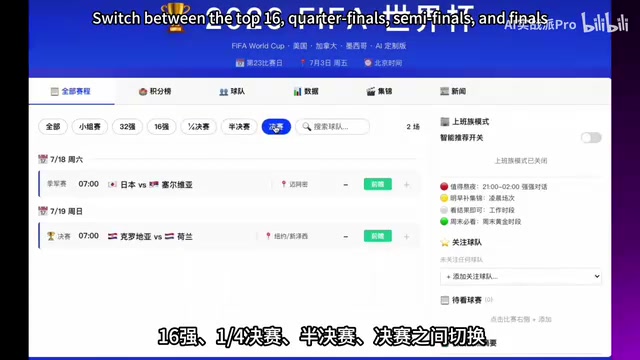
Core Features of the Smart Match Calendar
Based on the demo, the World Cup schedule calendar includes the following practical features:
- Tab navigation by stage: Switch between All, Group Stage, Round of 32, Round of 16, Quarterfinals, Semifinals, and Final — displaying match times, teams, venues, and scores for each.
- Smart recommendation toggle: The most useful feature. When enabled, the system evaluates upcoming matches and labels them — "Must-watch this weekend," "Fine to catch the highlights tomorrow morning," "Worth staying up for," or "Just check the score" — helping you avoid pointless late nights.
- Team follow: Select teams to follow; they'll be highlighted in red on the left panel.
- Watch list: Click the plus icon to add a match to your watch list; click again to remove it.
- Post-match highlights summary: The system prioritizes real match reports from official sources; if no live data is available, it auto-generates a post-match summary based on the final score, so you can get the full picture without watching the live stream.
The creator also replicated the same workflow in Codex: paste in the same prompt, confirm four steps, and the page is generated in about two minutes. Opening it in Safari looked equally impressive — the layout was arguably more creative. This confirms that the zero-code approach isn't locked to any single tool and transfers well across platforms.
Connecting to WeChat: Making the Calendar Push Updates Proactively
Once the webpage is ready, turning it into a proactive WeChat notification assistant is the advanced highlight of this setup.
The technical principle behind WeChat bot integration is worth a brief explanation: connecting an AI service to WeChat typically relies on Webhook mechanisms or third-party protocol libraries. The workflow in Hermes Agent — running a terminal command that pops up a QR code — essentially starts a lightweight local gateway service. This gateway acts as a middleware layer: one end connects to a WeChat account (via QR code authorization), and the other connects to the Agent's API, enabling two-way message forwarding. It's worth noting that because WeChat's official stance on personal account automation is cautious, most personal WeChat integration solutions on the market are based on unofficial protocols and carry some risk of account suspension. Testing with a secondary account is strongly recommended.
The creator selected WeChat in Hermes Agent's messaging platform settings. The normal flow requires two required parameters, but the creator shared a simpler path:
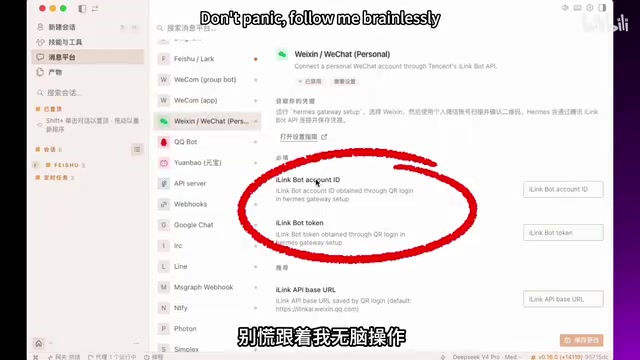
- Start a new conversation in Hermes Agent, type
Hermes Gateway Setup, and submit — you'll receive a step-by-step setup guide. - When asked whether to "install as a system service" or "connect to more platforms," choose the latter and specify WeChat.
- Hermes Agent will ask you to paste a command into your computer's terminal. After running it and selecting WeChat, a QR code appears in the terminal — scan it with your phone's WeChat.
- If you encounter technical prompts you don't understand, copy the terminal output back into the chat and let the Agent guide you through it step by step.
- Once setup is complete, send the newly launched bot a message on WeChat. An instant reply means success. If there's no response, screenshot the chat and drop it back into the conversation — let the Agent troubleshoot automatically until it works.
This "screenshot and hand it back to the AI" approach to debugging is, in many ways, the new paradigm for troubleshooting in the AI Agent era — freeing people from having to dig into technical details themselves.
Setting Up a Scheduled Task: Daily Match Schedule Pushed Automatically
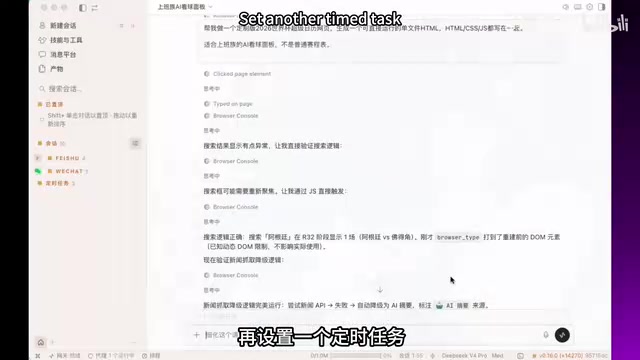
After a successful connection, the creator tested the WeChat bot by asking: "When is Argentina's next match at the 2026 World Cup?" — and got a quick reply. Then, returning to the calendar generation conversation, they asked the Agent to verify the WeChat connection and, once confirmed, set up a scheduled task.
The underlying logic of scheduled tasks maps to the classic Cron Job concept — a daemon process in Unix/Linux systems used to run scripts at regular intervals, controlled by time expressions (e.g., 0 8 * * * means "run every day at 8 AM"). Hermes Agent wraps this low-level mechanism into a natural-language interface: users don't need to know Cron syntax — just say "push every morning" and the task is configured. This detail points to an important broader trend: AI Agents are becoming natural-language front-ends for OS-level tools. Automation tasks that once required a developer to hand-write server configs can now be set up by anyone through conversation.
One detail worth flagging: when the creator chose "push today's match schedule every morning," the Agent — having spent the entire prior session working with Feishu — defaulted to sending the push to Feishu out of habit. This is a small "context bias" slip, technically corresponding to the large model's tendency to carry early-context preferences through a long conversation. After being corrected, the Agent redirected the task to WeChat and completed the setup successfully. This is a reminder that AI Agents in multi-platform scenarios can still make default-preference mistakes — the human confirmation step should never be skipped.
Also worth noting: to cancel a scheduled task at any time, just say so in plain language — whether in the Hermes Agent chat or the WeChat bot — and it's done. The interaction is remarkably free-form.
Final Thoughts: Zero-Code Tool Building — the Technical Barrier Is Disappearing
The real value of this approach may not be the calendar itself, but what it demonstrates about a new kind of capability: an ordinary person, writing zero lines of code, can use an AI Agent to design and build a product that serves their own needs. From describing requirements and refining the UI, to cross-platform integration and scheduled tasks — the entire pipeline is driven by natural language.
For the 2026 World Cup, it means directing your limited energy toward the matches genuinely worth losing sleep over. Zoomed out, it's also a vivid, real-world example of AI Agent adoption in practice — when "talking like a human" is all it takes to build a tool, the technical barrier is being erased fast.
Related articles

Frontend to AI Agent Development: A Frontline Architect Explains Career Paths and Opportunities
A frontline AI architect explains the industry changes and practical paths for frontend developers transitioning to AI Agent development: why pure frontend jobs are disappearing, why Agent + full-stack has become mainstream in hiring, and three transformation routes—Agent development engineer, FDE, and remote contracting—along with corresponding learning strategies.

How to Choose an AI Agent Development Course: Five Pitfall-Avoidance Guidelines
A mechanical-engineering career changer's two-year pitfall-tested checklist for screening AI Agent development courses: complete delivery pipeline, resume-worthy projects, real development perspective, update frequency, and coaching feedback—with concrete judgment methods and pitfall-avoidance tips.

Coze AI Agent Building for Beginners: A Zero-Code AI Agent Development Guide
Coze, ByteDance's one-stop AI application development platform, supports zero-code drag-and-drop AI agent building. This article outlines Coze's core concepts, three advantages, differences between the domestic and international versions, and the distinction between agents and apps, helping beginners quickly get started with AI Agent development.