Building AI Agents with Python and the Claude API: Tool Use and MCP in Practice

Hand-write an Agent Loop in Python with the Claude API and understand tool descriptions, MCP, and security boundaries.
Based on a technical walkthrough video, this article shows how to build an agent from scratch in Python with the Claude API that can read files and make decisions in a loop. It starts from the most basic `messages.create` call, explains the content block response structure, then introduces the `tools` list and JSON Schema, emphasizing that description determines when the model calls a tool and matters no less than schema. The core is a roughly twenty-line Agent Loop: when `stop_reason` is `tool_use`, execute the local function and return `tool_result` until the model ends its turn—with a mandatory max step limit to prevent infinite loops. The article also covers hosted tools, the SDK tool runner, and the Agent SDK as paths to fewer loops, introduces the MCP open standard with a "USB port" metaphor, and closes with security guidance on least privilege, logging, cost ceilings, and human confirmation.
Tool Use lets large models move from "chatting" to "doing," and the Agent Loop is the key to organizing that capability into a repeatable workflow. This article, based on a technical walkthrough video, breaks down how to build an agent from scratch in Python with the Claude API—one that can read files and make decisions in a loop—and also covers MCP, an open standard that more and more tools are adopting.
Starting with a Plain API Call
The first step in building an agent isn't writing a loop—it's getting the most basic request working. The video's approach is straightforward: create a virtual environment, pip install anthropic, generate an API Key in the Claude console, and store it in an environment variable named ANTHROPIC_API_KEY rather than hardcoding it in the code. This step seems trivial, but it's the prerequisite for all the security practices that follow.
At the code level, you import anthropic and create a client, then call client.messages.create, passing in the model name (the video uses Claude Sonnet 5.5 as an example), max_tokens, and a list of messages. Each message has a role (user or assistant) and content. The result is a set of content blocks; extract the text and print it, and one conversation is done.
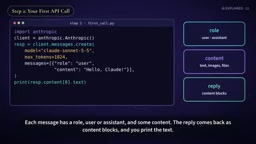
The code at this stage isn't "intelligent" in any way, but it establishes the skeleton for everything that follows: request, response, message accumulation. Understanding the structure of the returned content blocks is the foundation for understanding tool_use blocks later.
Environment Variables and API Key Management: Storing the API Key in the ANTHROPIC_API_KEY environment variable instead of hardcoding it is the default convention of the Anthropic SDK—the anthropic client automatically reads this variable on initialization, so there's no need to pass it explicitly in code. The immediate benefit is that keys never enter version control, and it's easy to switch credentials across environments (local, CI, production). The tradeoff is that environment variables are visible to any code that can read the process environment, so production setups typically layer on key rotation, per-project key distribution, and injection via a secrets manager. Understanding this convention also explains why none of the code examples that follow contain plaintext keys.
Giving the Model Tools: description Matters More Than schema
The core action that turns Claude into an agent is attaching a tools list to the request. Each tool has three parts: name, description, and an input_schema written in JSON Schema. The video's example is read_file, described as "read a text file from the notes folder," with a single required parameter path.
There's an easily overlooked detail here: the model decides when to call a tool by reading its description, so how well the description is written directly determines how accurately the tool gets invoked. A vague "read a file" versus a description that specifies the directory scope and file type makes a big difference. The schema constrains the parameter structure; the description expresses intent—different jobs, different responsibilities.
When Claude decides to use a tool, the response's stop_reason becomes tool_use, and a tool_use block appears containing the tool ID, name, and input parameters. The key point: Claude itself does not execute any tools. The Python code actually runs the function—permission boundaries, parameter validation, and blocking dangerous operations are all under the developer's control.
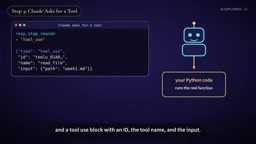
JSON Schema and tool_use Blocks: input_schema follows the JSON Schema spec to declare parameter types, whether they're required, enum values, and other constraints. The model generates parameters in this structure, but the server doesn't enforce business semantics. The tool_use block is a type of content block in the response; besides text blocks, a single response may contain multiple tool_use blocks, meaning the model can request parallel calls to multiple tools in one turn. Each block carries a unique tool_use_id, which is the key to pairing execution results with requests later—when returning a tool_result, you must include the same ID, otherwise the model can't tell which call the result corresponds to.
The Agent Loop: The Core Loop in Twenty Lines of Code
Once you have the tool_use block, the flow is this: append Claude's reply to the message list, then add a new user message containing a tool_result block, using the same tool_use_id and attaching the result of the local function. Call the API again; after reading the result, Claude either requests the next tool or gives a final answer.
Wrap this set of actions in a loop—as long as stop_reason is still tool_use, keep executing tools and returning results—and an agent takes shape. The video's author says this takes about 20 lines of Python. The loop exits when Claude ends its turn, at which point you print the final answer.
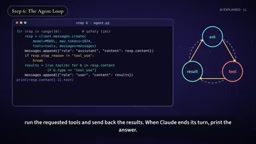
The loop must have a maximum step limit. Without this cap, if a tool keeps returning results the model isn't satisfied with, the agent can spin indefinitely—burning not just time but token costs. This is engineering discipline the video stresses repeatedly, not an optional extra.
stop_reason Values and Turn Semantics: stop_reason is the sole basis for deciding whether to continue the loop. Common values include end_turn (the model naturally ends its turn), tool_use (waiting for tool results), max_tokens (truncated at the output limit), and stop_sequence (hit a custom stop sequence). A robust loop shouldn't just distinguish "is it tool_use or not"; it should also handle abnormal terminations like max_tokens, otherwise you might keep appending to a truncated response and corrupt the message history. Additionally, tool_result blocks are by default treated as part of a user-role message; results from multiple parallel tools should be returned in the same user message so the model sees all results in one turn instead of being forced through extra rounds.
Several Paths to Writing Fewer Loops
The value of hand-writing the loop is understanding the mechanics, but production environments don't necessarily need to reinvent the wheel. The video mentions several labor-saving paths: one is hosted tools running on Anthropic's servers, such as web search and code execution, which developers don't need to implement themselves; another is the Python SDK's built-in tool runner, which encapsulates the entire loop; and further up is the Claude Agent SDK, which provides the agent harness that powers Claude Code.
Which layer to choose depends on how much control you need. Hosted tools are easy but offer limited customization; a self-built loop is flexible but requires handling errors, retries, and logging yourself. Understanding the underlying loop before choosing a higher-level abstraction means you won't be lost when problems arise.
The Boundary Between Hosted Tools and the tool runner: Hosted tools (such as web search and code execution) run on Anthropic's side; callers only see results and can't intervene in the intermediate process—suitable for standardized scenarios that need no customization. The Python SDK's tool runner runs the loop locally on your behalf, but you still define the tool functions, so control sits in between. The Claude Agent SDK goes further, encapsulating harness-level capabilities like context management, sub-agents, and permission hooks. The essential difference among the three is "who holds control of the loop": the higher the abstraction, the less work, but the fewer observability and intervention points when things go wrong. When choosing, first clarify whether you need custom retry policies, audit logs, or human confirmation checkpoints, then decide which layer to stop at.
MCP: The USB Port for AI Tools
The Model Context Protocol (MCP) is an open standard introduced by Anthropic. The video uses a very intuitive metaphor: it's the USB port for AI tools. Write an MCP server once for a database or service, and any MCP-compatible application can plug into it—including Claude, Claude Code, and tools from many other companies.
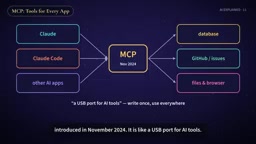
The analogy captures MCP's real value: turning "write a separate integration for each AI application" into "write once, use everywhere." For teams that need to expose internal systems to multiple AI clients, this can significantly reduce the cost of repeated adaptation. Its significance isn't that there's one more protocol—it's that the marginal cost of integration has been driven down.
A Few Security Recommendations Before You Start
The video's practical recommendations are pragmatic: start simple—one model, a few clearly described tools, one loop; give each tool the minimum necessary permissions; log every step; limit step counts and cost ceilings; require human confirmation before high-risk actions; and thoroughly test with real cases before trusting the agent.
These recommendations point to the same fact: an agent's capabilities come from tools, and so do its risks. An agent that can read files, query databases, and execute code—if permissions are too broad and logs too sparse—will be hard to diagnose and hard to contain when things go wrong. Cap the loop, minimize permissions, and leave a trail of actions: these three matter more than any framework choice in determining whether an agent can ship safely.
Related articles
Getting Started with Gemini 4 Argonne: A Hands-On Guide from Building Sites to Agents
Complete Gemini 4 Argonne tutorial: build a calorie tracker app with one prompt in Google AI Studio, review 10-page technical documents with long context, develop a browser game as a coding Agent in Anti-Gravity, plus API Key setup, pricing, and subscription requirements.
Cursor vs. Claude Code vs. Copilot: A Scenario-Based Selection Guide
Cursor, Claude Code, or GitHub Copilot? A scenario-based guide covering daily coding, large refactors and long tasks, and teams locked into existing IDEs—plus common pitfalls and combined-use advice.
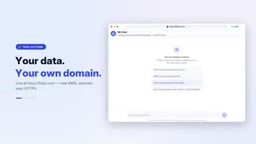
DB Chat: Conversing with PostgreSQL in Natural Language, with AI Auto-Generating SQL
dbchat lets users converse with a PostgreSQL database in natural language, with an AI agent auto-generating SQL and returning live results. This article analyzes its MCP Server + Next.js + AWS full-stack architecture and anti-hallucination guardrail design.