ChatGPT vs. AI Agents: Choosing Between Conversation and Agentic Workflows

ChatGPT is a product; an Agent is a design pattern—what really matters is choosing between conversation and agentic workflows.
The article argues that comparing ChatGPT and AI Agent as parallel products is a flawed premise: the former is a product, while the latter is a system design pattern that lets a model choose and execute steps autonomously. Using "turn meeting notes into spreadsheet rows" as an example, basic conversation only produces a checklist—copying, checking, and verification are all done by humans—while an agentic workflow reads the request, calls tools to retrieve notes, identifies tasks and owners, asks follow-up questions when information is missing, writes to the spreadsheet, and checks the result. Its core is the observe-choose-act-check loop; the check step is the most substantive dividing line between an agent and a chatbot, and tools—not the model itself—perform the actions. The article stresses that more tool connections do not equal a stronger agent: grant permissions only as needed and set approval rules; use conversation for simple explanations, and reserve agentic workflows for multi-tool, multi-step tasks, with limited permissions, stop conditions, and verifiable results.
Many people compare "ChatGPT and AI Agent" as two parallel product categories, but according to an analysis by YouTube tech channel (author Zig), this premise is itself flawed: ChatGPT is a product, while an Agent is a system design pattern—it lets the model choose and execute steps on its own. What's really worth comparing is basic conversation and agentic workflow—two different ways of getting things done.
One Task, Two Outcomes
To make the difference clear, the video assigns both approaches the same job: turn meeting notes into to-do items and save them into the team's spreadsheet.
With basic text conversation, what you get is a usable checklist. Then you have to copy it into the spreadsheet yourself, check whether anything was missed yourself, and confirm yourself whether the owners and deadlines are written correctly. The model provides content; the execution and verification that follow are on the human side.
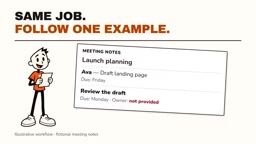
Switch to an agentic workflow, and the process becomes: after reading the request, the model first determines what information it needs, calls tools to retrieve the authorized meeting notes, and identifies tasks, owners, and due dates; if key information is missing, it can ask a question rather than fabricate an answer; it then calls the spreadsheet tool to write the row data, and afterward goes back to check whether the result is correct.
There's an easily overlooked detail here: the model does not operate your apps "remotely"—the tools do the actual work; the model is only responsible for decisions and orchestration.
Agentic workflow vs. workflow automation is a commonly confused distinction. Traditional automation (such as if-this-then-that rules or fixed scripts) has every step pre-orchestrated by humans, with a deterministic path; an agentic workflow, by contrast, has the model dynamically decide at runtime what to do next, which tool to call, and whether to ask a follow-up question. The former is predictable and easy to audit, but struggles with ambiguous input; the latter is flexible, but introduces non-determinism and new failure modes (such as misreading intent, loops, or excessive tool calls). In practice, the two are often mixed: use a deterministic process as the skeleton and hand decision points that require judgment to the model.
The Core of an Agent Is a Loop
The video summarizes an agent's operating logic as a loop: observe, choose, act, check, and stop when the task is complete.
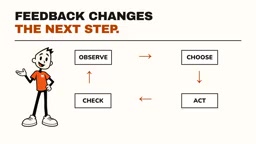
The "check" step is the most substantive dividing line between an agent and a chatbot. The model replying "done" is not evidence; it needs to confirm that the correct tasks actually appear in the correct spreadsheet. If permission is denied, a competent agent should report the problem or request assistance, rather than pretending the work is finished. The check result also feeds back into the next decision, giving the whole process the ability to self-correct.
This also explains why "connecting more tools to an agent" does not equal "a stronger agent." Each additional connection adds something that must be understood and controlled. In this example, sending email is not needed at all, so mailbox permission should naturally not be granted; actions such as sending messages or publishing changes should have their own approval rules.
Tool use / function calling is the key mechanism that enables an agent to act. The large model itself can only generate text and cannot directly read or write files, operate databases, or call APIs. By providing the model with structured tool descriptions (tool name, parameter schema, purpose description), developers enable the model to choose to call a tool during reasoning and generate parameters that conform to the format; an external runtime executes it and returns the result to the model, which enters the next round of reasoning. This means the model plays the role of orchestrator rather than executor, and the actual side effects are performed by tool-layer code. For this reason, permission control should operate at the tool layer, rather than hoping the model will discipline itself.
Stop conditions and maximum steps are fundamental safety mechanisms in agent engineering. Because the model continuously observes and makes decisions in a loop, if the goal is unreachable or it misjudges, it may fall into an infinite loop of repeated tool calls, generating latency and cost. Common practices include setting a maximum number of iterations, timeout limits, budget caps, and clearly defined success criteria (for example, "the corresponding row appears in the spreadsheet with complete fields"). When a condition is triggered and the task is not complete, the agent should explicitly report a failure state and hand back control, rather than retrying indefinitely or pretending to be finished.
When to Use Conversation, When to Use an Agent
The two approaches are not substitutes but suit different scenarios.
- When you only need an explanation or a draft: a single conversation may be enough.
- When you need to span multiple tools and execute multiple steps: an agentic workflow truly shows its value.

The key to the decision is not which product name is more prominent, but what the system can actually do and how you can maintain control. The practical recommendations from the video include: limit access scope, set clear stop conditions, and ensure results are verifiable. At the same time, face the risks squarely—an agent can still misunderstand your intent or make bad edits, so narrowed permissions and human review remain necessary safety nets.
Final Thoughts
Framing ChatGPT and AI Agent as opposites can easily make people think they must choose one or the other. A more pragmatic perspective is: ChatGPT itself can also call tools and complete tasks, and the boundary between it and an agent is not absolute. The real watershed is whether the task is "give an answer in one shot" or "have the system autonomously advance multiple steps and self-verify." Thinking this through before deciding whether to introduce an agent for a given process will be more effective than chasing concepts.
The video author says that in a follow-up, they will demonstrate how to visually build this workflow in n8n.
Related articles

23-Year-Old Builds $45K/Month App with Zero Code Using Claude Code + Cursor
23-year-old developer Conor Burr used Claude Code and Cursor to build the class-action settlement app Payout with zero code in 10 days, reaching $45K/month. Discover his rapid build, paywall design, and equity partnership growth strategy.

Mozy: An App Blocker That Trades Steps for Screen Time
Mozy is an app blocker that links walking to screen time, letting users earn minutes for distracting apps by taking steps. We analyze its core mechanism, target users, design highlights, and market prospects, exploring whether this step-for-screen-time model can effectively reduce phone dependency.
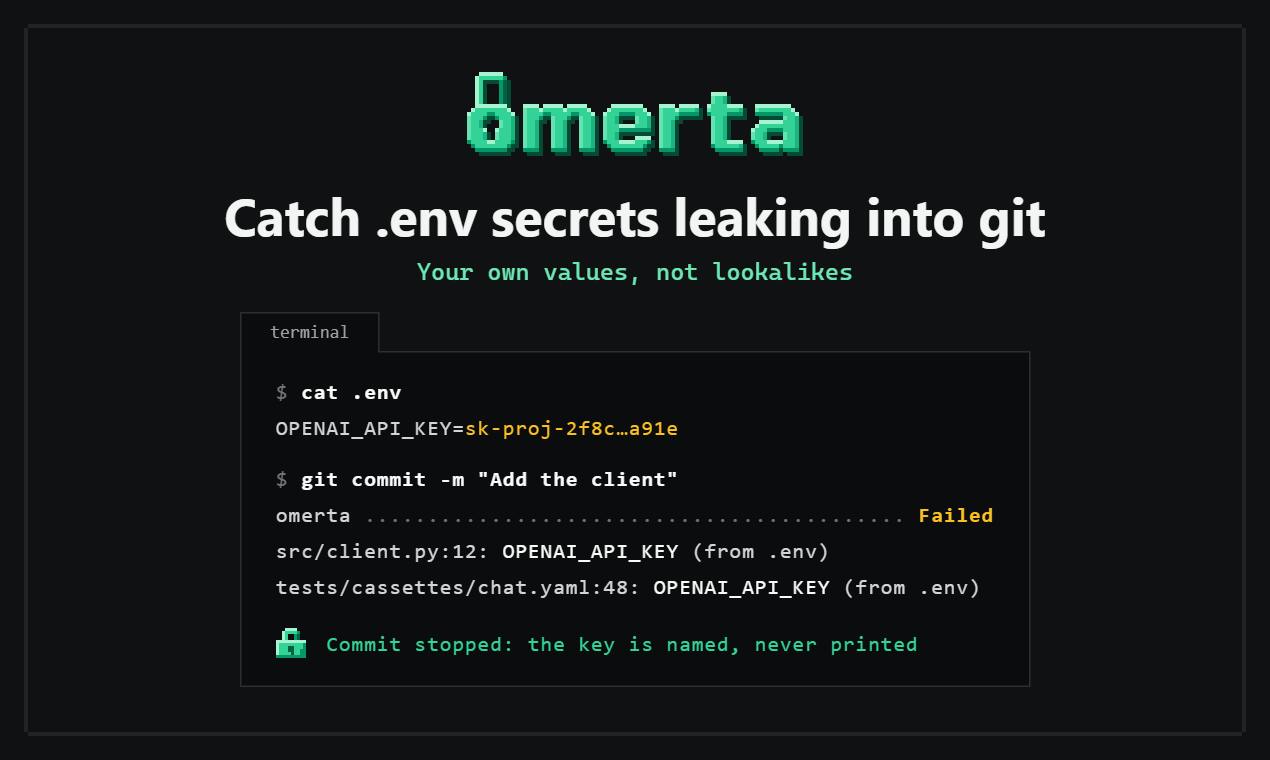
omerta: Using Real Environment Variable Values to Stop .env Secret Leaks
omerta is an open-source developer tool that catches .env secret leaks in pre-commit and Git history by comparing real environment variable values rather than pattern matching, reducing false negatives and false positives.