ChatGPT Work in Practice: 10 AI Agent Automation Workflows

ChatGPT Work evolves from a chat tool to a deliverable-producing Agent; 10 use cases show how the configuration layer determines output quality.
The article highlights ChatGPT Work's essential shift: prompts give answers, while Agents autonomously plan, call tools, and return complete deliverables. The real gap lies in the configuration layer—projects provide brand context, skills codify methods, and scheduled tasks enable automatic triggering. Through 10 high-repetition scenarios, it shows the same approach: solidify stable context and processes, attach only the changing parts, then ask the Agent for the finished product.
ChatGPT is undergoing an identity shift—from a conversational tool to an Agent that can deliver results for you. The difference: a prompt gives you an answer, and the work stays in your hands; whereas ChatGPT Work takes a goal and direction, plans the steps itself, calls tools, and returns a complete deliverable.
But out of the box, it's more like a smart new employee on their first day: capable enough, but you have to explain the context from scratch every time. The real gap comes from the configuration layer you build around it—a Project that helps it understand your brand, a Skill that makes it execute the way you work, and a Scheduled Task that makes it appear automatically before you even ask.
ChatGPT Work has two modes of operation: cloud (web or mobile) and desktop local. In most scenarios we want the Agent to keep working even after the computer is shut down, so cloud is the primary entry point; only when it needs to read files in local folders do we switch to desktop.
The following 10 use cases cover high-repetition scenarios like research, lead generation, presentations, and marketing campaigns, showing how Agents can truly take work off your hands.
1. Presentation Report Agent: Turning Data into a Slide Deck with a Story
Most people's approach is to ask AI to "generate slides," and they get a polished summary. But a good presentation is a story—a clear message plus supporting evidence.
The right order is to first load brand context into a ChatGPT Project, set up project instructions so the Agent understands the brand tone every time it executes a task. In the case, it's Clarely, a patient intake platform, which has reports, meeting notes, and other materials on hand, and needs to prepare a narrative for a team meeting. Mount the files (or point to a connected cloud drive), then use a custom Skill to first polish the storyline rather than directly summarizing the report.
Note that there are no step-by-step instructions here—the Agent plans the steps itself, reads the files one by one, and makes judgments. It produces a complete presentation and hosts it on ChatGPT Sites, with each page having a storyline and core message. The presentation is interactive: hover over numbers to see details, switch between "management version" and "team version" with one click, click to edit titles and body text, then download the updated version. The team no longer needs to go back to the AI to revise drafts.
Because the brand style is already built into the project, future presentations can reuse the same process. This is the dividing line between "chatting with AI" and "owning an Agent."
Custom Skill is one of the configuration units of ChatGPT Work. It's essentially a reusable instruction package that codifies how a specific task is done (steps, standards, output format). Unlike a Project, which provides background context, a Skill focuses more on "how to do it": for example, the process in the case of "polish the storyline before generating slides"—once saved as a Skill, the Agent will automatically follow this process the next time it handles a similar task, without needing to re-describe it. Skills can include checklists for output quality, brand tone constraints, or specific tool call sequences, and are a key mechanism for turning an Agent from a general assistant into a dedicated work partner.
ChatGPT Sites is a lightweight publishing feature provided by OpenAI that allows Agents to host generated web pages, interactive presentations, or proposals directly as an accessible online site. Unlike ordinary files, pages produced by Sites support interactivity (such as hovering to view data, switching views), can be edited, and maintain version updates, making them suitable for deliverables that need to be shared with teams or clients. The presentation report in the case is hosted on Sites, so the team can browse and modify it without downloading files, which also explains why "no need to go back to the AI to revise drafts"—changes are made directly on the published page.
2. Website Redesign Agent: From Reference Images to a Launch-Ready Site
A brand website needs a refresh, a personal portfolio needs to go live, or you just want to validate an idea—ChatGPT can take you from an existing site or a rough idea to a working website.
In the case, it's a pet grooming website with outdated content and an old-fashioned look. The first step is to find design references on Pinterest (the Agent's information sources are not limited to this, but this is a common habit of creators), and give the references to ChatGPT. This step enabled the Product Design plugin—OpenAI's free plugin for quickly building first prototypes, whether websites, products, or tools.
The instruction is: first audit conversion issues, then redesign with the same brand and content, and add a booking form. The Agent opens the live site, identifies and annotates issues one by one, and you can click to see what it's doing. Then it uses the plugin to return three redesign concept drafts, which you can open one by one for details, annotate comments on the images, ask it to revise, and then actually build. It also returns the audit results.
After selecting option one, confirm the build. ChatGPT generates a new version and publishes it as a live site—a fully usable website with a hero image and call-to-action banner, with copy unchanged, only the design updated. You can also actually go through the booking process, lead capture works, and you can see the captured leads in the backend.
It's not the final perfect version—images still feel AI-generated and lack subtle animations—but compared to the old version, it's a huge upgrade. The same Agent can be used for any owned or client website: give it a brand asset pack and let it quickly produce a refresh.
Product Design plugin is a free plugin provided by OpenAI, designed specifically for quickly generating product prototypes. It doesn't directly produce final code; instead, it generates multiple design concept drafts based on instructions and reference images for users to compare, annotate, and iterate. Its value lies in compressing the "idea to visual prototype" cycle to minutes, and it supports commenting directly on images for the Agent to revise. In the case, the Agent first uses this plugin to return three redesign concepts, and after the user selects one, it executes the actual build. This "concept first, build later" segmented approach avoids the rework cost of directly generating a complete site. The difference between plugins and projects/skills is that plugins extend the Agent's capability boundaries (such as design, data analysis), not the workflow.
3. Audience Research Agent: Parallel Deep Dive into Real User Voices
Good copy comes from customers' mouths, but what if you don't yet have enough user signals? The answer is social listening—but reading through hundreds of Reddit posts and comments can easily take a whole day.
In the case, it's for marketing Wave, an accounting software for small business owners. Give the Agent a high-level direction: find pain points of small business owners with accounting tools, specify sources like Reddit communities and software review sites, and ask it to split into sub-agents by source and execute in parallel. This is to let each sub-agent focus on one source, which is faster and deeper than a single Agent skimming everything—the larger the research scope, the more valuable this strategy.
The Agent actually browses websites using the cloud browser, dispatches three sub-agents to each capture one data source. After more than 35 minutes, it returns a 30-plus-page audience insight report: core findings and recommended messaging directions. Such findings are valuable because they are based on real comments, real needs, and real complaints about competitors, revealing common friction points among buyers. Every lead can be clicked to trace back and verify.
The Agent also compared the brand's existing landing page and proposed a new positioning direction based on this real data—"simple bookkeeping, less overthinking." This process is applicable to almost any niche industry, and can be saved as a Skill to reuse directly the next time you switch products or brands.
Sub-agent is a parallel execution strategy adopted by ChatGPT Work in complex tasks. The main Agent splits a large task into multiple subtasks, each sub-agent focuses on one data source or one competitor, executes independently, and then aggregates the results. The benefit is both depth and speed: a single Agent processing all sources sequentially tends to skim the surface, while sub-agents can each dig deep and analyze, finally merging into a comprehensive report. In the case, three sub-agents captured sources like Reddit and review sites respectively, returning a 30-plus-page report after 35 minutes. The larger the research scope and the more heterogeneous the sources, the more obvious the advantage of parallel sub-agents; but note that the main Agent's aggregation quality depends on whether the splitting logic is clear.
4. Data Analysis Agent: From "What Happened" to "Why"
Most dashboards only tell you what happened, while stakeholders want to know why—and finding someone usually takes hours of digging through data.
In the case, it's a customer support software brand with three datasets in Google Sheets: demo requests, ad spend, and website traffic. When analysis involves more than two data sources, it's recommended to clean the data first and use Google Sheets or a BI tool as the LLM's data analysis layer.
The brand's demo requests dropped by about 30% last month. Using the Data plugin, ask the Agent to find out why: check each possible cause one by one and build an interactive dashboard. After about 15 minutes, the dashboard first gives the conclusion—a mobile conversion break explains 95% of the lead loss; then it presents metrics and trend lines broken down by device around this story, and lists other potential explanations.
The most valuable part is having the Agent synthesize across datasets and propose multiple hypotheses. This kind of analysis used to be time-consuming because you had to approach the same problem from different angles to form an accurate judgment. Agents are very helpful in this kind of hypothesis building—not blindly believing everything it says, but gaining multiple perspectives for you to dig deeper and come up with effective solutions.
Furthermore, you can set it as a scheduled task: refresh the latest data every Monday, and automatically alert when demo requests drop by more than 10%.
5. Lead Generation Agent: Digging New Opportunities from Old Leads
Most people think lead generation is about capturing new names. But the fastest way to find new customers is to start with leads that were lost months ago due to budget or timing.
In the case, it's for SiteLib, an AI content and SEO platform for B2B SaaS teams, to acquire customers. First use the LinkedIn plugin (free, based on public information, no sensitive data involved) to find target professionals, then use the demo tool to build a prospecting plan, select a template, and connect Gmail to draft personalized emails.
The Agent reviews all lead data, uses LinkedIn to confirm their latest employer, and identifies buying signals—new funding, hiring content marketers, product launches, etc. It did filter out some leads: someone has changed roles, but this is not an outdated lead, but a warm contact at a new company who already knows you.
Then it scores on three dimensions: ICP fit, relationship warmth, and timing urgency—the stronger all three, the higher the score. The Agent produces a prospecting plan, email drafts, and a prioritized account list. The plan itself isn't beautifully designed, but the content is more important: how to review conversations, scoring definitions, a scorecard for each account based on the three criteria, and the approach, key contacts, scores, and channels for each account. It also discovered new funding news and similar accounts, and provided a two-week execution plan, from CRM ownership to qualified accounts to new accounts, even drafting personalized emails for each target.
In real scenarios, you might want to split it into two steps, or enrich signals with more ABM tools. But the core logic holds: give it your data and context, and the Agent can help you enrich lead signals, find high-priority targets, and even build an outreach plan.
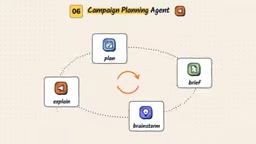
6. Marketing Campaign Agent: From Brief Template to Full Asset Pack
Marketers are always planning campaigns, preparing briefs, brainstorming directions, and repeatedly explaining what the brand is.
The first step is to create a Google team drive to store all assets like brand assets and product images, and connect this drive in the ChatGPT project instructions. Then use the template creation plugin to generate a reusable campaign brief template—a tip: if you have historical campaigns that performed well, uploading their briefs and building the template on top of them works better. So you get a branded template for the Agent to use when drafting campaign plans.
The actual scenario is planning a holiday season campaign, with preliminary ideas and directions already in place. Ask the Agent to first propose three campaign ideas, and it will give three core angles based on its understanding of the brand. After selecting direction one, ask the Agent to complete the campaign brief, generate creative assets, and save all files to the team drive. After about 15 minutes, the brief and asset pack are returned and saved.
The asset preview shows six pieces, covering feed size, square size, and story size, using product images from the drive. The winter gift box campaign brief covers messaging, offers, creative direction, channels, and other details. This doesn't mean it's finalized and ready to publish, but you can ask the Agent to complete a first draft for any future campaign based on success criteria.
7. Competitive Research Agent: Click Through Every Step Like a Buyer
Competitive research is not a website summary; real insights are hidden in the details—messaging, offers, funnel flow, and this is where an Agent can save time.
In the case, it's a French teaching brand. Give the Agent three competitor websites plus your own site, and ask it to explore each like a buyer and do a complete breakdown. It splits the work into three sub-agents, each clicking through one competitor site simultaneously. After more than 20 minutes, all results are saved to the drive, including a SWOT file and a competitor tracking table.
The tracking table is organized by competitor brand, with annotated key funnel stages saved under each folder. This kind of breakdown used to be extremely time-consuming; now the Agent slowly crawls in the background and collects everything into the SWOT file.
Another output is the competitor tracking table: each brand is broken down by dimensions such as target buyer, positioning, call to action and offers, pricing, lead magnets, and signup flow. It makes side-by-side comparison clear at a glance, and also includes the funnel breakdown and observations for each brand, as well as a changelog and project plan. The project plan part is somewhat redundant, but the competitor tracking table is extremely useful when formulating any marketing strategy—combined with the audience research mentioned earlier, the Agent can give you a clearer picture of how the brand should position itself and where growth opportunities lie.
8. Voice Cloning Agent: From Sample Imitation to Style Analysis
This applies to anyone who needs to write in a specific voice. Most people's approach is to paste a few samples and tell AI "write like this," but this only copies the surface—the AI doesn't know which of your writing habits actually work.
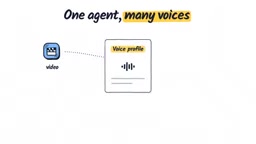
A better way: the author should create a script drafting skill for themselves, first ask the Agent to retrieve the last 20 long-form video scripts (use a YouTube analysis tool to pull subtitles, or organize subtitles into a folder and point to it), analyze speaking patterns, rhythm, structural approaches, and word usage habits, and build a voice profile and reusable Skill. One tip is to have it split into sub-agents on demand, because this is a typical tedious batch task.
The voice profile includes a summary, voice identity, speaking patterns, and story structure approach, with fairly high accuracy, and also provides different examples and checkpoints before finalizing. In actual use, attach the Skill using ChatGPT's document feature, produce opening hooks and intro paragraphs based on the video outline, and save them as a working document. The produced hooks are quite close to the author's way of speaking, especially the transitions between paragraphs.
The same principle can be transferred to emails, social media posts, newsletters, or when serving multiple clients and brands. What really makes the difference here is the source material you feed the Agent—spend more time collecting good material, and the effect will be vastly different.
9. Proposal Agent: Turning Discovery Calls into Web Pages That Close Deals
Many people already use AI to write proposals, but they still have to manually paste pricing, search for case studies, and fix design.
Back to SiteLib, the project already has pricing, past proposals, and brand assets ready. Use the Sites plugin to attach the prospect's discovery call transcript, with the instruction to turn it into a proposal that can win the deal. The Agent first sorts out the other party's needs from the call, then starts research, building both a PDF proposal and a web version.
The web version proposal is live: on-brand, includes the prospect's brand name and logo, opens with the other party's situation rather than a template opener, pairs the most relevant case studies to support the story, and ends with three pricing options that the prospect can directly select and update the proposal, or submit acceptance on the spot, or download a PDF containing all information. The whole experience is like a self-service portal.
It can also be saved as a Proposal Skill: for the next client, just attach a new call transcript. The real value is not in the proposal itself, but in putting the unchanging parts into the project, attaching only the changing parts, and then asking the Agent for the finished product. Freelancers can use it for statements of work, corporate marketers for budget requests, consultants for audit reports—the applications are endless.
10. AI Visibility Agent: Reverse Engineering AI's Answers
AI search is already a brand priority, but most people stop at tracking whether AI mentions their brand. Tracking itself doesn't change the answer. You should reverse engineer what AI has already said, find the specific sentences it cites, and make your brand the prominent answer AI is most likely to pick next time.
Before starting, ask the Agent to create a reusable branded AI search content brief template based on existing brand facts. Set the goal to improve AI visibility: when shoppers ask AI "what to buy," they can find us, optimizing for one high-intent question identified in earlier research. It's recommended to do one question at a time, so insights are deeper—AI search optimization always prioritizes quality over quantity.
The Agent uses a browser to check results on ChatGPT and Google AI Mode (sometimes it gets blocked and may need to log in to bypass restrictions). After about 15 minutes, the results are saved to the content planning folder, including captured answers and content briefs. This brief is quite detailed: not only AI answer snapshots, but also a funnel map inferred from visible answers, how we want AI to describe us based on brand facts, content structure suggestions (headings and evidence), and original data or evidence to provide to enhance uniqueness.
Particularly commendable is the session-by-session writing tasks in the appendix, covering Q&A for all potential funnel queries, covering as many search phrasings related to the core topic as possible. The greatest value is that the Agent turns AI search from guesswork into a clear writing plan backed by real data, without you having to do it manually.
AI Search Visibility refers to the degree to which brand content is cited or mentioned in AI-generated answers (such as ChatGPT, Google AI Mode). Traditional SEO tracks keyword rankings, while AI search optimization focuses on "which sentence and which source AI cites when answering user questions." The core of reverse engineering is: first capture AI's existing answers to target questions, analyze the specific sentences and evidence types it cites, then create targeted content so that the brand becomes the prominent source most likely to be selected when AI generates answers next time. This requires content to have structured evidence (data, original research, clear conclusions), rather than relying solely on keyword density. The content brief in the case is exactly a writing plan reverse-engineered from real AI answers, turning optimization from guesswork into data-backed action.
The Common Logic Behind These 10 Use Cases
Looking back at the entire list, what recurs is not a specific task, but a configuration approach: solidify the stable parts—brand context, work standards, data structures—into projects and skills; pass in the changing parts—new reports, new calls, new leads—as attachments; then ask the Agent for the finished product. The difference is not in how cleverly the prompt is written, but in what you build around it.
One-line Summary
ChatGPT Work transforms from a conversational tool into a deliverable-producing Agent; 10 use cases show how the configuration layer determines output quality.
Paragraph Summary
The article points out the essential shift of ChatGPT Work: prompts only give answers, while Agents take goals and autonomously plan, call tools, and return complete deliverables. The real gap is not in prompt techniques, but in the configuration layer built around the Agent—projects provide brand context, skills codify work methods, and scheduled tasks enable automatic triggering. Through 10 high-repetition scenarios (presentation reports, website redesign, audience research, data analysis, lead generation, marketing campaigns, competitive research, voice cloning, proposals, AI visibility), the article demonstrates the same configuration approach: solidify stable brand context and processes into projects and skills, attach only the changing parts, and then ask the Agent for the finished product. Parallel sub-agent strategies significantly improve depth and speed in large-scale research, and AI search optimization should shift from tracking mentions to reverse engineering the specific sentences AI cites.
Related articles

Uber Deploys ChatGPT Work Company-Wide: AI in the Workplace Enters the Scaled Implementation Phase
Uber deploys ChatGPT Work to 30,000+ employees, extending it from engineering to all roles. We analyze its expert-engineer pairing, end-to-end automation, and questions of AI control and power concentration—insights for scaling AI in the workplace.

Shift at Midnight Hands-On: When "ID Verification" Becomes Alien Hunting
Shift at Midnight blends ID verification with horror survival in a four-player co-op game. We break down its inspection mechanics and chaotic humor.

Zelensky Recounts the Outbreak of War: I Need Ammunition, Not a Ride
Zelensky recalls the first day of war in a YouTube interview: farewell to family, rejecting Biden's evacuation offer with "I need ammunition, not a ride," and how Bucha shaped his stance on compromise and peace talks.