Claude Code for Absolute Beginners: Installation, Configuration, and Core Features Explained

Beginner's guide to Claude Code: NPM install, bypassing login with ccswitch, and core modules.
Based on a Bilibili public lecture, this article covers installing and configuring Claude Code in China. It recommends NPM installation with Node.js 22+ and Git plus a VPN, and using the open-source tool ccswitch with a third-party API Key instead of official login to reduce ban risk. It also outlines permission modes, built-in commands, and MCP, Skills, and Submit.
Claude Code is becoming the everyday coding agent for more and more developers. According to a public lecture shared by instructor Lian from Mashibing Education on Bilibili, many companies in China have already begun requiring that 50% or even 90% or more of their code be completed with AI assistance, and Claude Code, Codex, Cursor, and Trae are among the tools most frequently used by programmers. Among them, Claude Code is the primary choice for many developers thanks to its deep terminal integration and extensible component system.
Based on that public lecture, this article walks through Claude Code's installation and configuration path along with its core feature modules, making it suitable for absolute beginners to get started quickly.
Before Installation: Working Around Two Pitfalls—Network and Account Bans
In the course, instructor Lian repeatedly stressed that users in China face two practical obstacles when using Claude Code: network restrictions during installation, and the risk of account bans during login.
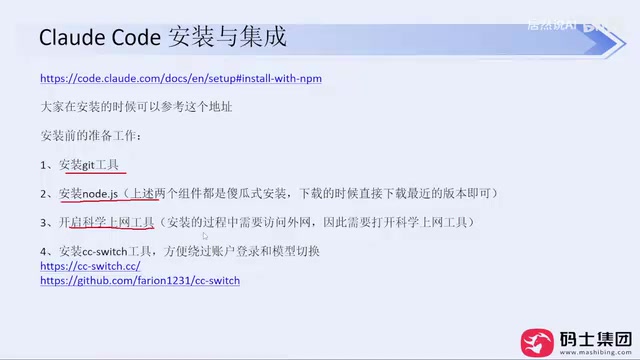
The official website provides two installation commands, PowerShell and CMD, but success rates are unstable under real-world network conditions. He recommends going directly with the NPM installation method from the site's "Advanced Options," provided you have two base environments ready: Node.js version 22 or above (currently the latest is 24) and Git, both of which can be installed by downloading the installer from their official sites and clicking "Next" all the way through. During installation, a VPN/proxy tool needs to be enabled—this is an unavoidable prerequisite.
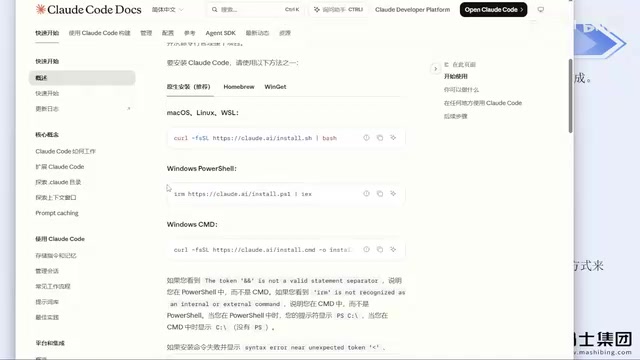
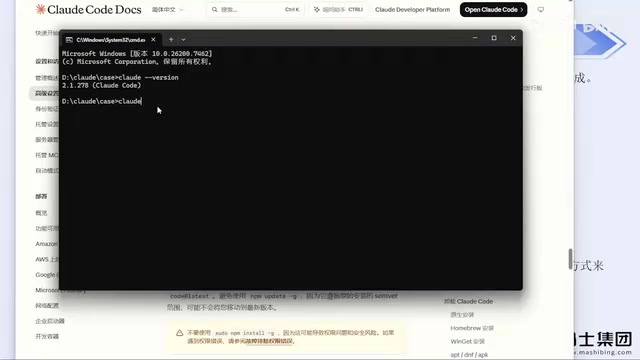
After installation, if entering claude --version on the command line outputs the version number normally, the installation was successful. Instructor Lian said he has installed it this way for colleagues at his company many times and has basically never run into errors.
NPM (Node Package Manager) is the package management tool that comes installed with Node.js, and it is also the world's largest repository of open-source JavaScript packages. The principle behind installing Claude Code via NPM is: pull the package named @anthropic-ai/claude-code from the official npm registry and install it globally. This is fundamentally different from downloading an installer directly from the official site—it relies on npm mirror sources rather than Claude's official domain, so it has a higher success rate under network conditions in China. In the command npm install -g @anthropic-ai/claude-code, the -g means global installation, and the installed executable is written to Node.js's global bin directory. If downloads are slow, you can temporarily switch the registry to a domestic mirror (e.g., npm config set registry https://registry.npmmirror.com), but note that mirror synchronization may lag behind on versions.
Login and Accounts: Using ccswitch to Skip Official Login
On first run, Claude Code will successively ask you to trust a folder, choose a theme style, and choose a login method. Instructor Lian explicitly pointed out that logging in directly with an official account carries the risk of being banned—his own account has been banned multiple times.
His solution is to use the open-source tool ccswitch. The tool was originally an open-source project on GitHub and has now been turned into a website; you can download the Windows MSI installer directly from the release page and install it. The core function of ccswitch is to bypass Claude Code's account login step and instead drive it with a third-party API Key.
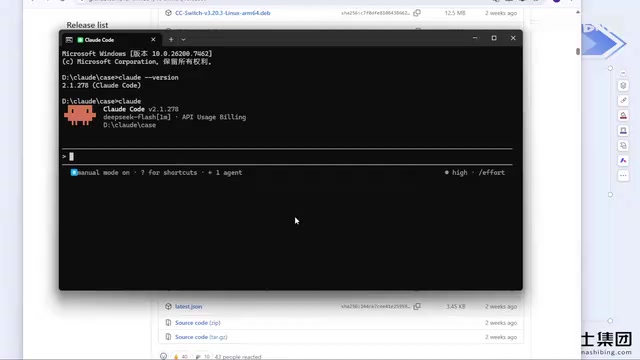
In ccswitch, click the plus sign, select a model provider (such as DeepSeekAd), and fill in the corresponding API Key to save it. If the provider you use isn't in the list, you can use "custom configuration" to enter the API Key, endpoint URL, and other information—third-party relay services work the same way. Once configured, restart Claude Code and the login step will be skipped entirely. Instructor Lian says he has used this method for months without being banned, whereas the earlier approach of configuring an API Key in the environment also carried ban risk.
::: tip Note ccswitch currently does not support DeepSeek Harness, which requires separate configuration. Also, when using ccswitch with Codex, pay attention to tool switching—different tools correspond to different configurations. :::
The reason a third-party API Key can avoid account bans by bypassing official login lies in the difference between the two authentication paths. When logging in with an official account, requests carry Anthropic account credentials, and the server can identify account ownership and apply regional and behavioral risk controls. When switching to a third-party API Key (especially one provided by a relay service), the requests Claude Code sends actually go through that provider's endpoint, so what Anthropic sees is the provider's calls, not the end user's personal account. This also means billing, rate limits, and model versions are all determined by the provider and are independent of an official subscription. It's worth noting that relay services themselves have availability fluctuations and carry privacy risks from data passing through third-party servers, so you should evaluate carefully when sensitive code is involved.
Permission Modes and Built-in Commands
The course outline lists permission modes and built-in commands as the second module. Claude Code's permission modes determine the granularity of authorization the Agent has when performing operations like reading and writing files and invoking commands; understanding this mechanism is a prerequisite for using it safely. However, the public lecture doesn't dwell much on this part—it is more of an outline-level overview, so when actually practicing, it's advisable to confirm each item against the official documentation.
MCP, Skills, and Submit are also listed as separate modules. These three form Claude Code's extensibility: MCP is used to connect to external tools and data sources, Skills encapsulates reusable task capabilities, and Submit relates to the task submission mechanism. Instructor Lian's view is that most users only interact with Claude Code through natural-language conversation, which doesn't produce ideal results; making good use of these built-in components is what significantly improves efficiency and output quality. But the course offers limited detail on the specific operations of each module—it's introductory, "just touching the surface" content.
MCP (Model Context Protocol) is a standard protocol open-sourced by Anthropic at the end of 2024, designed to let AI models connect to external tools, data sources, and services in a unified way. You can think of it as the "USB port" of AI applications: databases, file systems, Git repositories, browsers, and more can all be wrapped as MCP Servers, and Claude Code acts as an MCP Client calling them as needed. Skills, meanwhile, package a set of prompts, scripts, and resources into reusable capability units, letting the Agent execute stably according to a preset workflow on specific tasks without having to re-describe things in natural language each time. The two serve different purposes: MCP leans toward "connecting external capabilities," while Skills lean toward "solidifying internal workflows," and in practice they are often used together.
Model Selection and Cost Considerations
Regarding model providers, instructor Lian mentioned that DeepSeek has become relatively expensive after its price increase, and his personal impression is that DeepSeek Harness has a higher cache hit rate than other coding agents—this is personal experience and has not been systematically verified.
For VPN/proxy tools, he offered a practical tip: don't buy annual memberships, because such services are banned frequently; paying monthly is more expensive per unit, but it reduces the losses caused by service interruptions.
A Pragmatic Judgment
In the course, instructor Lian expressed a point worth taking seriously: vendors are still competing on model capabilities, but current model levels are already sufficient for most everyday work needs. There is no absolute good or bad between tools—whatever works smoothly for you is fine. For developers in China, domestic models are already sufficient for basic work scenarios, and there's no need to obsess over a specific model.
The value of this public lecture lies in clearly explaining the chain most likely to get stuck—installation, bypassing login, and configuring the API Key—but it lacks hands-on depth on advanced modules like permission modes, MCP, and Skills. To truly go "from beginner to expert," these parts still need to be supplemented with official documentation and real project practice.
One-line Summary
A beginner's guide to Claude Code: NPM installation, bypassing login with ccswitch, and an overview of core modules.
Paragraph Summary
Based on a Bilibili public lecture, this article walks through installing and configuring Claude Code in China's network environment. For installation, it recommends the NPM method from the official site's "Advanced Options," requiring Node.js 22+ and Git in advance plus a VPN/proxy tool; for login, it uses the open-source tool ccswitch to replace official account login with a third-party API Key, reducing ban risk. The article also outlines permission modes, built-in commands, and extensible components like MCP, Skills, and Submit, noting that natural-language conversation alone yields limited results. On cost, it mentions DeepSeek's price increase and recommends monthly VPN subscriptions. It concludes that current model capabilities are sufficient for everyday use and tools should be chosen by what works smoothly.
Related articles

Uber Deploys ChatGPT Work Company-Wide: AI in the Workplace Enters the Scaled Implementation Phase
Uber deploys ChatGPT Work to 30,000+ employees, extending it from engineering to all roles. We analyze its expert-engineer pairing, end-to-end automation, and questions of AI control and power concentration—insights for scaling AI in the workplace.

Shift at Midnight Hands-On: When "ID Verification" Becomes Alien Hunting
Shift at Midnight blends ID verification with horror survival in a four-player co-op game. We break down its inspection mechanics and chaotic humor.

Zelensky Recounts the Outbreak of War: I Need Ammunition, Not a Ride
Zelensky recalls the first day of war in a YouTube interview: farewell to family, rejecting Biden's evacuation offer with "I need ammunition, not a ride," and how Bucha shaped his stance on compromise and peace talks.