Complete Guide to Building a Local AI Inference Platform at Home with Salvaged Hardware

How to build a local AI inference platform at home using salvaged hardware on a budget.
This guide explores how to repurpose old hardware into a functional local AI inference platform, covering GPU VRAM requirements, model quantization techniques (4-bit GGUF), inference framework comparisons (llama.cpp, Ollama, vLLM), and practical considerations like thermal management. Inspired by a viral Hacker News post, it shows that running 7B-13B parameter models locally is achievable with consumer-grade hardware, offering privacy, cost savings, and deeper technical understanding.
Introduction: AI Doesn't Have to Live in the Cloud
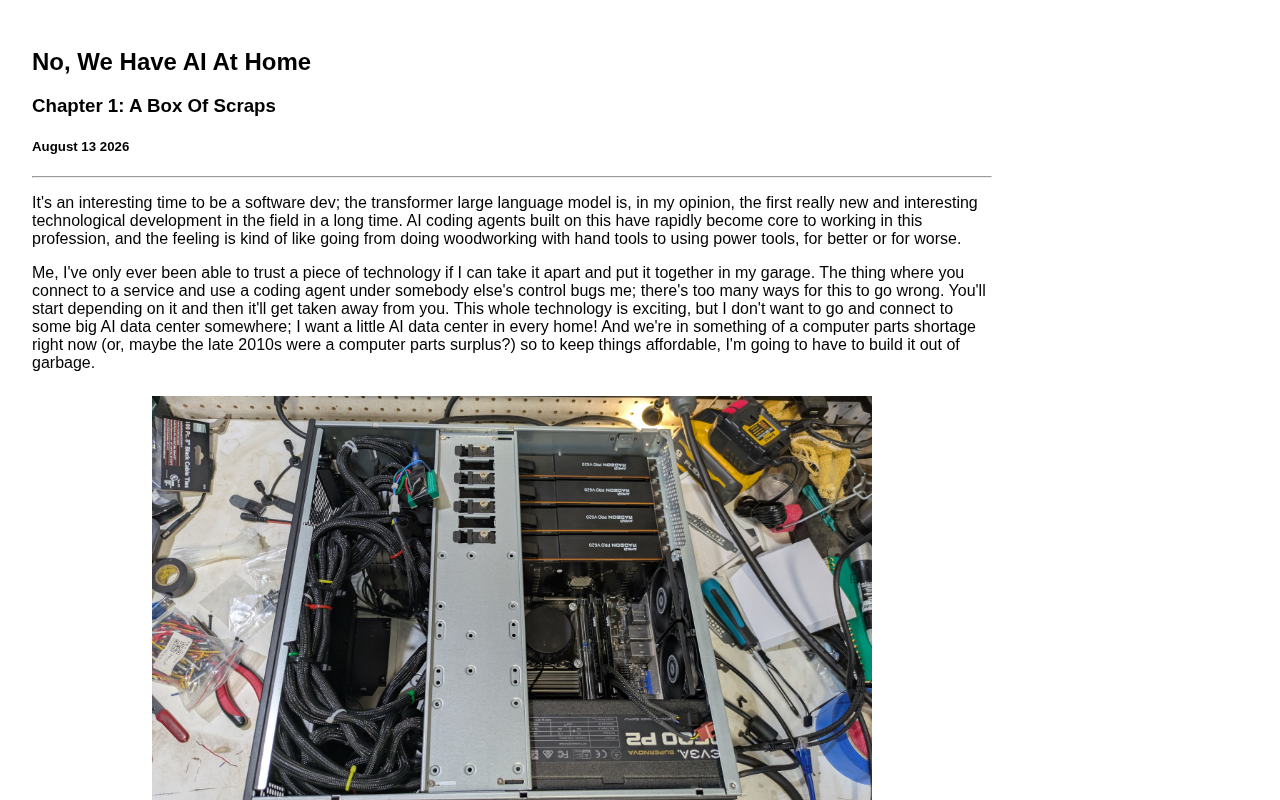
As large language models become increasingly mainstream, more and more developers and tech enthusiasts are no longer satisfied with simply calling cloud APIs. Instead, they want to build their own local AI inference platforms at home. This is driven by considerations around privacy protection, usage costs, and data sovereignty. A recent technical article titled "AI At Home Part 1: A Box Of Scraps" sparked heated discussion on Hacker News, garnering 82 upvotes and 43 comments. It tells the story of how the author assembled a functional local AI inference machine from salvaged hardware—a collection of spare parts lying around.
The value of this article isn't in showing off expensive top-tier configurations. Rather, it demonstrates a pragmatic path: how to start with existing resources on a limited budget and gradually build your own AI infrastructure.
Why Choose Local AI Deployment Over Cloud Services
Privacy and Data Sovereignty
The most direct benefit of running AI models locally is that your data never leaves your device. For scenarios involving sensitive information—whether personal notes, enterprise documents, or private conversations—local inference completely eliminates the risk of uploading data to third-party servers. This is particularly important for privacy-conscious technical users.
Controllable Long-term Costs
Cloud AI services typically charge by API calls or tokens. For high-frequency or long-running applications, costs accumulate rapidly. Tokens are the basic units that large language models use to process text, but they don't correspond one-to-one with characters or words. In English, one token roughly corresponds to 4 characters or 0.75 words; in Chinese, one character is typically encoded as 1-2 tokens. The model's tokenizer is responsible for splitting raw text into token sequences. Cloud AI providers (like OpenAI and Anthropic) typically charge based on total input and output tokens, with prices varying by model tier. Taking GPT-4 Turbo as an example, input pricing is approximately $10 per million tokens, and output pricing is approximately $30 per million tokens. For users who perform large-scale text generation, code assistance, or document analysis daily, monthly costs can reach hundreds or even thousands of dollars—making the economic advantage of local deployment increasingly significant over time.
Once you've made the one-time hardware investment, the marginal cost of local inference is nearly zero (only electricity costs). The article's title, "A Box Of Scraps," itself highlights the core philosophy: leverage idle or retired hardware to minimize the entry barrier for local AI deployment.
Deep Learning and Technical Mastery
The process of building your own local AI inference platform is an excellent opportunity to deeply understand AI inference mechanisms. From selecting models and applying quantization, to optimizing inference speed and managing VRAM usage, every step deepens your understanding of the underlying technology. This kind of "from-scratch" hands-on practice is something you simply cannot gain from calling APIs alone.
Feasibility of Building an AI Inference Platform with Salvaged Hardware
Hardware Barriers Are Dropping Significantly
In the past, running large models was thought to require professional-grade GPU clusters. But with the maturity of model quantization techniques, a consumer-grade graphics card—even hardware from several years ago—can now smoothly run models in the 7B to 13B parameter range.
The quantization technique mentioned here refers to compressing neural network weight parameters from their original 32-bit floating-point (FP32) storage to lower-precision representations (such as 8-bit, 4-bit, or even 2-bit integers). The GGUF format evolved from the llama.cpp project and is a model file format specifically optimized for CPU and hybrid CPU/GPU inference, supporting multiple quantization levels. 4-bit quantization means each parameter occupies only 4 bits of storage. Compared to the original FP32 format, model size shrinks by approximately 8x, and VRAM requirements decrease proportionally. While quantization inevitably introduces some precision loss, extensive testing has shown that for models in the 7B to 13B parameter range, 4-bit quantized output quality differs minimally from full-precision versions, with virtually no impact on user experience in most practical applications.
7B and 13B refer to 7 billion and 13 billion parameters respectively—parameters are the learnable weight values in a neural network. More parameters generally give a model stronger language understanding and generation capabilities, but also require more computational resources and storage. For reference, OpenAI's GPT-3 has 175 billion parameters, while Meta's open-source LLaMA 2 series offers 7B, 13B, and 70B variants. A 7B model at 4-bit quantization requires approximately 4-6GB of VRAM, while a 13B model needs 8-10GB—falling squarely within the capability range of consumer-grade graphics cards. Models in this parameter range can already handle code assistance, text summarization, conversational Q&A, and various other tasks, making them the sweet spot for local deployment.
This means that old graphics cards sitting in drawers and idle desktops can all be repurposed for local AI inference.
Start with the Minimum Viable System and Iterate
The article uses a "Part 1" serialized format, suggesting this is an incremental project. The author doesn't aim for a perfect configuration from the start, but rather assembles a minimum viable system from spare parts that can actually run. This approach is worth emulating: rather than being intimidated by an ideal but expensive configuration, get the system running first, then gradually upgrade based on actual needs.
Broad Consensus in the Tech Community
The lively discussion on Hacker News shows that local AI deployment has become an important topic in the tech community. Comments include in-depth exchanges about specific hardware selection, model choices, and inference frameworks, reflecting that this is a rapidly growing field of practice. Developers are eager to share their "build" experiences, collectively reducing the exploration costs along this path.
Key Technical Considerations for Building a Local AI Inference Platform
GPU VRAM Is the Primary Bottleneck
For running large models locally, GPU VRAM is often more critical than raw compute power. During AI inference, all model parameters need to be loaded into VRAM for efficient execution. Unlike training, inference doesn't need to store gradients and optimizer states, but still requires VRAM allocation for model weights, KV cache (Key-Value Cache—intermediate computation result caching that accelerates autoregressive generation), and input/output data. KV cache size grows linearly with context length, meaning VRAM consumption increases significantly when you want the model to process longer texts.
Model parameter count determines VRAM requirements, and quantization is the primary means of alleviating this pressure. When selecting hardware, prioritize VRAM capacity over raw performance benchmarks. For example, an older GPU with 16GB of VRAM (such as an NVIDIA Tesla P100 or RTX 3080 16GB) may be more suitable for local AI inference than a newer GPU with 8GB (such as an RTX 4060)—the former can load larger models or support longer context windows.
Choosing and Comparing Inference Frameworks
Current mainstream local inference solutions include llama.cpp, Ollama, vLLM, and others:
-
llama.cpp: An open-source project created by developer Georgi Gerganov that re-implements LLaMA model inference logic in pure C/C++, with no dependency on heavyweight frameworks like Python or PyTorch. Its core advantages are minimal dependency requirements and broad hardware compatibility: it supports pure CPU inference, Apple Silicon Metal acceleration, NVIDIA CUDA acceleration, and AMD ROCm acceleration. The project also implements multiple quantization schemes (Q2_K, Q4_K_M, Q5_K_S, etc.), allowing users to flexibly choose the balance between precision and performance based on their hardware. For salvaged hardware scenarios, llama.cpp's CPU inference capability is particularly important—even without a dedicated GPU, models can run on CPU with sufficient RAM alone, just at slower speeds.
-
Ollama: Essentially a wrapper around underlying inference engines like llama.cpp, providing a Docker-like user experience: users simply execute a command like
ollama run llama2to automatically download model files, configure the runtime environment, and start the inference service. Ollama also includes a built-in HTTP service interface compatible with the OpenAI API format, meaning existing applications developed against the OpenAI API only need to change the API endpoint to seamlessly switch to local inference. This design dramatically lowers the barrier for non-expert users, transforming local AI deployment from "need to compile source code" to "one command and done." -
vLLM: Developed by a research team at UC Berkeley, its core innovation is PagedAttention technology—borrowing the concept of virtual memory paging from operating systems to manage KV cache. In traditional inference frameworks, KV cache is typically allocated as contiguous memory blocks, leading to memory fragmentation and waste. PagedAttention divides KV cache into fixed-size "pages," allocating and reclaiming on demand, improving memory utilization by 2-4x. This makes vLLM particularly excellent at handling multiple concurrent requests simultaneously, with throughput reaching several times that of traditional approaches. However, vLLM is primarily optimized for NVIDIA GPUs and offers less support for CPU inference and low-end hardware compared to llama.cpp, making it more suitable for users with decent GPUs who want to build high-performance local inference services.
Choosing the right inference framework can significantly reduce the difficulty of setting up a local AI platform.
Thermal Management and Long-term Stability
When building with salvaged hardware, thermal management and long-term stable operation are easily overlooked issues. Aging cases, power supplies, and cooling systems may be pushed to their limits under sustained high-load inference. AI inference tasks—especially continuous text generation—keep GPUs and CPUs in high-power states for extended periods, generating far more heat than typical office work or casual gaming. It's recommended to check fan conditions, replace thermal paste, and ensure the power supply has adequate headroom (generally, the PSU's rated wattage should be at least 1.3x the system's peak power consumption). This is another aspect that needs to be refined over time in the "build" process.
Conclusion: A Pragmatic Movement for AI Democratization
The significance of "AI At Home" goes beyond a mere technical tutorial. It represents an attitude: AI capabilities should not be monopolized by a few well-resourced institutions—ordinary developers can equally build their own local AI inference platforms at home.
Starting from a box of scraps, gradually building, optimizing, and upgrading—this path both lowers the entry barrier and preserves room for growth. As open-source models and inference tools continue to advance, the feasibility of local AI deployment will only increase. For those who want to control their own data and deeply understand AI technology, now is the perfect time to get hands-on. We look forward to the author's subsequent installments revealing more practical details, and to more people joining this pragmatic "AI at Home" movement.
Related articles

Bilibili's Hit Dify Tutorial: A Practical Guide to Building 20+ AI Apps from Scratch
A distilled guide to Bilibili's top-rated Dify tutorial: Windows + Docker deployment, MySQL connection, five app types, model integration strategy, and publishing.

Agent Skills Beginner's Guide: From Concepts to Multi-Agent Collaboration in Practice
A comprehensive guide to Agent Skills: core concepts, components, the importance of Description, standardization, beginner learning paths, and multi-agent collaboration.

One Neuron Detects Both Cats and Cars? We Reproduced It and Found a New Explanation
The cat-car neuron reinterpreted: researcher Cammarata argues it distinguishes pointy from round, not cats from cars. We reproduced the experiment and found the new explanation holds on most inputs—but cars are the exception. The interpretability debate continues on language models.