Coze for Beginners: A Practical Guide from Agent Building to Workflow Mastery

A systematic walkthrough of building agents on Coze, classifying AI Agent products into platform, software, and framework layers.
Based on a Bilibili creator's tutorial, this article introduces ByteDance's Coze platform—its core features and getting-started path—and the classification logic of AI Agent products. It proposes a three-layer framework: Agent building platforms (Coze Studio, Dify, n8n) for developers, Agent software (Claude Code, Cursor) ready to use, and Agent development frameworks (LangChain, Spring AI) for IT developers. It then covers Coze quick start (templates, the five core elements: persona, knowledge base, plugins, workflow, memory) and multi-agent collaboration for project management, followed by advanced topics: workflow orchestration, skill store and plugins, and code nodes. It ends with learning advice and notes on the points system and outdated tutorials.
Title
Coze for Beginners: A Practical Guide from Agent Building to Workflow Mastery
Meta Description
Based on the latest Bilibili tutorial, this article systematically introduces the full process of building agents with Coze (Kouzi), covering AI Agent product categories, quick start, workflow orchestration, multi-agent collaboration, and knowledge base configuration—suitable for zero-background developers and non-developers learning to build AI applications.
Article Content
As the barrier to AI application development continues to lower, ByteDance's Coze (Kouzi) is becoming the platform of choice for more and more developers and non-developers building agents. From simple knowledge-base Q&A to complex multi-agent collaborative workflows, Coze provides a complete toolchain. Based on the latest tutorial from a Bilibili creator, this article systematically sorts out Coze's core features and hands-on paths, and extends the discussion to the classification logic of AI Agent products, helping you quickly locate your learning direction.
1. AI Agent Product Categories: Which Type Should You Start With?
Faced with the endless stream of Agent tools on the market, many beginners easily fall into the trap of "wanting to learn everything but mastering nothing." In the tutorial, the creator proposes a practical classification framework that divides AI Agent-related products into three major categories. Although there is no official standard, it is enough to help learners from different backgrounds find an entry point.
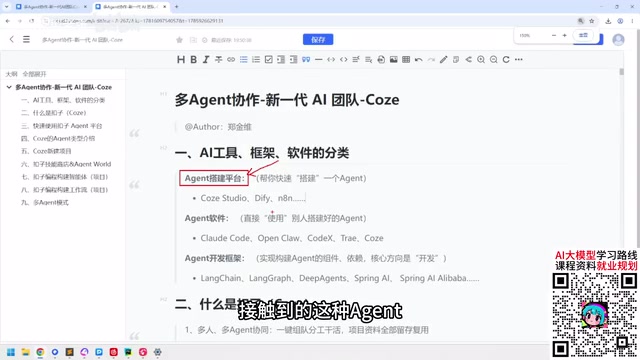
1. Agent Building Platforms: The Developer's "LEGO Bricks"
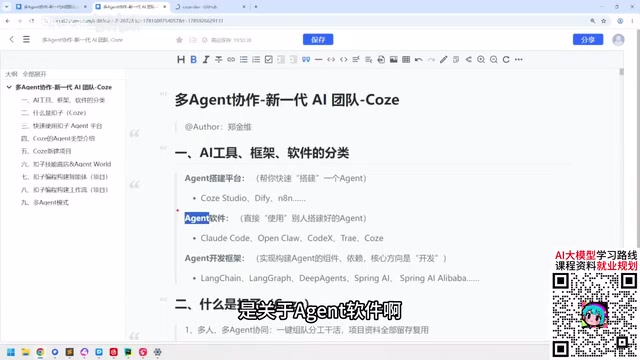
This type of platform targets developers with some technical background, with typical representatives including Coze Studio, Dify, and n8n. Take Coze Studio as an example—it is open-sourced on GitHub, and users can download and install it, then build agents through drag-and-drop and simple operations. The creator specifically warns: "Non-developers, don't touch this," because such tools require understanding the technical ecosystem and deployment logic.
Various Agent types officially provided by Coze, some paid and some free
For developers within a company, the first stop when encountering Agents is often knowledge base construction—low cost, quick results. Agent building platforms are exactly the efficient way to achieve this goal.
Dify is an open-source LLM application development platform that supports visual workflow orchestration, RAG retrieval-augmented generation, Agent building, and other features, and is often regarded as an open-source alternative to Coze. n8n, on the other hand, is a general-purpose workflow automation tool that integrates various services through node connections. In recent years it has also added AI capabilities, making it usable for building automated Agent processes. Compared with Coze, Dify emphasizes private deployment and data autonomy, making it suitable for teams with technical capability and sensitivity to data security; n8n's advantage lies in its native integration with a large number of third-party services, making it suitable for scenarios that need to connect multiple business systems. Understanding these differences helps in choosing the right platform based on actual needs.
2. Agent Software: Ready-to-Use Productivity Tools
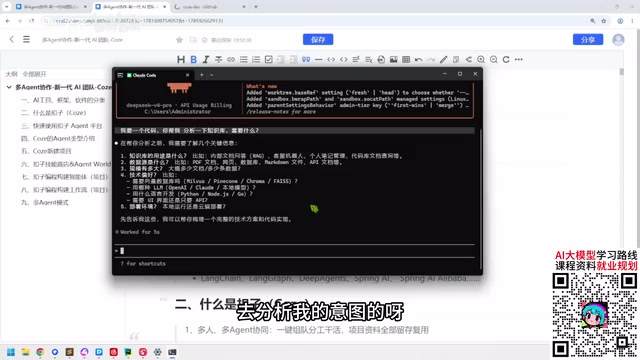
If you don't want to dig into the internal architecture and just want AI to do the work for you quickly, Agent software is a more suitable choice. The creator lists tools such as Claude Code, Codex, and Cursor. Their common feature is: you just need to configure the Token, describe your needs in natural language, and the software will automatically complete coding or other tasks.
"You don't need to know how its Agent architecture analyzes intent—as long as you configure the Token and spend the money, it will do the work for you." In the demo, after the creator input a requirement into Claude Code, the tool quickly returned analysis results and code ideas. This type of software is friendly to both developers and non-developers, with a gentle learning curve.
Agent software tools that can be used directly
3. Agent Development Frameworks: Deep Waters for IT Developers
The third category is development frameworks based on programming languages, such as LangChain, LangGraph, and Deep Agents in the Python ecosystem, and Spring AI in the Java ecosystem. These tools are entirely aimed at developers and require understanding underlying logic such as Agent architecture and memory mechanisms. The creator admits: "Non-developers don't need to pay attention to it." However, he also observes that as the learning cost decreases, many product managers are also beginning to venture into this field.
Development frameworks require understanding the underlying architecture of Agents
2. Coze Quick Start: A Hands-On Path from Zero to One
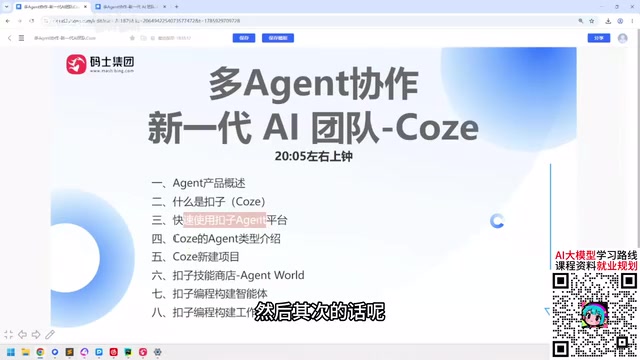
Coze's core philosophy is to lower the barrier to agent building. The creator emphasizes that many online tutorials are based on older versions, and the operation logic of the new version has changed. Below are the quick-start points organized based on the tutorial.
1. Registration and First Look at the Interface
When using Coze for the first time, it is recommended to first try the official Agent templates. Coze officially provides various types of Agents covering different scenarios, with a clear distinction between free and paid features. The creator suggests: "Start by using one first—once you use it, it becomes easy." Quickly experience the interaction flow through templates, then gradually go deeper into custom configuration.
The entry interface for creating an agent
2. Core Elements of Agent Building
Building a usable agent usually involves the following key modules:
- Persona and reply logic: Define the Agent's role, tone, and answer boundaries;
- Knowledge base: Upload documents or web data so the Agent can answer based on private knowledge;
- Plugins: Call external APIs to extend capabilities, such as search, weather, calendar, etc.;
- Workflow: Orchestrate multiple steps into an automated process to handle complex tasks;
- Memory: Enable the Agent to remember context information across multiple rounds of dialogue.
In the tutorial, the creator demonstrates how to quickly generate a knowledge-base Q&A Agent through simple configuration—the entire process requires no coding.
RAG (Retrieval-Augmented Generation) is the core technology behind knowledge-base Q&A. Its basic process is: split the documents uploaded by the user into chunks and convert them into vectors stored in a vector database; when the user asks a question, the system first retrieves the document chunks most relevant to the question, then passes these chunks as context to the large language model to generate an answer. This allows the model to answer based on private knowledge and reduces fabrication. Coze's knowledge base module encapsulates exactly this process—users don't need to worry about details such as vectorization and retrieval algorithms, and only need to upload documents. Understanding RAG helps in determining the optimization direction when the knowledge base performs poorly, such as adjusting chunk size, improving document quality, or optimizing retrieval strategy.
3. Multi-Agent Collaboration and Project Management
Coze's core direction is divided into two parts: "Agent" and "Project." The purpose of multi-agent collaboration is to serve projects—you can create multiple projects to advance in parallel, just like a company simultaneously advancing product A, product B, and product C. Under each project, multiple Agents can be configured, each responsible for different subtasks, collaborating through workflows.
3. Advanced Practice: Workflows, Plugins, and Programming Capabilities
When basic Agents can't meet your needs, Coze's workflows and programming capabilities provide more room to maneuver.
1. Workflow Orchestration
Workflows are Coze's powerful tool for handling complex logic. Through visual node connections, you can implement conditional judgment, loops, multi-step API calls, and more. The creator mentions that Coze's workflow capabilities are sufficient to build some lightweight projects—"just like the Claude Code you used before, what it can do, Coze can do too."
In Coze workflows, nodes are the basic units that make up the process. Each node performs a specific operation, such as calling a large model, initiating an HTTP request, executing code, or making conditional judgments. The execution order and data flow between nodes are defined through connections, and the output of an upstream node can serve as the input variable of a downstream node. Common node types include: large model nodes (calling LLM to generate content), plugin nodes (calling external APIs), code nodes (running custom scripts), conditional branch nodes (taking different paths based on variable values), and loop nodes (processing list data item by item). Mastering the input-output variable passing mechanism of nodes is the key to building complex workflows.
2. Skill Store and Plugin Ecosystem
Coze officially provides a skill store. The creator observes that Coze's strategy leans more toward officially provided skills (such as the early Agent Word) rather than relying entirely on community contributions. This means the platform has strong control over skill quality, but it may also limit flexibility. As for plugins, Coze supports custom plugin integration to extend the Agent's external capabilities.
3. Programming and Project Building
For users with coding ability, Coze supports implementing custom logic through code nodes. In the tutorial, the creator demonstrates how to use Coze to build agent workflows and even complete projects, which provides developers with a complete path from prototype to implementation.
4. Learning Advice and Ecosystem Observations
Looking back at the entire tutorial, the creator's core viewpoint is: platforms like Coze are blurring the boundary between developers and non-developers. For non-developers, start with Agent software—experience first, then go deeper; for developers, Agent building platforms and development frameworks are required courses.
It is worth noting that Coze adopts a points system and membership system, with complex tasks consuming more points, so long-term use requires considering costs. In addition, the platform iterates quickly, and some online tutorials may be outdated, so it is recommended to refer to official documentation and the latest version.
From a broader perspective, although there is no official conclusion on the classification framework of AI Agent products, dividing them into three layers of "platform-software-framework" can help learners quickly locate themselves. Whether you want to quickly build a knowledge-base bot or explore complex projects with multi-agent collaboration, Coze provides a starting point worth trying.
One-line Summary
A systematic overview of the hands-on path to building agents on the Coze platform, classifying AI Agent products into three layers: platform, software, and framework.
Paragraph Summary
Based on a Bilibili creator's tutorial, this article systematically introduces the core features and getting-started path of ByteDance's Coze platform, and extends the discussion to the classification logic of AI Agent products. The article first proposes a three-layer classification framework of "platform-software-framework": Agent building platforms (Coze Studio, Dify, n8n) target developers, Agent software (Claude Code, Cursor) is ready to use, and Agent development frameworks (LangChain, Spring AI) target IT developers. It then sorts out Coze's quick-start points, including registration and template experience, the five core elements of agent building (persona, knowledge base, plugins, workflow, memory), and the logic of multi-agent collaboration serving project management. The advanced section introduces workflow orchestration, the skill store and plugin ecosystem, and code node programming capabilities. Finally, it gives learning advice and notes the cost of the points system and the risk of outdated tutorials.
Related articles

11 Tested Rules to Slash Claude Token Costs to the Bare Minimum
Claude Token costs too high? Creator Doobie rewrote 11 token-saving rules after 30 days of logs: keep effort at medium, use /clear when switching tasks, don't let cache expire, downgrade auxiliary agents to Haiku—with official Anthropic data and cost comparisons.

Build Your First AI Agent with Zero Code: A Claude Code Practical Guide
Build an AI agent in Claude Code with zero code. Learn the full workflow: folder setup, claude.md rulebook, plan-mode briefs, skills, and independent review.
Claude Code Advisor Mode Explained: How Fable 5.2 and Sonnet 5.5 Collaborate on Code
A deep dive into Claude Code's experimental Advisor mode: how Fable 5.2 and Sonnet 5.5 split the work, access requirements, version thresholds, three ways to enable it, Fable's special billing rules, and a fact-check of the "3.4x cost reduction" claim against official docs.