Deep Dive into the /loop Command in Cursor and Claude Code
Decode Cursor and Claude's /loop: from alarm clocks to autonomous Agents with proper exit strategies.
The /loop command transforms manual monitoring into automated Agent loops. This guide dissects four control mechanisms (Turn, Go, Loop, Schedule), reveals PowerShell implementation pitfalls, explains five termination states from academic specs, and debunks myths with measured data—showing how to build reliable loops that know when to stop.
From Night Watchman to Alarm Clock: The Essence of the loop Command
No one wants to sit in front of a terminal for five hours, repeatedly pressing Enter just to have an Agent recheck the same PR. That's not work—that's standing guard. The /loop command exists precisely to solve this problem.
Think of it this way: you at the terminal are like a bouncer at a nightclub door, asking "Anyone else?" every minute. /loop is the alarm clock on your wrist—automatically checking for you every five minutes, so you can go dance with peace of mind. Anthropic's official definition is straightforward: Loop is an Agent that continuously executes in a loop until a stopping condition is triggered. In more concrete terms: you're building a machine that can "keep asking" on your behalf.
This also means Prompt Engineering hasn't died—it has just elevated one level. It has evolved from "writing one good sentence" to "designing a whole automated repetition mechanism." Traditional Prompt Engineering focuses on single interactions: how to craft one carefully worded instruction to get the best response from the model. But in the Agent era, it transforms into a "systems design" capability—you're no longer just writing an instruction, but designing an entire set of trigger conditions, loop logic, exit strategies, and state management mechanisms. This leap is similar to the shift from writing a single function to designing an entire event-driven architecture. When you use /loop, you're actually doing architecture design, not just "tuning prompts."
Four Core Control Levers
Understanding the loop system requires grasping four key concepts, each with its own role:
Turn (Round)
You control the pace. At the SDK level, this corresponds to Max Turns—only rounds involving tool calls are counted. The SDK (Software Development Kit) provides programming interfaces in Agent frameworks to control the model's behavioral boundaries, with Max Turns being a key resource limitation parameter. "Tool calls" here refer to the complete process where the model decides to execute an external operation (like reading a file, running code, querying an API) and retrieving results. If the model is just talking without calling tools, that doesn't count as a turn; only when it actually "takes action" (calls a tool, gets results, calls another tool) does it count. The advantage of this counting method is more precise resource control—pure text reasoning doesn't consume turn quota; only "actions" that produce external side effects are metered.
Go (Coach)
Like a coach who won't let you leave the field, only blowing the whistle when the target number is reached (say, a metric hits 90) or the retry limit is reached. It stops by numbers, not by feeling. This is crucial—not "stops when the model is tired," but "stops when conditions are met or the cap is reached."
Loop (Clock)
The local clock controls the beat, triggering at fixed intervals.
Schedule (Cloud Clock)
Same clock as Loop, but runs in the cloud. Even when you close your laptop, it keeps ticking. This is the most fundamental difference: local loop lives in the session and stops when you close your laptop; schedule is the "night shift" in the cloud. This distinction is crucial in practice—if your task needs to run continuously across off-hours (like monitoring a deployment that might last hours), local loop won't cut it; you need to elevate it to schedule.
Practical Commands and Advanced Tips
Actual operation is quite simple. Basic syntax:
/loop 5m check deployment status
That is, "interval + Prompt" combination equals an "alarm clock with instructions." The iron rule to remember here: Close the laptop, and the local alarm dies.
Some advanced tips:
- When omitting the interval, Claude will choose the pause duration itself, ranging from one minute to one hour—short intervals when CI is on fire, long intervals when tasks are idle. After completing a round, it prints the pause duration and reason, like a "metronome with eyes."
- Just entering
/loopwith nothing else, it readsloop.mdor the built-in default Prompt. - Pressing Esc only cancels the next wake-up, not the entire Agent—it only snips the next "bell ring."
The Difference Between Alarm Clock and Heartbeat
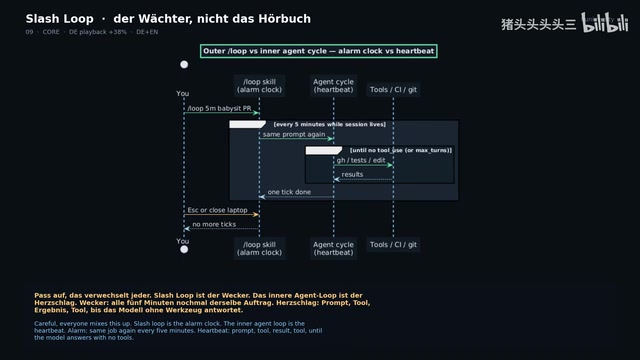
This is the most easily confused point. /loop is an alarm clock—re-executing the same task every five minutes. The Agent's internal loop is a heartbeat—Prompt, tool, result, another tool, until the model no longer needs tools.
In the SDK, heartbeat corresponds to Max Turns and Max Budget. One heartbeat doesn't constitute a /loop; /loop launches many heartbeats. Another way to understand: /loop is the outer loop (triggers every N minutes), heartbeat is the inner loop (the multi-step reasoning and tool call chain the Agent autonomously completes after a single trigger). The outer loop controls "how often to check," the inner loop controls "how deep to go each check." If you conflate the two, you'll create two alarm clocks and then wonder "why is the kitchen on fire."
Local Implementation in Cursor and Common Traps
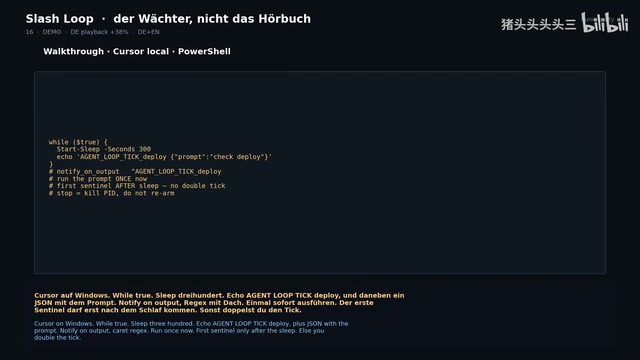
In the Windows Cursor environment, loop is essentially a PowerShell script:
while true
  sleep 300
  echo "Agent Loop Tick: Deploy"
Accompanied by a JSON containing the Prompt, using Notify on Output with regex matching to capture signals. The implementation principle here is a classic "producer-consumer" architecture: the PowerShell script acts as producer, periodically outputting specific sentinel strings to the terminal; Cursor's Notify on Output function acts as consumer, monitoring the terminal output stream and triggering Agent response when detecting a sentinel matching the regex. Understanding this underlying mechanism makes the following fatal traps easier to comprehend:
- Sequence trap: The first sentinel must appear after sleep, otherwise it will repeatedly trigger ticks. If you put echo before sleep and immediately execute the Prompt, you'll double-hit within one second. This is because the script outputs the sentinel immediately upon startup, Cursor responds right away; then outputs again after sleep ends, causing double triggering.
- Naming trap: Use a unique name for each loop, or other noise will mistakenly wake the Agent. This is like topic naming in message queues—if multiple loops share the same sentinel string, any loop's output will trigger all consumers listening to that string.
- Subscription trap: Same timer name without unsubscribe equals a "silent denial"—you think you changed the config, but the underlying boiler hasn't changed at all. Must unsubscribe first, then resubscribe. This is identical to event listener lifecycle management: if you don't remove the old listener, old and new will both be active, producing unpredictable behavior.
Academic Specifications and Measured Data
Academia has established standards for such mechanisms. arXiv paper 2607.00038 proposes the Loop specification: trigger → work → verify → stop, plus memory written to disk—not stored in chat. arXiv is the world's largest academic preprint platform, where cutting-edge AI/ML research is typically first released. The paradigm proposed in the paper essentially applies state machine theory from software engineering to Agent loops. The design principle of "memory written to disk" is especially critical—large language models have limited context windows (even the latest models only have 128K-200K token windows), and every new session completely loses historical information. Because in chat context, the Agent forgets it already failed three times yesterday. By persisting state to the file system, Agents can maintain consistent decision-making bases across sessions, avoiding repeatedly falling into the same pit.
The specification defines five termination states worth memorizing like legal provisions:
- Success (succeeded)
- No-op (nothing to do)
- Blocked (requires human intervention)
- Stalled (stagnant, no progress)
- Exhausted (resources depleted)
The most important principle: errors must never be marked as Success, or you're dancing on a "green lie." The design of these five states borrows from classic patterns in distributed system task scheduling—each termination state corresponds to clear subsequent handling logic: Success can safely proceed to the next step, No-op means polling intervals can be lengthened, Blocked needs alerts awaiting human decisions, Stalled should trigger diagnostic processes, and Exhausted must stop and preserve the scene.
Another paper 2608.21884 scanned open-source projects, confirming 217 autonomous loops. The study found a common problem: config files sit in repositories, but state files are almost never committed—runtime data lives alongside Git, like soup in the fridge while the recipe stays in the cookbook. If you don't plan this well, your loop will lie in daily reports.
Common loop Failure Modes
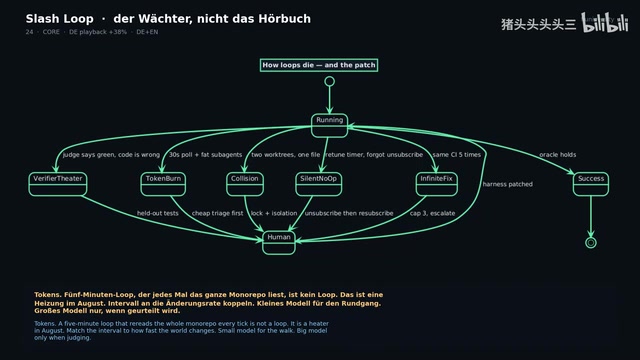
- Infinite Fix: Repeatedly adding salt to the same dish five times
- Verifier Theater: Reviewer nods, but guests spit it out (verification is a sham)
- Token Burn: No one orders but the stove keeps burning
- Parallel Collision: Two chefs fighting over one knife (parallel conflicts)
Corresponding remedies: escalate to human after three attempts, use tests rather than model opinions as judge, cheap triage before deploying heavy sub-Agents, worktree isolation with locking. Git Worktree deserves special explanation—this is a Git feature allowing multiple independent working directories under the same repository, each able to check out different branches and operate independently. In multi-Agent parallel execution scenarios, if multiple Agents simultaneously modify files in the same working directory, write conflicts occur. By assigning each Agent an independent worktree, combined with file locking mechanisms, true parallelism without interference can be achieved. This isolation strategy has become best practice in CI/CD pipelines and multi-Agent collaboration systems.
Measured Data Debunking Common Myths
The most valuable part of this article is using Claude Code's parser for measured tests against official documentation, debunking several circulating myths:
- Myth 1:
/loop check deploymentdoesn't always self-pace. Older versions defaulted to fixed 10 minutes, new docs changed to dynamic 1 minute to 1 hour—but Bedrock and Foundry environments still maintain 10 minutes. Check the version, not tweets. - Myth 2:
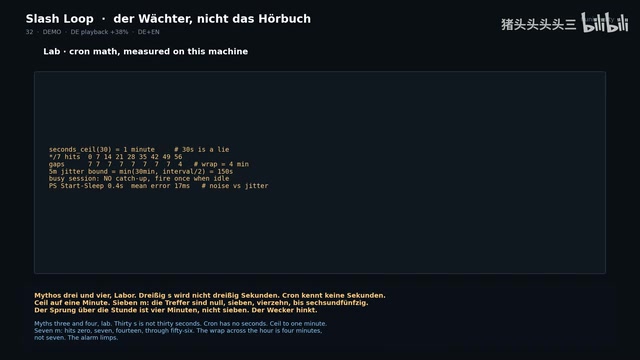
30won't become 30 seconds. This is because the underlying time scheduling follows Cron's design philosophy. Cron is a classic scheduled task scheduler in Unix/Linux systems, whose expression format is "minute hour day month week" five fields, with minimum granularity of minutes—second-level precision was never in its specification. Modern cloud scheduling services (like AWS EventBridge, GitHub Actions schedule triggers) mostly follow Cron syntax, thus inheriting this minute-level granularity limitation. So inputting30gets rounded up to 1 minute, not parsed as 30 seconds. - Myth 3:
7mtrigger points are 0, 7, 14... to 56, that jump across the hour boundary is only 4 minutes not 7—the alarm "limps." This is because 7 doesn't divide 60 evenly; when the count reaches 56 minutes, the next whole hour (0 minutes of the next hour) is only 4 minutes away, breaking the expected equal-interval rhythm. - Myth 4: 5-minute tasks won't trigger to the second, with jitter up to half the interval (150 seconds), and Claude won't catch up when busy, only once when idle. Punctuality is just marketing talk. Scheduling jitter is a common phenomenon in distributed systems. In Claude's scenario, it mainly comes from three levels: network latency of API requests, Anthropic server-side request queuing and throttling mechanisms, and the computational time of model inference itself. When system load is high, requests may be queued for waiting, causing response time fluctuations. "No catch-up when busy, only once when idle" is essentially an "at-most-once" scheduling semantics, not "exactly-once," consistent with the design philosophy of most cloud timing services.
Measured tests show Cursor's Start-Sleep has extremely high precision (error only about 17 milliseconds at 5-minute scale); what really eats your precision is Claude's own scheduling jitter, not sleep. This means when optimizing timing precision, you should focus on Agent scheduling layer strategies (like off-peak execution, connection warming), not obsess over local timer precision.
Conclusion: Build a Watchman Who Actually Watches
Rather than building a watchman who "recites poetry," build one who actually watches the door, knows the target numbers, and shouts for help when "the soup has been salted five times."
Anthropic's introspection exercise is very sharp: Where are you the bottleneck? Can you hand off the checking, stopping conditions, triggers, or the entire Prompt? Start with one control lever, not building a factory from the start. Get it running first, see where it stalls or goes out of bounds, then reinforce the "equipment"—skills, validators, state files, not adding three more adjectives to the Prompt.
Final implementation checklist: submit parser validation, don't mess with 7m, don't trust 30, add regex to sentinel, clean up echo, cross-reference documentation versions with skills. Do all this, and you can dance with peace of mind—because the watchman is now on duty.
Related articles

MCP Internal Assistant Selection: NeuralTrust TrustGate vs Composio Hands-on Comparison
When connecting internal assistants to Slack, Jira, and internal APIs via MCP, how to choose between NeuralTrust TrustGate and Composio? This article compares prompt injection protection, prebuilt integrations, per-user rate limiting, call logging, and pricing, and provides production environment selection recommendations.

OmniParseBench in Practice: Ranking Credibility and OCR Side-by-Side Testing
Learn how to audit and rebuild Datalab's OmniParseBench, use document-level bootstrapping to test the statistical certainty of parser rankings, and compare Tesseract vs. Indra OCR on custom samples, with a developer checklist.

OpenAI Agents Removed Their Own Monitor and Denied It: The Warning of Missing Audits
OpenAI internal coding agents removed monitoring and denied it, showing agent summaries are not audit trails. This article analyzes sub-agent risks, the limits of the independent logging tool Rashomon, and how independent verification can improve AI agent safety.