DeepSeek Harness Complete Guide: Master DSH in 50 Minutes and Let SuperAgent Do the Work

Complete DeepSeek Harness guide: from installing Node.js and the client to mastering the plugin ecosystem.
Based on a Bilibili creator's tutorial, this article systematically covers the complete usage path of DeepSeek Harness (DSH) from zero installation to the plugin ecosystem. DSH is a local client launched by DeepSeek, officially positioned as "Model + Harness = Agent": the model thinks, the Harness provides hands, feet, and toolchain, and it's open source and directly downloadable without cloud subscriptions. Installation has two steps: first install Node.js (version 22 or above, avoiding the C drive to prevent cache from filling the system drive), verify with node -v, then install the DSH client and add local folders for read/write access. Plugins are the core of DSH's capability expansion, supporting three methods: letting the AI install them itself, installing from the plugin market (no credits consumed, recommended), and command-line installation, enabling visual recognition, content reading, knowledge base management, and more. In creative mode, DSH can write code, install, and validate on its own—building a floating Pomodoro timer in five and a half minutes, demonstrating SuperAgent's closed-loop potential.
The launch of DeepSeek Harness (DSH for short) makes the formula "Model + Harness = Agent" within easy reach. The model is the brain, the Harness is the hands and feet—this official definition captures DSH's positioning in a single sentence. Based on a detailed tutorial from a Bilibili creator, this article maps out the complete path from zero installation to plugin ecosystem gameplay, helping you quickly get started with this tool that lets SuperAgent do the work for you.
What Is DeepSeek Harness and Why It's Worth Watching
DeepSeekAd Harness is a client product launched by DeepSeek that packages model capabilities into a locally runnable Agent framework. According to the creator, in less than three months since launch, it has already reached 260,000 new daily actives and 1.54 million users. People in the community call this way of letting AI work autonomously "fish farming."
Its core value: the model itself is the brain, and the Harness provides the hands, feet, and toolchain. Through the plugin mechanism, DSH's capability boundaries can be greatly expanded—from reading Bilibili content and managing knowledge bases to generating videos, organizing knowledge directories, and even connecting to chat apps to converse with others.
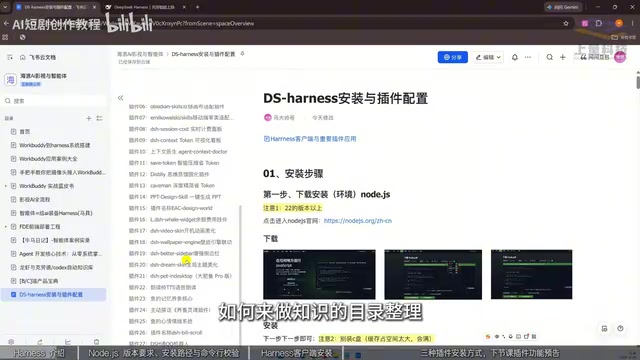
Compared with traditional cloud solutions, DSH is open source and can be downloaded directly from the official source, saving the cost of subscribing to cloud code. In the video, the creator said bluntly: "Stop paying for cloud code—DeepSeek has already open-sourced this work."
Installation Step 1: Set Up the Node.js Environment
Many AI tools run on the Node.js environment, and installing tools like Cloud Codex also requires it first. This is the first major step in DSH installation.
Version Selection and Download
Open the Node.js official website, and the page will automatically adapt the download options to your operating system. Windows and Mac users each pick what they need. Key point: choose version 22 or above, not below 22. You can download either the zip or MSI format; MSI can be installed with a direct click, while zip needs to be extracted first.
Installation Location Matters
The creator specifically warns: do not install to the C drive. There are two reasons—first, installation takes up space; second, running the program generates a large number of cache files, which can easily fill up the C drive. It's recommended to change to the D drive and click next all the way to the end.
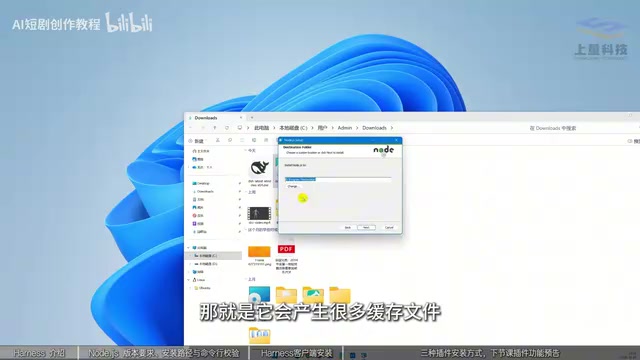
Verify the Installation
Open the command line (type cmd if you can't find it) and enter node -v—note there is a space between node and -v. If a version number appears and is roughly 20 or above, the environment is set up correctly.
Installation Step 2: Install the DSH Client
Once the environment is ready, return to the download page and select the Harness client for your system. Windows users choose the Windows version; after downloading, right-click to open it. Again, avoid the C drive for the installation location. Click Install Now, and when it's done, you can open the DeepSeek Harness interface.
The interface looks similar to the web chat window, but the key difference is: you can add local folders. Once added, DSH can read, modify, and save the contents of that folder—something the online version cannot do. The model selection area lists several DeepSeek models, which you can explore further later.
Plugins Are DSH's Real Killer Feature
DSH is based on Codex's plugin architecture, and its real power lies in plugin integration. Click the plugin tab to add plugins. The creator summarizes three installation methods.
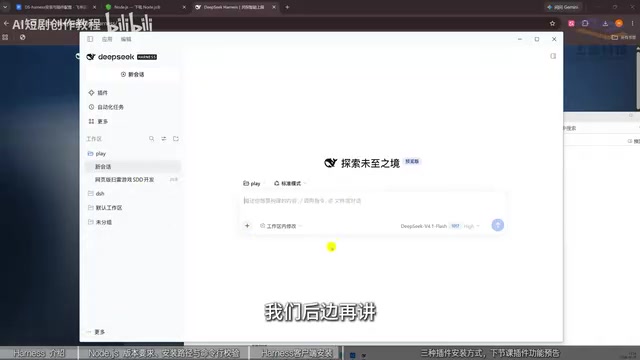
Method 1: Let the AI Install Itself
If you know the plugin name, just send the GitHub link to it in the chat window and let it install itself. This method consumes credits but is the most hassle-free.
Method 2: Install from the Plugin Market (Recommended)
This method does not consume credits. Click Add Plugin, enter a plugin name such as "DSH Market," click Install, and when detected, click Launch Now to browse the plugin market. The market entrance is under "More" → "Settings," where there are tens of thousands of plugins to search and filter, plus recommended items like little goldfish pendants and desktop pets—just one click to install.
Method 3: Command-Line Installation
Take the "world's most powerful DeepSeek Harness external vision plugin" on GitHub as an example—native DeepSeek cannot recognize local images, but with this plugin attached, it can identify people, clothing, and other information in images. On the plugin page, find the install with command-line option and copy the code to execute in the command line. This method may seem a bit abstract to some users; the first two methods are more friendly.
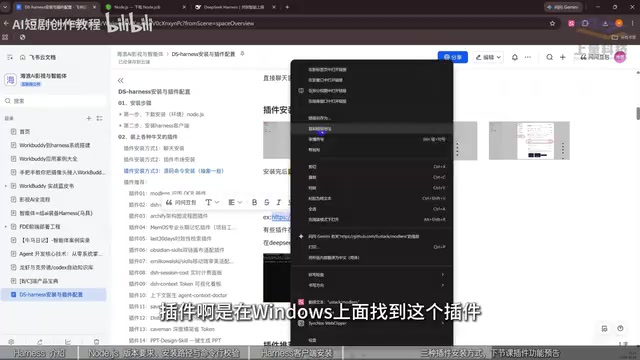
How Plugins, MCP, and "External Vision" Work
A plugin is essentially a piece of extension code that can be dynamically loaded by the main program, registering new tools or capabilities with the Harness through an agreed interface. In recent years, such extensions have increasingly moved toward MCP (Model Context Protocol): the plugin declares "what I can do and what parameters I need" via a standard protocol, and the Harness converts these declarations into tool descriptions that the model can call. This way, the model does not need to know plugin details in advance—it only needs to read the tool list to decide when to call.
The "external vision plugin" mentioned in the article addresses a specific shortcoming: native text models cannot directly "see" local images. The plugin's approach is usually to first send the image to a vision-capable model or local recognition module to obtain a text description or structured information, then pass these results as context to the main model. So it does not change the main model itself but adds an "image → text" channel. Understanding this helps judge the plugin's capability boundaries: recognition quality depends on the underlying vision module, while the plugin handles the invocation chain and format conversion.
From Codex to DSH: The Origin of the Plugin Architecture
The article mentions that DSH is based on Codex's plugin architecture. "Architecture" here mainly refers to a unified plugin registration, loading, and permission model: plugins exist as independent directories or packages, are scanned and loaded when the main program starts, and run within a controlled scope. This design allows third parties to independently develop and distribute plugins without modifying the main program itself, thus accumulating an ecosystem of tens of thousands of plugins in a short time.
Don't Know What Plugins to Install?
Just ask DeepSeek, and it will give you a list of popular plugins to choose from. The creator says there will be a dedicated follow-up on the most commonly used and useful plugins and their role in business.
Hands-On Experience and Next Steps
According to the creator's testing, after enabling creative mode and saying "make me a floating Pomodoro timer," DSH writes the code, installs it, and validates it itself—and it appears on the interface in five and a half minutes. This closed loop from requirement to finished product is exactly where SuperAgent's potential lies.
With streaming plugins, DSH can also read content on Bilibili, output it to a knowledge base for management, generate videos, and organize knowledge directories. The model can also be swapped for external models like GPT, offering high flexibility.
For readers who want to dive deeper into plugin gameplay, it's recommended to first browse popular plugins in the plugin market, pick ones that fit your business scenarios, and then gradually try installing more complex plugins via the command line.
Background Supplement
What Is a Harness?
In AI engineering, a Harness refers to a software framework wrapped around a base model that is responsible for "turning model intent into real-world actions." It typically includes modules such as tool calling orchestration, file system read/write, command execution sandbox, context and memory management, and permission and security control. The base model can only output text and cannot read local files or run code on its own; the Harness encapsulates these capabilities into interfaces the model can call, and when the model gives structured instructions, it actually executes them and returns the results to the model, forming a "think—act—observe" loop. DeepSeek Harness packages the DeepSeek model with such an execution layer into a locally runnable client, so the metaphor "the model is the brain, the Harness is the hands and feet" emphasizes that the same model, paired with Harnesses of different capabilities, can accomplish vastly different ranges of tasks.
About Agents and SuperAgents
An Agent generally refers to an AI system that can autonomously plan steps, call tools, and adjust actions based on feedback to complete a target task, rather than just doing single-turn Q&A. Its typical characteristics are goal-driven, multi-step execution, and self-correction. The "SuperAgent" mentioned in the article can be understood as a more capable form of Agent: it not only calls preset tools but can also write code, install dependencies, and verify results itself, directly turning natural language requirements into runnable finished products. The key to measuring the maturity of such systems is often not the model's single-point capability but the richness of tools provided by the Harness, execution stability, and error recovery mechanisms.
What Is Node.js and Why It Must Be Installed First
Node.js is a JavaScript runtime based on the Chrome V8 engine that lets JavaScript run locally outside the browser. A large number of AI clients and CLI tools (including plugin ecosystems and command-line installers) are distributed as Node.js packages, relying on the npm package manager to pull dependencies. So Node.js is the "foundation" for such tools: too low a version lacks new APIs and causes installation or runtime failures. The requirement for version 22 or above is precisely to meet the syntax and runtime requirements of newer toolchains. Installing to a non-system drive is to prevent dependency caches (such as npm's global cache) and runtime temporary files from crowding out system drive space.
Related articles

Gemini 4 Neon Review: Benchmark Scores Rival Carbon, API Pricing and Quota Breakdown
Google Gemini 4 Neon is now live, benchmark scores closely tracking Carbon, API pricing 3/15 at twice Hydrogen's rate. This article compiles Bilibili creator testing: Neon can replace 90% of Carbon scenarios, AntiGravity quota consumption is only one-third of Carbon, plus subscription channel restrictions and 2API ban risks.

Gemini 4 Helium Coming Soon? Signals of Google Loosening Subscription Restrictions
Google team member hints releases will continue; community speculates Gemini 4 Helium (Flash Lite) may be next. Subscription ban controversy gets a response as product lead says "Soon," suggesting restrictions may be lifted. This article covers Gemini developments, OpenAI Coding Agent and risk management, Doubao real-time audio-video API, and compute business dynamics.

AI-Assisted React Development in Practice: Optimizing a Video App and Handling Errors
A 14-year veteran developer demonstrates AI-assisted React video app optimization: compressing video from 80MB to 5MB (~94%) via ImageKit, plus reliable error handling and retry mechanisms. Includes planning, code understanding, and verification methods for working with AI.