Enterprise AI Operating System Implementation Guide: Complete Analysis of 7 Core Tool Stacks

A practical guide to building enterprise AI systems with 7 essential tools beyond the AI brain
This guide reveals why powerful AI models alone aren't enough for enterprise implementation. Based on 8 real deployments, it breaks down a 7-layer architecture: VS Code + GitHub for framework, n8n for automation, Paperclip for agent management, Bitchat for secure communication, Secret Manager for credentials, and data warehouses for analytics—with honest assessments of each tool's strengths and limitations.
Why a Powerful AI Brain Isn't Enough
More and more enterprises are trying to truly integrate AI into business processes, rather than just having employees chat with ChatGPT. Through implementing AI systems for 8 different enterprises, the team has distilled a core insight: the context problem has been solved, but the action problem still exists.
Here's an analogy: even if you have an Einstein-level brain, if you ask it to move sunglasses from one place on a desk to another, it can't do it—because brains aren't tools designed to "take action." Similarly, an AI "brain" with massive context and memory has very limited value if it can't connect to real business systems to execute actions, call data, and manage permissions.
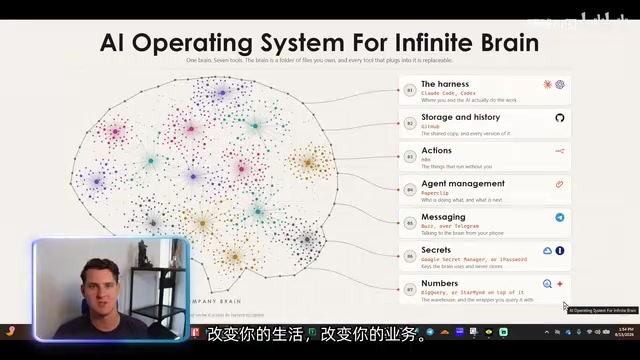
Based on this understanding, the "Wireless Brain" AI operating system was born. Beyond the core brain, you need to build seven types of key tools around it. Notably, all but one of these tools support self-hosting, which is particularly important for security-conscious enterprises.
Framework Layer: VS Code + GitHub as the Brain's Backbone
The first category of tools is the "Framework"—the carrier for interacting with AI and storing the brain. Here's a core recommendation: don't build your skills and agents on closed platforms like ChatGPT or Claude's official web applications.
The reason is vendor lock-in. Vendor lock-in is a classic risk in enterprise IT—when enterprises deeply bind core workflows, custom prompts, and skill libraries to a specific AI vendor's proprietary platform, switching costs grow exponentially over time. This includes not only technical migration costs but also the hidden costs of team retraining, historical data migration, and workflow reconstruction. This problem is especially pronounced in the AI field because models iterate extremely fast: the best model of 2024 might be surpassed by a new player in 2025. If you build all your skills, prompts, and workflows on one vendor's platform, migration costs will be very high when you want to switch from Claude to Grok or Codex.
The recommended solution is to use the free Visual Studio Code. The operation is simple: open VS Code, open your "brain folder" (essentially just a directory on your computer), then log into Claude Code, Codex, Gemini, and other command-line tools in the terminal.
VS Code's core advantage is multi-model parallelism—you can even open four terminal windows simultaneously and have Claude, Codex, and Gemini work in parallel, while also introducing local models. Using an open editor like VS Code as a unified entry point essentially implements a "model-agnostic" architecture at the application layer, similar to Kubernetes' cloud-agnostic strategy in container orchestration. Compared to using individual vendor CLI applications, this approach retains maximum flexibility.
GitHub: Central Repository for Multi-Level Brains
The second key tool is GitHub. Today's GitHub is no longer just for developers; business users can use it too. GitHub's core capability is the Git version control system, which not only tracks code changes but also perfectly manages text assets like Markdown documents, configuration files, and prompt templates. Its role is to serve as a central storage repository, synchronizing multiple levels of "brains":
- Personal Brain: Belongs to each individual employee
- Department Brain: Marketing, finance, task management each form their own
- Company Brain: Globally shared core knowledge
- Hidden Brain: Contains sensitive information like salaries and financials, with access assigned by permissions
This multi-level structure actually leverages Git's branch and repository permission management mechanisms: personal brains can be private repositories, department brains are internal organization repositories, and sensitive "hidden brains" are restricted to specific personnel through GitHub's fine-grained access control (RBAC). Every modification to brain content is fully recorded, supporting rollback and auditing—this is crucial in enterprise environments. GitHub Codespaces and GitHub Actions can further enable automated validation and deployment of brain content.
Employees sync these brains to their local laptops and use them with VS Code or Claude Code. It sounds complex, but it's actually easy to get started with—even users who aren't particularly tech-savvy can use it as naturally as chatting once configured.
Action Layer: n8n for Automated Workflows
When the AI brain needs to "take action"—like updating data in Google Sheets or sending Gmail—you need automation tools like n8n (or similar tools like Make).
n8n is an open-source workflow automation platform that uses a node-based visual programming paradigm. Unlike SaaS competitors like Zapier and Make, n8n supports complete self-hosting, with data never leaving the enterprise network. Its architecture is based on Node.js and supports 400+ pre-built integration nodes, covering scenarios from database operations to SaaS API calls.
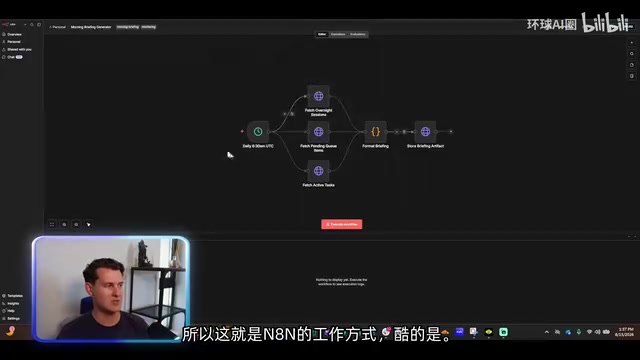
n8n defines workflows through a visual interface. Take a "daily briefing generator" as an example: automatically triggered at 6:30 AM every day, it fetches all chat records, to-do items, and active tasks, formats them, and stores them for further analysis.
The real efficiency boost comes from integration with the AI brain: enter n8n's settings to get an API key, hand it to the brain, and the brain can automatically build the entire automation process for you. In actual cases, the team once created 100 automated tasks in about 30 minutes.
n8n can execute two types of operations:
- Deterministic Logic: Processes based on "if-then" rules, essentially basic code
- Intelligent Judgment: Calls AI agents for analysis and decision-making
This "deterministic process + intelligent agent" hybrid mode corresponds in engineering to the combination of n8n's conditional branch nodes and AI Agent nodes—the former handles if-else logic to ensure predictability and auditability, while the latter calls LLMs when fuzzy judgment is needed (such as email classification, sentiment analysis, content summarization). This architecture avoids the unpredictability of purely AI-driven systems and the rigidity of purely rule-based systems, making it the ideal form for enterprise-grade automation.
Agent Management Layer: Paperclip and Its Real-World Limitations
If you want to achieve true "agent management"—having one AI agent assign tasks to another and automatically hand off completion—you need Paperclip.

Paperclip's vision is quite radical: you can set up a "CEO agent" that can create subordinate agents like a marketing director and CTO, and the CTO can further spawn SQL developers and frontend/backend developers. The entire system runs in coordination with task management systems like ClickUp—tasks move from "to-do" to "in progress," one AI completes it and passes it to another AI for review, and finally marks it as "complete."
The direction Paperclip represents—Multi-Agent Collaboration—is one of the most active research frontiers in current AI engineering. Its core concept comes from distributed artificial intelligence: decomposing complex tasks to multiple AI agents focused on specific capabilities, achieving collaboration through message passing and task queues. Similar frameworks include Microsoft's AutoGen, Stanford's Generative Agents, and CrewAI.
However, in actual use, Paperclip is "a bit difficult to use." The problem isn't the tool itself, but that building a truly complete autonomous organization requires a lot of upfront work. Such systems face several fundamental challenges: semantic drift in inter-agent communication (one agent's output may be misunderstood by downstream agents), cascading error amplification (upstream errors cause all downstream failures), and debugging difficulties (interaction states of multiple agents are hard to track). More realistically, most clients already have task systems like ClickUp, and they prefer to retain human control over AI agents, being able to review agent progress at any time rather than completely letting AI run autonomously.
This point is worth noting for all enterprises: fully autonomous AI organizations are technically feasible, but still need time in terms of management trust and implementation maturity. This is also why the "Human-in-the-Loop" model is still considered more reliable at the current stage. Using automated agent processes to a limited extent is more prudent.
Communication Layer: Bitchat for Secure Human-Machine Dialogue
The fourth category is messaging tools. Although Claude Code and Codex have strong conversational capabilities, the operational threshold is relatively high for ordinary business users.
Currently, Bitchat is recommended (created by Twitter co-founder Jack Dorsey, a Slack-like communication tool). Bitchat is based on the Nostr protocol (Notes and Other Stuff Transmitted by Relays), a decentralized social communication protocol. Unlike centralized SaaS communication tools like Slack and Microsoft Teams, tools based on the Nostr protocol allow enterprises to run relay nodes on their own servers, with messages not passing through third-party servers.
The specific approach is to self-host Bitchat on a virtual server, connect AI agents bound to the company brain to channels, and employees can ask the brain questions from their phones or any device. You can also establish regular chat channels for internal team communication.
Future plans include establishing multiple dedicated channels like finance brain, marketing brain, and task management brain. The core benefit of self-hosting is: all conversation data with AI agents is not shared with third parties. Under regulatory frameworks like EU GDPR and China's Data Security Law, data sovereignty has become a hard constraint in enterprise tool selection. Self-hosting means enterprises have complete control over data storage location, access logs, and lifecycle management, which is especially critical in strongly regulated industries like finance, healthcare, and government. If you choose to use the official hosted service, while free, the service provider can access your chat logs.
Security Layer: Proper Key Management Practices
Key and password management is the most easily overlooked yet most dangerous aspect of enterprise AI implementation.
Never store passwords and other sensitive information directly in the AI brain. Because AI models ingest this data, vendors cannot guarantee it won't be shared with others. More troublesome is that once the model detects you're sharing credentials, it will even repeatedly remind you to change passwords.
Recommended solutions are divided into two scenarios:
- Individual Users: Use 1Password, then connect to the AI brain
- Organizational Users (especially enterprises already using Google ecosystem): Use Google Secret Manager
Google Secret Manager works cleverly: create a project in the Google Cloud console and enable the Secret Manager API, store the actual password (like "JP Morgan password") in it. The system provides an alias (password name), and you only give this alias to the AI brain, not the actual password value.
This mechanism is called "Secret Reference" or "Indirection" pattern in security engineering, a core practice of zero-trust security architecture. Google Secret Manager and AWS Secrets Manager both implement enterprise-grade functions like encrypted storage of secrets (using AES-256 or higher strength encryption), access auditing (every secret read has logs), and automatic rotation (regularly changing passwords without affecting systems that reference them).
When the brain needs to execute an operation (like writing a Python script to initiate a transfer), the script replaces the password name with the actual password value at the last second. This way, the AI only processes aliases throughout and doesn't ingest truly sensitive information. Note that if you directly ask the AI for the actual password value, it might leak it—this reveals a deeper security issue: the LLM's context window is a potential information leakage surface. Even if keys only briefly appear in the script execution environment at runtime, if the AI's conversation logs are persistently stored or used for training, there's still a leakage risk. Therefore, best practice is to have key resolution completed entirely in a sandboxed runtime environment, not entering the LLM's context window. This isn't perfect protection, but works well with proper use. Similar tools include AWS Secrets Manager.
Data Layer: Data Warehouse + StarMind Provide Decision Support
The last category is data management. Many people try to stuff massive numbers directly into the AI brain, like daily sales from various products and channels—this is a common mistake.
The core principle is: the brain needs context, not raw data. The correct approach is to put data in a data warehouse and let the brain access it on demand through connections.
A data warehouse is a database architecture optimized for analytical queries. Unlike OLTP databases (like MySQL, PostgreSQL) that handle daily transactions, data warehouses use columnar storage, pre-aggregation, and other techniques to accelerate statistical analysis of large-scale data. Mainstream products include Google BigQuery, Snowflake, Amazon Redshift, and ClickHouse.
After connecting the backend database to the brain, the brain can see what database tables, views, and callable interfaces are available, becoming an efficient data analyst based on a strong data foundation. This approach may even replace traditional BI tools like PowerBI and Looker—because you can directly ask "what are my data trends," and the AI will read instructions in the brain about how to use BigQuery and automatically handle the analysis.
This actually points to a paradigm shift that's happening: from "dashboard-driven BI" to "conversation-driven BI." Traditional BI requires analysts to pre-design dashboards and reports, with users only able to view predefined perspectives; AI-driven analysis allows users to ask arbitrary questions in natural language, with the system dynamically generating SQL queries and returning results. This significantly lowers the threshold for data analysis but also places higher demands on data governance (data definitions, unified metrics, permission control).
If you don't have a professional backend data team, you can also call APIs from different data sources in real-time, but this approach scales poorly and makes it difficult to trace historical data. Therefore, a data warehouse remains the better choice.
Additionally, there are tools like StarMind, positioned as a business superintelligence platform that can connect all enterprise data sources and automatically build a structured summary database, allowing the AI brain to make decisions and execute actions based on evidence.
Summary: Giving the AI Brain a Body
The core idea of this "Wireless Brain" AI operating system can be summarized in one sentence: having a powerful brain isn't enough; you must connect the brain to a body for it to truly take action.
The seven tools each serve their purpose:
| Layer | Tool | Core Responsibility |
|---|---|---|
| Framework Layer | VS Code + GitHub | Interaction interface and knowledge storage |
| Action Layer | n8n | Automated workflow execution |
| Agent Layer | Paperclip | Task collaboration between AI agents |
| Communication Layer | Bitchat | Secure human-machine dialogue channel |
| Security Layer | Google Secret Manager / 1Password | Key and credential management |
| Data Layer | Data Warehouse + StarMind | Structured data supporting decisions |
For teams looking to implement enterprise AI, this tool stack provides a pragmatic reference framework. Particularly worth learning from is the candid assessment of Paperclip's limitations and the rigorous thinking about key management and data boundaries—these are precisely the hidden dangers where many AI implementation projects fail.
Specific tool selection still needs to be judged based on your own business situation, but the layered architecture concept of "brain for thinking, tools for action, data for support, keys managed independently" has reference value for enterprises of any scale.
Related articles

Vibe Coding Full-Stack in Practice: AI Programming from Beginner to Enterprise Deployment
From Cursor to Claude Code, this Bilibili AI programming course uses four progressive projects to cover full-stack development, open-source secondary development, and team collaboration. The article analyzes the shock to frontend roles, the efficiency shift from 50 people to 5, and the methodology required for enterprise-grade projects.

David Blaine's Global Quest for Real Magic: From South Africa to Japan and India
David Blaine travels to South Africa, Japan, and India in his Do Not Attempt special, documenting Spinning drivers, black mamba rescuers, iaijutsu masters, and ascetics—exploring the boundary between magic and real human极限 challenges.

Is a Touchscreen MacBook Coming? Vergecast Reveals Apple Executive's Response
Vergecast podcast reveals a conversation between a reporter and Apple executive John Ternus about a touchscreen MacBook and Apple Pencil support. Ternus says iPad is the best device for a stylus, while the reporter bets MacBook will eventually support Apple Pencil.