Gemini API in Practice: Building AI Agents with Files

Google shows how AI Studio and the GA Interactions API let you build AI Agents from just files—no complex loops.
In this Google DeepMind session, product managers Mariano and Philip demo the full AI dev toolchain: AI Studio for zero-config full-stack and native Android apps, and the now-GA Interactions API for agentic workflows. The key insight: an Agent is just a combination of files—Markdown plus a few scripts—running in managed cloud sandboxes with secure credential proxying.
In this official hands-on session from Google DeepMind, two product managers—Mariano and Philip—systematically showcased Google's current AI development toolchain from two angles: app development with AI Studio and Agent building with the Interactions API. The core message is singular: going from idea to production is becoming faster than ever, and building an Agent no longer requires writing complex Python loops—you just need to write files.
The Gemini Ecosystem: From Models to Multimodality
Mariano started by reviewing the iteration cadence of the Gemini family. From Gemini 1.5, to the widely praised Gemini 2.5, to the currently featured Gemini 3.5 Flash (the author's daily default model in this session), Google has maintained a high frequency of updates on its frontier models. Meanwhile, the open-source side with Gemma, the generative media model Nano Banana 2, and text-to-speech (TTS) models are all advancing in parallel.
The reason Gemini 3 has been widely adopted by leading vendors like Cursor, GitHub, Figma, and Vercel lies in its multimodal capabilities. It can accept diverse inputs such as system instructions, text, images, audio, video, speech, and URLs, and output text, images, audio, video, function calls, or code.
It's worth understanding this in depth: multimodal refers to a model's ability to understand and generate multiple types of data simultaneously. Traditional language models can only process text, whereas multimodal models map data of different modalities into the same semantic dimension via a unified embedding space, enabling cross-modal reasoning and association. This relies on extending the Transformer architecture—splitting images into patches and converting audio into spectral features to be fed into the model alongside text tokens. Gemini adopted a natively multimodal architecture from the outset, rather than stitching together separate vision and speech modules, which makes it perform more coherently on cross-modal tasks. For developers, this means a single API call can accomplish composite tasks like "describing an image" or "interpreting audio," greatly simplifying workflows that previously required chaining multiple specialized models.
This "mix-and-match" capability enables developers to build composite applications that were previously hard to achieve. Mariano gave an example: he built an Agent himself that reads his inbox through Workspace integration, then generates a short podcast to listen to while brewing coffee in the morning.
AI Studio: A One-Stop Platform from Idea to App
AI Studio (ai.studio / ai.dev) was the focus of this session. It's not just a Playground for testing new features—it has evolved into a complete app-building environment.
Zero-Config Full-Stack Development
As a full-stack web developer, what Mariano values most is full-stack Node.js app support. Now you can build an entire application within AI Studio, and the platform automatically configures the Node.js server and frontend, provides full access to the npm ecosystem, and includes built-in secret management for server-side API keys. He admitted that authentication and key management have always been among the most painful aspects of frontend development, and now these pain points are directly eliminated by built-in capabilities.
Additionally, native Firebase integration brings out-of-the-box "Sign in with Google" authentication and automatic provisioning of Firestore (a NoSQL database), with Cloud SQL support coming in the future. Integration with Workspace is achieved through automated OAuth, eliminating the need for manual configuration in the Cloud Console. This significantly lowers the barrier to connecting with enterprise data such as Gmail, Docs, and Drive.
OAuth (Open Authorization) here is an open authorization standard that allows third-party applications to gain access to specific user resources on a service without obtaining the user's password. When an app needs to read a user's Gmail or Drive data, OAuth grants time-limited, scope-restricted access tokens to enable least-privilege authorization. Traditionally, configuring OAuth requires manually creating credentials in the Google Cloud Console, setting up callback URLs, and declaring scope permissions—a tedious and error-prone process. An API Key, by contrast, is a static credential identifying the caller's identity; once leaked, it can be abused. Therefore, Secret Management—storing keys encrypted on the server side to avoid exposure in frontend code—is a fundamental security practice for production environments. By building these capabilities in, AI Studio directly resolves the authentication complexity that developers have long faced.
Generating Native Android Apps with Natural Language
One capability the author called a "game-changer" is generating native Kotlin and Jetpack Compose apps through natural language. According to Mariano, over 1 million apps have been created since the feature launched last month. The entire process requires no local environment setup—there's a real-time emulator running right in the browser, and it also supports one-click installation to your phone or one-click publishing to Play Console for testing.
Understanding the significance of this capability requires knowing the tech stack behind it. Kotlin is a programming language developed by JetBrains and established by Google in 2017 as Android's officially preferred language. Compared to Java, it's more concise with stronger null safety features, significantly reducing crash risks. Jetpack Compose is a modern declarative UI toolkit Google launched in 2021—developers only need to describe "what the interface should look like," and the framework automatically handles redrawing when state changes, replacing the tedious traditional approach based on XML layouts and imperative operations. This "Kotlin + Compose" combination is the current mainstream paradigm for native Android development. AI Studio's ability to directly generate code conforming to this modern standard via natural language means the output isn't an outdated or toy-level prototype, but an engineering product ready to enter production iteration—which is the technical basis for the "game-changer" assessment.
Detailed Improvements That Boost Development Efficiency
AI Studio also introduced several experience optimizations:
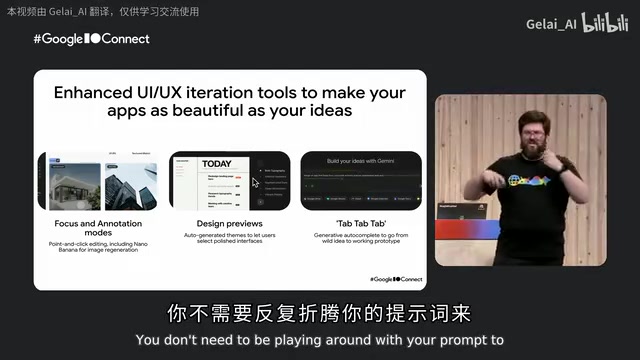
- Focus Annotation: Click directly on a component on the page to give precise modification instructions targeting that component, without struggling to describe it in words like "the heading of the second paragraph below the hero section."
- Design Previews: During model generation, several different-styled low-fidelity previews are offered first (e.g., high-density and lively, elegant dark, immersive UI), so developers can choose a style upfront and avoid rework after generation is complete.
- Tab Autocomplete: Targeting the bottleneck of prompt writing, type a few characters and pause for a moment, and the model will instantly complete and enhance your prompt.
Seamless Export to Local
When you've built up to a certain stage in AI Studio and want to return to a familiar IDE (such as Anti-Gravity) to continue development, you can export with one click—without losing any context or history. The code structure is clean, and it even asks whether to export the keys along with it. Mariano demonstrated a "Daily Stretch" app live, going from a prompt to a runnable dark-themed app—including images generated by Nano Banana—with nearly zero manual intervention throughout.
Interactions API: A Unified Interface for Agents
The second half was presented by Philip from Germany, who introduced the newly GA (General Availability) Interactions API—Google's brand-new unified interface for invoking Gemini models and Gemini Agents.
From "Turn-Based" to "Step-Based" Data Models
Philip pointed out that AI applications are shifting from simple Q&A to agentic use cases—we define tasks and goals, and let the model achieve them. To this end, the Interactions API made several key design choices:
- Unified Models and Agents: With the same codebase, you can choose to use a Gemini model, or use Agents like Anti-Gravity or Deep Research.
- Farewell to user/model Turn-Based Structure: The alternating "user input—model output" structure from the ChatGPT era can no longer support new complex interaction types like reasoning, function calls, and function results. The Interactions API shifts to a step-based data model, where each interaction becomes an independent data type—making it easier for both developers to build and models to reason.
- Server-Side State Management: Simply send new input and provide the ID of the previous turn, and the API automatically maintains context (you can also choose to manage it yourself).
- Asynchronous Background Execution: For long-running tasks, an ID is returned after creating a request, and you can get status via polling or receive event updates via streaming.
- Mixing First-Party and Third-Party Tools: Previously, Google Search couldn't be used together with custom functions; now they can be freely combined. For example, building a security incident Agent that searches for the latest React CVE vulnerabilities and then queries an internal database.
The shift from turn-based to step-based here is worth elaborating on. Early conversational AI (like ChatGPT) adopted a strictly alternating "user/model" turn-based data structure, where each conversation was modeled as a back-and-forth sequence of user messages and model replies. This structure was clear and concise for pure Q&A scenarios, but as model capabilities evolved, new interaction types emerged—chain-of-thought reasoning, function calling, tool execution results—which are neither "user input" nor "final reply." Forcing them into a turn-based framework causes semantic confusion. The step-based data model models each reasoning step, each tool call, and each result as an independent, typed data unit, forming a traceable execution trajectory. This not only makes it easier for developers to parse and debug Agent behavior, but also provides the model itself with more structured context, helping it maintain coherent reasoning across long-chain tasks.
Remote Environments: Managed Isolated Sandboxes
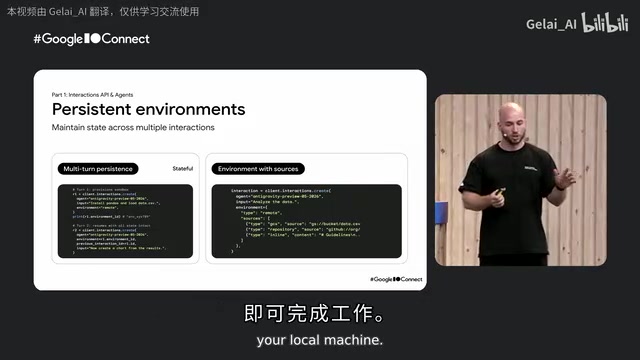
An environment parameter is a distinctive feature of the Interactions API. A remote environment is an isolated sandbox running within Google Cloud, in which the Agent can execute commands and create files without doing anything on the local machine.
A Sandbox is a security mechanism that confines program execution to a controlled, isolated environment, preventing it from affecting the host system or accessing unauthorized resources. When an Agent needs to execute arbitrary code, install dependencies, or read/write files, running it directly on the developer's local machine poses enormous security risks—malicious or erroneous code could damage the system or leak data. Moving the execution environment to a cloud-based isolated sandbox essentially applies containerization (based on lightweight virtualization technologies like gVisor or Firecracker) and cloud-native architecture. Persistence capability means the sandbox state is retained across multiple requests, avoiding the overhead of re-spinning up the environment and reinstalling dependencies each time.
These environments are persistent: you first have the Agent install dependencies like Pandas, and subsequent requests can directly use Pandas to analyze CSV files without reconfiguring. Resources can be mounted into the environment via GitHub repositories, GCS buckets, or inline files, and private repositories and private buckets are supported.
The first-time sandbox startup takes about 8 to 10 seconds. During Philip's live demo, the Agent reported environment info: Ubuntu, Linux, an 8-core AMD virtual CPU, 15GB of memory, with Python, pip, and curl pre-installed. This 8-to-10-second cold start time reflects the engineering trade-off between security isolation and startup efficiency, while configurations like Ubuntu, a multi-core CPU, and pre-installed Python indicate this is a fully functional Linux-like workstation, sufficient to support real computational tasks like data analysis and code building.
An Agent Is Just a "Combination of Files"
The most paradigm-shifting point of this session was Philip's redefinition of the essence of an Agent:
Agents are no longer those strange and complex Python or JavaScript loops. We just write files, then provide these files, and we've built our own Agent.
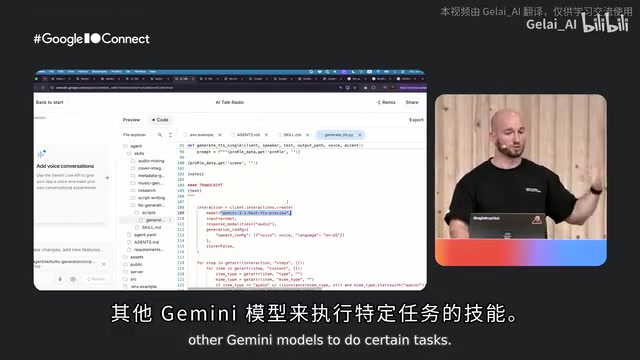
Take the "AI Talk Radio" applet demonstrated live as an example. Its agent folder structure is extremely simple: an agents.md file defines the role (turning any content into a radio program), a workflow describes the process (do research first, write the script, generate speech, generate background music, mix, and generate cover art), plus several skills. Each skill is a piece of documentation plus a Python script—for instance, the TTS generation skill, whose script calls the Flash TTS model of the Interactions API. In other words, the Anti-Gravity Agent runs on top of the Gemini API and, through skills, in turn calls other Gemini models to complete subtasks.
The accompanying Agents API lets you package "files + environment" into a reusable Agent, without re-providing the resource configuration on every request. A typical scenario is building a GitHub code review Agent: first have the Agent install the GitHub CLI and get the ID of that environment, then reuse this pre-installed CLI environment each time you create the Agent.
Google also provides an experimental Gemini API CLI—it's not a coding Agent (distinct from Claude Code, Gemini CLI, or Anti-Gravity CLI), but an API CLI dedicated to calling the API and creating Agents.
Credential Security: The Network Proxy Mechanism
Addressing the concern of "whether an Agent calling the Gemini API might abuse credentials," Google built a layer of network proxy: on one hand, it restricts the URLs or domains the Agent can access; on the other hand, it provides header transformation. Real credentials are kept in the proxy layer rather than inside the sandbox. The Agent only knows it "can call the Gemini API," and when it makes an external request, the proxy injects the real credentials. This means credentials can be rotated or removed at any time, and the Agent can never touch the real keys.
This design embodies the "Zero Trust" security philosophy—that is, trusting no part by default, including the sandbox in which the Agent itself runs. The traditional approach injects API keys into the runtime environment, but once the sandbox is compromised or the Agent behaves abnormally, keys face the risk of leakage. The network proxy, as an intermediary layer between the Agent and external services, plays the role of "credential custodian": when the Agent issues a request, it carries only a placeholder identifier, and the proxy layer injects the real credentials and completes header transformation only before forwarding, while restricting the Agent to accessing only permitted endpoints via a URL/domain allowlist. This way, even if the Agent's code is fully exposed, attackers cannot extract the real keys from it; and operators can rotate or revoke credentials at the proxy layer at any time, without modifying the Agent itself. This "separation of keys and execution" architecture is a key security cornerstone for building trustworthy managed Agent services.
Key Takeaways
The entire session conveyed three clear messages:
- AI Studio dramatically accelerates "from idea to production" and is the starting point for all development;
- The Interactions API is now officially GA, providing a unified, multimodal-aligned interface for agentic workflows;
- The essence of an Agent is a combination of files—Markdown plus a few scripts can define a powerful managed Agent.
For developers, the most direct action path is: visit ai.studio to get an API key (with a generous free tier and configurable spending caps), quickly prototype in AI Studio, then export to Anti-Gravity with one click for in-depth development. With concepts like "zero-config," "one-click deployment," and "files as Agents," Google is systematically lowering the barrier to building AI applications and Agents.
Core Highlights
Related articles
Understanding GitHub's Availability Report: Platform Stability and Developer Response Strategies
Deep dive into GitHub's monthly availability report: analyzing service degradation impacts, CI/CD fault tolerance, and platform dependency risk strategies for resilient development.
OpenAI's Claim of Solving a Millennium Prize Problem Sparks Academic Controversy
OpenAI claims its AI solved a Millennium Prize Problem, sparking debates over attribution, verification, and AI's role in reshaping mathematical research.
Ledoit-Wolf Covariance Shrinkage in Practice: 57% Lower Turnover + 10x GPU Acceleration
Learn how Ledoit-Wolf covariance shrinkage reduces portfolio turnover by up to 57% and how cuML GPU acceleration cuts backtest time from 1.5 hours to 9 minutes.