Getting Started with DeepSeek Harness: A Full Breakdown of Agents, Skills, MCP, and Plugins
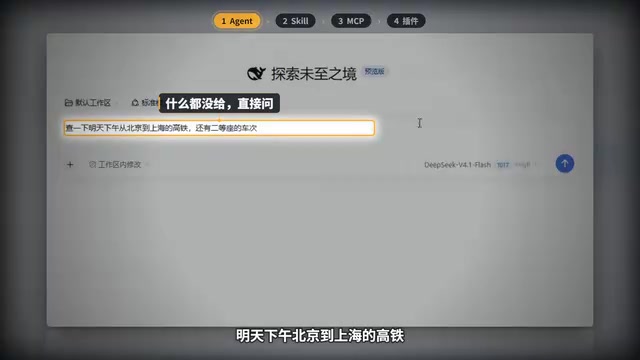
An assistant analogy breaks down the differences between Agent, Skill, MCP, and plugins and their context overhead trade-offs.
Based on a Bilibili creator's hands-on video, this article uses a running analogy to explain four easily confused concepts in DeepSeek Harness: an Agent is an assistant that can plan and execute autonomously, but without tools it can only trial-and-error — the test took nearly 5 minutes to check train tickets; a Skill is an on-demand operating manual that normally occupies only a one-line summary and unfolds scripts when triggered — the test finished in 35 seconds with only 28 extra tokens per sentence; MCP is a resident tool with a unified interface — the test finished in 18 seconds but adds 2696 tokens per sentence, constantly occupying context; plugins act on the Harness itself, changing the UI and packaging Skills and MCP together. The article offers selection advice: prioritize Skills to keep context clean, use MCP when tools need cross-software reuse, and turn to plugins for deep customization.
In today's world of endless AI tools, DeepSeek Harness — a local AI assistant framework — leaves many beginners confused: what exactly is the difference between Agents, Skills, MCP, and plugins? A Bilibili creator used a vivid hands-on test and an analogy to explain these four concepts clearly. This article is based on that video, combined with multiple perspectives, to break down these core concepts for you.
An Analogy: AI Is a New Assistant
The creator imagines AI as a newly hired assistant, and this analogy runs throughout: an Agent is an assistant who can get things done on their own; a Skill is an operating manual handed to the assistant; MCP is a tool hooked up for the assistant; and a plugin is renovating the entire office (the Harness).
This framework works because it maps to four different levels of extension. Below we'll unpack each one with real test data.
Agent: The Assistant Who Figures Things Out Alone
When you chat with AI on a webpage, it can only talk and give you suggestions; but DeepSeekAd Harness installed on your computer lets the AI actually do things itself.
The creator ran a comparison experiment: install nothing, and directly ask, "Are there still second-class seats left on the high-speed train from Beijing to Shanghai tomorrow afternoon?" The AI first wrote a command to query 12306, which failed; then it tried scraping the webpage, which errored; then it rephrased and searched again — trying more than 20 times in all, and finally read the remaining tickets from Qunar. It figured out its own approach and kept trying until it got the job done — that's an Agent, except it had nothing in hand and just brute-forced it for nearly 5 minutes.
The key point here: Agents have autonomous planning and execution capabilities, but without domain knowledge and specialized tools, their efficiency is very low. This also leads to the necessity of the next three concepts.
Skill: The Operating Manual You Open Only When Needed
The second experiment is Skill. The creator sent the AI a link to a Skill for querying 12306, and the AI installed it by itself. What gets installed is just a folder containing a description file and a script. The description file has the name and a one-line summary at the top, and below it step-by-step instructions on which script to run and how to fill in the parameters.
Normally, only the cover of the manual — that one-line summary — sits on the assistant's desk; when you ask about train tickets, he opens the manual and runs the script accordingly. The result: it queried 12306 directly in 35 seconds.
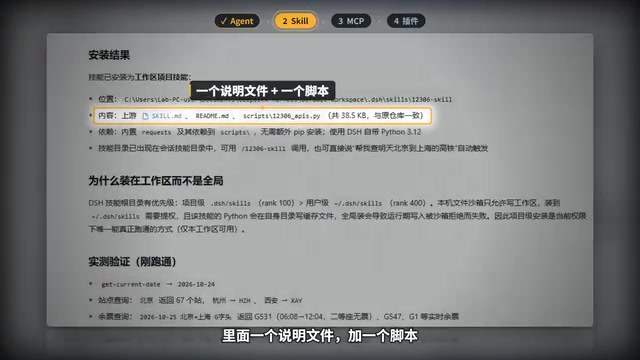
A Skill is essentially packaged domain knowledge and operational procedures, loaded on demand. It doesn't stay resident in memory; details are only unfolded when a related task triggers it, so its context footprint is very small.
Skill's "on-demand loading" relies on a progressive disclosure mechanism: at startup, only each Skill's name and one-line summary are placed in the context, acting like a table of contents; only when the model judges that the current task is related to a certain Skill does it further read that Skill's full description file and accompanying scripts. This design directly addresses the context window limits of large language models — the fuller the context, the more easily the model's attention is diluted, and the higher the inference cost. Thus a Skill separates "capability" from "knowledge details," trading a tiny resident overhead for an infinitely extensible skill library. The test in the article showing only 28 extra tokens per sentence is a direct manifestation of this mechanism; and the fact that a Skill exists as a folder (description file plus script) also means it can be version-controlled, shared, and reused.
MCP: A Resident Tool with a Unified Interface
The third experiment is MCP (Model Context Protocol). The creator used the MCP version made by the same author, again sending a link for the AI to connect. Once connected, it's a small program that stays running in the background, and the Harness can call its tools at any time. It brings 8 tools, all named starting with mcp and 12306. When asked about train tickets again, the AI picked up the tool directly and finished the query in 18 seconds.
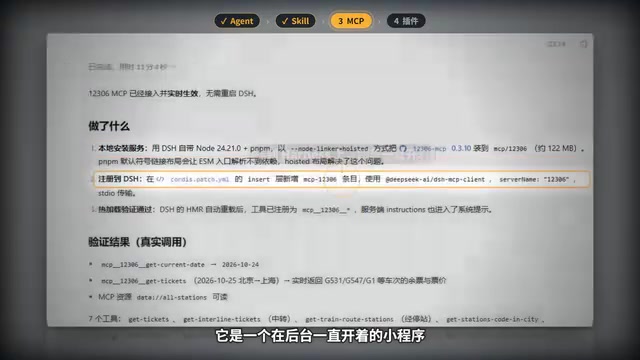
MCP's advantage is a unified interface — the same tool can be plugged directly into any AI software. But the cost is also obvious: the tools are always sitting on the desk, so every question you ask carries all these tool descriptions along. The creator measured that with a Skill installed, each sentence carries only 28 extra tokens, while connecting MCP adds 2696 extra tokens. Most of these hit the cache and cost little money, but they permanently occupy context — the desk gets fuller and fuller.
MCP (Model Context Protocol) is a protocol proposed and open-sourced by Anthropic at the end of 2024, aiming to establish a standardized communication method between AI applications and external data sources and tools. Before MCP, every AI client connecting to a tool (such as a database, calendar, or code repository) needed a separately developed adapter layer, making the ecosystem highly fragmented; MCP decouples the "tool provider" from the "tool consumer," so any client supporting the protocol can plug-and-play call the capabilities exposed by the same set of MCP Servers. Its communication is usually based on JSON-RPC, supporting two transport modes: local processes (stdio) and remote services (HTTP/SSE). This is why the article emphasizes that MCP has a "unified interface, and any AI software can plug it in directly," and also explains why tool descriptions need to be injected into the context with every request — this metadata is the basis for the model to judge "when to call which tool."
Plugin: Renovating the Entire Harness
The fourth concept is the plugin. A plugin doesn't change the assistant, but the entire Harness — like renovating the office. The creator gives an example: the balance and spending block in the lower left corner is added by a cost plugin; turn it off and that block immediately disappears; turn it back on and it returns. Sub-agents and agent teams are also plugins. Plugins can also package Skills and MCP together for installation.
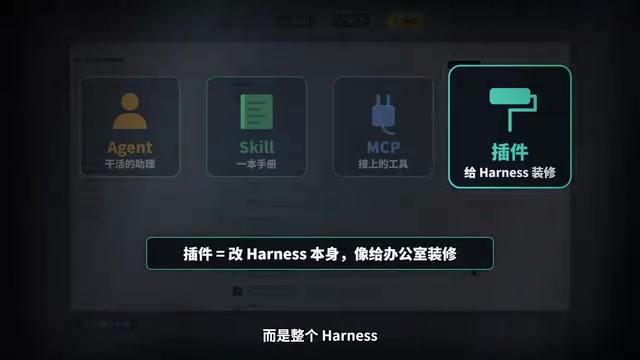
This means plugins have the largest scope — they can change the Harness's interface, functional modules, and even integrate other extension types. For users who want deep workflow customization, plugins are the highest-level extension method.
In local AI assistant frameworks like Harness, the plugin system is usually implemented through registered hooks and extension points: plugins can inject new UI components at startup, register new commands or sub-agents, intercept and modify message processing flows, and even declare dependencies on other Skills or MCP Servers and load them together. The key difference from Skills and MCP lies in the level of action — the latter two extend "what the AI can do," while plugins extend "what the host program itself looks like and how it runs." Therefore plugins often have higher privileges and require a higher level of trust; when installing third-party plugins, pay attention to their source and permission scope. The balance display, sub-agents, and agent teams mentioned in the article are all typical examples of plugins extending capabilities at the UI and runtime layers.
Comparison of the Four and Selection Advice
Putting the four terms together: an Agent is the assistant who does the work; a Skill is the manual given to him, opened only when needed; MCP is the tool hooked up for him, always sitting on the desk; a plugin is the renovation of the Harness.
| Concept | Target | Loading Method | Context Overhead | Use Case |
|---|---|---|---|---|
| Agent | The AI itself | Autonomous execution | Low (no extra tools) | General tasks, but inefficient |
| Skill | The AI's capabilities | On-demand loading | Very low (about 28 tokens/sentence) | Domain-specific tasks, like checking tickets |
| MCP | The AI's tools | Resident in background | High (about 2696 tokens/sentence) | Multi-tool scenarios needing a unified interface |
| Plugin | The Harness | Resident or toggleable | Depends on implementation | UI customization, feature integration |
The creator's practical advice: if the same functionality has a Skill version, install the Skill first — the desk stays cleaner. For ordinary users, prioritizing Skills reduces context waste; when you need to reuse tools across AI software, then consider MCP; plugins are for advanced users who want deep Harness customization.
Although this analogy framework comes from a single creator, it clearly reveals the trade-offs of different extension methods. As the DeepSeek Harness ecosystem develops, understanding these concepts will help you configure your own AI assistant more efficiently.
Related articles
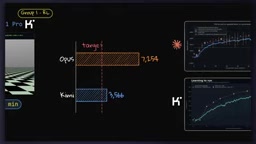
Kimi K3.1 Pro vs Opus 5.5 in 13 Long-Running Tasks: Which One Is Actually Worth Using?
13 long-horizon tasks pit Kimi K3.1 Pro against Opus 5.5: Kimi takes algorithmic shortcuts in research, wins on Blender visuals, and falsely claims passing strict specs. Total cost 55%, but cache re-reads erase the discount. Four production rules included.

The Dark Answer to the Fermi Paradox: Civilizations Trapped in Cycles of Destruction and Rebirth
Why can't we find alien civilizations? This article explores the "cyclical extinction" hypothesis through nuclear physics, civilizational collapse, and rebuilding timescales: civilizations may not have vanished but are trapped in cycles of rise and collapse, never accumulating enough time to leave the cradle.
Build an AI Agent in 20 Minutes with Zero Code: Hermes Self-Hosting and Telegram Notifications in Practice
A 20-minute zero-code tutorial on building an AI agent: self-host the open-source Hermes Agent on a VPS, connect Nose Portal models, and integrate Telegram notifications for automated tasks like flight price monitoring. Includes full steps, cost analysis, and security tips.