Getting Started with Jenkins: The Core Hub of CI/CD Automation Explained

Jenkins is an open scheduling hub that automates CI/CD pipelines through a powerful plugin ecosystem.
Jenkins is a Java-based scheduling platform that serves as the central hub of CI/CD and DevOps workflows. Rather than having built-in functionality, it relies on over 1,800 plugins spanning source code retrieval, compilation and build, security scanning (DevSecOps), and deployment to containers, cloud, and on-premises environments. This article explains Jenkins' core positioning, JDK requirements, and plugin categories to help beginners build a solid understanding of automated delivery pipelines.
As one of the most established tools in the continuous integration and continuous delivery (CI/CD) space, Jenkins is a must-learn skill for virtually every backend and DevOps engineer. This article approaches the topic from a beginner's perspective, walking through Jenkins' core role, runtime requirements, and the position it occupies within the broader DevOps ecosystem — helping you build a solid, big-picture understanding of automated deployment pipelines.
Background: The History of CI/CD and DevOps Continuous Integration (CI) has its roots in Extreme Programming (XP) and was formally defined by Martin Fowler in 2006: developers frequently merge code into the main branch, and each merge triggers an automated build and test run to catch integration issues early — rather than waiting for a "big bang" merge right before release. Continuous Delivery (CD) extends this idea by ensuring the codebase is always in a releasable state, with humans making the final call on when to ship. Continuous Deployment takes it one step further, automatically pushing every passing change to production. DevOps is the broader cultural and engineering movement that tears down the wall between Development (Dev) and Operations (Ops), emphasizing collaboration, automation, and rapid feedback loops. Jenkins emerged as a central piece of infrastructure at the intersection of these two worlds.
What Exactly Is Jenkins
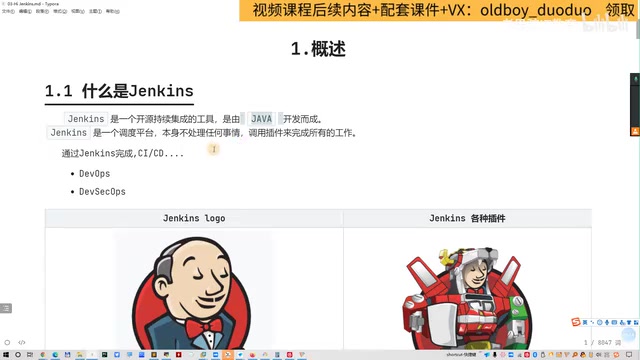
A common misconception among beginners is that Jenkins itself does a lot. In reality, Jenkins is fundamentally a scheduling platform written in Java — it has almost no built-in functionality of its own. What makes it powerful is the vast plugin ecosystem built around it.
Think of Jenkins as an empty "command center." By installing plugins, you give it the ability to run Shell commands, connect to remote machines, invoke Ansible and Docker, and more. With those capabilities in place, it can pull code from GitLab and orchestrate the full CI/CD pipeline.
The Technical Architecture of the Plugin Ecosystem Jenkins' plugin mechanism evolved from a container model similar to OSGi. The official plugin marketplace (plugins.jenkins.io) now lists over 1,800 plugins, covering everything from source control to monitoring and alerting. Plugins can depend on one another, forming complex capability networks. This highly extensible architecture is Jenkins' greatest strength — but it also introduces version compatibility challenges. In production environments, always validate plugin updates in a test environment first; careful plugin version management is a key part of day-to-day operations. Modern Jenkins also strongly recommends using Jenkinsfile (Pipeline as Code): pipeline definitions written in Groovy DSL are stored in the code repository alongside application code, making pipeline changes reviewable and rollback-capable — a clean break from the old approach of manually configuring jobs through the web UI.

In other words, Jenkins is a tool that connects and automates the entire chain of operations — development, testing, building, and deployment — that would otherwise require manual intervention. When teams also introduce code security checks (such as vulnerability scanning), traditional DevOps evolves into DevSecOps: inserting a Security layer between Development and Operations so that code undergoes security validation as part of the automated pipeline.
Runtime Environment: Why You Must Install the JDK
Since Jenkins is a Java application, the first step to deploying it is setting up a Java runtime environment. There's an important distinction to understand here:
- JRE (Java Runtime Environment): Sufficient for running most Java applications day-to-day.
- JDK (Java Development Kit): Required when deploying applications like Jenkins.
When it comes to choosing a JDK, there are two main options: OpenJDK and Oracle JDK. They are functionally nearly identical. OpenJDK is the open-source version; Oracle JDK is Oracle's official distribution. For enterprise environments, OpenJDK is often the simpler choice thanks to its open-source, no-cost licensing — though the final decision should align with your team's standards and license compliance requirements.
Deeper Considerations for JDK Selection The line between JDK and JRE blurred after Java 9's modularization effort (Project Jigsaw), but for Jenkins, using the full JDK remains the safest bet — some build tasks rely on compiler toolchain components (
javac,javap, etc.). On the licensing side, Oracle JDK has required a commercial license for production use since January 2019, while OpenJDK is distributed under GPLv2+CE and is completely free, with long-term support distributions maintained by Red Hat, Azul, Amazon (Corretto), and others. Jenkins officially recommends running on JDK 11 or JDK 17 (both LTS releases) to receive multi-year security patch support and avoid risks associated with outdated Java versions.
Jenkins' Core Role in the DevOps Ecosystem
Jenkins has a precise and well-known self-description:
"Jenkins is the hub of the CI/CD, DevOps ecosystem."
This captures Jenkins' core value perfectly — it is the central hub of the entire CI/CD and DevOps ecosystem. Every tool, plugin, and external system converges at this hub, which handles unified scheduling and orchestration.
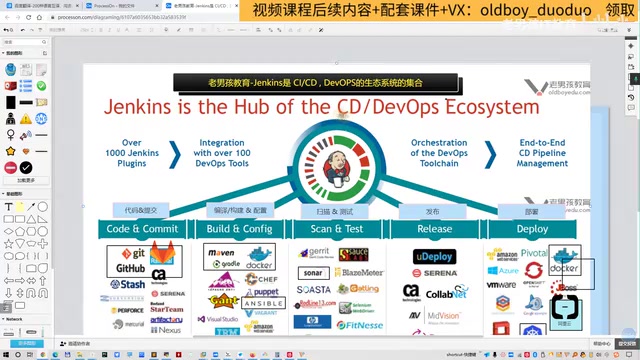
The plugins surrounding this hub fall into roughly four categories. Understanding these categories makes it much easier to find the right tools for any real-world project.
1. Source Code Retrieval
Every automated pipeline starts with fetching source code. Jenkins integrates with all major version control systems, including:
- Git / GitHub / GitLab (most commonly used)
- Subversion (SVN)
- Mercurial and others
Through these plugins, Jenkins automatically pulls the latest code from the repository, feeding it into the rest of the pipeline. It's worth noting that Jenkins' Multibranch Pipeline feature can automatically detect all branches in a repository and run independent pipelines for each — a natural fit for GitFlow, Trunk-Based Development, and other mainstream branching strategies.
2. Compilation and Build
Once code is retrieved, it needs to be compiled and packaged. Jenkins supports build tools for a wide range of technology stacks:
- Java projects: Maven, Gradle
- Frontend / Node.js projects: NodeJS, NPM
Build artifacts can be traditional Jar/War packages, or the build step can produce Docker images directly, ready for containerized deployment downstream. The build stage can also invoke tools like Ansible to handle more complex orchestration tasks.
3. Code Scanning (Security and Quality)
This is the engineering embodiment of the DevSecOps philosophy — shifting security checks "left" into the early stages of development, rather than discovering issues right before go-live. After code is pulled, it can be scanned across two key dimensions:
- Code standards: Verifying that code conforms to language and style conventions.
- Security vulnerabilities: Identifying potential security risks within the codebase.
A widely used tool in this space is SonarQube. Many organizations pay for professional scanning tools and integrate them directly into their Jenkins pipelines to ensure the quality and security of every code delivery.
SonarQube and the Quality Gate Mechanism SonarQube is the de facto standard in static code analysis, supporting 30+ programming languages and detecting code smells (patterns that don't break functionality but hurt maintainability), security vulnerabilities, bugs, and duplicate code. Its key mechanism is the Quality Gate: in a Jenkins pipeline, if scan results fall below a defined threshold — for example, unit test coverage below 80%, or the presence of a Critical-severity security vulnerability — the pipeline automatically halts and is marked as failed, blocking substandard code from advancing to the build and deployment stages. This is the practical engineering implementation of the DevSecOps principle of Shift Left Security: the earlier a problem is caught, the cheaper it is to fix.
4. Deployment and Release
Once code has passed scanning and been successfully built, it enters the deployment phase. Jenkins supports deploying applications to a wide range of target environments:
- Container and orchestration platforms: Docker, Kubernetes (K8s)
- Application servers: JBoss (a Web container similar to Tomcat)
- Public cloud: AWS, Azure, Alibaba Cloud, and others
- Private cloud / virtualization platforms: VMware, OpenStack
Of these, VMware is relatively lightweight, while OpenStack has more components and is more complex — typically used by vendors to build private cloud environments. Public clouds like AWS and Alibaba Cloud can be used on demand based on project requirements.
Jenkins' Place in the Cloud-Native Era In the cloud-native era driven by Kubernetes adoption, Jenkins faces competition from newer tools like GitHub Actions, GitLab CI/CD, Tekton, and ArgoCD. These tools were born cloud-native, integrate deeply with container orchestration, and offer clear advantages in lightweight scenarios. The Jenkins community has responded with Jenkins X (designed specifically for Kubernetes cloud-native environments) and the Jenkins Operator (for managing Jenkins instances in a Kubernetes-native way). Even so, Jenkins retains an irreplaceable position in traditional enterprise IT and hybrid architecture environments, backed by its massive installed base, unmatched plugin ecosystem, and strong adaptability to complex, heterogeneous infrastructure. For anyone getting started, learning Jenkins isn't just about picking up a tool — it's about building a systematic understanding of the entire CI/CD engineering landscape.
Summary
Jenkins' appeal isn't in its own complexity — it lies in its role as an open scheduling hub that seamlessly connects code management, compilation, security scanning, and deployment through plugins, ultimately enabling truly automated delivery.
For engineers just getting started, internalizing the core idea that "Jenkins is the hub, plugins are the capabilities" is far more valuable than memorizing specific operations. Once you've set up the JDK environment and installed Jenkins, the next step is straightforward: choose the right plugins for your tech stack and build your CI/CD automation pipeline step by step.
Key Takeaways
Related articles

Apple HomeView Hands-On Review: Is the $300 Smart Home Hub Worth It?
Apple HomeView hands-on: a $300 smart home hub with facial recognition for quick account switching, but no App Store or voice recognition. Is the wall-mounted version worth it? Should you buy the first generation?

Meta Muse Wonder Launch: What It Means for Meta's Return to the Frontier AI Race
Meta releases Muse Wonder and WonderFull, benchmarks reach the frontier, community feedback is polarized. An in-depth look at Meta's return to the frontier AI race, its personal agent strategy, and Zuckerberg's different path.

Apple Home Smart Home Lineup Leaked: LG and Schneider Team Up, UWB Door Lock on Board
Apple Home ecosystem gains new LG and Schneider devices: UWB smart lock with proximity unlock, 2.5K dual-camera doorbell, privacy indoor camera, and AirPods-like seamless pairing.